Solved Router and Cable Modem - Install both at the Same Time?

abredt

New member
Member
Local time
1:04 AM
Messages
80
I need to buy both because I'm only getting 20 Mbps.
It seems like I should not install both new components, but start with the cable modem.

Or am I being too conservative and should go with both being 802.11ac components instead of 802.11n?

For the cable modem, I am considering ARRIS/Motorola SB6141 which Time Warner approves of for 50 Mbps. I think/hope it will talk to my old router - a Linksys WRT54G.

For the router - ASUS RTN66U.

All advice appreciated,
cb
 

My Computer My Computer

Computer Manufacturer/Model Number
Dell 15R Laptop
OS
Windows 7 Home Premium
CPU
Intel Core i5
Memory
6 GB
Both your existing router and modem are rated for at least 50Mbps so I would check with Time Warner first to make sure you are supposed to be getting faster service. I'm on Cox and they have three tiers rated at various speeds. Tier 1 is 20Mbps, Tier 2 is 50Mbps, and Tier 3 is 150Mbps; I have Tier 2. I recently replaced both my modem and my router because they were over seven years old and the router was dying. However, I had to do some tweaking with the piddle poor cabling job Cox's contract installers did to get the full speed I was supposed to get (the biggest improvement came from putting a terminating cap on the unused leg of the data tap). Also, you most likely share the same cable connection with several of your neighbors and that can slow down the speeds you can get. During high volume traffic times, my speeds can drop to as low as 30 Mbps. What position you are on the line can also affect the maximum speed you can get; the farther away you are from your ISP's hub, the less speed you will get.

If you do decide to replace both, I would get and install the modem first, then, if necessary get and install the router.
 

My Computer My Computer

Computer type
PC/Desktop
Computer Manufacturer/Model Number
Custom Build
OS
Win 7 Ultimate 64 bit
CPU
Intel i7-3930K
Motherboard
ASUS P9X79 WS
Memory
Kingston HyperX Genesis 32GB Kit (8x4GB Modules) 1600MHz DDR
Graphics Card(s)
MSI R7850 Twin Frozr 2GD5/OC Radeon HD 7850 2GB 256-bit GDDR
Sound Card
Asus Xonar Essence STX
Monitor(s) Displays
3x Asus VG248QE 24", Vizio 32" TV
Screen Resolution
1920 x 1080, ?
Hard Drives
Samsung 128GB 840 Pro SSD (1),
Samsung 4TB 850 EVO SSDs (4)
Samsung 4TB 850 EVO SSDs (16) external backup drives used in 2.5" hot swap bays in the computer.
PSU
Corsair HX750w
Case
Antec Two Hundred v2 (modified)
Cooling
Cooler Master GeminII S524 120mm (fan replaced with a 140mm)
Keyboard
Logitech G510s
Mouse
Logitech M525 (two in use)
Internet Speed
=< 32Mbps down, 8Mbps up
Antivirus
AVAST!, MBAM, SAS, Spybot S&D (all but MBAM free) Glary Util
Browser
IE11
Other Info
LSI 9211-8i HBA card (8 SATA III ports), 2.5" & 3.5" Hot Swap Bays, HooToo HT-CR001 PCI-E to USB 3.0 Internal Hub + 6 Slot Card Reader, and LG Model CH12LS28 BD-ROM Optical Drive. Also, ScanSnap S1500 ADF duplexing scanner, Canon 9000F flat bed scanner, Corsair SP2500 2.1 speakers, Samsung CLP 415nw laser color printer, Cyberpower PP2200SW UPS
Time Warner says my current Scientific Atlanta cable modem in only rated for 20 Mbps. (Why didn't they tell me that when I signed up for 50Mbps service??)

My 2 Windows 7 laptops often lose their internet connections overnight and I have to restart them.
Somewhere I read that the problem might be that the WRT54G router might be having problems handing the 64-bit OS.

So I need both. As you suggest, I will get the new modem first and when that is working, I will get the router unless someone says I should do both at the same time to handle future needs.
Thanks, cb
 

My Computer My Computer

Computer Manufacturer/Model Number
Dell 15R Laptop
OS
Windows 7 Home Premium
CPU
Intel Core i5
Memory
6 GB
When I first signed up with Cox, Tier 2 was only 20 Mbps so the old modem wasn't undersized. About a year or two ago, they increased tier 2 to 50Mbps for no additional cost. I still was unable to get more that 5-6Mbps down. I later figured out it was because of the eejit contractors Cox sent out (not properly terminating the unused terminal on the data tap). I had to help the maroon because he wanted to bury the cable only an inch or two and run the cable up the outside of the wall of my mobile home and put a hole in the siding. When I insisted that he run it inside the wall, he tried to weasel out by saying he didn't have a fish tape. I just smiled and said I did.

I would try just replacing the modem first and connect to a computer by way of an Ethernet cable to see what kind of speeds you can get, then try it with the existing router. If the router throttles your speed, then consider replacing it.
 

My Computer My Computer

Computer type
PC/Desktop
Computer Manufacturer/Model Number
Custom Build
OS
Win 7 Ultimate 64 bit
CPU
Intel i7-3930K
Motherboard
ASUS P9X79 WS
Memory
Kingston HyperX Genesis 32GB Kit (8x4GB Modules) 1600MHz DDR
Graphics Card(s)
MSI R7850 Twin Frozr 2GD5/OC Radeon HD 7850 2GB 256-bit GDDR
Sound Card
Asus Xonar Essence STX
Monitor(s) Displays
3x Asus VG248QE 24", Vizio 32" TV
Screen Resolution
1920 x 1080, ?
Hard Drives
Samsung 128GB 840 Pro SSD (1),
Samsung 4TB 850 EVO SSDs (4)
Samsung 4TB 850 EVO SSDs (16) external backup drives used in 2.5" hot swap bays in the computer.
PSU
Corsair HX750w
Case
Antec Two Hundred v2 (modified)
Cooling
Cooler Master GeminII S524 120mm (fan replaced with a 140mm)
Keyboard
Logitech G510s
Mouse
Logitech M525 (two in use)
Internet Speed
=< 32Mbps down, 8Mbps up
Antivirus
AVAST!, MBAM, SAS, Spybot S&D (all but MBAM free) Glary Util
Browser
IE11
Other Info
LSI 9211-8i HBA card (8 SATA III ports), 2.5" & 3.5" Hot Swap Bays, HooToo HT-CR001 PCI-E to USB 3.0 Internal Hub + 6 Slot Card Reader, and LG Model CH12LS28 BD-ROM Optical Drive. Also, ScanSnap S1500 ADF duplexing scanner, Canon 9000F flat bed scanner, Corsair SP2500 2.1 speakers, Samsung CLP 415nw laser color printer, Cyberpower PP2200SW UPS
Time Warner is cable Internet? Docsis 2 modems should be able to deliver up to 40-43 Mbps but the cable company here change modems with Docsis 3 ones for any speed above 20 Mbps. Maybe that's the case for you too.
 

My Computer My Computer

Computer type
PC/Desktop
Computer Manufacturer/Model Number
Custom Build
OS
Windows 7 Ultimate x64 SP1
CPU
AMD Phenom 2 1090T
Motherboard
Gigabyte GA-890FXA-UD5
Memory
2x8GB Kingston HyperX Fury Black 1600Mhz Unganged
Graphics Card(s)
MSI GTX 970 Gaming 4G
Sound Card
Realtek On-Board HD 7.1 Audio / Logitech G35
Monitor(s) Displays
3xAcer GD245HQ
Screen Resolution
1920x1080
Hard Drives
Samsung 850 Pro 512GB SSD - OS /
WD Caviar Black SATA 3 - 1 TBx2 - Dynamic RAID 0 /
WD Caviar Green SATA 2 - 640GBx2 - Dynamic RAID 0 /
WD Caviar Green SATA 2 - 640GB - Internal Backup /
Seagate Barracude SATA 3 - 3TB - External Backup/ Sync
PSU
HighPower 1000W
Case
Cooler Master HAF 932
Cooling
Noctua NH-D14
Keyboard
Logitech G19
Mouse
Logitech G500
Internet Speed
100/4 Mbit Cable (100GB quota)
Antivirus
ZoneAlarm Extreme Security / MBAM Pro / MBAE Free / SAS Free
Browser
IE 11 - Firefox - Chrome
Other Info
Logitech F710/ G27/ G940/ Z5500 // TrackIR 5 // Nvidia 3D Surround Vision
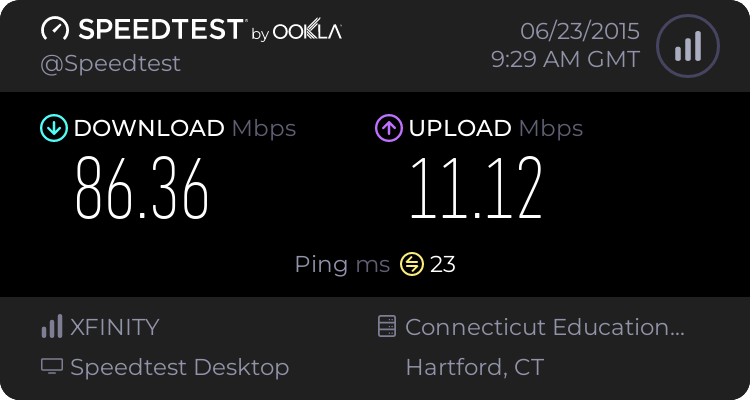
I've had many issues with my SBG6141. I replaced it with a SB6121 and thought my speeds might suffer. I was wrong. My speeds are the same or better. For my router I use the Netgear WNDR4300. These are my speeds using my MacBook Air (802.11n 5GHz). I no longer have intermittent drop outs and my speeds are consistent.

4453021154.png


Wired connection to my desktop.

4469951048.png
 
Last edited:

My Computer My Computer

Computer type
PC/Desktop
Computer Manufacturer/Model Number
custom build
OS
Windows 7 Professional 64bit
CPU
Intel i7-5960X
Motherboard
EVGA X99 Classified
Memory
64GB Corsair Dominator 2400MHz
Graphics Card(s)
3 EVGA GTX980's
Sound Card
on board
Monitor(s) Displays
3 Dell E2715H 27"
Screen Resolution
1920x1080 (5760x1080)
Hard Drives
Samsung 950 Pro 1TB M.2 SSD,
Western Digital Black 2TB HDD's x5
Western Digital Black 1TB HDD's x3
PSU
Corsair AX1200i
Case
Corsair 750D
Cooling
Corsair H110i GT
Keyboard
Corsair K70
Mouse
Corsair M45
Internet Speed
250 down/10 up
Antivirus
Microsoft Security Essentials
Browser
IE 11, Google Chrome
I got a Netgear CM500 cable modem and was surprised that it connected to my old WRT54G router.
Thanks to all, cb
 

My Computer My Computer

Computer Manufacturer/Model Number
Dell 15R Laptop
OS
Windows 7 Home Premium
CPU
Intel Core i5
Memory
6 GB
Back
Top