

HI there, greetings from Croatia!
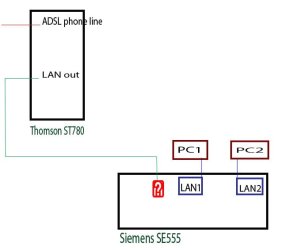
I need some help here. I this possible (picture)? If it is, where I have to input LAN cable from Thompson router to Siemens router?
Here is the problem: In my home there is 3 PC, 2 laptops, 4 mobphones. They are all on Thomson, LAN or WiFi, everything is working fine. But.. Yesterday I manage to repair older PC (PC2 on the picture) for daughter, and encountered to a strange problem. PC is working fine ( celereon 2.8 occ, 2GB RAM), but WiFi is not. I have 2 wifi adapters (Siemens&Realink), tested them at others machines, they works. Normally, password, user name, whatever.
Then I passed through The Calvary- installed XP media centre, XP black edition, Vista extreme, Win7, -same problem. LAN is working but WiFi finds router signal, try to connect and falls without explanations(like connection is out of something, or password is incorrect). I tried with installing original Siemens and then Realink software, installing just drivers, didn't help. Don't know what to do next. Maybe somebody here know? Any help will be welcome.
So, I will try to solve this problem by adding one more router so PC2 can connect to Internet via LAN. Is it possible?
Thanks everybody for reading such a long post.
I need some help here. I this possible (picture)? If it is, where I have to input LAN cable from Thompson router to Siemens router?
Here is the problem: In my home there is 3 PC, 2 laptops, 4 mobphones. They are all on Thomson, LAN or WiFi, everything is working fine. But.. Yesterday I manage to repair older PC (PC2 on the picture) for daughter, and encountered to a strange problem. PC is working fine ( celereon 2.8 occ, 2GB RAM), but WiFi is not. I have 2 wifi adapters (Siemens&Realink), tested them at others machines, they works. Normally, password, user name, whatever.
Then I passed through The Calvary- installed XP media centre, XP black edition, Vista extreme, Win7, -same problem. LAN is working but WiFi finds router signal, try to connect and falls without explanations(like connection is out of something, or password is incorrect). I tried with installing original Siemens and then Realink software, installing just drivers, didn't help. Don't know what to do next. Maybe somebody here know? Any help will be welcome.
So, I will try to solve this problem by adding one more router so PC2 can connect to Internet via LAN. Is it possible?
Thanks everybody for reading such a long post.
Attachments
Last edited:
My Computer
At a glance
win 7 & XPAMD 4000+3x1GB Kingstonegforce 8600gt
- Computer Manufacturer/Model Number
- handmade
- OS
- win 7 & XP
- CPU
- AMD 4000+
- Motherboard
- MSI K8NeoPlatinum sck 939
- Memory
- 3x1GB Kingstone
- Graphics Card(s)
- gforce 8600gt
- Sound Card
- integrated
- Monitor(s) Displays
- samsung
- Screen Resolution
- 1208 x 1024
- Hard Drives
- hitachi 150
samsung 250 (USB)
WD 150
- PSU
- Asus 380W
- Case
- ASUS
- Cooling
- water & Zellman
- Keyboard
- Logitech
- Mouse
- MS
- Internet Speed
- 1192kbs


