routine Win 7 updates check stalls

CosmicJest

New member
Member
VIP
Local time
8:52 PM
Messages
152
Hello,

Helping a friend with a Lenovo laptop about a year old currently running Win 7 Pro. She wants to update to Windows 10, but had a problem with the installation failing.

Looking into the update history, I can see where she made two attempts - one failed one cancelled - and I made one attempt that failed.

I tried running Windows Update 4-5 times, even leaving it overnight. Each time it stalled on the checking for updates screen and needed to be shut down to stop the process (I didn't know the process name to kill it). I don't even want to click on Windows Update now for fear I'll re-start the unstoppable process!

I tried making a Windows 10 installation disk, thinking that might resolve the issue, but the installation only proceeded as far as checking for updates, and then stalled. I was able to try to cancel the install, but it froze again while it was cleaning up the installation files, and I had to do a hard shut down. Luckily the computer rebooted with no problem.

Then I came here. I've downloaded the SURT tool and ran it twice - it froze both times. I ran chkdsk with no problems. The zipped CBS file is 99.8 MB! Since max zip file size allowance is 8 MB, how do you want me to proceed?
 

My Computer

Computer type
PC/Desktop
Computer Manufacturer/Model Number
Lenovo ThinkPad E545 / Dell Optiplex 980
OS
Windows 7 Pro 64-bit
CPU
AMD 2.9GHz / Intel 3.2GHz
Memory
8GB / 4GB
Antivirus
AVG / Norton 360
Browser
Firefox & Chrome
Rename CBS log oldCBS log & then please follow Windows Update Posting Instructions.
After running sfc /scannow This will place the SFCdetails.txt log on your desktop to include with your post.
Open command prompt as administrator: copy and paste:
findstr /c:"[SR]" %windir%\logs\cbs\cbs.log >%userprofile%\Desktop\sfcdetails.txt

then press Enter.
 

My Computer

Computer type
Laptop
OS
Win 7 Home Premium x64/Linux Lite 2.6 x64
I'm sorry, I misspoke above. It was fsc /scannow I ran, not chkdsk. It ran with no integrity violations.

I cannot rename the CBS log folder as it is being used. There is a 1.3 MB text document called CBS within the folder that I can't open - access denied.

I forgot to mention in the first post that I have not received any error messages. I believe I have followed the instructions as well as I am able.

Windows Update is not booting from the Control Panel at all today, and clicking on the Windows Update link has frozen the Control Panel.
 

My Computer

Computer type
PC/Desktop
Computer Manufacturer/Model Number
Lenovo ThinkPad E545 / Dell Optiplex 980
OS
Windows 7 Pro 64-bit
CPU
AMD 2.9GHz / Intel 3.2GHz
Memory
8GB / 4GB
Antivirus
AVG / Norton 360
Browser
Firefox & Chrome
If you enter the code (bold line) I provided in the command window (command prompt) it will create smaller log on your desktop with relevant information. Please post it.

The file you can't open in the CBS folder is the CBS.log and open with notepad.

Have you tried M$ fixit? click here.
Meanwhile, I'll do a little diggin' myself and see what I come up with! ;)

Have you tried system restore to a time period prior to attempts of installing win10.

The CBS folder contains the cbs.log That file is much smaller that the cbs folder. CBS folder contains cbs.log and cbs.persist.cab compressed folders. When cbs.log file becomes too large it is automatically converted to cbs.persist.cab.
 
Last edited:

My Computer

Computer type
Laptop
OS
Win 7 Home Premium x64/Linux Lite 2.6 x64
Yes, I ran the fixit man first thing - got there through the troubleshooter. Thanks. Her firewall is provided by Avast Premier, which I'm unfamiliar with - I don't know if there might be an issue with that.

Also, in Task Manager, I don't see Windows Update running, although I find the Windows Update service running under the Services tab.
 
Last edited:

My Computer

Computer type
PC/Desktop
Computer Manufacturer/Model Number
Lenovo ThinkPad E545 / Dell Optiplex 980
OS
Windows 7 Pro 64-bit
CPU
AMD 2.9GHz / Intel 3.2GHz
Memory
8GB / 4GB
Antivirus
AVG / Norton 360
Browser
Firefox & Chrome
Just checked my Task Manager, same thing
I run Avast free antivirus with several anti-malware & anti-exploit programs. Run windows firewall. Maybe conflict with Avast Premier and windows firewall. You might try temporarily disabling Avast Premier.
 

My Computer

Computer type
Laptop
OS
Win 7 Home Premium x64/Linux Lite 2.6 x64
Just saw your last. I'll try this after work & post back.
 

My Computer

Computer type
PC/Desktop
Computer Manufacturer/Model Number
Lenovo ThinkPad E545 / Dell Optiplex 980
OS
Windows 7 Pro 64-bit
CPU
AMD 2.9GHz / Intel 3.2GHz
Memory
8GB / 4GB
Antivirus
AVG / Norton 360
Browser
Firefox & Chrome
I see NoelDP is back (on other posts), hope he's feeling better. He has resolved many issues and if we can't I'm confident he will.
 

My Computer

Computer type
Laptop
OS
Win 7 Home Premium x64/Linux Lite 2.6 x64
I don't think we're going to have to ask NoelDP, as I'm downloading Windows 10 as I type! :cool:

A firewall problem is indeed what it was - but there was a twist, because not only was the Avast firewall interfering, but Norton Online Backup was removed as a side job of getting the update, and it had four active registry keys! Removing Norton alone didn't resolve the issue, but once I turned the Avast firewall off and enabled the Windows firewall, the Windows 10 update started with no problem.

I don't anticipate further problems. Thanks for your help, and glad NoelDP is feeling better. :)
 

My Computer

Computer type
PC/Desktop
Computer Manufacturer/Model Number
Lenovo ThinkPad E545 / Dell Optiplex 980
OS
Windows 7 Pro 64-bit
CPU
AMD 2.9GHz / Intel 3.2GHz
Memory
8GB / 4GB
Antivirus
AVG / Norton 360
Browser
Firefox & Chrome
Norton Antivirus has a tool they created to remove all of Norton. Website is click here. Glad to be able to help you resolve issues. Happy Computing!! :geek:
 

My Computer

Computer type
Laptop
OS
Win 7 Home Premium x64/Linux Lite 2.6 x64
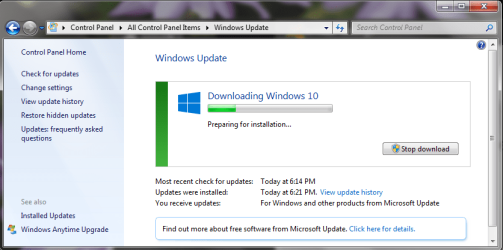
Man, I jinxed it! The Windows 10 update download stalled about 25% through.

There are three things different from before removing Norton and deactivating the Avast firewall:
1) the process actually showed that it had begun
2) the Windows Update process was active with a PID of 1164. (I couldn't find anything meaningful on that PID but maybe it's a clue)
3) The update stalled, but didn't freeze, so I was able to cancel it. The service is still running, but the box is closed.

Having had numerous Norton products over the years, I did run the Norton Removal Tool, even though Norton Online Backup isn't one of the listed products it claims to remove. I should have said I'd run it, if only for the benefit of people who don't know about it - my bad. I didn't know if there might have been other Norton products on the computer in the past, and it wouldn't hurt anything. It didn't touch Norton Online Backup though. I removed that using Revo Uninstaller, which I've been using for well over 10 years, and wouldn't be without.

But back to the matter at hand...what do we try next?
 

Attachments

  • stalled download.PNG
    stalled download.PNG
    39.7 KB · Views: 0
  • WU PID 1164.PNG
    WU PID 1164.PNG
    27 KB · Views: 20
Last edited:

My Computer

Computer type
PC/Desktop
Computer Manufacturer/Model Number
Lenovo ThinkPad E545 / Dell Optiplex 980
OS
Windows 7 Pro 64-bit
CPU
AMD 2.9GHz / Intel 3.2GHz
Memory
8GB / 4GB
Antivirus
AVG / Norton 360
Browser
Firefox & Chrome
Take a look at this from TheWindowsClub, click here.
 

My Computer

Computer type
Laptop
OS
Win 7 Home Premium x64/Linux Lite 2.6 x64
PID's are effectively random in most cases - they are simply Process IDentification tags, and will change every time a process is started. The only one that I know of that doesn't change at all is the SYSTEM process, which is always #4

I wouldn't worry too much about the download stopping - it was probably due to something at MS's end rather than yours. Wait a while and see if it starts up again.
 

My Computer

Computer type
Laptop
Computer Manufacturer/Model Number
Asus K52F or Lenovo B51-80
OS
Win 7 x64 Home Premium (and x86 VirtualBox VM)/Win10
CPU
i3 370M/i7 6500U
Motherboard
Asus/Lenovo
Memory
8GB - finally :)/8GB
Graphics Card(s)
it's an i3, dude!/dual Intel&nVidia
Sound Card
onboard
Monitor(s) Displays
15.6" built-in
Screen Resolution
1366x768/1920x1080
Hard Drives
750GB Seagate internal
Sundry external drives attached to other computers on the local network
1TB SSD on the Lenovo
PSU
n/a
Internet Speed
as much as I can get - usually on a dongle/phone, so <1MB/s
Antivirus
MSE/Defender
Browser
IE11/12/Edge/Chrome/FF(if I must)
Thanks for chiming in NoelDP. Hope you're feeling much better. :)
 

My Computer

Computer type
Laptop
OS
Win 7 Home Premium x64/Linux Lite 2.6 x64

Attachments

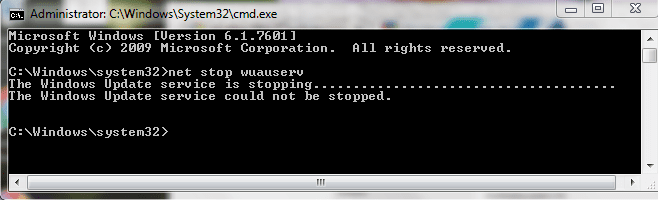
  • wuauserv cannot be stopped.PNG
    wuauserv cannot be stopped.PNG
    13.6 KB · Views: 16

My Computer

Computer type
PC/Desktop
Computer Manufacturer/Model Number
Lenovo ThinkPad E545 / Dell Optiplex 980
OS
Windows 7 Pro 64-bit
CPU
AMD 2.9GHz / Intel 3.2GHz
Memory
8GB / 4GB
Antivirus
AVG / Norton 360
Browser
Firefox & Chrome
When I got home from work and opened the computer, I was greeted with a message that Windows Updates were turned off. Hmmm. So I clicked to turn them on, then I went to Control Panel and clicked on Windows Updates, which froze the CP again.

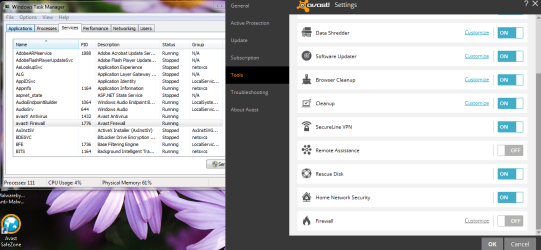
I opened Task Manager, and the Avast firewall service is running, even though it's turned off! What the??? I was denied access to stop the service.
 

Attachments

  • Avast fw running while off.PNG
    Avast fw running while off.PNG
    83.1 KB · Views: 1

My Computer

Computer type
PC/Desktop
Computer Manufacturer/Model Number
Lenovo ThinkPad E545 / Dell Optiplex 980
OS
Windows 7 Pro 64-bit
CPU
AMD 2.9GHz / Intel 3.2GHz
Memory
8GB / 4GB
Antivirus
AVG / Norton 360
Browser
Firefox & Chrome
Obvious solution - uninstall Avast, and run their cleanup tool, then install MSE and make sure the Windows Firewall is switched on.

Download the Avast removal utility from here Avast Uninstall Utility | Download aswClear for Avast Removal
Follow the instructions for running it, and when complete, reboot the machine.
 

My Computer

Computer type
Laptop
Computer Manufacturer/Model Number
Asus K52F or Lenovo B51-80
OS
Win 7 x64 Home Premium (and x86 VirtualBox VM)/Win10
CPU
i3 370M/i7 6500U
Motherboard
Asus/Lenovo
Memory
8GB - finally :)/8GB
Graphics Card(s)
it's an i3, dude!/dual Intel&nVidia
Sound Card
onboard
Monitor(s) Displays
15.6" built-in
Screen Resolution
1366x768/1920x1080
Hard Drives
750GB Seagate internal
Sundry external drives attached to other computers on the local network
1TB SSD on the Lenovo
PSU
n/a
Internet Speed
as much as I can get - usually on a dongle/phone, so <1MB/s
Antivirus
MSE/Defender
Browser
IE11/12/Edge/Chrome/FF(if I must)
I hesitated to uninstall a paid product without consulting my friend, but did so in the interest of getting this problem resolved. Before installing MSE, however, I decided to check Windows Update. It still freezes the Control Panel when I click the link.
 

My Computer

Computer type
PC/Desktop
Computer Manufacturer/Model Number
Lenovo ThinkPad E545 / Dell Optiplex 980
OS
Windows 7 Pro 64-bit
CPU
AMD 2.9GHz / Intel 3.2GHz
Memory
8GB / 4GB
Antivirus
AVG / Norton 360
Browser
Firefox & Chrome
OK - please post the C:\Windows\windowsupdate.log file, and a couple of the event logs...
Open Event Viewer
click on the Windows logs entry in the left pane to expand it.
Now click on the Application entry - wait while it loads.
Click on 'File' in the menu bar and select Save...
Save the file as Appevt.evtx
Repeat for the System log
then zip both, and upload them.
 

My Computer

Computer type
Laptop
Computer Manufacturer/Model Number
Asus K52F or Lenovo B51-80
OS
Win 7 x64 Home Premium (and x86 VirtualBox VM)/Win10
CPU
i3 370M/i7 6500U
Motherboard
Asus/Lenovo
Memory
8GB - finally :)/8GB
Graphics Card(s)
it's an i3, dude!/dual Intel&nVidia
Sound Card
onboard
Monitor(s) Displays
15.6" built-in
Screen Resolution
1366x768/1920x1080
Hard Drives
750GB Seagate internal
Sundry external drives attached to other computers on the local network
1TB SSD on the Lenovo
PSU
n/a
Internet Speed
as much as I can get - usually on a dongle/phone, so <1MB/s
Antivirus
MSE/Defender
Browser
IE11/12/Edge/Chrome/FF(if I must)
For the Application log, I don't have an option to save under File, so I took an Action and Saved All Events As Appevt.evtx, which will hopefully be what you're looking for. I saved the System log in a similar manner. The Windows Update log is in there, too. Thank you for taking the time to look at them.
 

My Computer

Computer type
PC/Desktop
Computer Manufacturer/Model Number
Lenovo ThinkPad E545 / Dell Optiplex 980
OS
Windows 7 Pro 64-bit
CPU
AMD 2.9GHz / Intel 3.2GHz
Memory
8GB / 4GB
Antivirus
AVG / Norton 360
Browser
Firefox & Chrome
Back
Top