routine Win 7 updates check stalls

One more thing - I didn't install MSE right away because the user is switching to BitDefender once this all gets sorted out. However, I'm giving her computer back today and will proceed via remote connection, so I went ahead and installed MSE, which refused to update. :( So I'm going to uninstall MSE & install BitDefender so she can safely surf while we continue to try to resolve the problem.
 

My Computer My Computer

Computer type
PC/Desktop
Computer Manufacturer/Model Number
Lenovo ThinkPad E545 / Dell Optiplex 980
OS
Windows 7 Pro 64-bit
CPU
AMD 2.9GHz / Intel 3.2GHz
Memory
8GB / 4GB
Antivirus
AVG / Norton 360
Browser
Firefox & Chrome
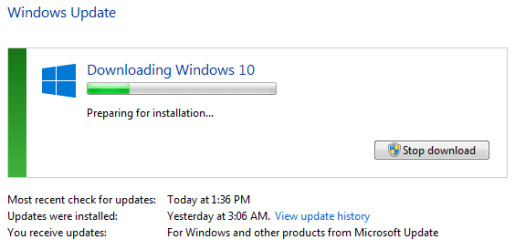
Something happened, and several updates were installed last night at 3 AM! But why? What changed?

I tried downloading Win 10 again, but it stalls at the same point. However, the window did not freeze, and that's another change.

BitDefender is now live, and while waiting for feedback, I've also installed WinPatrol (one of my wouldn't-be-without programs) as an added layer of protection.
 

Attachments

  • updates installed.PNG
    updates installed.PNG
    6 KB · Views: 15

My Computer My Computer

Computer type
PC/Desktop
Computer Manufacturer/Model Number
Lenovo ThinkPad E545 / Dell Optiplex 980
OS
Windows 7 Pro 64-bit
CPU
AMD 2.9GHz / Intel 3.2GHz
Memory
8GB / 4GB
Antivirus
AVG / Norton 360
Browser
Firefox & Chrome
I rebooted the computer, and it began installing 1 of 1 update. That was about six hours ago. What should I do?
 

My Computer My Computer

Computer type
PC/Desktop
Computer Manufacturer/Model Number
Lenovo ThinkPad E545 / Dell Optiplex 980
OS
Windows 7 Pro 64-bit
CPU
AMD 2.9GHz / Intel 3.2GHz
Memory
8GB / 4GB
Antivirus
AVG / Norton 360
Browser
Firefox & Chrome
Wait. Just let it complete.
 

My Computer My Computer

Computer type
PC/Desktop
Computer Manufacturer/Model Number
Home made Desktop
OS
Windows 10 Pro. 64/ version 1709 Windows 7 Pro/64
CPU
Intel i7-6800K @ 4.3
Motherboard
ASUS X-99 Deluxe II
Memory
Corsair Platinum 16 gig @2400
Graphics Card(s)
EVGA GTX 1070 OC
Monitor(s) Displays
Asus 27" LED LCD/VE278Q
Screen Resolution
1920-1080 or 1280-720 HDMI
Hard Drives
INTEL SSD 730-240 Gb Sata 3.0/
PSU
EVGA Platium 1200W
Case
Phanteks Luxe Tempered Glass 8 fans/ one radiator
Cooling
XSPC/ Water Cooled CPU
Keyboard
Das 4 Professional
Mouse
Logitech M705/MX Anywhere 2-S
Internet Speed
100 mbits
Antivirus
Microsoft Security Essentials/ Malwarebytes Premium 3.0/ SAS
Browser
I.E. 11 default/Firefox/ ISP Time Warner Cable/Spectrum
Other Info
LG BluRay Burner/
Sound system-KLipsch-THX/
Icy Dock ssd Hot Swap bays.
Whew! I was quite relieved and very happy to see a login screen this morning! It /was/ updating to Win 10, and the update failed. So current status is: improved. I can now check Windows Update without freezing the Control Panel, and several updates updates have downloaded and installed correctly; but the Win 10 update has failed four times now.

I'm re-trying to install Win 10 by DVD, and it's currently checking for updates, which I suspect may take a few hours, if past experience is any indication; but I anticipate that ultimately this installation will also fail.

When I began the installation this morning, I put the DVD in and then rebooted, being greeted with with an expected screen, and continued. When asked for product key, the key I found on the bottom of the computer was not accepted by Windows (the key was double checked for accuracy), and I was instructed to reboot without the disk, and then re-insert it to continue, which I did. A second time the product key was not accepted, but I was given an opportunity to skip it, which I did. And so I continue to wait.

On the side, when I upgraded my own Win 8.1 computer, I had a similar issue with it not accepting the product key, and I ended up waiting for the upgrade through Windows Update; so I wonder how far one can go in the install via media process before it insists on having a product key, and what happens if it doesn't accept it...
 

My Computer My Computer

Computer type
PC/Desktop
Computer Manufacturer/Model Number
Lenovo ThinkPad E545 / Dell Optiplex 980
OS
Windows 7 Pro 64-bit
CPU
AMD 2.9GHz / Intel 3.2GHz
Memory
8GB / 4GB
Antivirus
AVG / Norton 360
Browser
Firefox & Chrome
Still checking for updates. I think it's time to cancel the process.

Where do I go from here?
 

My Computer My Computer

Computer type
PC/Desktop
Computer Manufacturer/Model Number
Lenovo ThinkPad E545 / Dell Optiplex 980
OS
Windows 7 Pro 64-bit
CPU
AMD 2.9GHz / Intel 3.2GHz
Memory
8GB / 4GB
Antivirus
AVG / Norton 360
Browser
Firefox & Chrome
Back
Top