
How to Subscribe or Unsubscribe to a RSS Feed in Internet Explorer
Information
Feeds, also known as RSS feeds, XML feeds, syndicated content, or web feeds, contain frequently updated content published by a website. They are often used for news and blog websites, but are also used for distributing other types of digital content, including pictures, audio files, or video. Internet Explorer can discover and display feeds as you visit websites. You can also subscribe to feeds to automatically check for and download updates that you can view later. In addition, when you add a Web Slice to your Favorites bar, you automatically subscribe to its associated feed.
This tutorial will show you how to subscribe or unsubscribe to a RSS feed in Internet Explorer.
This tutorial will show you how to subscribe or unsubscribe to a RSS feed in Internet Explorer.
EXAMPLE: Subscribed RSS Feeds in Internet Explorer
NOTE: To see your list of available RSS feeds in Internet Explorer, click/tap on the Favorites star toolbar button to the right of the tabs, and click/tap on the Feeds tab.

OPTION ONE
To Subscribe to a RSS Feed in Internet Explorer
1. Open Internet Explorer.
NOTE: In Windows 8, this would only apply to the IE10 desktop version, and not the IE10 Metro (Windows UI) version.
2. Go to the website (ex: Windows 7 Forums
 ) that has an available feed you want to subscribe to. (see screenshot below)
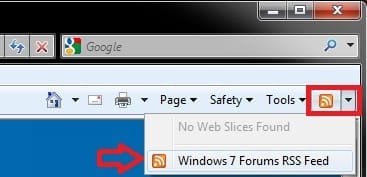
3. Click/tap on the Feed command bar toolbar button drop down arrow, then click/tap on the feed you want to subscribe to. (see screenshot below)
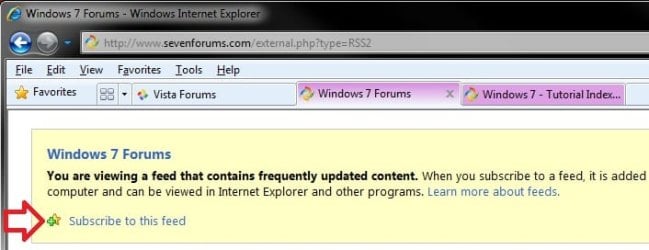
4. Click/tap on the Subscribe to this feed link. (see screenshot below)
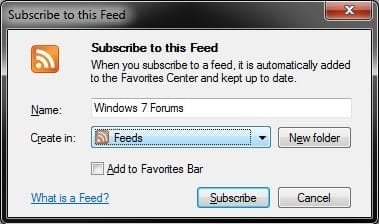
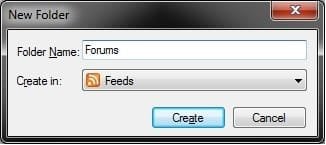
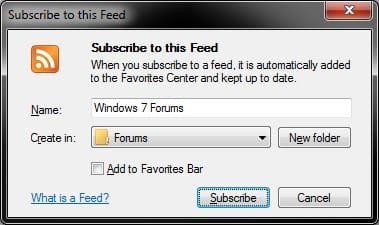
5. Type in a name for the feed, select a feed folder or create a new folder, then click/tap on Subscribe. (see screenshots below)

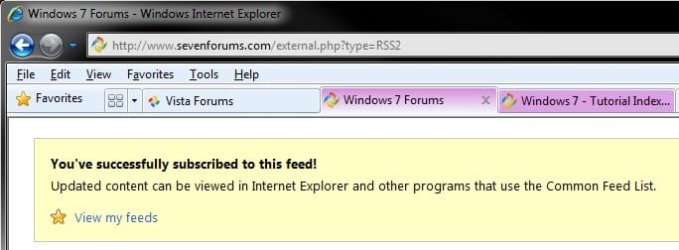
6. You have now subscribed to the feed. (see screenshot below)
OPTION TWO
To Unsubscribe from a RSS Feed in Internet Explorer
1. Open Internet Explorer.
NOTE: In Windows 8, this would only apply to the IE10 desktop version, and not the IE10 Metro (Windows UI) version.
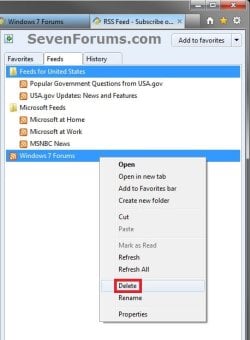
2. Click/tap on the Favorites star toolbar button to the right of the tabs, and click on the Feeds tab. (see screenshot below step 3)
3. Select and right click on the feed you want to unsubscribe to, and click/tap on Delete. (see screenshot below)
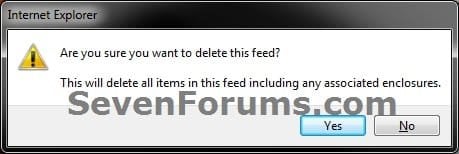
4. Click/tap on Yes to confirm. (see screenshot below)
5. You have now unsubscribed from the feed.
That's it,
Shawn
Last edited:


