
Solved RunDLL error imapi4.ax

jmw

New member
Local time
12:17 PM
Messages
6
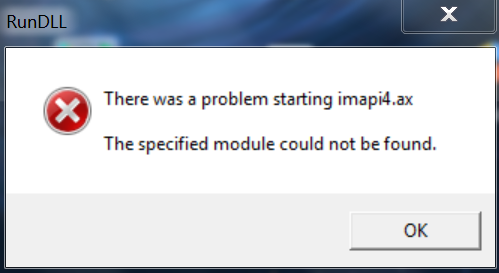
I get an error message like the image below that appears at any time
error_imapi4.png


What does the message mean and how to fix it?
 

My Computer

Computer type
Laptop
Computer Manufacturer/Model Number
MSI WS60 20 OJ
OS
Windows 7 Professional 64-bit
CPU
Intel(R) Core(TM) i7-4720HQ CPU @ 2.60GHz
Motherboard
Micro-Star International Co., Ltd. MS-16H3
Memory
8.00 GB
Graphics Card(s)
(1) NVIDIA Quadro K2100M (2) Intel(R) HD Graphics 4600
Sound Card
(1) Realtek High Definition Audio (2) NVIDIA Virtual Audio
Screen Resolution
1920 x 1080
Hard Drives
TOSHIBA SSD 128 GB
HGST 1 TB
Mouse
Logitech
Hi jmw,
Welcome to SevenForums!

Click :orb:
Searchbox: type
cmd
right-click it > choose run as administrator
copy and paste with mouse
sfc /scannow
press enter
You may have to run it more than once to replace/repair missing DLL.
 

My Computer

Computer type
PC/Desktop
Computer Manufacturer/Model Number
HP Desktop & Compaq Laptop
OS
Win 10 x64, Linux Lite, Win 7 x64, BlackArch, & Kali
Hard Drives
Samsung 850 Pro 256Gb,
Hitachi HDD 1Tb,
Crucial MX SSD 250Gb
Segate 3Tb USB 3.0 Ext. Backup HDD
Internet Speed
150Mbps dn, 20Mbps up
Antivirus
Avast Free, Malwarebytes Anti-Exploit & Anti-Ransomware
Browser
Firefox, Chrome, Opera, & VPN
Hi Snick

Thank you for your response. I will try :)
 

My Computer

Computer type
Laptop
Computer Manufacturer/Model Number
MSI WS60 20 OJ
OS
Windows 7 Professional 64-bit
CPU
Intel(R) Core(TM) i7-4720HQ CPU @ 2.60GHz
Motherboard
Micro-Star International Co., Ltd. MS-16H3
Memory
8.00 GB
Graphics Card(s)
(1) NVIDIA Quadro K2100M (2) Intel(R) HD Graphics 4600
Sound Card
(1) Realtek High Definition Audio (2) NVIDIA Virtual Audio
Screen Resolution
1920 x 1080
Hard Drives
TOSHIBA SSD 128 GB
HGST 1 TB
Mouse
Logitech
I tried the trick from Snick for 2 days, still the warning appeared but decreased only once out time while login windows.

Then I find another solution on google, exactly in microsoft community:
Code:
https://answers.microsoft.com/en-us/windows/forum/windows_7-security/i-have-this-rundll-error-there-was-a-problem/008555b4-5053-456a-8dd1-9d856e553c65


Yup is totally different from the problem I experienced but I tried to scan with malwarebytes and it worked.
 

My Computer

Computer type
Laptop
Computer Manufacturer/Model Number
MSI WS60 20 OJ
OS
Windows 7 Professional 64-bit
CPU
Intel(R) Core(TM) i7-4720HQ CPU @ 2.60GHz
Motherboard
Micro-Star International Co., Ltd. MS-16H3
Memory
8.00 GB
Graphics Card(s)
(1) NVIDIA Quadro K2100M (2) Intel(R) HD Graphics 4600
Sound Card
(1) Realtek High Definition Audio (2) NVIDIA Virtual Audio
Screen Resolution
1920 x 1080
Hard Drives
TOSHIBA SSD 128 GB
HGST 1 TB
Mouse
Logitech
Did your sfc /scannow come back clean or were there files/folders that could not be repaired?
 

My Computer

Computer type
PC/Desktop
Computer Manufacturer/Model Number
HP Desktop & Compaq Laptop
OS
Win 10 x64, Linux Lite, Win 7 x64, BlackArch, & Kali
Hard Drives
Samsung 850 Pro 256Gb,
Hitachi HDD 1Tb,
Crucial MX SSD 250Gb
Segate 3Tb USB 3.0 Ext. Backup HDD
Internet Speed
150Mbps dn, 20Mbps up
Antivirus
Avast Free, Malwarebytes Anti-Exploit & Anti-Ransomware
Browser
Firefox, Chrome, Opera, & VPN

My Computer

Computer type
Laptop
Computer Manufacturer/Model Number
MSI WS60 20 OJ
OS
Windows 7 Professional 64-bit
CPU
Intel(R) Core(TM) i7-4720HQ CPU @ 2.60GHz
Motherboard
Micro-Star International Co., Ltd. MS-16H3
Memory
8.00 GB
Graphics Card(s)
(1) NVIDIA Quadro K2100M (2) Intel(R) HD Graphics 4600
Sound Card
(1) Realtek High Definition Audio (2) NVIDIA Virtual Audio
Screen Resolution
1920 x 1080
Hard Drives
TOSHIBA SSD 128 GB
HGST 1 TB
Mouse
Logitech
Error message not appearing now?
Scan with Malwarebytes? Did it find malware?
 

My Computer

Computer type
PC/Desktop
Computer Manufacturer/Model Number
HP Desktop & Compaq Laptop
OS
Win 10 x64, Linux Lite, Win 7 x64, BlackArch, & Kali
Hard Drives
Samsung 850 Pro 256Gb,
Hitachi HDD 1Tb,
Crucial MX SSD 250Gb
Segate 3Tb USB 3.0 Ext. Backup HDD
Internet Speed
150Mbps dn, 20Mbps up
Antivirus
Avast Free, Malwarebytes Anti-Exploit & Anti-Ransomware
Browser
Firefox, Chrome, Opera, & VPN

My Computer

Computer type
Laptop
Computer Manufacturer/Model Number
MSI WS60 20 OJ
OS
Windows 7 Professional 64-bit
CPU
Intel(R) Core(TM) i7-4720HQ CPU @ 2.60GHz
Motherboard
Micro-Star International Co., Ltd. MS-16H3
Memory
8.00 GB
Graphics Card(s)
(1) NVIDIA Quadro K2100M (2) Intel(R) HD Graphics 4600
Sound Card
(1) Realtek High Definition Audio (2) NVIDIA Virtual Audio
Screen Resolution
1920 x 1080
Hard Drives
TOSHIBA SSD 128 GB
HGST 1 TB
Mouse
Logitech
I noticed you don't have any Anti-Virus, Anti-Malware, Anti-Exploit or Anti-Ransomware listed in your System specs.
Do you have any of these installed?

Here's a few other excellent free scanners, which I highly recommend and utilize on a daily basis.

Malwarebytes
ADWCleaner
HitmanPro 3.8 (64-bit)
Superantispyware free

If you use HitmanPro trial or any other trial (permits you to remove malware) you can run Revo Uninstaller to remove trial cookie marker (if it's stored on your computer).
 

My Computer

Computer type
PC/Desktop
Computer Manufacturer/Model Number
HP Desktop & Compaq Laptop
OS
Win 10 x64, Linux Lite, Win 7 x64, BlackArch, & Kali
Hard Drives
Samsung 850 Pro 256Gb,
Hitachi HDD 1Tb,
Crucial MX SSD 250Gb
Segate 3Tb USB 3.0 Ext. Backup HDD
Internet Speed
150Mbps dn, 20Mbps up
Antivirus
Avast Free, Malwarebytes Anti-Exploit & Anti-Ransomware
Browser
Firefox, Chrome, Opera, & VPN
I use malwarebytes and ESET Smart Security
 

My Computer

Computer type
Laptop
Computer Manufacturer/Model Number
MSI WS60 20 OJ
OS
Windows 7 Professional 64-bit
CPU
Intel(R) Core(TM) i7-4720HQ CPU @ 2.60GHz
Motherboard
Micro-Star International Co., Ltd. MS-16H3
Memory
8.00 GB
Graphics Card(s)
(1) NVIDIA Quadro K2100M (2) Intel(R) HD Graphics 4600
Sound Card
(1) Realtek High Definition Audio (2) NVIDIA Virtual Audio
Screen Resolution
1920 x 1080
Hard Drives
TOSHIBA SSD 128 GB
HGST 1 TB
Mouse
Logitech
For few days I have the same problem, try to clean with various tools but nothing.
Any help how to remove this stupid message, I think I collect some viruses and I clean but some tail is on PC and I cannot find
where. Don't know which process trigger this message.
Any advice.
Thanks
 

My Computer

Computer type
PC/Desktop
Computer Manufacturer/Model Number
HP
OS
Windows 7 32 bit
CPU
Intel Pentium 4
Memory
4GB
Graphics Card(s)
inside
Back
Top