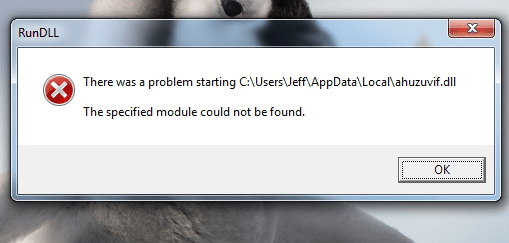
RunDLL Error

JeffBowman

New member
Local time
4:11 PM
Messages
3
Location
Canada
I have been seeing this error message for quite some time now


But I am not sure how to amend this issue. This message pops up every time my computer starts up. I have tried to go the registry and delete the file, as a website recommended me to, but as the error dictates, the file could not be found.

If anyone is able to assist me in this, I would gladly appreciate the help! Thanks :)
 

Attachments

  • rundllerror.png
    rundllerror.png
    20.7 KB · Views: 7

My Computer

Computer Manufacturer/Model Number
Toshiba - Satellite Notebook - PSC08C-01W019
OS
Windows 7 Home Premium - 64-Bit
CPU
Intel Pentium(R) Dual-Core CPU T4500 @ 2.30 GHz
Memory
3.00 GB RAM
Hard Drives
Toshiba MK3265GSX
Welcome
Looks like it MIGHT be malware or a virus
Download the free malwarebytes and make a full scan after you update it. Should take about 45 minutes
The same with your antivirus.
 

My Computer

Computer type
PC/Desktop
Computer Manufacturer/Model Number
Dell XPS 420
OS
Windows 10, Home Clean Install
CPU
Intel Core2 processsor Q8200(2.33Ghz 1333FSB) Quad Core Tech
Motherboard
Dell
Memory
6 gb
Graphics Card(s)
ATI Radeon 256MB HD3650
Sound Card
Intergrated 7.1 Channel Audio
Monitor(s) Displays
Dell SP2009W 20"
Hard Drives
640 GB Serial ATA Hard drive
Cooling
Fan
Keyboard
Dell USB Keyboard
Mouse
Dell Premium Optical USB
Internet Speed
DSL 2.85
What do you mean by "The same with your antivirus."

Also I have been running ESET on my computer, and have had no record of viruses in relation to this issue. This message first initially came after my friend and I solved a virus problem; and hasn't disappeared since. But I have also scanned my registry and cleaned it as well.
 

My Computer

Computer Manufacturer/Model Number
Toshiba - Satellite Notebook - PSC08C-01W019
OS
Windows 7 Home Premium - 64-Bit
CPU
Intel Pentium(R) Dual-Core CPU T4500 @ 2.30 GHz
Memory
3.00 GB RAM
Hard Drives
Toshiba MK3265GSX
What I meant to say is run a full anti virus scan with your anti virus. If already done do so with malwarebyes, too.
 

My Computer

Computer type
PC/Desktop
Computer Manufacturer/Model Number
Dell XPS 420
OS
Windows 10, Home Clean Install
CPU
Intel Core2 processsor Q8200(2.33Ghz 1333FSB) Quad Core Tech
Motherboard
Dell
Memory
6 gb
Graphics Card(s)
ATI Radeon 256MB HD3650
Sound Card
Intergrated 7.1 Channel Audio
Monitor(s) Displays
Dell SP2009W 20"
Hard Drives
640 GB Serial ATA Hard drive
Cooling
Fan
Keyboard
Dell USB Keyboard
Mouse
Dell Premium Optical USB
Internet Speed
DSL 2.85
Back
Top