
You are using an out of date browser. It may not display this or other websites correctly.
You should upgrade or use an alternative browser.
You should upgrade or use an alternative browser.
Solved Rundll error
- Thread starter rickluc
- Start date

- Local time
- 2:45 PM
- Messages
- 4,563
Looks like one of your control panel files is damaged.
Please Run sfc /scan now using option 2 in this tutorial: SFC /SCANNOW Command - System File Checker
Please post back the results.
Please indicate what message was displayed at the end:
Windows found no integrity violations
OR
Corrupt files were found, and windows was unable to fix them.
OR
Corrupt files were found, and windows successfully repaired them
Please Run sfc /scan now using option 2 in this tutorial: SFC /SCANNOW Command - System File Checker
Please post back the results.
Please indicate what message was displayed at the end:
Windows found no integrity violations
OR
Corrupt files were found, and windows was unable to fix them.
OR
Corrupt files were found, and windows successfully repaired them
My Computer
- Computer type
- PC/Desktop
- Computer Manufacturer/Model Number
- Custom Built
- OS
- Windows 10 Pro
- CPU
- AMD Ryzen 5 2400G Processor with Radeon RX Vega 11 Graphics
- Motherboard
- ASRock X470 Master SLI/AC AM4 AMD Promontory X470 SATA 6Gb/s
- Memory
- G.SKILL Ripjaws V Series 16GB (2 x 8GB) 288-Pin DDR4 SDRAM D
- Graphics Card(s)
- 2047MB NVIDIA GeForce GTX 1060 6GB (EVGA)
- Sound Card
- Motherboard Built in
- Monitor(s) Displays
- Acer R240HY bidx 23.8-Inch IPS HDMI DVI VGA (1920 x 1080) Wi
- Screen Resolution
- 1920 x 1080
- Hard Drives
- 1TB Sandisk SSD PLUS (Main drive)
500 GB Seagate 7200 RPM (Games)
500 GB Western Digital 7200 RPM (Virtual Machines)
- PSU
- CORSAIR TX Series TX650M 650W 80+ Gold Modular Power Supply
- Case
- CORSAIR CARBIDE SPEC-02 Mid-Tower Gaming Case, Red LED Fan
- Cooling
- 220mm, two 120mm, and four 60mm fans
- Keyboard
- Wired Dell keyboard
- Mouse
- Wireless Logitech mouse
- Internet Speed
- 250mb down, 30mb up
- Antivirus
- Panda Cloud Antivirus
- Browser
- Chrome-ish x64
- Other Info
- Your awesome for reading this.
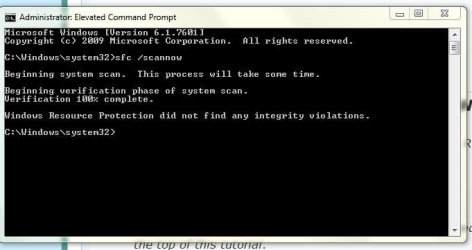
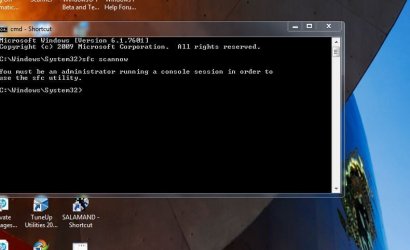
OK I done what you said. The first clip is from running option 2 on the administration side of computer. The second clip is from running option 2 from the family side. The admin side is where the error ocurrs. Thanks
Attachments
My Computer
- OS
- Windows 7 Home Premium 32 bit
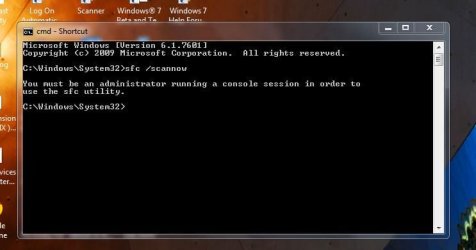
Heres my elevated command prompt from administration side again. I didn't put the / in the first try. Still got the same answer. Maybe I don't know how to get an elevated command prompt on administration side. Thanks
Attachments
My Computer
- OS
- Windows 7 Home Premium 32 bit
- Local time
- 2:45 PM
- Messages
- 4,563
Ok, so no integrity violations were found. That is great news. It means nothing is wrong with windows system files. This means that most likely the control panel item listed is a third party control panel item. Such as audio driver interface or graphics.
When specifically does this error occur? When launching control panel? Or is it an mmc snap in?
Unfortunately I did an internet search on the dll file and it came up empty.
When did you notice this error occurring?
Was there a time when it did work fine? Was there any software changes since when it did work?
When specifically does this error occur? When launching control panel? Or is it an mmc snap in?
Unfortunately I did an internet search on the dll file and it came up empty.
When did you notice this error occurring?
Was there a time when it did work fine? Was there any software changes since when it did work?
My Computer
- Computer type
- PC/Desktop
- Computer Manufacturer/Model Number
- Custom Built
- OS
- Windows 10 Pro
- CPU
- AMD Ryzen 5 2400G Processor with Radeon RX Vega 11 Graphics
- Motherboard
- ASRock X470 Master SLI/AC AM4 AMD Promontory X470 SATA 6Gb/s
- Memory
- G.SKILL Ripjaws V Series 16GB (2 x 8GB) 288-Pin DDR4 SDRAM D
- Graphics Card(s)
- 2047MB NVIDIA GeForce GTX 1060 6GB (EVGA)
- Sound Card
- Motherboard Built in
- Monitor(s) Displays
- Acer R240HY bidx 23.8-Inch IPS HDMI DVI VGA (1920 x 1080) Wi
- Screen Resolution
- 1920 x 1080
- Hard Drives
- 1TB Sandisk SSD PLUS (Main drive)
500 GB Seagate 7200 RPM (Games)
500 GB Western Digital 7200 RPM (Virtual Machines)
- PSU
- CORSAIR TX Series TX650M 650W 80+ Gold Modular Power Supply
- Case
- CORSAIR CARBIDE SPEC-02 Mid-Tower Gaming Case, Red LED Fan
- Cooling
- 220mm, two 120mm, and four 60mm fans
- Keyboard
- Wired Dell keyboard
- Mouse
- Wireless Logitech mouse
- Internet Speed
- 250mb down, 30mb up
- Antivirus
- Panda Cloud Antivirus
- Browser
- Chrome-ish x64
- Other Info
- Your awesome for reading this.
It occurs when I leave th family side od computer and log into the administration side of computer. It comes up just as sone as the window opens on the admin. side.
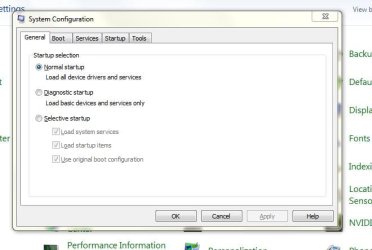
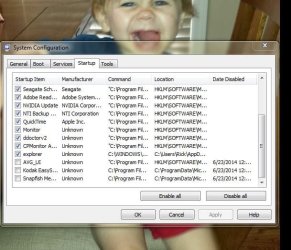
I installed, or had Norton install, Norton Security Suite. So I went into msconfig and seen where I had selective startup checked. So I checked normal startup. So I just went back in and moved the check back on the selective startup. Then I logged back in admin. side and still got the same error.
I installed, or had Norton install, Norton Security Suite. So I went into msconfig and seen where I had selective startup checked. So I checked normal startup. So I just went back in and moved the check back on the selective startup. Then I logged back in admin. side and still got the same error.
Attachments
My Computer
- OS
- Windows 7 Home Premium 32 bit
- Local time
- 2:45 PM
- Messages
- 4,563
Uncheck everything on the startup tab except your antivirus (which looks like it is avg-I do not see norton listed there. Are you sure that was what you installed?), and click ok and restart the pc. What happens then?
My Computer
- Computer type
- PC/Desktop
- Computer Manufacturer/Model Number
- Custom Built
- OS
- Windows 10 Pro
- CPU
- AMD Ryzen 5 2400G Processor with Radeon RX Vega 11 Graphics
- Motherboard
- ASRock X470 Master SLI/AC AM4 AMD Promontory X470 SATA 6Gb/s
- Memory
- G.SKILL Ripjaws V Series 16GB (2 x 8GB) 288-Pin DDR4 SDRAM D
- Graphics Card(s)
- 2047MB NVIDIA GeForce GTX 1060 6GB (EVGA)
- Sound Card
- Motherboard Built in
- Monitor(s) Displays
- Acer R240HY bidx 23.8-Inch IPS HDMI DVI VGA (1920 x 1080) Wi
- Screen Resolution
- 1920 x 1080
- Hard Drives
- 1TB Sandisk SSD PLUS (Main drive)
500 GB Seagate 7200 RPM (Games)
500 GB Western Digital 7200 RPM (Virtual Machines)
- PSU
- CORSAIR TX Series TX650M 650W 80+ Gold Modular Power Supply
- Case
- CORSAIR CARBIDE SPEC-02 Mid-Tower Gaming Case, Red LED Fan
- Cooling
- 220mm, two 120mm, and four 60mm fans
- Keyboard
- Wired Dell keyboard
- Mouse
- Wireless Logitech mouse
- Internet Speed
- 250mb down, 30mb up
- Antivirus
- Panda Cloud Antivirus
- Browser
- Chrome-ish x64
- Other Info
- Your awesome for reading this.
Yes it was Norton. I was running AVg and got a virus and paid Norton $?? to remove virus and install Norton Security. So I seen where AVG was still loading so I unchecked it. But I have went into admin side a few times since Norton was installed and everything was fine. This just started today. I have been jumping back and force from family side to admin. side to try and gt device and printer window to fill up. On the admin. side all my devices and printers shows up in device and printer window but on the family side the window is blank. Its been like this sinc 2009 and I am now trying to fix it.
Attachments

My Computer
- OS
- Windows 7 Home Premium 32 bit
OK I unchecked all the items in startup tab in msconfig and the problem was solved logging into admin. side, no error message. Now what? ThanksUncheck everything on the startup tab except your antivirus (which looks like it is avg-I do not see norton listed there. Are you sure that was what you installed?), and click ok and restart the pc. What happens then?
My Computer
- OS
- Windows 7 Home Premium 32 bit
- Local time
- 2:45 PM
- Messages
- 4,563
Now checkmark each one and reboot one at a time, when you find the one that causes it, report what it is as well as the full location path.
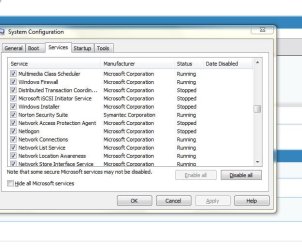
Do me a favor, please take a screenshot of norton security running. Because it should be listed in your startup items but I do not see it. I want to be sure its installed and you have virus protection.
Do me a favor, please take a screenshot of norton security running. Because it should be listed in your startup items but I do not see it. I want to be sure its installed and you have virus protection.
My Computer
- Computer type
- PC/Desktop
- Computer Manufacturer/Model Number
- Custom Built
- OS
- Windows 10 Pro
- CPU
- AMD Ryzen 5 2400G Processor with Radeon RX Vega 11 Graphics
- Motherboard
- ASRock X470 Master SLI/AC AM4 AMD Promontory X470 SATA 6Gb/s
- Memory
- G.SKILL Ripjaws V Series 16GB (2 x 8GB) 288-Pin DDR4 SDRAM D
- Graphics Card(s)
- 2047MB NVIDIA GeForce GTX 1060 6GB (EVGA)
- Sound Card
- Motherboard Built in
- Monitor(s) Displays
- Acer R240HY bidx 23.8-Inch IPS HDMI DVI VGA (1920 x 1080) Wi
- Screen Resolution
- 1920 x 1080
- Hard Drives
- 1TB Sandisk SSD PLUS (Main drive)
500 GB Seagate 7200 RPM (Games)
500 GB Western Digital 7200 RPM (Virtual Machines)
- PSU
- CORSAIR TX Series TX650M 650W 80+ Gold Modular Power Supply
- Case
- CORSAIR CARBIDE SPEC-02 Mid-Tower Gaming Case, Red LED Fan
- Cooling
- 220mm, two 120mm, and four 60mm fans
- Keyboard
- Wired Dell keyboard
- Mouse
- Wireless Logitech mouse
- Internet Speed
- 250mb down, 30mb up
- Antivirus
- Panda Cloud Antivirus
- Browser
- Chrome-ish x64
- Other Info
- Your awesome for reading this.
- Local time
- 2:45 PM
- Messages
- 4,563
Ok, like I stated though. Open the actual application. Or are you saying you cannot find it in your start menu or desktop?
And also, what was the location path and item name that you found to be the cause of the prompt?
I am starting to suspect you are infected with malware....
And also, what was the location path and item name that you found to be the cause of the prompt?
I am starting to suspect you are infected with malware....
My Computer
- Computer type
- PC/Desktop
- Computer Manufacturer/Model Number
- Custom Built
- OS
- Windows 10 Pro
- CPU
- AMD Ryzen 5 2400G Processor with Radeon RX Vega 11 Graphics
- Motherboard
- ASRock X470 Master SLI/AC AM4 AMD Promontory X470 SATA 6Gb/s
- Memory
- G.SKILL Ripjaws V Series 16GB (2 x 8GB) 288-Pin DDR4 SDRAM D
- Graphics Card(s)
- 2047MB NVIDIA GeForce GTX 1060 6GB (EVGA)
- Sound Card
- Motherboard Built in
- Monitor(s) Displays
- Acer R240HY bidx 23.8-Inch IPS HDMI DVI VGA (1920 x 1080) Wi
- Screen Resolution
- 1920 x 1080
- Hard Drives
- 1TB Sandisk SSD PLUS (Main drive)
500 GB Seagate 7200 RPM (Games)
500 GB Western Digital 7200 RPM (Virtual Machines)
- PSU
- CORSAIR TX Series TX650M 650W 80+ Gold Modular Power Supply
- Case
- CORSAIR CARBIDE SPEC-02 Mid-Tower Gaming Case, Red LED Fan
- Cooling
- 220mm, two 120mm, and four 60mm fans
- Keyboard
- Wired Dell keyboard
- Mouse
- Wireless Logitech mouse
- Internet Speed
- 250mb down, 30mb up
- Antivirus
- Panda Cloud Antivirus
- Browser
- Chrome-ish x64
- Other Info
- Your awesome for reading this.
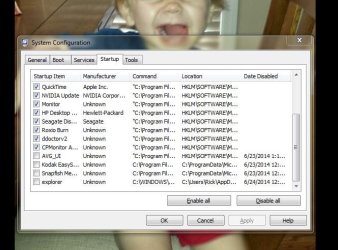
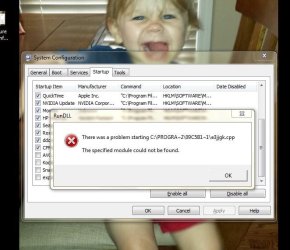
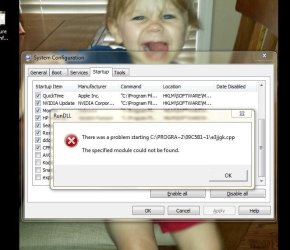
The item in startup folder of system configuration is explorer. See the attached clip of explorer unchecked. With it unchecked and I log onto the administration side the error doesn't come up. Also if I type explorer in the start search box and then click on theicon that says explorer it will bring up the error on the family side. See attachment.
Attachments
My Computer
- OS
- Windows 7 Home Premium 32 bit
- Local time
- 2:45 PM
- Messages
- 4,563
1.) Download herdprotect: (choose the portable version)
Download herdProtect - Free Anti-Malware Platform
2.) Run the scan.
3.) When the scan finishes, save the results per the screenshot below. Then upload the log here.
DO NOT REMOVE ANYTHING YET. I will advise if anything needs removed when I receive the log.
Attached Images

Download herdProtect - Free Anti-Malware Platform
2.) Run the scan.
3.) When the scan finishes, save the results per the screenshot below. Then upload the log here.
DO NOT REMOVE ANYTHING YET. I will advise if anything needs removed when I receive the log.
Attached Images
My Computer
- Computer type
- PC/Desktop
- Computer Manufacturer/Model Number
- Custom Built
- OS
- Windows 10 Pro
- CPU
- AMD Ryzen 5 2400G Processor with Radeon RX Vega 11 Graphics
- Motherboard
- ASRock X470 Master SLI/AC AM4 AMD Promontory X470 SATA 6Gb/s
- Memory
- G.SKILL Ripjaws V Series 16GB (2 x 8GB) 288-Pin DDR4 SDRAM D
- Graphics Card(s)
- 2047MB NVIDIA GeForce GTX 1060 6GB (EVGA)
- Sound Card
- Motherboard Built in
- Monitor(s) Displays
- Acer R240HY bidx 23.8-Inch IPS HDMI DVI VGA (1920 x 1080) Wi
- Screen Resolution
- 1920 x 1080
- Hard Drives
- 1TB Sandisk SSD PLUS (Main drive)
500 GB Seagate 7200 RPM (Games)
500 GB Western Digital 7200 RPM (Virtual Machines)
- PSU
- CORSAIR TX Series TX650M 650W 80+ Gold Modular Power Supply
- Case
- CORSAIR CARBIDE SPEC-02 Mid-Tower Gaming Case, Red LED Fan
- Cooling
- 220mm, two 120mm, and four 60mm fans
- Keyboard
- Wired Dell keyboard
- Mouse
- Wireless Logitech mouse
- Internet Speed
- 250mb down, 30mb up
- Antivirus
- Panda Cloud Antivirus
- Browser
- Chrome-ish x64
- Other Info
- Your awesome for reading this.
1.) Download herdprotect: (choose the portable version)
Download herdProtect - Free Anti-Malware Platform
2.) Run the scan.
3.) When the scan finishes, save the results per the screenshot below. Then upload the log here.
DO NOT REMOVE ANYTHING YET. I will advise if anything needs removed when I receive the log.
Attached Images
This is the first scan: Well I thought I saved one on desktop and one in the place herdProtect wanted to save it. I can't find it, where is it? I clicked on the save results.
My Computer
- OS
- Windows 7 Home Premium 32 bit
1.) Download herdprotect: (choose the portable version)
Download herdProtect - Free Anti-Malware Platform
2.) Run the scan.
3.) When the scan finishes, save the results per the screenshot below. Then upload the log here.
DO NOT REMOVE ANYTHING YET. I will advise if anything needs removed when I receive the log.
Attached Images
This is the first scan: Well I thought I saved one on desktop and one in the place herdProtect wanted to save it. I can't find it, where is it? I clicked on the save results.
Got them:
Attachments
My Computer
- OS
- Windows 7 Home Premium 32 bit
- Local time
- 2:45 PM
- Messages
- 4,563
Before you begin, it is very important that you read each step before starting. It is also important to answer any and all questions asked, and follow each step. If you do not know how to do something, or have questions. Ask them.
1.) Run herdprotect again, and this time remove the following items:
Click the item, and choose action-remove to remove it. Then post a fresh log once the items are removed.
Malware scan of NP6oEISb.DLL (HeroicPlay Installer Plugin Stub) 7bb53eec5cc48f74cda7e09f2b987223b817e018 - herdProtect
2.) Go into add remove programs and uninstall the following items:
While not threats themselves, these items are usually unnecessary. If the entry is not there, that is fine. You may keep them if you use them, But mostly they are not needed. Let me know what you decide.
-Java
-Aol
-Juno
-Adobe reader. <---since your web browser typically can open pdfs itself, there is no reason for this program. I only suggest keeping it if you use internet explorer.
3.) You can disagree with this step, but let me know what you decide.
Please Uninstall Norton antivirus. Why do I suggest this? First of all, it appears that norton is not installed correctly. Second of all, Norton does not participate to have there products evaluated by non profit groups on its effectiveness. Av comparatives, as well as av test evaluate multiple different antivirus programs to see how effective they are against threats, and then score them. Norton (Symantec) chooses not to participate in these tests. To me it is a reg flag when a so called antivirus program company decides not to be evaluated in tests.
Please uninstall Norton in the add/remove programs under control panel. If not found that is ok.
Either way, please run this removal tool that from the link below:
https://support.norton.com/sp/en/us/home/current/solutions/kb20080710133834EN_EndUserProfile_en_us
Follow the instructions on that page to completely uninstall it.
Restart the pc.
Now download and install panda antivirus.
It is free and can be found here: Free Antivirus Download - Panda Cloud Antivirus
Then restart once more. Let me know the results.
1.) Run herdprotect again, and this time remove the following items:
Click the item, and choose action-remove to remove it. Then post a fresh log once the items are removed.
Code:
File path: 		c:\windows\couponprinter.ocx
Publisher:
Signer: 		Coupons, Inc.
MD5: 			aae16c482413402c1a894cf9bbe73b99
SHA-1: 			070b9c178cf4b78870a45b966876a9611db11a66
Created: 		5/15/2009 12:01:24 AM
Detections: 		6
Determination: 		Adware
Malware scan of NP6oEISb.DLL (HeroicPlay Installer Plugin Stub) 7bb53eec5cc48f74cda7e09f2b987223b817e018 - herdProtect
Code:
File path: 		c:\program files\heroicplay_6oei\installr\1.bin\np6oeisb.dll
Publisher: 		HeroicPlay
Signer: 		Mindspark Interactive Network
MD5: 			52fe7d3aebac47be097e6f6aa1f54c18
SHA-1: 			7bb53eec5cc48f74cda7e09f2b987223b817e018
Created: 		12/27/2012 6:49:24 AM
Detections: 		8
Code:
File path: 		c:\users\rick\desktop\wpc_full.exe
Publisher: 		FDRLab, Inc.
MD5: 			c3e4e9a2ecff15bd28f087dbc7d172cb
SHA-1: 			1db41f320cb65d00c44c98aa7fc8e78e09faf774
Created: 		3/9/2012 6:03:04 PM
Detections: 		11
Code:
File path: 		c:\program files\heroicplay_6oei\installr\1.bin\6oezsetp.dll
Publisher: 		HeroicPlay
Signer: 		Mindspark Interactive Network
MD5: 			d9aae7078372a193bb479094e2b4e07a
SHA-1: 			f7e6c6ef5298d859fb9c3cdcc2e2dd26e196dbe8
Created: 		12/27/2012 6:49:24 AM
Detections: 		8
2.) Go into add remove programs and uninstall the following items:
While not threats themselves, these items are usually unnecessary. If the entry is not there, that is fine. You may keep them if you use them, But mostly they are not needed. Let me know what you decide.
-Java
-Aol
-Juno
-Adobe reader. <---since your web browser typically can open pdfs itself, there is no reason for this program. I only suggest keeping it if you use internet explorer.
3.) You can disagree with this step, but let me know what you decide.
Please Uninstall Norton antivirus. Why do I suggest this? First of all, it appears that norton is not installed correctly. Second of all, Norton does not participate to have there products evaluated by non profit groups on its effectiveness. Av comparatives, as well as av test evaluate multiple different antivirus programs to see how effective they are against threats, and then score them. Norton (Symantec) chooses not to participate in these tests. To me it is a reg flag when a so called antivirus program company decides not to be evaluated in tests.
Please uninstall Norton in the add/remove programs under control panel. If not found that is ok.
Either way, please run this removal tool that from the link below:
https://support.norton.com/sp/en/us/home/current/solutions/kb20080710133834EN_EndUserProfile_en_us
Follow the instructions on that page to completely uninstall it.
Restart the pc.
Now download and install panda antivirus.
It is free and can be found here: Free Antivirus Download - Panda Cloud Antivirus
Then restart once more. Let me know the results.
My Computer
- Computer type
- PC/Desktop
- Computer Manufacturer/Model Number
- Custom Built
- OS
- Windows 10 Pro
- CPU
- AMD Ryzen 5 2400G Processor with Radeon RX Vega 11 Graphics
- Motherboard
- ASRock X470 Master SLI/AC AM4 AMD Promontory X470 SATA 6Gb/s
- Memory
- G.SKILL Ripjaws V Series 16GB (2 x 8GB) 288-Pin DDR4 SDRAM D
- Graphics Card(s)
- 2047MB NVIDIA GeForce GTX 1060 6GB (EVGA)
- Sound Card
- Motherboard Built in
- Monitor(s) Displays
- Acer R240HY bidx 23.8-Inch IPS HDMI DVI VGA (1920 x 1080) Wi
- Screen Resolution
- 1920 x 1080
- Hard Drives
- 1TB Sandisk SSD PLUS (Main drive)
500 GB Seagate 7200 RPM (Games)
500 GB Western Digital 7200 RPM (Virtual Machines)
- PSU
- CORSAIR TX Series TX650M 650W 80+ Gold Modular Power Supply
- Case
- CORSAIR CARBIDE SPEC-02 Mid-Tower Gaming Case, Red LED Fan
- Cooling
- 220mm, two 120mm, and four 60mm fans
- Keyboard
- Wired Dell keyboard
- Mouse
- Wireless Logitech mouse
- Internet Speed
- 250mb down, 30mb up
- Antivirus
- Panda Cloud Antivirus
- Browser
- Chrome-ish x64
- Other Info
- Your awesome for reading this.
I appreciate your help but I can't bring my self to remove Java. Any computer I been on has had Java. As far as Norton goes I just paid $100 for it and think I better stick with it beings the tech. straighten out my virus I had. I use Internet Explorer has my main web browers so will leave Adobe Reader installed. There is no AOL and/or Juno in my programs window.
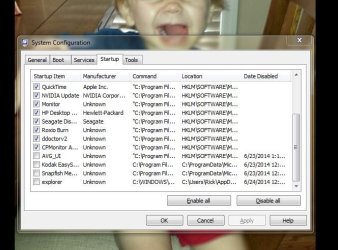
Can you tell me what the program explorer stands for? When I go into msconfig and uncheck it and then log into Administration side, I don't get that error. Thanks
Can you tell me what the program explorer stands for? When I go into msconfig and uncheck it and then log into Administration side, I don't get that error. Thanks
Attachments
My Computer
- OS
- Windows 7 Home Premium 32 bit
- Local time
- 2:45 PM
- Messages
- 4,563
Java is a security risk. Just because pcs have it by default installed does not mean you need it.
If you need java leave it installed. If not, uninstall it. It is much better to have it uninstalled and only install it when you need it. The average customer does not need java installed.
As for norton,
You still have not posted the screenshot with its interface opened like I asked the last 3 times.
Please download ccleaner from here:
CCleaner - Standard
Install it. Then navigate to tools-startup. Click on explorer, click delete.
Close and reboot.
If you need java leave it installed. If not, uninstall it. It is much better to have it uninstalled and only install it when you need it. The average customer does not need java installed.
As for norton,
You still have not posted the screenshot with its interface opened like I asked the last 3 times.
Please download ccleaner from here:
CCleaner - Standard
Install it. Then navigate to tools-startup. Click on explorer, click delete.
Close and reboot.
My Computer
- Computer type
- PC/Desktop
- Computer Manufacturer/Model Number
- Custom Built
- OS
- Windows 10 Pro
- CPU
- AMD Ryzen 5 2400G Processor with Radeon RX Vega 11 Graphics
- Motherboard
- ASRock X470 Master SLI/AC AM4 AMD Promontory X470 SATA 6Gb/s
- Memory
- G.SKILL Ripjaws V Series 16GB (2 x 8GB) 288-Pin DDR4 SDRAM D
- Graphics Card(s)
- 2047MB NVIDIA GeForce GTX 1060 6GB (EVGA)
- Sound Card
- Motherboard Built in
- Monitor(s) Displays
- Acer R240HY bidx 23.8-Inch IPS HDMI DVI VGA (1920 x 1080) Wi
- Screen Resolution
- 1920 x 1080
- Hard Drives
- 1TB Sandisk SSD PLUS (Main drive)
500 GB Seagate 7200 RPM (Games)
500 GB Western Digital 7200 RPM (Virtual Machines)
- PSU
- CORSAIR TX Series TX650M 650W 80+ Gold Modular Power Supply
- Case
- CORSAIR CARBIDE SPEC-02 Mid-Tower Gaming Case, Red LED Fan
- Cooling
- 220mm, two 120mm, and four 60mm fans
- Keyboard
- Wired Dell keyboard
- Mouse
- Wireless Logitech mouse
- Internet Speed
- 250mb down, 30mb up
- Antivirus
- Panda Cloud Antivirus
- Browser
- Chrome-ish x64
- Other Info
- Your awesome for reading this.
Similar threads
- Replies
- 17
- Views
- 15K


- Replies
- 0
- Views
- 484
- Replies
- 0
- Views
- 1K
