Solved Rundll error

Java is a security risk. Just because pcs have it by default installed does not mean you need it.

If you need java leave it installed. If not, uninstall it. It is much better to have it uninstalled and only install it when you need it. The average customer does not need java installed.

As for norton,

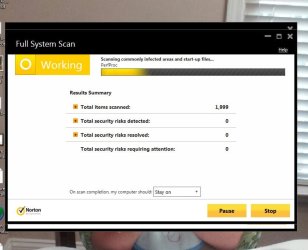
You still have not posted the screenshot with its interface opened like I asked the last 3 times.


Please download ccleaner from here:

CCleaner - Standard

Install it. Then navigate to tools-startup. Click on explorer, click delete.

Close and reboot.
As for Norton,
I don't under stand what you mean by with its interface opened?
Thanks
 

My Computer

OS
Windows 7 Home Premium 32 bit
Ok, I am saying open up norton. Take a screenshot with it open and running.

What was the results from ccleaner?
 

My Computer

Computer type
PC/Desktop
Computer Manufacturer/Model Number
Custom Built
OS
Windows 10 Pro
CPU
AMD Ryzen 5 2400G Processor with Radeon RX Vega 11 Graphics
Motherboard
ASRock X470 Master SLI/AC AM4 AMD Promontory X470 SATA 6Gb/s
Memory
G.SKILL Ripjaws V Series 16GB (2 x 8GB) 288-Pin DDR4 SDRAM D
Graphics Card(s)
2047MB NVIDIA GeForce GTX 1060 6GB (EVGA)
Sound Card
Motherboard Built in
Monitor(s) Displays
Acer R240HY bidx 23.8-Inch IPS HDMI DVI VGA (1920 x 1080) Wi
Screen Resolution
1920 x 1080
Hard Drives
1TB Sandisk SSD PLUS (Main drive)
500 GB Seagate 7200 RPM (Games)
500 GB Western Digital 7200 RPM (Virtual Machines)
PSU
CORSAIR TX Series TX650M 650W 80+ Gold Modular Power Supply
Case
CORSAIR CARBIDE SPEC-02 Mid-Tower Gaming Case, Red LED Fan
Cooling
220mm, two 120mm, and four 60mm fans
Keyboard
Wired Dell keyboard
Mouse
Wireless Logitech mouse
Internet Speed
250mb down, 30mb up
Antivirus
Panda Cloud Antivirus
Browser
Chrome-ish x64
Other Info
Your awesome for reading this.
I ran ccleaner 4 times to clear all in analyze.

See attached Norton.
 

Attachments

  • Capture after running ccleaner analyze 4 times.JPG
    Capture after running ccleaner analyze 4 times.JPG
    68.6 KB · Views: 0
  • Capture Norton working.JPG
    Capture Norton working.JPG
    51.7 KB · Views: 0
  • Capture norton complete.JPG
    Capture norton complete.JPG
    57.4 KB · Views: 0

My Computer

OS
Windows 7 Home Premium 32 bit
Ok, so you deleted the item explorer from startup in ccleaner tools-startup like I asked and the problem is solved now?
 

My Computer

Computer type
PC/Desktop
Computer Manufacturer/Model Number
Custom Built
OS
Windows 10 Pro
CPU
AMD Ryzen 5 2400G Processor with Radeon RX Vega 11 Graphics
Motherboard
ASRock X470 Master SLI/AC AM4 AMD Promontory X470 SATA 6Gb/s
Memory
G.SKILL Ripjaws V Series 16GB (2 x 8GB) 288-Pin DDR4 SDRAM D
Graphics Card(s)
2047MB NVIDIA GeForce GTX 1060 6GB (EVGA)
Sound Card
Motherboard Built in
Monitor(s) Displays
Acer R240HY bidx 23.8-Inch IPS HDMI DVI VGA (1920 x 1080) Wi
Screen Resolution
1920 x 1080
Hard Drives
1TB Sandisk SSD PLUS (Main drive)
500 GB Seagate 7200 RPM (Games)
500 GB Western Digital 7200 RPM (Virtual Machines)
PSU
CORSAIR TX Series TX650M 650W 80+ Gold Modular Power Supply
Case
CORSAIR CARBIDE SPEC-02 Mid-Tower Gaming Case, Red LED Fan
Cooling
220mm, two 120mm, and four 60mm fans
Keyboard
Wired Dell keyboard
Mouse
Wireless Logitech mouse
Internet Speed
250mb down, 30mb up
Antivirus
Panda Cloud Antivirus
Browser
Chrome-ish x64
Other Info
Your awesome for reading this.
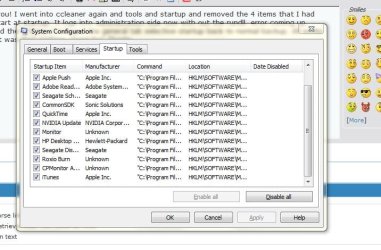
I removed everything that ccleaner suggested. Explorer is still in msconfig window under startup.
 

My Computer

OS
Windows 7 Home Premium 32 bit
I removed everything that ccleaner suggested. Explorer is still in msconfig window under startup.

Huh? Why did you run the cleaner? That was not what I asked. In ccleaner, click tools. Click startup. Click the explorer entry. Choose delete.

Please follow directions...
 

My Computer

Computer type
PC/Desktop
Computer Manufacturer/Model Number
Custom Built
OS
Windows 10 Pro
CPU
AMD Ryzen 5 2400G Processor with Radeon RX Vega 11 Graphics
Motherboard
ASRock X470 Master SLI/AC AM4 AMD Promontory X470 SATA 6Gb/s
Memory
G.SKILL Ripjaws V Series 16GB (2 x 8GB) 288-Pin DDR4 SDRAM D
Graphics Card(s)
2047MB NVIDIA GeForce GTX 1060 6GB (EVGA)
Sound Card
Motherboard Built in
Monitor(s) Displays
Acer R240HY bidx 23.8-Inch IPS HDMI DVI VGA (1920 x 1080) Wi
Screen Resolution
1920 x 1080
Hard Drives
1TB Sandisk SSD PLUS (Main drive)
500 GB Seagate 7200 RPM (Games)
500 GB Western Digital 7200 RPM (Virtual Machines)
PSU
CORSAIR TX Series TX650M 650W 80+ Gold Modular Power Supply
Case
CORSAIR CARBIDE SPEC-02 Mid-Tower Gaming Case, Red LED Fan
Cooling
220mm, two 120mm, and four 60mm fans
Keyboard
Wired Dell keyboard
Mouse
Wireless Logitech mouse
Internet Speed
250mb down, 30mb up
Antivirus
Panda Cloud Antivirus
Browser
Chrome-ish x64
Other Info
Your awesome for reading this.
OK now I got you! I went into ccleaner again and tools and startup and removed the 4 items that I had unmarked to start at startup. It logs into administration side now with out the rundll. error coming up. Since I removed the 4 items I changed the general tab selective startup back to normal backup. All works well now. What was that explorer stand for? Thanks
 

Attachments

  • Capture msconfig startup tab.JPG
    Capture msconfig startup tab.JPG
    63.7 KB · Views: 21
  • Capture startup now.JPG
    Capture startup now.JPG
    68.8 KB · Views: 0

My Computer

OS
Windows 7 Home Premium 32 bit
I am not sure, it could have been some kind of malware or spyware. Or it could have been some program that did not uninstall properly. Either way, it should be gone now.

Since you pay for norton, it might not be a bad idea to call them and have them do a thorough look at your pc at no additional cost. It is one of the few benefits of paying for a AV product. They will usually look at your computer remotely with their tech support to make sure you are all clean. For free.

Only use the support or help links in the norton software though.

If you search google for the number you will most likely get the wrong one. Scammers love people searching for phone numbers.
 

My Computer

Computer type
PC/Desktop
Computer Manufacturer/Model Number
Custom Built
OS
Windows 10 Pro
CPU
AMD Ryzen 5 2400G Processor with Radeon RX Vega 11 Graphics
Motherboard
ASRock X470 Master SLI/AC AM4 AMD Promontory X470 SATA 6Gb/s
Memory
G.SKILL Ripjaws V Series 16GB (2 x 8GB) 288-Pin DDR4 SDRAM D
Graphics Card(s)
2047MB NVIDIA GeForce GTX 1060 6GB (EVGA)
Sound Card
Motherboard Built in
Monitor(s) Displays
Acer R240HY bidx 23.8-Inch IPS HDMI DVI VGA (1920 x 1080) Wi
Screen Resolution
1920 x 1080
Hard Drives
1TB Sandisk SSD PLUS (Main drive)
500 GB Seagate 7200 RPM (Games)
500 GB Western Digital 7200 RPM (Virtual Machines)
PSU
CORSAIR TX Series TX650M 650W 80+ Gold Modular Power Supply
Case
CORSAIR CARBIDE SPEC-02 Mid-Tower Gaming Case, Red LED Fan
Cooling
220mm, two 120mm, and four 60mm fans
Keyboard
Wired Dell keyboard
Mouse
Wireless Logitech mouse
Internet Speed
250mb down, 30mb up
Antivirus
Panda Cloud Antivirus
Browser
Chrome-ish x64
Other Info
Your awesome for reading this.
Thanks for your help.
I remember Norton telling me I had 7 days for warranty. But I think that was just on the remove of the virus. So maybe I can get some where with them. Thanks again
 

My Computer

OS
Windows 7 Home Premium 32 bit
No problem :)

Here are my security recommendations You can ignore the part about panda since you want to keep norton :)

I advise you to install and use the following security programs so you do not get infected again:

-Panda antivirus -You can only have 1 antivirus installed at a time, I recommend using this one and uninstalling what you are using now.

-Malwarebytes
-Superantispyware
-Should I remove it

Run them around once every 2 weeks.

Should I remove it is not a malware scanner. What it does is it looks at all of the installed programs on your PC and gives you a percentage % of how many people uninstall the software. If the percentage % is high, I would remove it as it is most likely not a good program. It also gives a ton of information about what the program does and how it behaves.

I also suggest using a standard user account in windows, and only using an admin account when you need to install software:

http://www.sevenforums.com/tutorials/181024-user-account-create.html

When using a standard account and you make a change or install a program that affects the whole system, UAC will prompt you to continue. Make sure the setting or program you are tying to install is listed, then click yes to continue. If you are just browsing the web and the prompt appears with a program you have not heard of, or do not know what it is, it is much safer to click no then yes. No will block the action, and if you were trying to do something, you can always start it again and choose yes.

UAC makes this easy, see here:

What is user account control (UAC)?

I also suggest choosing always notify for UAC:

What are User Account Control settings?

I also recommend that you use bleeping computers suggestions which can be found here:

How to keep your computer safe online

So how Did I get Infected?


Those are my recommendations to you, and I Highly suggest you follow them.

 

My Computer

Computer type
PC/Desktop
Computer Manufacturer/Model Number
Custom Built
OS
Windows 10 Pro
CPU
AMD Ryzen 5 2400G Processor with Radeon RX Vega 11 Graphics
Motherboard
ASRock X470 Master SLI/AC AM4 AMD Promontory X470 SATA 6Gb/s
Memory
G.SKILL Ripjaws V Series 16GB (2 x 8GB) 288-Pin DDR4 SDRAM D
Graphics Card(s)
2047MB NVIDIA GeForce GTX 1060 6GB (EVGA)
Sound Card
Motherboard Built in
Monitor(s) Displays
Acer R240HY bidx 23.8-Inch IPS HDMI DVI VGA (1920 x 1080) Wi
Screen Resolution
1920 x 1080
Hard Drives
1TB Sandisk SSD PLUS (Main drive)
500 GB Seagate 7200 RPM (Games)
500 GB Western Digital 7200 RPM (Virtual Machines)
PSU
CORSAIR TX Series TX650M 650W 80+ Gold Modular Power Supply
Case
CORSAIR CARBIDE SPEC-02 Mid-Tower Gaming Case, Red LED Fan
Cooling
220mm, two 120mm, and four 60mm fans
Keyboard
Wired Dell keyboard
Mouse
Wireless Logitech mouse
Internet Speed
250mb down, 30mb up
Antivirus
Panda Cloud Antivirus
Browser
Chrome-ish x64
Other Info
Your awesome for reading this.
Back
Top