Solved Running out of USB ports! Help!

yankleber

IT Dinosaur
Member
VIP
Local time
2:20 AM
Messages
212
Location
Home
OK, I think that I may be just one more among a billion persons with this same problem since nowadays everything is USB. LoL.

I have seven USB ports on my computer, being 5 in the back and 2 in the front.

All my five back ports are busy (audio interface, mouse, wi-fi dongle and two USB HDDs) leaving me with only the two front ports that doesn't helps too much since I still have two more HDDs, a musical keyboard, laser printer and a LOT of pendrives. To keep unplugging stuff to free up ports is not an option for me.

I bought recently a cheap USB hub that revealed to be a big crap: the only devices that I manage to make work on it are pendrives and the wi-fi dongle, and even so sometimes the wi-fi dongle refuses to work or stop to work after a while. The HDDs just light their leds but aren't even recognized by the system.

I have tried a different cheap USB hub from my wife's notebook but it's the same crap (doesn't afford HDD). Then I suppose that cheap USB hubs won't work for me.

I would like to know if there is any decent USB out there that works or even an extra USB interface that I can add to my computer. My motherboard has two long blue slots and two medium sized cream ones. All of them are free.

Thanks!

:)
 

My Computer My Computer

At a glance

Windows 7 Professional 64bitIntel i5-33308GBOnboard
Computer type
PC/Desktop
Computer Manufacturer/Model Number
Custom
OS
Windows 7 Professional 64bit
CPU
Intel i5-3330
Motherboard
GigaByte B75M-D3H
Memory
8GB
Graphics Card(s)
Onboard
Sound Card
Behringer UCA222
Monitor(s) Displays
Samsung 22.5"
Screen Resolution
1920x1080
Hard Drives
SSD Kingston 120GB
HDD Samsung 320GB
Internet Speed
1M
Antivirus
ZoneAlarm FW + AV Free
Browser
Chrome
Is the usb hub have its own power? I have found that some devices don't work right unless the usb hub is self powered.
 

My Computer My Computer

At a glance

Windows 7 64 bit ProfessionalAMD A 816gbOn board
Computer type
PC/Desktop
Computer Manufacturer/Model Number
Hp
OS
Windows 7 64 bit Professional
CPU
AMD A 8
Motherboard
Amd
Memory
16gb
Graphics Card(s)
On board
Hard Drives
Se agate 1 tv
Antivirus
Security
Is the usb hub have its own power? I have found that some devices don't work right unless the usb hub is self powered.
It doesn't. I have found some powered hubs but I confess that being it from crazy Chinese brands I didn't feel too much secure on connect such stuff on my computer. LoL.

Browsing the web I just found something that may be the solution of my problem, that is a PCI express board that adds four extra USB 3.0 ports. It is a PCIE x1 and I have two PCIE x16 free on my computer. Question is: will it work?

:rolleyes:
 

My Computer My Computer

At a glance

Windows 7 Professional 64bitIntel i5-33308GBOnboard
Computer type
PC/Desktop
Computer Manufacturer/Model Number
Custom
OS
Windows 7 Professional 64bit
CPU
Intel i5-3330
Motherboard
GigaByte B75M-D3H
Memory
8GB
Graphics Card(s)
Onboard
Sound Card
Behringer UCA222
Monitor(s) Displays
Samsung 22.5"
Screen Resolution
1920x1080
Hard Drives
SSD Kingston 120GB
HDD Samsung 320GB
Internet Speed
1M
Antivirus
ZoneAlarm FW + AV Free
Browser
Chrome
Browsing the web I just found something that may be the solution of my problem, that is a PCI express board that adds four extra USB 3.0 ports. It is a PCIE x1 and I have two PCIE x16 free on my computer. Question is: will it work?
After some research, the answer is: YES, it will work. You can connect any x1, x4 or x4 in x16 slots. Just ordered mine!

:D
 

My Computer My Computer

At a glance

Windows 7 Professional 64bitIntel i5-33308GBOnboard
Computer type
PC/Desktop
Computer Manufacturer/Model Number
Custom
OS
Windows 7 Professional 64bit
CPU
Intel i5-3330
Motherboard
GigaByte B75M-D3H
Memory
8GB
Graphics Card(s)
Onboard
Sound Card
Behringer UCA222
Monitor(s) Displays
Samsung 22.5"
Screen Resolution
1920x1080
Hard Drives
SSD Kingston 120GB
HDD Samsung 320GB
Internet Speed
1M
Antivirus
ZoneAlarm FW + AV Free
Browser
Chrome
Great, let us know if it works.
 

My Computer My Computer

At a glance

Windows 7 64 bit ProfessionalAMD A 816gbOn board
Computer type
PC/Desktop
Computer Manufacturer/Model Number
Hp
OS
Windows 7 64 bit Professional
CPU
AMD A 8
Motherboard
Amd
Memory
16gb
Graphics Card(s)
On board
Hard Drives
Se agate 1 tv
Antivirus
Security
Browsing the web I just found something that may be the solution of my problem, that is a PCI express board that adds four extra USB 3.0 ports. It is a PCIE x1 and I have two PCIE x16 free on my computer. Question is: will it work?
After some research, the answer is: YES, it will work. You can connect any x1, x4 or x4 in x16 slots. Just ordered mine!

:D

Since it can plug into an x1 slot, the fastest all the ports combined will run at is 5Gbps. If you need the full USB 3.0 speed—5Gbps—you can run only one device at a time. Otherwise, your speed will be throttled. This won't be an issue if the devices are USB 2.0 or only one or, maybe, two of the four devices actually runs at a time

Also, make sure the card has a port for additional power and be sure to use it. PCI-e by itself is not capable of producing enough power to run USB devices that run on USB power, especially when trying to run four devices at the same time.

Frankly, I feel that manufacturers that market USB 3.0 expansion cards that have more than one port running on a single PCI-e lane should be shot, then prosecuted for fraud, then shot again!
 

My Computer My Computer

At a glance

Win 7 Ultimate 64 bitIntel i7-3930KKingston HyperX Genesis 32GB Kit (8x4GB Modul...MSI R7850 Twin Frozr 2GD5/OC Radeon HD 7850 2...
Computer type
PC/Desktop
Computer Manufacturer/Model Number
Custom Build
OS
Win 7 Ultimate 64 bit
CPU
Intel i7-3930K
Motherboard
ASUS P9X79 WS
Memory
Kingston HyperX Genesis 32GB Kit (8x4GB Modules) 1600MHz DDR
Graphics Card(s)
MSI R7850 Twin Frozr 2GD5/OC Radeon HD 7850 2GB 256-bit GDDR
Sound Card
Asus Xonar Essence STX
Monitor(s) Displays
3x Asus VG248QE 24", Vizio 32" TV
Screen Resolution
1920 x 1080, ?
Hard Drives
Samsung 128GB 840 Pro SSD (1),
Samsung 4TB 850 EVO SSDs (4)
Samsung 4TB 850 EVO SSDs (16) external backup drives used in 2.5" hot swap bays in the computer.
PSU
Corsair HX750w
Case
Antec Two Hundred v2 (modified)
Cooling
Cooler Master GeminII S524 120mm (fan replaced with a 140mm)
Keyboard
Logitech G510s
Mouse
Logitech M525 (two in use)
Internet Speed
=< 32Mbps down, 8Mbps up
Antivirus
AVAST!, MBAM, SAS, Spybot S&D (all but MBAM free) Glary Util
Browser
IE11
Other Info
LSI 9211-8i HBA card (8 SATA III ports), 2.5" & 3.5" Hot Swap Bays, HooToo HT-CR001 PCI-E to USB 3.0 Internal Hub + 6 Slot Card Reader, and LG Model CH12LS28 BD-ROM Optical Drive. Also, ScanSnap S1500 ADF duplexing scanner, Canon 9000F flat bed scanner, Corsair SP2500 2.1 speakers, Samsung CLP 415nw laser color printer, Cyberpower PP2200SW UPS
PCIe USB 3 adapters can often be more problematic than PCIe USB 2 adapters, especially if it's a 'no-name' from China. Just keep that in mind if you have any problems when you get it.
 

My Computer My Computer

At a glance

Windows 7 Professional x64, Arch Linux
Computer type
PC/Desktop
OS
Windows 7 Professional x64, Arch Linux
I hope I'm not off subject.

I would suggest that one uses Hotswap bays for drives which will hook to the sata ports on the motherboard and sata power from the power supply.
That would free up some USB ports.
 

My Computer My Computer

At a glance

Windows 10 Pro. 64/ version 1709 Windows 7 Pr...Intel i7-6800K @ 4.3Corsair Platinum 16 gig @2400EVGA GTX 1070 OC
Computer type
PC/Desktop
Computer Manufacturer/Model Number
Home made Desktop
OS
Windows 10 Pro. 64/ version 1709 Windows 7 Pro/64
CPU
Intel i7-6800K @ 4.3
Motherboard
ASUS X-99 Deluxe II
Memory
Corsair Platinum 16 gig @2400
Graphics Card(s)
EVGA GTX 1070 OC
Monitor(s) Displays
Asus 27" LED LCD/VE278Q
Screen Resolution
1920-1080 or 1280-720 HDMI
Hard Drives
INTEL SSD 730-240 Gb Sata 3.0/
PSU
EVGA Platium 1200W
Case
Phanteks Luxe Tempered Glass 8 fans/ one radiator
Cooling
XSPC/ Water Cooled CPU
Keyboard
Das 4 Professional
Mouse
Logitech M705/MX Anywhere 2-S
Internet Speed
100 mbits
Antivirus
Microsoft Security Essentials/ Malwarebytes Premium 3.0/ SAS
Browser
I.E. 11 default/Firefox/ ISP Time Warner Cable/Spectrum
Other Info
LG BluRay Burner/
Sound system-KLipsch-THX/
Icy Dock ssd Hot Swap bays.
Well, what a quite lot of awesome inputs!

:)

At this point I already ordered the USB card, but it was cheap (something around $20) so if it doesn't work as expected it won't be a total disaster. I really didn't know that a USB PCIE expansion didn't have its own power, this is absolutely a big shame!

After to be aware of it I am anticipating that I may have problems just because I am willing to plug there exactly the devices I don't swap all the time and that coincidentally are the more power starving (HDDs).

Now I got interested on the 'hot swap' stuff. I never heard about them till now, but you definitively got my attention. This is something that can be attached to any computer or does it demands some kind of special setup in the case?
 

My Computer My Computer

At a glance

Windows 7 Professional 64bitIntel i5-33308GBOnboard
Computer type
PC/Desktop
Computer Manufacturer/Model Number
Custom
OS
Windows 7 Professional 64bit
CPU
Intel i5-3330
Motherboard
GigaByte B75M-D3H
Memory
8GB
Graphics Card(s)
Onboard
Sound Card
Behringer UCA222
Monitor(s) Displays
Samsung 22.5"
Screen Resolution
1920x1080
Hard Drives
SSD Kingston 120GB
HDD Samsung 320GB
Internet Speed
1M
Antivirus
ZoneAlarm FW + AV Free
Browser
Chrome
Hot swap bays usually get installed in one or more 5.25" bays in the computer case and will need a power feed from the PSU and a SATA cable from the MOBO to each hot swap bay of the computer.

This is an example of a single hot swap bay:

serveimage


This is an example of one that can hold three HDDs and occupies two 5.25" bays:

serveimage


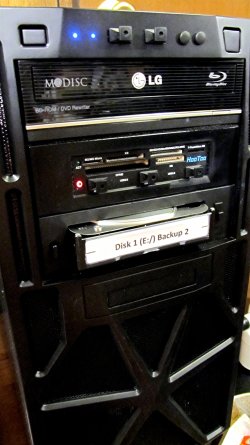
I have two hot swap bays in my current desktop machine. The 2.5" hot swap bay came built into the case. The 3.5" hot swap bay I added into a 5.25" bay.

HDD in Swap Bay.JPG

This photo shows a 3.5" HDD inserted in the hot swap bay. This particular style doesn't use an eject lever/door, which I prefer. The 2.5" bay is a little door hiding underneath the 3.5" drive. I primarily use them for updating backup drives. To use a hot swap bay, you have to be able to enable hot swap in the MOBO's BIOS.
 

My Computer My Computer

At a glance

Win 7 Ultimate 64 bitIntel i7-3930KKingston HyperX Genesis 32GB Kit (8x4GB Modul...MSI R7850 Twin Frozr 2GD5/OC Radeon HD 7850 2...
Computer type
PC/Desktop
Computer Manufacturer/Model Number
Custom Build
OS
Win 7 Ultimate 64 bit
CPU
Intel i7-3930K
Motherboard
ASUS P9X79 WS
Memory
Kingston HyperX Genesis 32GB Kit (8x4GB Modules) 1600MHz DDR
Graphics Card(s)
MSI R7850 Twin Frozr 2GD5/OC Radeon HD 7850 2GB 256-bit GDDR
Sound Card
Asus Xonar Essence STX
Monitor(s) Displays
3x Asus VG248QE 24", Vizio 32" TV
Screen Resolution
1920 x 1080, ?
Hard Drives
Samsung 128GB 840 Pro SSD (1),
Samsung 4TB 850 EVO SSDs (4)
Samsung 4TB 850 EVO SSDs (16) external backup drives used in 2.5" hot swap bays in the computer.
PSU
Corsair HX750w
Case
Antec Two Hundred v2 (modified)
Cooling
Cooler Master GeminII S524 120mm (fan replaced with a 140mm)
Keyboard
Logitech G510s
Mouse
Logitech M525 (two in use)
Internet Speed
=< 32Mbps down, 8Mbps up
Antivirus
AVAST!, MBAM, SAS, Spybot S&D (all but MBAM free) Glary Util
Browser
IE11
Other Info
LSI 9211-8i HBA card (8 SATA III ports), 2.5" & 3.5" Hot Swap Bays, HooToo HT-CR001 PCI-E to USB 3.0 Internal Hub + 6 Slot Card Reader, and LG Model CH12LS28 BD-ROM Optical Drive. Also, ScanSnap S1500 ADF duplexing scanner, Canon 9000F flat bed scanner, Corsair SP2500 2.1 speakers, Samsung CLP 415nw laser color printer, Cyberpower PP2200SW UPS
My Hotswap bays fit in the front of the computer in the 5 1/4 in. bays and hook to normal sata and power connection. Their is a list of them here.

https://www.google.com/#q=Hotswap+bay

You can install drives or remove them as needed or desired.
You can also do it without turning off the computer.

A little video.


My Computer My Computer

At a glance

Windows 10 Pro. 64/ version 1709 Windows 7 Pr...Intel i7-6800K @ 4.3Corsair Platinum 16 gig @2400EVGA GTX 1070 OC
Computer type
PC/Desktop
Computer Manufacturer/Model Number
Home made Desktop
OS
Windows 10 Pro. 64/ version 1709 Windows 7 Pro/64
CPU
Intel i7-6800K @ 4.3
Motherboard
ASUS X-99 Deluxe II
Memory
Corsair Platinum 16 gig @2400
Graphics Card(s)
EVGA GTX 1070 OC
Monitor(s) Displays
Asus 27" LED LCD/VE278Q
Screen Resolution
1920-1080 or 1280-720 HDMI
Hard Drives
INTEL SSD 730-240 Gb Sata 3.0/
PSU
EVGA Platium 1200W
Case
Phanteks Luxe Tempered Glass 8 fans/ one radiator
Cooling
XSPC/ Water Cooled CPU
Keyboard
Das 4 Professional
Mouse
Logitech M705/MX Anywhere 2-S
Internet Speed
100 mbits
Antivirus
Microsoft Security Essentials/ Malwarebytes Premium 3.0/ SAS
Browser
I.E. 11 default/Firefox/ ISP Time Warner Cable/Spectrum
Other Info
LG BluRay Burner/
Sound system-KLipsch-THX/
Icy Dock ssd Hot Swap bays.
If by chance you don't have Hotswap ability in bios you just turn off the computer and then swap the drives. As far as I know this will work. I don't have a system I can test it on.

I would also suggest if you keep the drives in the bays and use them a lot adding a fan that blows on them because they do get hotter in such a enclosed space.
 

My Computer My Computer

At a glance

Windows 10 Pro. 64/ version 1709 Windows 7 Pr...Intel i7-6800K @ 4.3Corsair Platinum 16 gig @2400EVGA GTX 1070 OC
Computer type
PC/Desktop
Computer Manufacturer/Model Number
Home made Desktop
OS
Windows 10 Pro. 64/ version 1709 Windows 7 Pro/64
CPU
Intel i7-6800K @ 4.3
Motherboard
ASUS X-99 Deluxe II
Memory
Corsair Platinum 16 gig @2400
Graphics Card(s)
EVGA GTX 1070 OC
Monitor(s) Displays
Asus 27" LED LCD/VE278Q
Screen Resolution
1920-1080 or 1280-720 HDMI
Hard Drives
INTEL SSD 730-240 Gb Sata 3.0/
PSU
EVGA Platium 1200W
Case
Phanteks Luxe Tempered Glass 8 fans/ one radiator
Cooling
XSPC/ Water Cooled CPU
Keyboard
Das 4 Professional
Mouse
Logitech M705/MX Anywhere 2-S
Internet Speed
100 mbits
Antivirus
Microsoft Security Essentials/ Malwarebytes Premium 3.0/ SAS
Browser
I.E. 11 default/Firefox/ ISP Time Warner Cable/Spectrum
Other Info
LG BluRay Burner/
Sound system-KLipsch-THX/
Icy Dock ssd Hot Swap bays.
That's very cool, fellows!

:D

I had something alike several years ago for IDE drives and of course they weren't hot swap. At that time I had to screw the drives into a male drawer and then slide the drawer inside the female part. Seems to me that those new ones do NOT have a male part and the HD is slipped directly into the bay?

I found on an online store near to me a nice hot swap device from a brand called 'Akasa' that goes into the computer case 3.5" and comes with two 2.5" bays.

Here's a pic of it:
drive-gaveta-com-2-baia-para-hd-25-sata-akasa-lokstor-m21-262301-MLB8533057472_052015-O.jpg

To use a hot swap bay, you have to be able to enable hot swap in the MOBO's BIOS.

This is a VERY important point. I will check my BIOS although my computer is not too old (a bit less than a 2 and a half year).

Thanks a lot for the tips!

:)
 

My Computer My Computer

At a glance

Windows 7 Professional 64bitIntel i5-33308GBOnboard
Computer type
PC/Desktop
Computer Manufacturer/Model Number
Custom
OS
Windows 7 Professional 64bit
CPU
Intel i5-3330
Motherboard
GigaByte B75M-D3H
Memory
8GB
Graphics Card(s)
Onboard
Sound Card
Behringer UCA222
Monitor(s) Displays
Samsung 22.5"
Screen Resolution
1920x1080
Hard Drives
SSD Kingston 120GB
HDD Samsung 320GB
Internet Speed
1M
Antivirus
ZoneAlarm FW + AV Free
Browser
Chrome
Well, what a quite lot of awesome inputs!

:)

At this point I already ordered the USB card, but it was cheap (something around $20) so if it doesn't work as expected it won't be a total disaster. I really didn't know that a USB PCIE expansion didn't have its own power, this is absolutely a big shame!

After to be aware of it I am anticipating that I may have problems just because I am willing to plug there exactly the devices I don't swap all the time and that coincidentally are the more power starving (HDDs).

Now I got interested on the 'hot swap' stuff. I never heard about them till now, but you definitively got my attention. This is something that can be attached to any computer or does it demands some kind of special setup in the case?

Four HDDs won't be throttled any, if at all, by the limited bandwidth of the card you ordered, especially if you aren't reading or writing to all of them at the same time.

The one limitation you do have to worry about is if the USB ports get enough power. If the card has a power port (usually 4 pin Molex or, increasingly, SATA power), make sure you connect it to the PSU. If there is no power port, you may be out of luck.
 

My Computer My Computer

At a glance

Win 7 Ultimate 64 bitIntel i7-3930KKingston HyperX Genesis 32GB Kit (8x4GB Modul...MSI R7850 Twin Frozr 2GD5/OC Radeon HD 7850 2...
Computer type
PC/Desktop
Computer Manufacturer/Model Number
Custom Build
OS
Win 7 Ultimate 64 bit
CPU
Intel i7-3930K
Motherboard
ASUS P9X79 WS
Memory
Kingston HyperX Genesis 32GB Kit (8x4GB Modules) 1600MHz DDR
Graphics Card(s)
MSI R7850 Twin Frozr 2GD5/OC Radeon HD 7850 2GB 256-bit GDDR
Sound Card
Asus Xonar Essence STX
Monitor(s) Displays
3x Asus VG248QE 24", Vizio 32" TV
Screen Resolution
1920 x 1080, ?
Hard Drives
Samsung 128GB 840 Pro SSD (1),
Samsung 4TB 850 EVO SSDs (4)
Samsung 4TB 850 EVO SSDs (16) external backup drives used in 2.5" hot swap bays in the computer.
PSU
Corsair HX750w
Case
Antec Two Hundred v2 (modified)
Cooling
Cooler Master GeminII S524 120mm (fan replaced with a 140mm)
Keyboard
Logitech G510s
Mouse
Logitech M525 (two in use)
Internet Speed
=< 32Mbps down, 8Mbps up
Antivirus
AVAST!, MBAM, SAS, Spybot S&D (all but MBAM free) Glary Util
Browser
IE11
Other Info
LSI 9211-8i HBA card (8 SATA III ports), 2.5" & 3.5" Hot Swap Bays, HooToo HT-CR001 PCI-E to USB 3.0 Internal Hub + 6 Slot Card Reader, and LG Model CH12LS28 BD-ROM Optical Drive. Also, ScanSnap S1500 ADF duplexing scanner, Canon 9000F flat bed scanner, Corsair SP2500 2.1 speakers, Samsung CLP 415nw laser color printer, Cyberpower PP2200SW UPS
Regarding hot-swap enclosures: Not all motherboards will have a "hot swap" option in BIOS. The most important thing is that the SATA controller must be set to AHCI or RAID mode. If this is the case, you have SATA hot-swap support. Check out wikipedia AHCI page for more info.

But, since all yankleber's external drives are USB I'm not sure hot-swap enclosures are appropriate. Some USB enclosures can be disassembled and contain a normal SATA drive inside, but that's not always the case.

One thing that hasn't been mentioned: you (yankleber) may have unused USB headers on your motherboard, and all you need to access those is something like this. Check eBay, USB 2 stuff is practically being given away these days.
 

My Computer My Computer

At a glance

Windows 7 Professional x64, Arch Linux
Computer type
PC/Desktop
OS
Windows 7 Professional x64, Arch Linux
If by chance you don't have Hotswap ability in bios you just turn off the computer and then swap the drives. As far as I know this will work. I don't have a system I can test it on.
If my BIOS doesn't have this ability I will really prefer to stick to the USB option. I hate when I have to reboot my computer. It is fast (around 8 seconds for a full boot) but the problem is that I use to keep several apps and browser tabs opened so a simple off-on can be a real pain.

:p
 

My Computer My Computer

At a glance

Windows 7 Professional 64bitIntel i5-33308GBOnboard
Computer type
PC/Desktop
Computer Manufacturer/Model Number
Custom
OS
Windows 7 Professional 64bit
CPU
Intel i5-3330
Motherboard
GigaByte B75M-D3H
Memory
8GB
Graphics Card(s)
Onboard
Sound Card
Behringer UCA222
Monitor(s) Displays
Samsung 22.5"
Screen Resolution
1920x1080
Hard Drives
SSD Kingston 120GB
HDD Samsung 320GB
Internet Speed
1M
Antivirus
ZoneAlarm FW + AV Free
Browser
Chrome
That's very cool, fellows!

:D

I had something alike several years ago for IDE drives and of course they weren't hot swap. At that time I had to screw the drives into a male drawer and then slide the drawer inside the female part. Seems to me that those new ones do NOT have a male part and the HD is slipped directly into the bay?

I found on an online store near to me a nice hot swap device from a brand called 'Akasa' that goes into the computer case 3.5" and comes with two 2.5" bays.

Here's a pic of it:
drive-gaveta-com-2-baia-para-hd-25-sata-akasa-lokstor-m21-262301-MLB8533057472_052015-O.jpg

To use a hot swap bay, you have to be able to enable hot swap in the MOBO's BIOS.

This is a VERY important point. I will check my BIOS although my computer is not too old (a bit less than a 2 and a half year).

Thanks a lot for the tips!

:)

The male part you are referring to is called a tray (sometimes, a sled or a caddy). The examples I showed are trayless but there are still some that use trays (I recently bought some 4-2.5" bays that use trays for a future case but I won't be removing them very often). For frequent hot swapping, the trayless versions are better.

It's highly likely you will be able to enable hot swap on a computer as young as yours.
 

My Computer My Computer

At a glance

Win 7 Ultimate 64 bitIntel i7-3930KKingston HyperX Genesis 32GB Kit (8x4GB Modul...MSI R7850 Twin Frozr 2GD5/OC Radeon HD 7850 2...
Computer type
PC/Desktop
Computer Manufacturer/Model Number
Custom Build
OS
Win 7 Ultimate 64 bit
CPU
Intel i7-3930K
Motherboard
ASUS P9X79 WS
Memory
Kingston HyperX Genesis 32GB Kit (8x4GB Modules) 1600MHz DDR
Graphics Card(s)
MSI R7850 Twin Frozr 2GD5/OC Radeon HD 7850 2GB 256-bit GDDR
Sound Card
Asus Xonar Essence STX
Monitor(s) Displays
3x Asus VG248QE 24", Vizio 32" TV
Screen Resolution
1920 x 1080, ?
Hard Drives
Samsung 128GB 840 Pro SSD (1),
Samsung 4TB 850 EVO SSDs (4)
Samsung 4TB 850 EVO SSDs (16) external backup drives used in 2.5" hot swap bays in the computer.
PSU
Corsair HX750w
Case
Antec Two Hundred v2 (modified)
Cooling
Cooler Master GeminII S524 120mm (fan replaced with a 140mm)
Keyboard
Logitech G510s
Mouse
Logitech M525 (two in use)
Internet Speed
=< 32Mbps down, 8Mbps up
Antivirus
AVAST!, MBAM, SAS, Spybot S&D (all but MBAM free) Glary Util
Browser
IE11
Other Info
LSI 9211-8i HBA card (8 SATA III ports), 2.5" & 3.5" Hot Swap Bays, HooToo HT-CR001 PCI-E to USB 3.0 Internal Hub + 6 Slot Card Reader, and LG Model CH12LS28 BD-ROM Optical Drive. Also, ScanSnap S1500 ADF duplexing scanner, Canon 9000F flat bed scanner, Corsair SP2500 2.1 speakers, Samsung CLP 415nw laser color printer, Cyberpower PP2200SW UPS
Four HDDs won't be throttled any, if at all, by the limited bandwidth of the card you ordered, especially if you aren't reading or writing to all of them at the same time.

The one limitation you do have to worry about is if the USB ports get enough power. If the card has a power port (usually 4 pin Molex or, increasingly, SATA power), make sure you connect it to the PSU. If there is no power port, you may be out of luck.

That's good to know. Normally in most of times I will be accessing two of those HDs for a few minutes while I refuel my TV pendrives with movies. Actually at this time I will need just ONE extra port for the new HD so probably I will be fine. Regarding the fourth HD, that I use for safety backup of my work, I prefer to keep it off and just plug it when I update the copies and when I need to rescue something from there, and then I can plug it into one of the front ports.

:)

By the picture of the card, yup, it seems to have that ugly 4-pin molex plug. Look:

placa-pci-express-pci-e-x1-usb-30-5gbps-4-portas-680601-MLB20366212004_082015-O.jpg


So I think that I won't run out of power...

;)

This way seems to me that the only advantage on use a hot swap bay over the USB is that I would be able to get the full speed of SATA. Since these HDs are only for store my personal collection of favorite movies and series and they are used to feed pendrives that I use on TV there is not a point on speed up the transference ratio once the pendrives will be a bottleneck anyway.

:rolleyes:
 

My Computer My Computer

At a glance

Windows 7 Professional 64bitIntel i5-33308GBOnboard
Computer type
PC/Desktop
Computer Manufacturer/Model Number
Custom
OS
Windows 7 Professional 64bit
CPU
Intel i5-3330
Motherboard
GigaByte B75M-D3H
Memory
8GB
Graphics Card(s)
Onboard
Sound Card
Behringer UCA222
Monitor(s) Displays
Samsung 22.5"
Screen Resolution
1920x1080
Hard Drives
SSD Kingston 120GB
HDD Samsung 320GB
Internet Speed
1M
Antivirus
ZoneAlarm FW + AV Free
Browser
Chrome
Regarding hot-swap enclosures: Not all motherboards will have a "hot swap" option in BIOS. The most important thing is that the SATA controller must be set to AHCI or RAID mode. If this is the case, you have SATA hot-swap support. Check out wikipedia AHCI page for more info.

But, since all yankleber's external drives are USB I'm not sure hot-swap enclosures are appropriate. Some USB enclosures can be disassembled and contain a normal SATA drive inside, but that's not always the case.

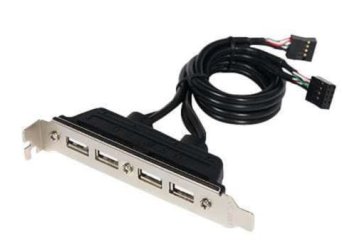
One thing that hasn't been mentioned: you (yankleber) may have unused USB headers on your motherboard, and all you need to access those is something like this. Check eBay, USB 2 stuff is practically being given away these days.

Excellent points (I'm having a DOH! moment) although I wouldn't buy from that link on Newegg; that is for a Marketplace vendor, not Newegg, and is a little flaky. Easier alternatives would be to get add-on USB ports mounted to a PCI bracket, such as this one:

usb1.JPG

These are also available in two port versions if you have only one USB header available. Here is a link to several choices on eBay. If you have an unused USB 3.0 header available, you can also get these brackets in USB 3.0.
 

My Computer My Computer

At a glance

Win 7 Ultimate 64 bitIntel i7-3930KKingston HyperX Genesis 32GB Kit (8x4GB Modul...MSI R7850 Twin Frozr 2GD5/OC Radeon HD 7850 2...
Computer type
PC/Desktop
Computer Manufacturer/Model Number
Custom Build
OS
Win 7 Ultimate 64 bit
CPU
Intel i7-3930K
Motherboard
ASUS P9X79 WS
Memory
Kingston HyperX Genesis 32GB Kit (8x4GB Modules) 1600MHz DDR
Graphics Card(s)
MSI R7850 Twin Frozr 2GD5/OC Radeon HD 7850 2GB 256-bit GDDR
Sound Card
Asus Xonar Essence STX
Monitor(s) Displays
3x Asus VG248QE 24", Vizio 32" TV
Screen Resolution
1920 x 1080, ?
Hard Drives
Samsung 128GB 840 Pro SSD (1),
Samsung 4TB 850 EVO SSDs (4)
Samsung 4TB 850 EVO SSDs (16) external backup drives used in 2.5" hot swap bays in the computer.
PSU
Corsair HX750w
Case
Antec Two Hundred v2 (modified)
Cooling
Cooler Master GeminII S524 120mm (fan replaced with a 140mm)
Keyboard
Logitech G510s
Mouse
Logitech M525 (two in use)
Internet Speed
=< 32Mbps down, 8Mbps up
Antivirus
AVAST!, MBAM, SAS, Spybot S&D (all but MBAM free) Glary Util
Browser
IE11
Other Info
LSI 9211-8i HBA card (8 SATA III ports), 2.5" & 3.5" Hot Swap Bays, HooToo HT-CR001 PCI-E to USB 3.0 Internal Hub + 6 Slot Card Reader, and LG Model CH12LS28 BD-ROM Optical Drive. Also, ScanSnap S1500 ADF duplexing scanner, Canon 9000F flat bed scanner, Corsair SP2500 2.1 speakers, Samsung CLP 415nw laser color printer, Cyberpower PP2200SW UPS
Four HDDs won't be throttled any, if at all, by the limited bandwidth of the card you ordered, especially if you aren't reading or writing to all of them at the same time.

The one limitation you do have to worry about is if the USB ports get enough power. If the card has a power port (usually 4 pin Molex or, increasingly, SATA power), make sure you connect it to the PSU. If there is no power port, you may be out of luck.

That's good to know. Normally in most of times I will be accessing two of those HDs for a few minutes while I refuel my TV pendrives with movies. Actually at this time I will need just ONE extra port for the new HD so probably I will be fine. Regarding the fourth HD, that I use for safety backup of my work, I prefer to keep it off and just plug it when I update the copies and when I need to rescue something from there, and then I can plug it into one of the front ports.

:)

By the picture of the card, yup, it seems to have that ugly 4-pin molex plug. Look:

placa-pci-express-pci-e-x1-usb-30-5gbps-4-portas-680601-MLB20366212004_082015-O.jpg


So I think that I won't run out of power...

;)

This way seems to me that the only advantage on use a hot swap bay over the USB is that I would be able to get the full speed of SATA. Since these HDs are only for store my personal collection of favorite movies and series and they are used to feed pendrives that I use on TV there is not a point on speed up the transference ratio once the pendrives will be a bottleneck anyway.

:rolleyes:

That card probably will be fine for multiple USB powered HDDs. HDDs don't run at the full speed of SATA III so you probably wouldn't notice any slowdowns, if at all.
 

My Computer My Computer

At a glance

Win 7 Ultimate 64 bitIntel i7-3930KKingston HyperX Genesis 32GB Kit (8x4GB Modul...MSI R7850 Twin Frozr 2GD5/OC Radeon HD 7850 2...
Computer type
PC/Desktop
Computer Manufacturer/Model Number
Custom Build
OS
Win 7 Ultimate 64 bit
CPU
Intel i7-3930K
Motherboard
ASUS P9X79 WS
Memory
Kingston HyperX Genesis 32GB Kit (8x4GB Modules) 1600MHz DDR
Graphics Card(s)
MSI R7850 Twin Frozr 2GD5/OC Radeon HD 7850 2GB 256-bit GDDR
Sound Card
Asus Xonar Essence STX
Monitor(s) Displays
3x Asus VG248QE 24", Vizio 32" TV
Screen Resolution
1920 x 1080, ?
Hard Drives
Samsung 128GB 840 Pro SSD (1),
Samsung 4TB 850 EVO SSDs (4)
Samsung 4TB 850 EVO SSDs (16) external backup drives used in 2.5" hot swap bays in the computer.
PSU
Corsair HX750w
Case
Antec Two Hundred v2 (modified)
Cooling
Cooler Master GeminII S524 120mm (fan replaced with a 140mm)
Keyboard
Logitech G510s
Mouse
Logitech M525 (two in use)
Internet Speed
=< 32Mbps down, 8Mbps up
Antivirus
AVAST!, MBAM, SAS, Spybot S&D (all but MBAM free) Glary Util
Browser
IE11
Other Info
LSI 9211-8i HBA card (8 SATA III ports), 2.5" & 3.5" Hot Swap Bays, HooToo HT-CR001 PCI-E to USB 3.0 Internal Hub + 6 Slot Card Reader, and LG Model CH12LS28 BD-ROM Optical Drive. Also, ScanSnap S1500 ADF duplexing scanner, Canon 9000F flat bed scanner, Corsair SP2500 2.1 speakers, Samsung CLP 415nw laser color printer, Cyberpower PP2200SW UPS
Back
Top