Safe mode and Restore problems

PussEKatt

New member
Member
Local time
7:56 AM
Messages
99
Hi,
I have a virus that is causing 3 problems.
1-I can get System restore up and choose a restore date but it wont go any further than that eg it wont run
2-I dont even get the option to boot into safe mode,because
3-A new line has been added to my startup menu which the PC boots into instantly.
My windows instilation has not been damaged in any other way because I was able to get into windows once only ( because I cant remember what I did to do that ) Once in windows I tried going back to the restore point that I set but as I said above it will not run.I discovered the other 2 problems when I tried to restart in safe mode.
Hopefully someone else has had this same virus and knows how to fix it,failing that any suggestions would be greatly appreciated.

Thank you
 

My Computer

OS
Windows home premium 64 bit
CPU
AMD Athlon II Dual Core 2.3Ghz
Memory
2048 MB DDR SD RAM
Graphics Card(s)
AMD M88OG with ATI Mobility Radeon HD 4250
Hard Drives
500 Gb
Hi PussEKatt,

As you havn't said what virus and how you removed it, can only give general advise.
Would advise running Malwarebytes as well.

Its pretty common for virus's to dissable system restore but when the AV removes the virus it does not restore normal settings.

Start-up items can be removed via system Configuration.
Control panel >> Administration tools >> system configuration >> services -tick hide MS
Untick anything you do not recognize.

Roy
 

My Computer

Computer type
PC/Desktop
Computer Manufacturer/Model Number
medionl/Aspire 6930G/acer x55a
OS
W7 home premium 32bit/W7HP 64bit/w10 tp insider ring
CPU
E5300 dual core
Motherboard
medion MS7366
Memory
3gb
Graphics Card(s)
Nvidia Geforce 7100 Nforce 630i
Monitor(s) Displays
avixc
Internet Speed
n (isp resticted to 72)
Antivirus
mse/pands
Browser
palemoon
Other Info
Belkin Fd7050 n USB using Railink RT2870 drivers, more upto date

My Computers

System One System Two

  • Computer type
    PC/Desktop
    Computer Manufacturer/Model Number
    custom build
    OS
    Windows 7 HP 64
    CPU
    i5 6600K - 800MHz to 4200MHz
    Motherboard
    GA-Z170-HD3P
    Memory
    4+4G GSkill DDR4 3000
    Graphics Card(s)
    IG - Intel 530
    Monitor(s) Displays
    Samsung 226BW
    Screen Resolution
    1680x1050
    Hard Drives
    (1) -1 SM951 – 128GB M.2 AHCI PCIe SSD drive for Windows 7 and Lubuntu
    (2) -1 WD SATA 3 - 1T for Data
    (3) -1 WD SATA 3 - 1T for backup
    PSU
    Thermaltake 450W TR2 gold
    Keyboard
    Old and good Chicony mechanical keyboard
    Mouse
    Logitech mX performance - 9 buttons (had to disable some)
    Internet Speed
    500Mb/s
    Browser
    Firefox 64
    Other Info
    TinyWall firewall
  • Computer type
    Laptop
    System Manufacturer/Model Number
    Asus Q550LF
    OS
    Windows 7 Pro
    CPU
    i7-4500U 800MHz to 3.0GHz
    Motherboard
    Asus Q550LF
    Memory
    (4+4)G DDR3 1600
    Graphics Card(s)
    IG intel 4400 + NVIDIA GeForce GT 745M
    Sound Card
    Realtek
    Monitor(s) Displays
    LG Display LP156WF4-SPH1
    Screen Resolution
    1920 x 1080
    Hard Drives
    BX500 120G SSD for Windows and programs +
    1T HDD for data
    Internet Speed
    500 Mb/s
    Browser
    Firefox
    Other Info
    TinyWall firewall
HI and thanks for the advice and l;inks.
I have not removed the virus,I was hoping to restore my PC to before I installed this software but as I am having trouble getting system restore to work is why I came on here for advice.I dont know if this is being nieve or not but I was suspicious of this software so I set a restore point just before I ran it and I thought,any problems and I will just run Sys restore and that will be the end of the problem.I had no idear that all this would happen and that I would not be able to run sys restore or get into safe mode.
@ torchwood:before getting into sys configuration there is the choice of 3 options.Obviously I dont select the first option "Normal startup"but which of the other 2 options do I select ? Diagonistic or Selective.
@ Megathertz07 Thanks for the link will download it now.
PS Its my desktop that has the virus,I am replying from my laptop.
Thanks again,will try to get back in to my desktop and try both solutions.Hopefully can let you both know how it went in 20/24 hopurs.
 

My Computer

OS
Windows home premium 64 bit
CPU
AMD Athlon II Dual Core 2.3Ghz
Memory
2048 MB DDR SD RAM
Graphics Card(s)
AMD M88OG with ATI Mobility Radeon HD 4250
Hard Drives
500 Gb
the window that opens
has SERVICES on the TOP line click on it.
 

My Computer

Computer type
PC/Desktop
Computer Manufacturer/Model Number
medionl/Aspire 6930G/acer x55a
OS
W7 home premium 32bit/W7HP 64bit/w10 tp insider ring
CPU
E5300 dual core
Motherboard
medion MS7366
Memory
3gb
Graphics Card(s)
Nvidia Geforce 7100 Nforce 630i
Monitor(s) Displays
avixc
Internet Speed
n (isp resticted to 72)
Antivirus
mse/pands
Browser
palemoon
Other Info
Belkin Fd7050 n USB using Railink RT2870 drivers, more upto date
Hi guys.
Thanks for your help,I am up and running again on my desktop.
I still need one more problem addressed and I have 2 questions to ask.
The problem is that I have 2 instances of windows running on my desktop ( 1 for my C drive and the other just for Steam games )so on my startup screen I have the choice of whichever partition I want to go to.The Trojan that I had added a third option (which it always booted from ) called "Patch Guard Disabled" The spyware program got rid of the trojan but that startup option is still there.Any idear how I can get rid of that ?
The 2 questions that I want to ask you gusy are.
1-I and probably thousands of other PC users have the impression that if you set a restore point, then you can always go back to it and everything will be fine bagain.As we know now that did not happen ( or at least it was not as easy as just resetting to a restore point ) so the question is What else should I have done after setting a restore point ?
2- In future would it be better to try suspicious software in a sandbox program ? or is this not as simple as it sounds as well.
I look forward to your answers to these questions and thanks again for all your help.
 

My Computer

OS
Windows home premium 64 bit
CPU
AMD Athlon II Dual Core 2.3Ghz
Memory
2048 MB DDR SD RAM
Graphics Card(s)
AMD M88OG with ATI Mobility Radeon HD 4250
Hard Drives
500 Gb
Hi PussEKatt,

from what i can find, thats NOT a "malware" OS.

At some point whilst installing a game, it asked you to install a Cheat to bypass driver signing this being Patch Guard Disabled
remove OS tutorial
Windows Boot Manager - Delete a Listed Operating System - Windows 7 Help Forums

NOT a good move as it dissables ALL driver enforcement rules, over-rides UAC and boot standard operating requirements/proceedures
(it can be done within Windows anyway, PGD is an old pre W7 patch!!)

As for your restore points they are set by YOU on any and all drives on your computer.
If you restore C it does not automatically restore other drives UNLESS you specify which

Most around here use Macrium (free) and create an image on a regular basis
As for security over and above your AV i run Malwarebytes weekly
Wouldn't hurt to install and run it NOW either

Finally as im not a Steam gamer i do not know which game asked/required PGD to be installed.
You never mentioned which trojan it was would be helpfull, to decide on which way to go now.

Roy
 

My Computer

Computer type
PC/Desktop
Computer Manufacturer/Model Number
medionl/Aspire 6930G/acer x55a
OS
W7 home premium 32bit/W7HP 64bit/w10 tp insider ring
CPU
E5300 dual core
Motherboard
medion MS7366
Memory
3gb
Graphics Card(s)
Nvidia Geforce 7100 Nforce 630i
Monitor(s) Displays
avixc
Internet Speed
n (isp resticted to 72)
Antivirus
mse/pands
Browser
palemoon
Other Info
Belkin Fd7050 n USB using Railink RT2870 drivers, more upto date
Hi again,
Three trojsns were installed,ther were all variants of Trojan.Agent/Gen
I figured out it would be an old Trojan because what happened was.I like playing Football Manager but I find that there is way too much stuff that has nothing to do with playing.( press confrences,international results,U 21 results ,etc etc etc ) so I was looking for a football manager game that is less involved and I found LMA Manager 2007.I downloaded this but the file was corrupt so I looked elsewhare for another file,I found one but after downloading I was suspicious because LMA was in lower case and the file did not seem large enough.Thats why I set a restore point before installing it.Thats why I am asking about restore points, because obviously just setting a restore point was not enough,what else should I have done ?
I have already downloaded Malware Bytes,thanks.
Quote:NOT a good move as it dissables ALL driver enforcement rules, over-rides UAC and boot standard operating requirements/proceedures
(it can be done within Windows anyway, PGD is an old pre W7 patch!!)
So, how do I do this from within Windows ?
Thanks again,looking forward to hearing from you.
 

My Computer

OS
Windows home premium 64 bit
CPU
AMD Athlon II Dual Core 2.3Ghz
Memory
2048 MB DDR SD RAM
Graphics Card(s)
AMD M88OG with ATI Mobility Radeon HD 4250
Hard Drives
500 Gb
Hi PusseKat,

as i said system restore is performed on a drive by drive basis, so C (core) and D (games) both have to be set in System restore (configuration option)

For allowing unsigned drivers see this tutorial
Advanced Boot Options - Windows 7 Help Forums

At this time if i was you i would have

1) followed the tutorial post# 7 removed PGD OS entry
2) downloaded Macrium

TODO

check that all my games are running
>>>> IF <<<< unsigned are required follow Advanced boot option tutorial
If no additional drivers are required Advanced boot option IS NOT required

Once the above is completed
Create a FULL system Macrium image.
notes
System restore is un-neccessary once Macrium is installed and can be turned off (optional)
rerun Macrium at least monthly or prior to install of a new game.

Roy
 

My Computer

Computer type
PC/Desktop
Computer Manufacturer/Model Number
medionl/Aspire 6930G/acer x55a
OS
W7 home premium 32bit/W7HP 64bit/w10 tp insider ring
CPU
E5300 dual core
Motherboard
medion MS7366
Memory
3gb
Graphics Card(s)
Nvidia Geforce 7100 Nforce 630i
Monitor(s) Displays
avixc
Internet Speed
n (isp resticted to 72)
Antivirus
mse/pands
Browser
palemoon
Other Info
Belkin Fd7050 n USB using Railink RT2870 drivers, more upto date
Hi torchwood
Sorry,I didnt realise that was a tutorial on how to get rid of PGD.I checked it out (after reading this post ) and its for Windows 8,I am running Windows 7 Home Premium 64 bit,can I still use that tutorial ? As far as Macrium goes,I didnt realise you wanted me to use that either I thought you recommended MalwareBytes. Anyway,here is where we/I am up to so far.
I downloaded Superantispyware ( as suggested by post #3 ) and installed and ran it.That is how I found out that I have the Trojan Agent Gen.
I tried to install MalwareBytes but I kept getting this message " An administrator has blocked you from running this program" I put that down to the Trojan.So I looked up how to get rid of Trojan/Gen and found out that I had to download and install the following software.TDSS,RKill,MalwareBytes,Hitman Pro,Emisoft Emergency,Adware and JRT.I downloaded all of these programes because I thought that I would be able to install and run the first one and go from there,but I was unable to install anything as I kept getting the same "An administratpor blocked" message.So in an attempt to be able to install software I googled and tried the following.
Using an advanced cmd I typed "net user administrator /active.yes"..This did not work.
I tried to disable "SmartScreen" but the option was not even there.
I am going to try.HKEY_LOCAL_Machine\Software\MS\Win\CurrentVersion\Policies\System...I will see if I can Enasble UA and change the value from 1 to 0.
I dont understand how this Trojan can do all this after Superantispyware got rid of it unless there is another Undected virus still on the PC ? I have run Superantispyware again and it finds nothing at all now.
You should also know that the only reason I can still get into my desktop PC is because I went to Start>Computer>Propertioes>Advanced>Settings and under Start Up I changed the default OS to my C drive.The default StartUp was set to PGD and the time delay was set to 1 second.PGD is still there as an option and that is why I am desperate to get rid of it in case the Trojan/virus decides to reset it again.
As far as the Restore point goes, I only set it on C drive and then only because I was suspecious about this software.I was under the impression that if you set a restore point you can always go back to it ?!
Unsigned Drivers, I have never had to use them as far as I know and no software has ever asked for them, again as far as I know.
In case it is a symptom,you should know that I cant get on the internet using my desktop PC either.Thats everything up to date now.As usual, I look forward to hearing from you.
 

My Computer

OS
Windows home premium 64 bit
CPU
AMD Athlon II Dual Core 2.3Ghz
Memory
2048 MB DDR SD RAM
Graphics Card(s)
AMD M88OG with ATI Mobility Radeon HD 4250
Hard Drives
500 Gb
Hi PussEkat,

The remove OS tutorial is valid for W7,
Please follow it.

Once you have removed it, try ESET on-line scanner (dissable your current AV whilst running it)


Roy
 

My Computer

Computer type
PC/Desktop
Computer Manufacturer/Model Number
medionl/Aspire 6930G/acer x55a
OS
W7 home premium 32bit/W7HP 64bit/w10 tp insider ring
CPU
E5300 dual core
Motherboard
medion MS7366
Memory
3gb
Graphics Card(s)
Nvidia Geforce 7100 Nforce 630i
Monitor(s) Displays
avixc
Internet Speed
n (isp resticted to 72)
Antivirus
mse/pands
Browser
palemoon
Other Info
Belkin Fd7050 n USB using Railink RT2870 drivers, more upto date
Hi Roy,
Apolagies again, as my last post is at the bottom of the page I did not realise that you had answered until I noticed Page 2 ( I was only checking my post and looking for an answer under it and when there was none I quickly scrolled to the bottom of the page and logged out.Anyway,thank you for your answer and I tried that tutorial and it did get rid of the PGD entry on my startup screen.
Here is what has happened since I last wrote.
I tried Un-Hacker which got rid of a virus called "WTMHDINTUS" I then tried Viper Rescue,Windows repair all in 1 and finally I was able to run Malwarebytes.I had the option to use system restore again so I thought all was fixed.Using system restore I set my PC to the restore point I had set before trying that infected software and after about 10 minutes I got the message that sys restore could not reset my PC because my AV software was blocking it and I should turn my AV off and try again.Here is the Very interesting part.
I noticed that at the top of my restore point page a small option was set to turn off system restore and the restore point I had set before was missing.I was not in safe mode but my AV was already turned off and I had unplugged the ethernet cable from the back of my desktop PC.I find all this very suspicious and I beleive that I still have a virus but I believe it is lying dormant and needs me to connect to the internet before it can activate.If this is correct then I dont know what to do to find and remove this threat because AV software will not find it because it is not active yet.If I connect to the net then I think it will activatev itself and I will be back at square 1 again.As far as I can see the only option I have now is to scan/check the registry keys as I cant see where else it could be hiding,but hey, I am only using common sense and logic,you are the expert so what are your thoughts on this and what do you recomend I do ?

Colin from Perth West Australia
 

My Computer

OS
Windows home premium 64 bit
CPU
AMD Athlon II Dual Core 2.3Ghz
Memory
2048 MB DDR SD RAM
Graphics Card(s)
AMD M88OG with ATI Mobility Radeon HD 4250
Hard Drives
500 Gb
Hi Colin,

Thats not a good sign.

Most security forums say once your infected the best and safest way to proceed is a clean install, especially when a Rootkit is involved

Do you want to take that route??

Roy
 

My Computer

Computer type
PC/Desktop
Computer Manufacturer/Model Number
medionl/Aspire 6930G/acer x55a
OS
W7 home premium 32bit/W7HP 64bit/w10 tp insider ring
CPU
E5300 dual core
Motherboard
medion MS7366
Memory
3gb
Graphics Card(s)
Nvidia Geforce 7100 Nforce 630i
Monitor(s) Displays
avixc
Internet Speed
n (isp resticted to 72)
Antivirus
mse/pands
Browser
palemoon
Other Info
Belkin Fd7050 n USB using Railink RT2870 drivers, more upto date
Hi Roy,
I dont mind doing a clean install if I have to because all my software is original and I have all the disks but I would prefer to use that as a last resort.Although I dont like getting a virus I am finding it very interesting and I am learning a lot as well.As I said before I dont mind altering registery keys and looking into hidden folders etc etc and this is giving me a good reason to do so.
An update on what has happened since my last reply.
I ran Un-Hack me again and it came up with 3 results.svchost,Auto services and wtmhdintus.dll
Hopefully all these apply to that wtmhdintus virus and I just might of got rid of it completely now.Not going to jump right in though, I will do a bit more checking and learning and watching for any more suspicious behaviour before connecting my desktop to the internet but I must admit I do think I have seen the last of that virus with a silly name.
I am unsure what a .dll does.Is it possable that the svchost and the wtmhdintus .dill could be the dormant virus ? I know that svchost can start other stuff but I am not sure axactly what sort of stuff it can start.Do you know?
What part of England are you from ?

Colin
 

My Computer

OS
Windows home premium 64 bit
CPU
AMD Athlon II Dual Core 2.3Ghz
Memory
2048 MB DDR SD RAM
Graphics Card(s)
AMD M88OG with ATI Mobility Radeon HD 4250
Hard Drives
500 Gb
Hi Colin,

Up to you which way you want to go.

Couple questions
AV's DONT normally block restore points, in some cases they actually create them!
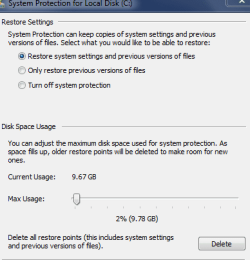
System restore GUI should look like this -- activated and space allocated see screenshot.
Did you ever run Eset-on-line??

As for the services found by Unhackme.
svchost - anything could be in there, good and bad
Auto services - not entirelly sure about Autoruns yes as it says run on start-up
wtmhdintus only found 1 malware reference to it some kind of browser hijacker from an unknown site.
Can you run this, Farbar (FRST) copy/paste BOTH logs
Farbar Recovery Scan Tool Download
(have a look at thier malware section)

I very rarely alter registry keys, 1 if memory serves.
I use Macrium and create system images, so if i hit a problem i reload a CLEAN image (5/10 min job:D)
Imaging with free Macrium - Windows 7 Help Forums

Im down in sunny Southampton.

Roy
 

Attachments

  • sysres.PNG
    sysres.PNG
    24.4 KB · Views: 14

My Computer

Computer type
PC/Desktop
Computer Manufacturer/Model Number
medionl/Aspire 6930G/acer x55a
OS
W7 home premium 32bit/W7HP 64bit/w10 tp insider ring
CPU
E5300 dual core
Motherboard
medion MS7366
Memory
3gb
Graphics Card(s)
Nvidia Geforce 7100 Nforce 630i
Monitor(s) Displays
avixc
Internet Speed
n (isp resticted to 72)
Antivirus
mse/pands
Browser
palemoon
Other Info
Belkin Fd7050 n USB using Railink RT2870 drivers, more upto date
Hi Roy,
That Macriums program looks good,I will download it and use it in future.I dont play around in the registry but if something needs to be done there then I am up for it,the same goes for hidden files/folders.
I have attached the logs you asked for.I see that 4 up from the bottom of the Services printout there is an entry for the wtmhdintus virus,could you also check the Google Chrome updater entry for me please because the date on the 2 entries are after I got the virus.
Can you point me at a site that shows/explains how to read and understand these logs please as I find it very interesting
Havent been to Southampton,have been to London and a short stay in Birmingham to watch Aston Villa play at Villa park.
Look forward to hearing from you.

ColinView attachment Addition_09-09-2017 19.01.22.txt

View attachment FRST_09-09-2017 19.01.22.txt
 

My Computer

OS
Windows home premium 64 bit
CPU
AMD Athlon II Dual Core 2.3Ghz
Memory
2048 MB DDR SD RAM
Graphics Card(s)
AMD M88OG with ATI Mobility Radeon HD 4250
Hard Drives
500 Gb

My Computer

OS
Windows home premium 64 bit
CPU
AMD Athlon II Dual Core 2.3Ghz
Memory
2048 MB DDR SD RAM
Graphics Card(s)
AMD M88OG with ATI Mobility Radeon HD 4250
Hard Drives
500 Gb
Hi Colin,

Pretty sure something is still lurking there:(

Im NOT a malware expert allthough i can spot certain things,
So time for you to call in the experts

Please go to BleepingComputers - am i infected
(where you downloaded Farbar from)
They will require the 2 logs.
XREF this post, information is the key.

Im not fobbing you off, just want you up and running with a clean system.


Roy
 

My Computer

Computer type
PC/Desktop
Computer Manufacturer/Model Number
medionl/Aspire 6930G/acer x55a
OS
W7 home premium 32bit/W7HP 64bit/w10 tp insider ring
CPU
E5300 dual core
Motherboard
medion MS7366
Memory
3gb
Graphics Card(s)
Nvidia Geforce 7100 Nforce 630i
Monitor(s) Displays
avixc
Internet Speed
n (isp resticted to 72)
Antivirus
mse/pands
Browser
palemoon
Other Info
Belkin Fd7050 n USB using Railink RT2870 drivers, more upto date
Hi Roy,
Thank you for all your help.I have registered at Bleeping Computer and started a thread as you advise.
Shall I mark this topic closed ?

Colin
 

My Computer

OS
Windows home premium 64 bit
CPU
AMD Athlon II Dual Core 2.3Ghz
Memory
2048 MB DDR SD RAM
Graphics Card(s)
AMD M88OG with ATI Mobility Radeon HD 4250
Hard Drives
500 Gb
Hi,
I've found the easiest way to get into safe mode for built in recovery options page with safe mode and with networking is to "if you can" boot into windows just unplug the power cord to kill the power feed.

Once you restart windows should auto send you to recovery screen
If it works I'd use safe mode with networking listing
Use malewarebytes free from within windows and also adwcleaner free
Review Jacee’s instructions to run Adwcleaner here post #7,
Ignore the title of the thread,
Instant Savings App

Also use the Custom scan/ full scan option not the Threat scan,
http://www.malwarebytes.org/products/malwarebytes_free

AdwCleaner Download
 

My Computer

Computer type
PC/Desktop
Computer Manufacturer/Model Number
Custom assembled by me :}
OS
Win-7-Pro64bit 7-H-Prem-64bit
CPU
i7-5930K 2nd i9-9940x both water blocked VRM's too
Motherboard
ASUS SABERTOOTH X99 2nd ASUS x299 Apex
Memory
Trident-z 3200C14 2nd Trident-z 3600C16
Graphics Card(s)
EVGA 1080ti ftw3 2nd Titan Xp both water blocked
Sound Card
Built-in Realtek
Monitor(s) Displays
1-AOC G2460PG 24"G-Sync 144Hz/ 2nd 1-ASUS VG248QE 24" 144Hz
Screen Resolution
1920 x 1080 144Hz
Hard Drives
2-Samsung M.2 Evo & Evo Plus
2-Samsung 850 EVO 500GB SSD's/ 3-2.5 W.D. Black 1tb-&3-1tb/3-3.5 WD Black 1tb hdd's
PSU
EVGA SuperNOVA 1000-P2 2nd 1200-P2
Case
2-Corsair Obsidian Series 450D Black ATX Mid Tower
Cooling
Custom water loops
Keyboard
Logitech G710+/ 2nd Logitech G910
Mouse
2-RedDragon M901 Perdition 16400 dpi Gaming mouse = wired
Internet Speed
Comcast Ping 19ms 89.31mbps download speed 6.12mbps upload
Antivirus
Malwarebytes Pro/ Superantispyware Pro
Browser
FireFox & Pale moon
Other Info
2nd ASUS X299 Apex/Intel i9-9940x with Custom water loop/7H-Prem-x64/Corsair 450D case/Ram Trident-z 3600C16 4x8gb / Samsung970Evo plus 500gb SSD/Dual ssd EZ swap evo/PSU EVGA SuperNova 1200w-P2 80+Platinum/GPU Titan Xp /8-ML-140 on push-pull on 2-280GTX rads
Back
Top