- Local time
- 7:15 PM
- Messages
- 47
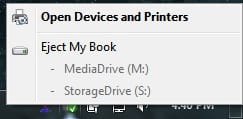
FYI to all, here's a site to re-enable this on Windows 7 (32 & 64 alike I was a little miffed when they got rid of that nice precaution.
I've been testing this and trying out different ways to attempt to (for lack of a better word) corrupt the software as to gauge it's prowess.
In the end, I discovered that, although it's 3rd-party, it's very reliable.
Here's the site: (the product is called "USB Safely Remove.)
Safely Remove Hardware in one click! USB, SATA, Firewire. Keyboard shortcuts for stopping, clear device names, remove a device from the icon
Enjoy,
Erik
OceanicAirlines
I was a little miffed when they got rid of that nice precaution.I've been testing this and trying out different ways to attempt to (for lack of a better word) corrupt the software as to gauge it's prowess.
In the end, I discovered that, although it's 3rd-party, it's very reliable.
Here's the site: (the product is called "USB Safely Remove.)
Safely Remove Hardware in one click! USB, SATA, Firewire. Keyboard shortcuts for stopping, clear device names, remove a device from the icon
Enjoy,
Erik
OceanicAirlines
My Computer
- Computer Manufacturer/Model Number
- System
- OS
- Operating System
- CPU
- Intel Core 2 Quad Q6600 @ 2.4GHz / Core i7 Q740 @ 1.73GHz
- Motherboard
- A
- Memory
- A
- Graphics Card(s)
- A
- Sound Card
- A
- Monitor(s) Displays
- S
- Screen Resolution
- s
- Hard Drives
- A
- PSU
- A
- Case
- A
- Cooling
- A
- Keyboard
- A
- Mouse
- A
- Internet Speed
- A
- Other Info
- A