Solved Samsung 840 Evo 120GB SSD Underperformance

Ocman76

New member
Local time
9:45 AM
Messages
54
I got a SDD for my new PC and installed it as the boot drive, however I have been running some benchmarks and am confused on the results. For reference, this drive is listed to have 540 MBps Sustained Sequential Read and 410 MBps Sustained Sequential Write speed.

AS SSD Benchmark:

Benchmark.png


Crystal Disk Benchmark:
Untitled.png


The performance seems a little slow on the read :( I am using a 6 GB/s SATA cable and have already tried using Samsung Magician to optimize the drive. Does anyone have any suggestions?
obfdyz0op
 

My Computer My Computer

At a glance

Windows 7 Ultimate x64 SP1AMD FX-8320 @ 4.5 GHz (4.3 Volts)2 X 4 GB G Skill Ares 1600 @ 8-8-8-24Gigabyte G1 Gaming GTX 970
Computer type
PC/Desktop
Computer Manufacturer/Model Number
Custom Build
OS
Windows 7 Ultimate x64 SP1
CPU
AMD FX-8320 @ 4.5 GHz (4.3 Volts)
Motherboard
ASUS M5A99X EVO R2.0 AM3+
Memory
2 X 4 GB G Skill Ares 1600 @ 8-8-8-24
Graphics Card(s)
Gigabyte G1 Gaming GTX 970
Sound Card
On Board
Monitor(s) Displays
Asus 24" @ 144 Hz
Screen Resolution
1920 X 1080
Hard Drives
Samsung 840 EVO 120 GB SSD + WD Black Series 1 TB 7200 RPM
PSU
Corsair CXM 600 Watt
Case
NZXT Phantom 410
Cooling
3x 120 mm + 3x 140 mm + Corsair H80i Push/Pull
Keyboard
CM Storm QuickFire Rapid (mechanical)
Mouse
Anker 4000 DPI Gaming Mouse
Internet Speed
90 DL & 90 UL
Antivirus
MSE
Browser
Firefox
Other Info
Logitech Z-906 Speakers
Your motherboard most likely does not have sata III ports. You are running on sata II ports most likely. The cable used won't make any difference if the port itself is not sata III. That being said, those numbers are not bad at all. Try running the test on the mechanical drive it replaced.
 

My Computers My Computers

  • At a glance

    Windows 11 ProRyzen 9 5900X32GB G Skill DDR4-3600EVGA RTX 3080 FTW 3 Ultra
    Computer type
    PC/Desktop
    Computer Manufacturer/Model Number
    ALWAYS UNDER CONSTRUCTION
    OS
    Windows 11 Pro
    CPU
    Ryzen 9 5900X
    Motherboard
    Asus X570 Crosshair Viii Hero
    Memory
    32GB G Skill DDR4-3600
    Graphics Card(s)
    EVGA RTX 3080 FTW 3 Ultra
    Sound Card
    On Board/Sennheiser PC37X Headset
    Monitor(s) Displays
    3 X Asus 27"
    Screen Resolution
    2560x1440
    Hard Drives
    2 X 1 TB NVME drives
    PSU
    EVGA 850
    Case
    Phanteks Eclipse P400A
    Cooling
    EVGA 280 AIO
    Keyboard
    Logitech G510s/ Logitech G13
    Mouse
    Logitech G502
    Internet Speed
    24/1
    Antivirus
    ESET/MBAM Pro/SAS Pro
    Browser
    Chrome/ Firefox/ Edge
  • At a glance

    Windows 11 ProIntel Ultra 9 288V32 GB LPDDR5X 8533
    Computer type
    Laptop
    System Manufacturer/Model Number
    Dell 16 Plus
    OS
    Windows 11 Pro
    CPU
    Intel Ultra 9 288V
    Memory
    32 GB LPDDR5X 8533
    Monitor(s) Displays
    16" Mini-LED HDR600 Touch 90 Hz
    Screen Resolution
    2560X1600
    Hard Drives
    1 TB NVME
Your motherboard most likely does not have sata III ports. You are running on sata II ports most likely. The cable used won't make any difference if the port itself is not sata III. That being said, those numbers are not bad at all. Try running the test on the mechanical drive it replaced.

I don't mean to be rude, but im not that dumb. My motherboard doesn't have any Sata II ports, only Sata III.

This is my motherboard:
ASUS M5A99X EVO R2.0 AM3+ AMD 990X + SB950 SATA 6Gb/s USB 3.0 ATX AMD Motherboard with UEFI BIOS - Newegg.com

I will run the benchmarks on the mechanical drive when I get home and post them back here.
Is it possible I just got an underperforming SSD? I'm honestly disappointed because the Samsung SSD's are more expensive than other brands and have better reviews. I could have paid $20 more and gotten double the capacity. :(

Thanks for responding btw, ive been having trouble recently getting any help on different forums.
 

My Computer My Computer

At a glance

Windows 7 Ultimate x64 SP1AMD FX-8320 @ 4.5 GHz (4.3 Volts)2 X 4 GB G Skill Ares 1600 @ 8-8-8-24Gigabyte G1 Gaming GTX 970
Computer type
PC/Desktop
Computer Manufacturer/Model Number
Custom Build
OS
Windows 7 Ultimate x64 SP1
CPU
AMD FX-8320 @ 4.5 GHz (4.3 Volts)
Motherboard
ASUS M5A99X EVO R2.0 AM3+
Memory
2 X 4 GB G Skill Ares 1600 @ 8-8-8-24
Graphics Card(s)
Gigabyte G1 Gaming GTX 970
Sound Card
On Board
Monitor(s) Displays
Asus 24" @ 144 Hz
Screen Resolution
1920 X 1080
Hard Drives
Samsung 840 EVO 120 GB SSD + WD Black Series 1 TB 7200 RPM
PSU
Corsair CXM 600 Watt
Case
NZXT Phantom 410
Cooling
3x 120 mm + 3x 140 mm + Corsair H80i Push/Pull
Keyboard
CM Storm QuickFire Rapid (mechanical)
Mouse
Anker 4000 DPI Gaming Mouse
Internet Speed
90 DL & 90 UL
Antivirus
MSE
Browser
Firefox
Other Info
Logitech Z-906 Speakers
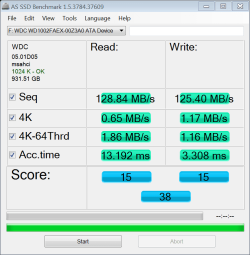
You're still getting decent numbers though. I'll save you the trouble. Here id a Western Digital Black 6 GB/s

WD AS SSD.PNG
 

My Computers My Computers

  • At a glance

    Windows 11 ProRyzen 9 5900X32GB G Skill DDR4-3600EVGA RTX 3080 FTW 3 Ultra
    Computer type
    PC/Desktop
    Computer Manufacturer/Model Number
    ALWAYS UNDER CONSTRUCTION
    OS
    Windows 11 Pro
    CPU
    Ryzen 9 5900X
    Motherboard
    Asus X570 Crosshair Viii Hero
    Memory
    32GB G Skill DDR4-3600
    Graphics Card(s)
    EVGA RTX 3080 FTW 3 Ultra
    Sound Card
    On Board/Sennheiser PC37X Headset
    Monitor(s) Displays
    3 X Asus 27"
    Screen Resolution
    2560x1440
    Hard Drives
    2 X 1 TB NVME drives
    PSU
    EVGA 850
    Case
    Phanteks Eclipse P400A
    Cooling
    EVGA 280 AIO
    Keyboard
    Logitech G510s/ Logitech G13
    Mouse
    Logitech G502
    Internet Speed
    24/1
    Antivirus
    ESET/MBAM Pro/SAS Pro
    Browser
    Chrome/ Firefox/ Edge
  • At a glance

    Windows 11 ProIntel Ultra 9 288V32 GB LPDDR5X 8533
    Computer type
    Laptop
    System Manufacturer/Model Number
    Dell 16 Plus
    OS
    Windows 11 Pro
    CPU
    Intel Ultra 9 288V
    Memory
    32 GB LPDDR5X 8533
    Monitor(s) Displays
    16" Mini-LED HDR600 Touch 90 Hz
    Screen Resolution
    2560X1600
    Hard Drives
    1 TB NVME
You're still getting decent numbers though. I'll save you the trouble. Here id a Western Digital Black 6 GB/s

Thanks. Looks like I do get a good performance jump over a mechanical drive. Should I not expect to be getting that close to the manufacturer listed read and write speeds for me SSD? This is normal?
 

My Computer My Computer

At a glance

Windows 7 Ultimate x64 SP1AMD FX-8320 @ 4.5 GHz (4.3 Volts)2 X 4 GB G Skill Ares 1600 @ 8-8-8-24Gigabyte G1 Gaming GTX 970
Computer type
PC/Desktop
Computer Manufacturer/Model Number
Custom Build
OS
Windows 7 Ultimate x64 SP1
CPU
AMD FX-8320 @ 4.5 GHz (4.3 Volts)
Motherboard
ASUS M5A99X EVO R2.0 AM3+
Memory
2 X 4 GB G Skill Ares 1600 @ 8-8-8-24
Graphics Card(s)
Gigabyte G1 Gaming GTX 970
Sound Card
On Board
Monitor(s) Displays
Asus 24" @ 144 Hz
Screen Resolution
1920 X 1080
Hard Drives
Samsung 840 EVO 120 GB SSD + WD Black Series 1 TB 7200 RPM
PSU
Corsair CXM 600 Watt
Case
NZXT Phantom 410
Cooling
3x 120 mm + 3x 140 mm + Corsair H80i Push/Pull
Keyboard
CM Storm QuickFire Rapid (mechanical)
Mouse
Anker 4000 DPI Gaming Mouse
Internet Speed
90 DL & 90 UL
Antivirus
MSE
Browser
Firefox
Other Info
Logitech Z-906 Speakers
To some extent yes, and the numbers will change every time you run a test. But, don't run many tests on it. Running too many will slow it down for a while until it has a chance to 'clean' itself up. Actually, the 4KB read speeds and access times are the only numbers you will use on an OS 90% of the time. The rest are not really important unless you transfer 10GB files around.
 

My Computers My Computers

  • At a glance

    Windows 11 ProRyzen 9 5900X32GB G Skill DDR4-3600EVGA RTX 3080 FTW 3 Ultra
    Computer type
    PC/Desktop
    Computer Manufacturer/Model Number
    ALWAYS UNDER CONSTRUCTION
    OS
    Windows 11 Pro
    CPU
    Ryzen 9 5900X
    Motherboard
    Asus X570 Crosshair Viii Hero
    Memory
    32GB G Skill DDR4-3600
    Graphics Card(s)
    EVGA RTX 3080 FTW 3 Ultra
    Sound Card
    On Board/Sennheiser PC37X Headset
    Monitor(s) Displays
    3 X Asus 27"
    Screen Resolution
    2560x1440
    Hard Drives
    2 X 1 TB NVME drives
    PSU
    EVGA 850
    Case
    Phanteks Eclipse P400A
    Cooling
    EVGA 280 AIO
    Keyboard
    Logitech G510s/ Logitech G13
    Mouse
    Logitech G502
    Internet Speed
    24/1
    Antivirus
    ESET/MBAM Pro/SAS Pro
    Browser
    Chrome/ Firefox/ Edge
  • At a glance

    Windows 11 ProIntel Ultra 9 288V32 GB LPDDR5X 8533
    Computer type
    Laptop
    System Manufacturer/Model Number
    Dell 16 Plus
    OS
    Windows 11 Pro
    CPU
    Intel Ultra 9 288V
    Memory
    32 GB LPDDR5X 8533
    Monitor(s) Displays
    16" Mini-LED HDR600 Touch 90 Hz
    Screen Resolution
    2560X1600
    Hard Drives
    1 TB NVME
To some extent yes, and the numbers will change every time you run a test. But, don't run many tests on it. Running too many will slow it down for a while until it has a chance to 'clean' itself up. Actually, the 4KB read speeds and access times are the only numbers you will use on an OS 90% of the time. The rest are not really important unless you transfer 10GB files around.

Alright, thanks for the help!

Can't say im a little disappointed to know that other people with cheaper drives have faster access speeds though haha. :p
 

My Computer My Computer

At a glance

Windows 7 Ultimate x64 SP1AMD FX-8320 @ 4.5 GHz (4.3 Volts)2 X 4 GB G Skill Ares 1600 @ 8-8-8-24Gigabyte G1 Gaming GTX 970
Computer type
PC/Desktop
Computer Manufacturer/Model Number
Custom Build
OS
Windows 7 Ultimate x64 SP1
CPU
AMD FX-8320 @ 4.5 GHz (4.3 Volts)
Motherboard
ASUS M5A99X EVO R2.0 AM3+
Memory
2 X 4 GB G Skill Ares 1600 @ 8-8-8-24
Graphics Card(s)
Gigabyte G1 Gaming GTX 970
Sound Card
On Board
Monitor(s) Displays
Asus 24" @ 144 Hz
Screen Resolution
1920 X 1080
Hard Drives
Samsung 840 EVO 120 GB SSD + WD Black Series 1 TB 7200 RPM
PSU
Corsair CXM 600 Watt
Case
NZXT Phantom 410
Cooling
3x 120 mm + 3x 140 mm + Corsair H80i Push/Pull
Keyboard
CM Storm QuickFire Rapid (mechanical)
Mouse
Anker 4000 DPI Gaming Mouse
Internet Speed
90 DL & 90 UL
Antivirus
MSE
Browser
Firefox
Other Info
Logitech Z-906 Speakers
Well I'm glad you lot have got this far !

Firstly, the migration software fails. I've done a clone with another third party software. But, whenever I put the drive in, nothing happens and the laptop kind of turns itself of and then back on repeatedly.

F2 for setup doesn't work whilst it's doing this.

Does anyone think I've got a faulty SSD?

Thanks in advance
 

My Computer My Computer

At a glance

windows 7 64
Computer type
Laptop
Computer Manufacturer/Model Number
acer
OS
windows 7 64

My Computers My Computers

  • At a glance

    Windows 11 ProRyzen 9 5900X32GB G Skill DDR4-3600EVGA RTX 3080 FTW 3 Ultra
    Computer type
    PC/Desktop
    Computer Manufacturer/Model Number
    ALWAYS UNDER CONSTRUCTION
    OS
    Windows 11 Pro
    CPU
    Ryzen 9 5900X
    Motherboard
    Asus X570 Crosshair Viii Hero
    Memory
    32GB G Skill DDR4-3600
    Graphics Card(s)
    EVGA RTX 3080 FTW 3 Ultra
    Sound Card
    On Board/Sennheiser PC37X Headset
    Monitor(s) Displays
    3 X Asus 27"
    Screen Resolution
    2560x1440
    Hard Drives
    2 X 1 TB NVME drives
    PSU
    EVGA 850
    Case
    Phanteks Eclipse P400A
    Cooling
    EVGA 280 AIO
    Keyboard
    Logitech G510s/ Logitech G13
    Mouse
    Logitech G502
    Internet Speed
    24/1
    Antivirus
    ESET/MBAM Pro/SAS Pro
    Browser
    Chrome/ Firefox/ Edge
  • At a glance

    Windows 11 ProIntel Ultra 9 288V32 GB LPDDR5X 8533
    Computer type
    Laptop
    System Manufacturer/Model Number
    Dell 16 Plus
    OS
    Windows 11 Pro
    CPU
    Intel Ultra 9 288V
    Memory
    32 GB LPDDR5X 8533
    Monitor(s) Displays
    16" Mini-LED HDR600 Touch 90 Hz
    Screen Resolution
    2560X1600
    Hard Drives
    1 TB NVME
Those benchmarks are excellent , mine is far worse and i have a new 240 gb SSD.
 

My Computer My Computer

At a glance

Microsoft Windows 7 Home Premium 64-bit 7601 ...Intel(R) Core(TM) i5-2430M CPU @ 2.40GHz6.00 GBIntel(R) HD Graphics 3000
Computer type
Laptop
Computer Manufacturer/Model Number
Asus laptop U56E
OS
Microsoft Windows 7 Home Premium 64-bit 7601 Multiprocessor Free Service Pack 1
CPU
Intel(R) Core(TM) i5-2430M CPU @ 2.40GHz
Motherboard
ASUSTeK Computer Inc. U56E
Memory
6.00 GB
Graphics Card(s)
Intel(R) HD Graphics 3000
Sound Card
(1) High Definition Audio Device (2) High Definition Audio
Screen Resolution
1366 x 768 x 32 bits (4294967296 colors) @ 60 Hz
Hard Drives
WDC WD6400BPVT-80HXZT3
What software did you use to clone the drive? You can try this http://www.sevenforums.com/tutorials/149969-ssd-install-transfer-operating-system.html or the easiest way will cost you @20 (US) Paragon Migrate OS to SSD - System migration to Solid State Drives (SSD) - Overview 3 click and everything is done for you.

Even cheaper is either clone the entire drive with Macrium Reflect Free or image just the partitions you want and "restore" them to the SSD (here is a good tutorial on how to use Macrium Reflect for imaging; cloning is reasonably intuitive).

I tried using the Paragon approach and it just made a mess of things (same with Samsung's migration software; multiple partitions throw both of them for a loop). Cloning with Reflect worked perfectly. Running the WEI (Windows Experience Index) ensures TRIM is enabled. Using AS SSD is an easy check to see if the alignment is correct. And make sure Defrag is turned off for the SSD. Most likely, all will be alright after the clone but it never hurts to check.
 

My Computer My Computer

At a glance

Win 7 Ultimate 64 bitIntel i7-3930KKingston HyperX Genesis 32GB Kit (8x4GB Modul...MSI R7850 Twin Frozr 2GD5/OC Radeon HD 7850 2...
Computer type
PC/Desktop
Computer Manufacturer/Model Number
Custom Build
OS
Win 7 Ultimate 64 bit
CPU
Intel i7-3930K
Motherboard
ASUS P9X79 WS
Memory
Kingston HyperX Genesis 32GB Kit (8x4GB Modules) 1600MHz DDR
Graphics Card(s)
MSI R7850 Twin Frozr 2GD5/OC Radeon HD 7850 2GB 256-bit GDDR
Sound Card
Asus Xonar Essence STX
Monitor(s) Displays
3x Asus VG248QE 24", Vizio 32" TV
Screen Resolution
1920 x 1080, ?
Hard Drives
Samsung 128GB 840 Pro SSD (1),
Samsung 4TB 850 EVO SSDs (4)
Samsung 4TB 850 EVO SSDs (16) external backup drives used in 2.5" hot swap bays in the computer.
PSU
Corsair HX750w
Case
Antec Two Hundred v2 (modified)
Cooling
Cooler Master GeminII S524 120mm (fan replaced with a 140mm)
Keyboard
Logitech G510s
Mouse
Logitech M525 (two in use)
Internet Speed
=< 32Mbps down, 8Mbps up
Antivirus
AVAST!, MBAM, SAS, Spybot S&D (all but MBAM free) Glary Util
Browser
IE11
Other Info
LSI 9211-8i HBA card (8 SATA III ports), 2.5" & 3.5" Hot Swap Bays, HooToo HT-CR001 PCI-E to USB 3.0 Internal Hub + 6 Slot Card Reader, and LG Model CH12LS28 BD-ROM Optical Drive. Also, ScanSnap S1500 ADF duplexing scanner, Canon 9000F flat bed scanner, Corsair SP2500 2.1 speakers, Samsung CLP 415nw laser color printer, Cyberpower PP2200SW UPS
Thanks for the reply essenbe.

I've been using the Samsung software that came with the drive

Thanks
 

My Computer My Computer

At a glance

windows 7 64
Computer type
Laptop
Computer Manufacturer/Model Number
acer
OS
windows 7 64
Back
Top