Solved Samsung SSD 840 EVO boot problem

geotre

New member
Local time
9:29 AM
Messages
25
I have a Asus G73JW laptop with:
Win7 ultimate x 64 bit;
Nvidia geforce GTX460M, 1,5gb;
CPU: :Intel Core i7 - 740QM, 1,73 GHz;
Memory = 16GB;
Samsung SSD 500GB with OS on it + Samsung HDD 1 TB for storage.
EAX advanced HD 5.0; THX trustudio
Security: AVG antivirus with windows firewall on at all times.
BIOS: Vendor = American megatrends; Version: G73JW 203
VBIOS version: 70.06.25.00.0B.N41G73. T15
EC version: b12c1e0203

Over the last 6 months my laptop started to fail to boot into windows from time to time - error message = " A disc read error occurred, press control+alt+del." Pressing control- alt -del resulted in the same message time and again. I then found that unplugging and then reinserting the Samsung 840 EVO SSD on which the OS is, resulted in it booting again. It would then boot without any problems for a week or so before the whole process repeated. During this time I noticed that the Samsung SSD appeared in my computer disk manager, but not in the BIOS. I became aware of this because I tried to reinstall windows on the Samsung SSD, but I could not, because the windows installation did not see the SSD drive only the HDD. I was at that time able to run a test on the SSD with the Samsung software and it tested 100% okay.
About 6 weeks ago the above process stopped working.
I then tried to boot win PE [ Macrium Reflect] error message = "Macrium Reflect has encountered a serious problem. Failed to create dump file C:\reflect\5.3-7109=x64-0.dmp"


Is there any one that can advise me how to solve this problem?
 

My Computer

Computer type
Laptop
Computer Manufacturer/Model Number
Asus G73JW
OS
Windows 7 ultimate x 64bit
CPU
Intel core i7 740QM, 1,73 GHz
Memory
16 GB
Graphics Card(s)
Nividia Geforce GTX 460M
Sound Card
THX tru studio
Monitor(s) Displays
17,3 FHD/3D
Hard Drives
Samsung EVO 840 SSD - 500GB contains OS
Samsung HDD 1TB - for storage
Mouse
R.A.T. 3
Internet Speed
5 MB/sec
Antivirus
AVG
Browser
Google chrome
Hello geotre now have you tried disconnecting the other drive and try booting with just the SSD in place?
It would be interesting to see if it came up in the BIOS when you do that too.
The other thing is did you clean or wipe that drive before the reinstall? I ask because that is what I do to make sure there are no remnants of the original install are left over.

Now the other things are have you run and checks on the system? if not try these

SFC /SCANNOW Command - System File Checker
Disk Check < if necessary include the /f and /r in the command line as per Option2 (if you are going to use the /r switch there is no need for the /f switch)
Run these in safe mode and the sfc often best run for two to three runs – you can leave out the /r switch in ckdsk if you feel it not necessary


if no fix then these

SUPERAntiSpyware | Remove Malware | Remove Spyware - AntiMalware, AntiSpyware, AntiAdware!
Malwarebytes | Malwarebytes Premium
AdwCleaner Download
ADW download from bleeping computer delete any rubbish found with the malware scans
(NB If you are running Kaspersky as the main AV then it might need disabling it when trying ADW because it does not like it at times)
The malware ones you could leave out if you like but they only take a couple of minutes to run.
 

My Computer

Computer type
PC/Desktop
Computer Manufacturer/Model Number
Own build (new) Desk1 / Asus ROG Win 7 / Desk2 1st build
OS
Desk1 7 Home Prem / Desk2 10 Pro / Main lap Asus ROG 10 Pro 2 laptop Toshiba 7 Pro Asus P2520 7 & 10
CPU
Desk1 i5 3750K / Laptop i7 GTX 860M / Desk2 i5 2500
Motherboard
Desk1 Asus P877-V / Desk2 Gigabyte H67 UD3H / Laptop ?
Memory
Desk1 8GB (1866) / Desk2 16GB (1333) / Laptop 8Gb DDR3
Graphics Card(s)
Desk 1& 2NVidia GTX 650 & Laptops on board Intel
Sound Card
Desk 1 & 2 -XONAR DG Realtek High Def audio Laptop
Monitor(s) Displays
Desk 1 Benq HD 2450 / Desk2 Philips 24" / Laptop 17.5"
Screen Resolution
1920x1080 D1 & D2 & Laptop 1
Hard Drives
Desk1 Samsung 120GB 830 SSD
Asus ROG 256GB 850 Pro SSD
Desk2 Samsung 840 256 SSD
Toshiba 120GB EVO
PSU
Desk 1 Corsair HX 1050/ Laptop ? / Desk 2 Corsair HX 650
Case
Desk 1 Cooler HAF XM ? Toshiba laptop / Desk2 Coolermaster
Cooling
Fans on all Desk1 -2 Desk2 - all Coolermasters 5 Laptop ?
Keyboard
Desk 1 MS Sidewinder X6 Desk 2 MS Sidewinder X 4
Mouse
Desk 1&2 - Gigabyte MS 900 gamer - laptop - Logitec wireless
Internet Speed
ADSL2+
Other Info
One other Desktop (tester) and spare Toshba laptop both with SSD's
Running Kaspersky 2016 ISS on all machines config'd identically
Logitec audio stereo systems on each machine (x3)
Canon MG5250MFC
Router/modem TP-Link running WPA2SK
I would say that your bios has an issue.
Take note of your BIOS settings and then load the defaults and change settings as needed.
Try to look for a BIOS update.

Do you live near by the sea?
 

My Computers

System One System Two

  • Computer type
    PC/Desktop
    Computer Manufacturer/Model Number
    custom build
    OS
    Windows 7 HP 64
    CPU
    i5 6600K - 800MHz to 4200MHz
    Motherboard
    GA-Z170-HD3P
    Memory
    4+4G GSkill DDR4 3000
    Graphics Card(s)
    IG - Intel 530
    Monitor(s) Displays
    Samsung 226BW
    Screen Resolution
    1680x1050
    Hard Drives
    (1) -1 SM951 – 128GB M.2 AHCI PCIe SSD drive for Windows 7 and Lubuntu
    (2) -1 WD SATA 3 - 1T for Data
    (3) -1 WD SATA 3 - 1T for backup
    PSU
    Thermaltake 450W TR2 gold
    Keyboard
    Old and good Chicony mechanical keyboard
    Mouse
    Logitech mX performance - 9 buttons (had to disable some)
    Internet Speed
    500Mb/s
    Browser
    Firefox 64
    Other Info
    TinyWall firewall
  • Computer type
    Laptop
    System Manufacturer/Model Number
    Asus Q550LF
    OS
    Windows 7 Pro
    CPU
    i7-4500U 800MHz to 3.0GHz
    Motherboard
    Asus Q550LF
    Memory
    (4+4)G DDR3 1600
    Graphics Card(s)
    IG intel 4400 + NVIDIA GeForce GT 745M
    Sound Card
    Realtek
    Monitor(s) Displays
    LG Display LP156WF4-SPH1
    Screen Resolution
    1920 x 1080
    Hard Drives
    BX500 120G SSD for Windows and programs +
    1T HDD for data
    Internet Speed
    500 Mb/s
    Browser
    Firefox
    Other Info
    TinyWall firewall
I would say that your bios has an issue.
Take note of your BIOS settings and then load the defaults and change settings as needed.
Try to look for a BIOS update.

Do you live near by the sea?
Yes Megahertz mate the thought had crossed my mind re the BIOS as the OP mentioned the drive not appearing in it. It;s partly why I was wondering what is seen in the BIOS if the C: drive was the only one connected up.
 

My Computer

Computer type
PC/Desktop
Computer Manufacturer/Model Number
Own build (new) Desk1 / Asus ROG Win 7 / Desk2 1st build
OS
Desk1 7 Home Prem / Desk2 10 Pro / Main lap Asus ROG 10 Pro 2 laptop Toshiba 7 Pro Asus P2520 7 & 10
CPU
Desk1 i5 3750K / Laptop i7 GTX 860M / Desk2 i5 2500
Motherboard
Desk1 Asus P877-V / Desk2 Gigabyte H67 UD3H / Laptop ?
Memory
Desk1 8GB (1866) / Desk2 16GB (1333) / Laptop 8Gb DDR3
Graphics Card(s)
Desk 1& 2NVidia GTX 650 & Laptops on board Intel
Sound Card
Desk 1 & 2 -XONAR DG Realtek High Def audio Laptop
Monitor(s) Displays
Desk 1 Benq HD 2450 / Desk2 Philips 24" / Laptop 17.5"
Screen Resolution
1920x1080 D1 & D2 & Laptop 1
Hard Drives
Desk1 Samsung 120GB 830 SSD
Asus ROG 256GB 850 Pro SSD
Desk2 Samsung 840 256 SSD
Toshiba 120GB EVO
PSU
Desk 1 Corsair HX 1050/ Laptop ? / Desk 2 Corsair HX 650
Case
Desk 1 Cooler HAF XM ? Toshiba laptop / Desk2 Coolermaster
Cooling
Fans on all Desk1 -2 Desk2 - all Coolermasters 5 Laptop ?
Keyboard
Desk 1 MS Sidewinder X6 Desk 2 MS Sidewinder X 4
Mouse
Desk 1&2 - Gigabyte MS 900 gamer - laptop - Logitec wireless
Internet Speed
ADSL2+
Other Info
One other Desktop (tester) and spare Toshba laptop both with SSD's
Running Kaspersky 2016 ISS on all machines config'd identically
Logitec audio stereo systems on each machine (x3)
Canon MG5250MFC
Router/modem TP-Link running WPA2SK
Hi, ICIT2LOL and Megahertz07 for trying to help, herewith my answers to your questions/suggestions:

I removed the HDD [ storage drive ] and the Samsung EVO 840 appeared in the BIOS, I then set all the BIOS settings to default as suggested by Megahertz07 and then set the BIOS to boot from the SSD drive, but unfortunately it still gave the "Boot manager missing - press ctrl/alt/del to restart" message.

I tried to , but could not reinstall windows, as the SSD was not seen by the windows installation software.
I cannot run ckdsk now, but I did when I still had access to the computer and it was fine; the Samsung magician software also checked the SSD and find it to be 100%.

Re the BIOS update , I did check the ASUS website and mine was up to date. I do not live near the sea.

FYI: Something else I tried before contacting you guys ---> My wife has a ACER 64 bit laptop with 2 HDD drive bays and I inserted the SSD in the "storage" bay with the intention to format it and start over, but then my wife's laptop did not boot!!

Thanks for trying any other suggestions??
 

My Computer

Computer type
Laptop
Computer Manufacturer/Model Number
Asus G73JW
OS
Windows 7 ultimate x 64bit
CPU
Intel core i7 740QM, 1,73 GHz
Memory
16 GB
Graphics Card(s)
Nividia Geforce GTX 460M
Sound Card
THX tru studio
Monitor(s) Displays
17,3 FHD/3D
Hard Drives
Samsung EVO 840 SSD - 500GB contains OS
Samsung HDD 1TB - for storage
Mouse
R.A.T. 3
Internet Speed
5 MB/sec
Antivirus
AVG
Browser
Google chrome
You've installed Win 7 on the SSD with the HDD attached, didn't you?
The boot files are on the HDD, not on the SSD, that is why you can't see as a boot able drive on BIOS.
Attach the HDD, boot windows, open disk manager, expand all columns so we can read them, with sniping tool take a snapshot and post here as an attachment. (Go Advanced, Manage Attachments, Browse for the file, upload).
 

My Computers

System One System Two

  • Computer type
    PC/Desktop
    Computer Manufacturer/Model Number
    custom build
    OS
    Windows 7 HP 64
    CPU
    i5 6600K - 800MHz to 4200MHz
    Motherboard
    GA-Z170-HD3P
    Memory
    4+4G GSkill DDR4 3000
    Graphics Card(s)
    IG - Intel 530
    Monitor(s) Displays
    Samsung 226BW
    Screen Resolution
    1680x1050
    Hard Drives
    (1) -1 SM951 – 128GB M.2 AHCI PCIe SSD drive for Windows 7 and Lubuntu
    (2) -1 WD SATA 3 - 1T for Data
    (3) -1 WD SATA 3 - 1T for backup
    PSU
    Thermaltake 450W TR2 gold
    Keyboard
    Old and good Chicony mechanical keyboard
    Mouse
    Logitech mX performance - 9 buttons (had to disable some)
    Internet Speed
    500Mb/s
    Browser
    Firefox 64
    Other Info
    TinyWall firewall
  • Computer type
    Laptop
    System Manufacturer/Model Number
    Asus Q550LF
    OS
    Windows 7 Pro
    CPU
    i7-4500U 800MHz to 3.0GHz
    Motherboard
    Asus Q550LF
    Memory
    (4+4)G DDR3 1600
    Graphics Card(s)
    IG intel 4400 + NVIDIA GeForce GT 745M
    Sound Card
    Realtek
    Monitor(s) Displays
    LG Display LP156WF4-SPH1
    Screen Resolution
    1920 x 1080
    Hard Drives
    BX500 120G SSD for Windows and programs +
    1T HDD for data
    Internet Speed
    500 Mb/s
    Browser
    Firefox
    Other Info
    TinyWall firewall
Yes mate do as Megahertz has suggested and my own addit is that if you are going to use that drive again then I alwasy clean or wipe a drive before I install in my mind a plain format is just not good enough.

Now I am guessing that when you installed that drive into your wife's computer it may have caused the machine to be confused as to which drive it was suppose to be booting from. Now I would try booting the computer then add the drive to be cleaned or personally I would use a SATA to USB adaptor or even a USB dock and clean the drive as an external device.

Anyway go with what Megahertz has suggested and see what we are dealing with.
 

My Computer

Computer type
PC/Desktop
Computer Manufacturer/Model Number
Own build (new) Desk1 / Asus ROG Win 7 / Desk2 1st build
OS
Desk1 7 Home Prem / Desk2 10 Pro / Main lap Asus ROG 10 Pro 2 laptop Toshiba 7 Pro Asus P2520 7 & 10
CPU
Desk1 i5 3750K / Laptop i7 GTX 860M / Desk2 i5 2500
Motherboard
Desk1 Asus P877-V / Desk2 Gigabyte H67 UD3H / Laptop ?
Memory
Desk1 8GB (1866) / Desk2 16GB (1333) / Laptop 8Gb DDR3
Graphics Card(s)
Desk 1& 2NVidia GTX 650 & Laptops on board Intel
Sound Card
Desk 1 & 2 -XONAR DG Realtek High Def audio Laptop
Monitor(s) Displays
Desk 1 Benq HD 2450 / Desk2 Philips 24" / Laptop 17.5"
Screen Resolution
1920x1080 D1 & D2 & Laptop 1
Hard Drives
Desk1 Samsung 120GB 830 SSD
Asus ROG 256GB 850 Pro SSD
Desk2 Samsung 840 256 SSD
Toshiba 120GB EVO
PSU
Desk 1 Corsair HX 1050/ Laptop ? / Desk 2 Corsair HX 650
Case
Desk 1 Cooler HAF XM ? Toshiba laptop / Desk2 Coolermaster
Cooling
Fans on all Desk1 -2 Desk2 - all Coolermasters 5 Laptop ?
Keyboard
Desk 1 MS Sidewinder X6 Desk 2 MS Sidewinder X 4
Mouse
Desk 1&2 - Gigabyte MS 900 gamer - laptop - Logitec wireless
Internet Speed
ADSL2+
Other Info
One other Desktop (tester) and spare Toshba laptop both with SSD's
Running Kaspersky 2016 ISS on all machines config'd identically
Logitec audio stereo systems on each machine (x3)
Canon MG5250MFC
Router/modem TP-Link running WPA2SK
Hi Guys, Sorry it took me so long to get back to you. Megahertz07, I am sure that when I installed Windows on the SSD, the HDD was in. I reinserted the HDD as you suggested and still got the "boot manager missing....ect." message. When I check the BIOS Boot option 1: was the Samsung SSD drive and the HDD does not appear in the BIOS, just the opposite as to what it was before!

Since the SSD was now showing in the BIOS I thought I shall try to reinstall windows on it. Removed the HDD and switched boot option 1 to DVD drive and inserted the windows 7 ultimate DVD----no loading of windows files - says "boot manager missing, press ... ect" What the heck? Tried 3 times, then used the Macrium boot CD, which did load windows files, but I could not do anything further, so I went back to the Win 7 DVD, which this time loaded and installed!! Now I did not have an option to wipe the SSD before the new installation as ICIT2LOL suggested I do, what software do you suggest I use to do this?

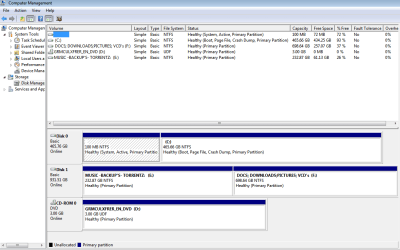
This is probably not necessary , but I did take a snapshot of disk management so you can have a look at it.

Thanks guys for helping, very much appreciated!!! - you have been great.
 

Attachments

  • Disk management 2.PNG
    Disk management 2.PNG
    25.8 KB · Views: 2

My Computer

Computer type
Laptop
Computer Manufacturer/Model Number
Asus G73JW
OS
Windows 7 ultimate x 64bit
CPU
Intel core i7 740QM, 1,73 GHz
Memory
16 GB
Graphics Card(s)
Nividia Geforce GTX 460M
Sound Card
THX tru studio
Monitor(s) Displays
17,3 FHD/3D
Hard Drives
Samsung EVO 840 SSD - 500GB contains OS
Samsung HDD 1TB - for storage
Mouse
R.A.T. 3
Internet Speed
5 MB/sec
Antivirus
AVG
Browser
Google chrome
Now I did not have an option to wipe the SSD before the new installation as ICIT2LOL suggested I do, what software do you suggest I use to do this?

Now it only needs a running Windows OS and you will need to gain access to a machine running Windows because the drive cannot clean itself while running Windows as you might appreciate.
So the process is here Disk - Clean and Clean All with Diskpart Command

Now the other machine needs to be running Windows as I said and the drive can either be installed into that machine or hooked up via a USB to SATA adaptor or I find a USB connected dock the most useful see pics

You then run the DISKPART command line making sure that the drive listed in DISKPART ie the drive running the Windows is usually numbered 0 (zero) the drive you want to clean will be anything from 1 - 10 depending on what other drive are hooked up. Now it is an idea to make sure the other machine only has the OS drive (C:) connected so that any other drive ie yours will be the next drive listed and it will let you know the capacity of the drive which can make differentiating the drives a bit easier.

Now this sounds pretty complicated but in reality it is very easy and if you get stuck post back with the problem
 

Attachments

  • USBSATA.PNG
    USBSATA.PNG
    26.6 KB · Views: 33
  • DOCK.PNG
    DOCK.PNG
    33.2 KB · Views: 0

My Computer

Computer type
PC/Desktop
Computer Manufacturer/Model Number
Own build (new) Desk1 / Asus ROG Win 7 / Desk2 1st build
OS
Desk1 7 Home Prem / Desk2 10 Pro / Main lap Asus ROG 10 Pro 2 laptop Toshiba 7 Pro Asus P2520 7 & 10
CPU
Desk1 i5 3750K / Laptop i7 GTX 860M / Desk2 i5 2500
Motherboard
Desk1 Asus P877-V / Desk2 Gigabyte H67 UD3H / Laptop ?
Memory
Desk1 8GB (1866) / Desk2 16GB (1333) / Laptop 8Gb DDR3
Graphics Card(s)
Desk 1& 2NVidia GTX 650 & Laptops on board Intel
Sound Card
Desk 1 & 2 -XONAR DG Realtek High Def audio Laptop
Monitor(s) Displays
Desk 1 Benq HD 2450 / Desk2 Philips 24" / Laptop 17.5"
Screen Resolution
1920x1080 D1 & D2 & Laptop 1
Hard Drives
Desk1 Samsung 120GB 830 SSD
Asus ROG 256GB 850 Pro SSD
Desk2 Samsung 840 256 SSD
Toshiba 120GB EVO
PSU
Desk 1 Corsair HX 1050/ Laptop ? / Desk 2 Corsair HX 650
Case
Desk 1 Cooler HAF XM ? Toshiba laptop / Desk2 Coolermaster
Cooling
Fans on all Desk1 -2 Desk2 - all Coolermasters 5 Laptop ?
Keyboard
Desk 1 MS Sidewinder X6 Desk 2 MS Sidewinder X 4
Mouse
Desk 1&2 - Gigabyte MS 900 gamer - laptop - Logitec wireless
Internet Speed
ADSL2+
Other Info
One other Desktop (tester) and spare Toshba laptop both with SSD's
Running Kaspersky 2016 ISS on all machines config'd identically
Logitec audio stereo systems on each machine (x3)
Canon MG5250MFC
Router/modem TP-Link running WPA2SK
Hi ICIT2LOL,
FYI and others that might have the same problem in future: The diskpart command did not work on the SSD - it failed to select the SSD, did manage to do a quick format, which in retrospect I probably should not have done. It did clear the disk though. I understand that one should try to avoid doing these things to a SSD as explained here: How To Securely Erase Your SSD Without Destroying It. So I managed to reinstall windows, but I already had one instance where it gave me a boot problem AGAIN! I am not sure what the heck is going on.
 

My Computer

Computer type
Laptop
Computer Manufacturer/Model Number
Asus G73JW
OS
Windows 7 ultimate x 64bit
CPU
Intel core i7 740QM, 1,73 GHz
Memory
16 GB
Graphics Card(s)
Nividia Geforce GTX 460M
Sound Card
THX tru studio
Monitor(s) Displays
17,3 FHD/3D
Hard Drives
Samsung EVO 840 SSD - 500GB contains OS
Samsung HDD 1TB - for storage
Mouse
R.A.T. 3
Internet Speed
5 MB/sec
Antivirus
AVG
Browser
Google chrome
Now that I see your Disk Manager Image from post 8, I apologize as I was wrong (post 6)
The only boot able disk (active) is disk 0.
Data disk 1 has no active sector.
In other words, everything is correct and should be working.

In a Legacy - MBR BIOS:
- You will see all disks (boot able or no boot able) under SATA devices.
- You may not see non boot able disks under boot options.

As BIOS doesn't always show your SSD and the win 7 installation doesn't find it, I would say that you have a SSD failure.

Put the disk on desktop that has a Windows.
Open Disk manager and on the SSD delete all partitions - Don't create new. Leave it RAW. (If it doesn't see the SSD, you have a SSD failure)
On the Laptop, put the SSD on SATA 0 and remove the HDD.
Try to install Win 7 on it.

If the installation doesn't see the SSD, I would say it has a failure.
Remember, Samsung EVO 840 SSD has 5 years warranty.
 

My Computers

System One System Two

  • Computer type
    PC/Desktop
    Computer Manufacturer/Model Number
    custom build
    OS
    Windows 7 HP 64
    CPU
    i5 6600K - 800MHz to 4200MHz
    Motherboard
    GA-Z170-HD3P
    Memory
    4+4G GSkill DDR4 3000
    Graphics Card(s)
    IG - Intel 530
    Monitor(s) Displays
    Samsung 226BW
    Screen Resolution
    1680x1050
    Hard Drives
    (1) -1 SM951 – 128GB M.2 AHCI PCIe SSD drive for Windows 7 and Lubuntu
    (2) -1 WD SATA 3 - 1T for Data
    (3) -1 WD SATA 3 - 1T for backup
    PSU
    Thermaltake 450W TR2 gold
    Keyboard
    Old and good Chicony mechanical keyboard
    Mouse
    Logitech mX performance - 9 buttons (had to disable some)
    Internet Speed
    500Mb/s
    Browser
    Firefox 64
    Other Info
    TinyWall firewall
  • Computer type
    Laptop
    System Manufacturer/Model Number
    Asus Q550LF
    OS
    Windows 7 Pro
    CPU
    i7-4500U 800MHz to 3.0GHz
    Motherboard
    Asus Q550LF
    Memory
    (4+4)G DDR3 1600
    Graphics Card(s)
    IG intel 4400 + NVIDIA GeForce GT 745M
    Sound Card
    Realtek
    Monitor(s) Displays
    LG Display LP156WF4-SPH1
    Screen Resolution
    1920 x 1080
    Hard Drives
    BX500 120G SSD for Windows and programs +
    1T HDD for data
    Internet Speed
    500 Mb/s
    Browser
    Firefox
    Other Info
    TinyWall firewall
Ok mate well the choice is yours as to how you prepare the SSD and for me a format is just not good enough.

I have cleaned quite a few of my SSD's albeit only a couple of times and never with clean all in DISKPART which will overtax the SSD blocks or certain ones of them.

But the choice is yours of course and I do stand to be corrected on what I have stated.
 

My Computer

Computer type
PC/Desktop
Computer Manufacturer/Model Number
Own build (new) Desk1 / Asus ROG Win 7 / Desk2 1st build
OS
Desk1 7 Home Prem / Desk2 10 Pro / Main lap Asus ROG 10 Pro 2 laptop Toshiba 7 Pro Asus P2520 7 & 10
CPU
Desk1 i5 3750K / Laptop i7 GTX 860M / Desk2 i5 2500
Motherboard
Desk1 Asus P877-V / Desk2 Gigabyte H67 UD3H / Laptop ?
Memory
Desk1 8GB (1866) / Desk2 16GB (1333) / Laptop 8Gb DDR3
Graphics Card(s)
Desk 1& 2NVidia GTX 650 & Laptops on board Intel
Sound Card
Desk 1 & 2 -XONAR DG Realtek High Def audio Laptop
Monitor(s) Displays
Desk 1 Benq HD 2450 / Desk2 Philips 24" / Laptop 17.5"
Screen Resolution
1920x1080 D1 & D2 & Laptop 1
Hard Drives
Desk1 Samsung 120GB 830 SSD
Asus ROG 256GB 850 Pro SSD
Desk2 Samsung 840 256 SSD
Toshiba 120GB EVO
PSU
Desk 1 Corsair HX 1050/ Laptop ? / Desk 2 Corsair HX 650
Case
Desk 1 Cooler HAF XM ? Toshiba laptop / Desk2 Coolermaster
Cooling
Fans on all Desk1 -2 Desk2 - all Coolermasters 5 Laptop ?
Keyboard
Desk 1 MS Sidewinder X6 Desk 2 MS Sidewinder X 4
Mouse
Desk 1&2 - Gigabyte MS 900 gamer - laptop - Logitec wireless
Internet Speed
ADSL2+
Other Info
One other Desktop (tester) and spare Toshba laptop both with SSD's
Running Kaspersky 2016 ISS on all machines config'd identically
Logitec audio stereo systems on each machine (x3)
Canon MG5250MFC
Router/modem TP-Link running WPA2SK
Hello ,
i have the same problems with an Samsung EVO 1TB .
It working perfectly to store anything (i tested him in my main pc and my Toshiba laptop)

but

1) It refuse to upload Windows , 7 , 8.1 from bootable usb stick and 10 from bootable dvd .
2) It have the same behavior in my main (well working with old Kinston 64GB, Gigabyte DDR3, Intel i3, 16GB ram) pc when i put Samsung SSD in place of Kingston. Messing up Bios until disconnect it.

and in my new (Gigabyte DDR4 , i5 , 8GB Ram) that i had the idea to create with Samsung as bootable disc.

I lost many hours from my life for that Samsung trash and any samsung warranty can compensate.

Tomorrow i will ask , using warranty, a repair or money refund.

Was the first and the last time in my life ,that i bought Samsung products. Korean products are by far the worst in global markets.

As i understand from all previous messages , these SSDs are constructed with unsurpassed problems.
 

My Computer

Computer type
PC/Desktop
Computer Manufacturer/Model Number
Custom
OS
Windows 7Ultimate
CPU
Intel i3
Motherboard
Gigabyte
Memory
16GB
Graphics Card(s)
Nvidia 210
Hard Drives
Kingston 64GB
Browser
Firefox
Hello ,
i have the same problems with an Samsung EVO 1TB .
It working perfectly to store anything (i tested him in my main pc and my Toshiba laptop)

but

1) It refuse to upload Windows , 7 , 8.1 from bootable usb stick and 10 from bootable dvd .
2) It have the same behavior in my main (well working with old Kinston 64GB, Gigabyte DDR3, Intel i3, 16GB ram) pc when i put Samsung SSD in place of Kingston. Messing up Bios until disconnect it.

and in my new (Gigabyte DDR4 , i5 , 8GB Ram) that i had the idea to create with Samsung as bootable disc.

I lost many hours from my life for that Samsung trash and any samsung warranty can compensate.

Tomorrow i will ask , using warranty, a repair or money refund.

Was the first and the last time in my life ,that i bought Samsung products. Korean products are by far the worst in global markets.

As i understand from all previous messages , these SSDs are constructed with unsurpassed problems.
Well seems to me you bought a dud mate because I have quite a collection of Samsungs and no problems over quite a few years. So why didn't you just get it replaced as it was obviously bad and frankly I think the Korean made stuff is better than the crappy stuff that comes out of China in some of the brands I think you probably made the mistake f just not picking up on something wrong in the first place
 

My Computer

Computer type
PC/Desktop
Computer Manufacturer/Model Number
Own build (new) Desk1 / Asus ROG Win 7 / Desk2 1st build
OS
Desk1 7 Home Prem / Desk2 10 Pro / Main lap Asus ROG 10 Pro 2 laptop Toshiba 7 Pro Asus P2520 7 & 10
CPU
Desk1 i5 3750K / Laptop i7 GTX 860M / Desk2 i5 2500
Motherboard
Desk1 Asus P877-V / Desk2 Gigabyte H67 UD3H / Laptop ?
Memory
Desk1 8GB (1866) / Desk2 16GB (1333) / Laptop 8Gb DDR3
Graphics Card(s)
Desk 1& 2NVidia GTX 650 & Laptops on board Intel
Sound Card
Desk 1 & 2 -XONAR DG Realtek High Def audio Laptop
Monitor(s) Displays
Desk 1 Benq HD 2450 / Desk2 Philips 24" / Laptop 17.5"
Screen Resolution
1920x1080 D1 & D2 & Laptop 1
Hard Drives
Desk1 Samsung 120GB 830 SSD
Asus ROG 256GB 850 Pro SSD
Desk2 Samsung 840 256 SSD
Toshiba 120GB EVO
PSU
Desk 1 Corsair HX 1050/ Laptop ? / Desk 2 Corsair HX 650
Case
Desk 1 Cooler HAF XM ? Toshiba laptop / Desk2 Coolermaster
Cooling
Fans on all Desk1 -2 Desk2 - all Coolermasters 5 Laptop ?
Keyboard
Desk 1 MS Sidewinder X6 Desk 2 MS Sidewinder X 4
Mouse
Desk 1&2 - Gigabyte MS 900 gamer - laptop - Logitec wireless
Internet Speed
ADSL2+
Other Info
One other Desktop (tester) and spare Toshba laptop both with SSD's
Running Kaspersky 2016 ISS on all machines config'd identically
Logitec audio stereo systems on each machine (x3)
Canon MG5250MFC
Router/modem TP-Link running WPA2SK
Back
Top