Hmm well this has been quite informative because I would never have been game to defrag a SSD. The Samsungs I have bought have never been much trouble excepting that one time the software stopped my Ivy B USB ports from working and hence why I have never used it since.
Right now I am waiting to trial a couple of Crucial MX 300's as the read/write rate is not far behind the Samsung readings although I guess we all assume that the figures they put out are correct and I don't have any special devices like a techies bench top tool to run such tests.
My next build and probably my last because everything has got so over priced out here and limited to a lot of the Z270 chipset stuff is going to be Skylake based because of the apparent collusion between Intel and Microsoft to make Kabylake only 10 supportable.
But anyway as soon as I get back home and run those drives I shall post back how they perform as best I can do at least.
Thanks for the links Tim and Jack I think maybe the Samsungs you used nay have been the older 830?? it was a bit of a slug to be honest the 840 and 850 are pretty darn good.
John
Mine's an 850 PRO... I think the only problem was that darn Magician software. Whether it hurt my
drive or not is hard to say. We did have some USB port issues relating to Sleep Mode in the past.
Whether that had to do with Magician or not is anyone's guess.
I have no reservation about continuing to use Samsung SSD's.
Apparently, from all I've gathered, Windows 8-10 automatically defrag/optimize SSD's.
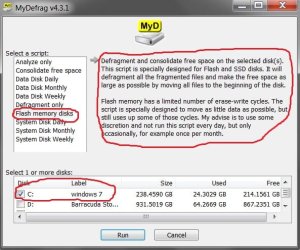
The only thing I can contribute to that debate is that MyDefrag reduced 32%+ file system fragmentation
down to 1%, and the drive is now quicker and smoother. The script the program has in settings for flash
memory drives doesn't write a lot to the drive, but rather condenses blocks and moves the free space to
the front of the drive. That's what I got out of it. Any fragmentation 15% or less in analysis I wouldn't
mess with. Supposedly, you'll not kill an SSD with the right defrag program as long as it's not used
more frequently than once a month. Look at it this way- it took me a year and a half to get to 32%+
fragmentation. Analyzing the SSD does not hurt it, so at least file system fragmentation can be
monitored.
I wish people would quit making assumptions about the topic and read the educational links in this
thread by people who know what they're talking about.
Anyway, for me, this has been interesting and we offer a thanks to all who participated.
tim
My Computer
At a glance
Windows 7 Pro SP1 x64Intel Haswell i7-4770 3.4GHzG. SKILLS 32GB Ripjaws X Series DDR3 1600 SDRAMIntegrated HD4600- upgrade coming!
- Computer type
- PC/Desktop
- Computer Manufacturer/Model Number
- HP ENVY 700-515xt CTO, with more cam, headers, and 4.11 gears.
- OS
- Windows 7 Pro SP1 x64
- CPU
- Intel Haswell i7-4770 3.4GHz
- Motherboard
- OEM Kaili2 (MSI MS-7826 v2.0)
- Memory
- G. SKILLS 32GB Ripjaws X Series DDR3 1600 SDRAM
- Graphics Card(s)
- Integrated HD4600- upgrade coming!
- Sound Card
- Integrated...for now.
- Monitor(s) Displays
- Dell ST-2310 Digital
- Screen Resolution
- I like 1920x1080
- Hard Drives
- C\:-Samsung 850PRO SSD-256gb, D:\-SG Barracuda 7200 HDD 1 TB (Storage)
- PSU
- 350w OEM (About to become a display in the aquarium!)
- Case
- ENVY OEM
- Cooling
- FANS
- Keyboard
- Logitech and HP- USB.
- Mouse
- Logitech LS1 (Alltime favorite of mine!) and HP- both USB
- Internet Speed
- 65Mbps Down (min)/4.5Mbps UP- Charter Comm HS cable
- Antivirus
- avast! Internet Security 2015/MBAM
- Browser
- Opera, at present. Love that Chromium horsepower!