Solved Samsung 850 PRO 256GB Anomalies

Hmm well this has been quite informative because I would never have been game to defrag a SSD. The Samsungs I have bought have never been much trouble excepting that one time the software stopped my Ivy B USB ports from working and hence why I have never used it since.

Right now I am waiting to trial a couple of Crucial MX 300's as the read/write rate is not far behind the Samsung readings although I guess we all assume that the figures they put out are correct and I don't have any special devices like a techies bench top tool to run such tests.

My next build and probably my last because everything has got so over priced out here and limited to a lot of the Z270 chipset stuff is going to be Skylake based because of the apparent collusion between Intel and Microsoft to make Kabylake only 10 supportable.

But anyway as soon as I get back home and run those drives I shall post back how they perform as best I can do at least.

Thanks for the links Tim and Jack I think maybe the Samsungs you used nay have been the older 830?? it was a bit of a slug to be honest the 840 and 850 are pretty darn good.
John:)

Mine's an 850 PRO... I think the only problem was that darn Magician software. Whether it hurt my

drive or not is hard to say. We did have some USB port issues relating to Sleep Mode in the past.

Whether that had to do with Magician or not is anyone's guess.

I have no reservation about continuing to use Samsung SSD's.

Apparently, from all I've gathered, Windows 8-10 automatically defrag/optimize SSD's.

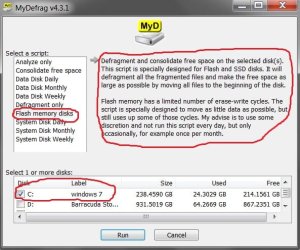
The only thing I can contribute to that debate is that MyDefrag reduced 32%+ file system fragmentation

down to 1%, and the drive is now quicker and smoother. The script the program has in settings for flash

memory drives doesn't write a lot to the drive, but rather condenses blocks and moves the free space to

the front of the drive. That's what I got out of it. Any fragmentation 15% or less in analysis I wouldn't

mess with. Supposedly, you'll not kill an SSD with the right defrag program as long as it's not used

more frequently than once a month. Look at it this way- it took me a year and a half to get to 32%+

fragmentation. Analyzing the SSD does not hurt it, so at least file system fragmentation can be

monitored.

I wish people would quit making assumptions about the topic and read the educational links in this

thread by people who know what they're talking about.

Anyway, for me, this has been interesting and we offer a thanks to all who participated.

tim
 

My Computer My Computer

At a glance

Windows 7 Pro SP1 x64Intel Haswell i7-4770 3.4GHzG. SKILLS 32GB Ripjaws X Series DDR3 1600 SDRAMIntegrated HD4600- upgrade coming!
Computer type
PC/Desktop
Computer Manufacturer/Model Number
HP ENVY 700-515xt CTO, with more cam, headers, and 4.11 gears.
OS
Windows 7 Pro SP1 x64
CPU
Intel Haswell i7-4770 3.4GHz
Motherboard
OEM Kaili2 (MSI MS-7826 v2.0)
Memory
G. SKILLS 32GB Ripjaws X Series DDR3 1600 SDRAM
Graphics Card(s)
Integrated HD4600- upgrade coming!
Sound Card
Integrated...for now.
Monitor(s) Displays
Dell ST-2310 Digital
Screen Resolution
I like 1920x1080
Hard Drives
C\:-Samsung 850PRO SSD-256gb, D:\-SG Barracuda 7200 HDD 1 TB (Storage)
PSU
350w OEM (About to become a display in the aquarium!)
Case
ENVY OEM
Cooling
FANS
Keyboard
Logitech and HP- USB.
Mouse
Logitech LS1 (Alltime favorite of mine!) and HP- both USB
Internet Speed
65Mbps Down (min)/4.5Mbps UP- Charter Comm HS cable
Antivirus
avast! Internet Security 2015/MBAM
Browser
Opera, at present. Love that Chromium horsepower!
Mine's an 850 PRO... I think the only problem was that darn Magician software. Whether it hurt my

drive or not is hard to say. We did have some USB port issues relating to Sleep Mode in the past.

Whether that had to do with Magician or not is anyone's guess.

Yep I think I mentioned back a bit that I did have an issue with the USB ports dropping out (not literally LOL!!) in my Ivy B build and spent a few months trying to fix it and was about to change the board when one of the other members saw my post and knew straight away what it was as he had seen this problem before and uninstalling the magician fixed it. That is why I never use it any more.

Well I might just try the defrag out when I get home as then I have back ups in case I break this lifeline of mine ;)
 

My Computer My Computer

At a glance

Desk1 7 Home Prem / Desk2 10 Pro / Main lap A...Desk1 i5 3750K / Laptop i7 GTX 860M / Desk2 i...Desk1 8GB (1866) / Desk2 16GB (1333) / Laptop...Desk 1& 2NVidia GTX 650 & Laptops on board Intel
Computer type
PC/Desktop
Computer Manufacturer/Model Number
Own build (new) Desk1 / Asus ROG Win 7 / Desk2 1st build
OS
Desk1 7 Home Prem / Desk2 10 Pro / Main lap Asus ROG 10 Pro 2 laptop Toshiba 7 Pro Asus P2520 7 & 10
CPU
Desk1 i5 3750K / Laptop i7 GTX 860M / Desk2 i5 2500
Motherboard
Desk1 Asus P877-V / Desk2 Gigabyte H67 UD3H / Laptop ?
Memory
Desk1 8GB (1866) / Desk2 16GB (1333) / Laptop 8Gb DDR3
Graphics Card(s)
Desk 1& 2NVidia GTX 650 & Laptops on board Intel
Sound Card
Desk 1 & 2 -XONAR DG Realtek High Def audio Laptop
Monitor(s) Displays
Desk 1 Benq HD 2450 / Desk2 Philips 24" / Laptop 17.5"
Screen Resolution
1920x1080 D1 & D2 & Laptop 1
Hard Drives
Desk1 Samsung 120GB 830 SSD
Asus ROG 256GB 850 Pro SSD
Desk2 Samsung 840 256 SSD
Toshiba 120GB EVO
PSU
Desk 1 Corsair HX 1050/ Laptop ? / Desk 2 Corsair HX 650
Case
Desk 1 Cooler HAF XM ? Toshiba laptop / Desk2 Coolermaster
Cooling
Fans on all Desk1 -2 Desk2 - all Coolermasters 5 Laptop ?
Keyboard
Desk 1 MS Sidewinder X6 Desk 2 MS Sidewinder X 4
Mouse
Desk 1&2 - Gigabyte MS 900 gamer - laptop - Logitec wireless
Internet Speed
ADSL2+
Other Info
One other Desktop (tester) and spare Toshba laptop both with SSD's
Running Kaspersky 2016 ISS on all machines config'd identically
Logitec audio stereo systems on each machine (x3)
Canon MG5250MFC
Router/modem TP-Link running WPA2SK
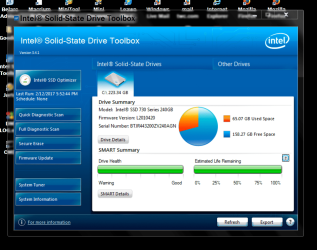
As long as I keep getting this report, I leave my SSD's alone.

I use Intel SSD Tool Box about once a week.

Intel health report.PNG

Jack
 

My Computer My Computer

At a glance

Windows 10 Pro. 64/ version 1709 Windows 7 Pr...Intel i7-6800K @ 4.3Corsair Platinum 16 gig @2400EVGA GTX 1070 OC
Computer type
PC/Desktop
Computer Manufacturer/Model Number
Home made Desktop
OS
Windows 10 Pro. 64/ version 1709 Windows 7 Pro/64
CPU
Intel i7-6800K @ 4.3
Motherboard
ASUS X-99 Deluxe II
Memory
Corsair Platinum 16 gig @2400
Graphics Card(s)
EVGA GTX 1070 OC
Monitor(s) Displays
Asus 27" LED LCD/VE278Q
Screen Resolution
1920-1080 or 1280-720 HDMI
Hard Drives
INTEL SSD 730-240 Gb Sata 3.0/
PSU
EVGA Platium 1200W
Case
Phanteks Luxe Tempered Glass 8 fans/ one radiator
Cooling
XSPC/ Water Cooled CPU
Keyboard
Das 4 Professional
Mouse
Logitech M705/MX Anywhere 2-S
Internet Speed
100 mbits
Antivirus
Microsoft Security Essentials/ Malwarebytes Premium 3.0/ SAS
Browser
I.E. 11 default/Firefox/ ISP Time Warner Cable/Spectrum
Other Info
LG BluRay Burner/
Sound system-KLipsch-THX/
Icy Dock ssd Hot Swap bays.
Well I might just try the defrag out when I get home as then I have back ups in case I break this lifeline of mine ;)

Just do some research on it to satisfy your own mind... there are more negative about it out there than positive.

However, the positive aspects are coming from people who know what they are talking about. There's

definitely enough professional, intelligent info on the subject in this thread's links. Thanks to the other

John for bringing it up here, as I wouldn't have mentioned it. I did start another thread about it a bit ago-

SSD Defrag: New Info?

I can only state that I am satisfied with the approach I took after much research. I'm far from a computer

expert, but do stand on my research abilities as an educated and experienced mechanical engineer.

In order to help, John, we'll provide you a bit of info in this post to possibly save you some chasing.

Whatever you decide, my advice would be to, first and foremost, at least analyze your drives- with 2-3

separate programs. We used Windows 7 analysis, Defraggler, and O&O.

We chose to defrag with MyDefrag because of the inherent script for flash memory drives-

Windows, SSDs and Defragmentation: the definitive answer - gHacks Tech News

The real and complete story - Does Windows defragment your SSD? - Scott Hanselman

Yes, file system fragmentation DOES affect SSD read speed

Download MyDefrag (formerly JkDefrag) - MajorGeeks

We posted before and after results further back in this thread.

I don't use the Analyize from MyDefrag, but rather Windows, Defraggler, and O&O- hmmm, think I

mentioned that... LOL!... but rather just the script for 'Flash memory disks'... NOT looking to initiate any

arguments or debates here on the SSD defrag matter, but merely shared what I chose to do. It was a

positive experience for me.

Anyone else is free to form their own opinion and act accordingly. On record, I'll not tell someone to 'do it'

or 'don't do it'. I made my own choice and am satisfied with it.

Thanks-

tim
 

Attachments

  • Untitled.jpg
    Untitled.jpg
    57.1 KB · Views: 8

My Computer My Computer

At a glance

Windows 7 Pro SP1 x64Intel Haswell i7-4770 3.4GHzG. SKILLS 32GB Ripjaws X Series DDR3 1600 SDRAMIntegrated HD4600- upgrade coming!
Computer type
PC/Desktop
Computer Manufacturer/Model Number
HP ENVY 700-515xt CTO, with more cam, headers, and 4.11 gears.
OS
Windows 7 Pro SP1 x64
CPU
Intel Haswell i7-4770 3.4GHz
Motherboard
OEM Kaili2 (MSI MS-7826 v2.0)
Memory
G. SKILLS 32GB Ripjaws X Series DDR3 1600 SDRAM
Graphics Card(s)
Integrated HD4600- upgrade coming!
Sound Card
Integrated...for now.
Monitor(s) Displays
Dell ST-2310 Digital
Screen Resolution
I like 1920x1080
Hard Drives
C\:-Samsung 850PRO SSD-256gb, D:\-SG Barracuda 7200 HDD 1 TB (Storage)
PSU
350w OEM (About to become a display in the aquarium!)
Case
ENVY OEM
Cooling
FANS
Keyboard
Logitech and HP- USB.
Mouse
Logitech LS1 (Alltime favorite of mine!) and HP- both USB
Internet Speed
65Mbps Down (min)/4.5Mbps UP- Charter Comm HS cable
Antivirus
avast! Internet Security 2015/MBAM
Browser
Opera, at present. Love that Chromium horsepower!
Back
Top