bohemiansonic89
New member
Hello,
first off, I hope I am posting this in the right sub-section. If not, I apologize (and feel free to move it to the relevant section).
My general query is to do with SSDs and Bitlocker encryption.
Description:
I recently upgraded my primary SSD (with boot and OS partitions) from an entry-level Kingston 120GB SSDNow V300 to a 240GB SanDisk Extreme PRO SSD, hoping that I would notice some improvement, if not in real-life usage then at least in benchmarks, despite my primary goal for this upgrade being the increase in disk space.
Issue:
The problem is that not only did I not see any improvement, but the results were worse than before.
The only difference between the two disks is that
I understand that moving to AES-256 means taking a hit in performance, but I assumed that the better (and newer) SSD would compensate for this.
I read through all the relevant threads on this forum (like this one) as well as through other sites on the net. My understanding is that software encryption and SSDs (especially those with a controller that is designed for compression of data, like the SandForce on my original Kingston V300) do not go hand in hand.
However, my Sandisk SSD has a Marvell controller, which I take it does better with data that cannot be compressed (i.e. encrypted), so that should not be the issue.
Basically, I do not know what I am doing wrong. All I want is my PC to be encrypted while taking full advantage of having my system/boot drive be on an SSD instead of a HDD.
Do I change the encryption to 256 without diffuser, 128 with diffuser (Windows default) or other?
Following are benchmark results for comparison:
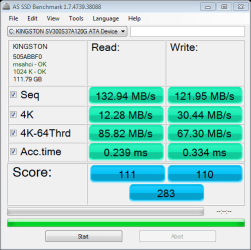
1) Kingston SSD with Bitlocker enabled, 128-bit with diffuser
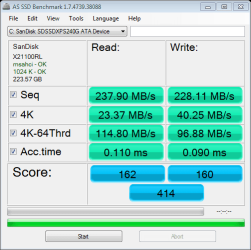
2) Sandisk Extreme Pro SSD with Bitlocker DISABLED
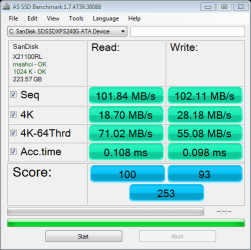
3) Sandisk Extreme Pro SSD with Bitlocker ENABLED, 256-bit with diffuser
In addition, my motherboard only has SATA II, so that is why the resuls in 2) are lower than one might expect.
Thank you to anyone for pointing out what I am doing wrong or what I should do the fix the problem.
first off, I hope I am posting this in the right sub-section. If not, I apologize (and feel free to move it to the relevant section).
My general query is to do with SSDs and Bitlocker encryption.
Description:
I recently upgraded my primary SSD (with boot and OS partitions) from an entry-level Kingston 120GB SSDNow V300 to a 240GB SanDisk Extreme PRO SSD, hoping that I would notice some improvement, if not in real-life usage then at least in benchmarks, despite my primary goal for this upgrade being the increase in disk space.
Issue:
The problem is that not only did I not see any improvement, but the results were worse than before.
The only difference between the two disks is that
- the first had Bitlocker AES-128 with diffuser, and
- the second has Bitlocker AES-256 with diffuser. Everything else in the build remains unchanged.
I understand that moving to AES-256 means taking a hit in performance, but I assumed that the better (and newer) SSD would compensate for this.
I read through all the relevant threads on this forum (like this one) as well as through other sites on the net. My understanding is that software encryption and SSDs (especially those with a controller that is designed for compression of data, like the SandForce on my original Kingston V300) do not go hand in hand.
However, my Sandisk SSD has a Marvell controller, which I take it does better with data that cannot be compressed (i.e. encrypted), so that should not be the issue.
Basically, I do not know what I am doing wrong. All I want is my PC to be encrypted while taking full advantage of having my system/boot drive be on an SSD instead of a HDD.
Do I change the encryption to 256 without diffuser, 128 with diffuser (Windows default) or other?
Following are benchmark results for comparison:
1) Kingston SSD with Bitlocker enabled, 128-bit with diffuser
2) Sandisk Extreme Pro SSD with Bitlocker DISABLED
3) Sandisk Extreme Pro SSD with Bitlocker ENABLED, 256-bit with diffuser
In addition, my motherboard only has SATA II, so that is why the resuls in 2) are lower than one might expect.
Thank you to anyone for pointing out what I am doing wrong or what I should do the fix the problem.
My Computer
At a glance
Windows 7 Ultimate x64AMD Phenom II X4 9452x8GB of GeIL CL9-9-9 D3-1333MSI R6850
- Computer type
- PC/Desktop
- Computer Manufacturer/Model Number
- custom build
- OS
- Windows 7 Ultimate x64
- CPU
- AMD Phenom II X4 945
- Motherboard
- MSI 760GM-E51
- Memory
- 2x8GB of GeIL CL9-9-9 D3-1333
- Graphics Card(s)
- MSI R6850
- Hard Drives
- OS on 240GB SSD (SanDisk Extreme PRO)
+ a few HDDs
- Antivirus
- avast! Free Antivirus