SAP Front End Black Screen

McLaxn

New member
Local time
8:56 AM
Messages
5
I have used the SAP Front End interface for months and then I updated my graphics card with the latest drivers. All of the sudden, when SAP opens, it's just a black screen and I can't do anything with it. I've gone through and completely clean uninstalled the programs and reinstalled it a few times now and no improvement. Then I went and uninstalled the graphics card drivers and reinstalled them and still nothing. I don't know what else there is to do about this. If someone could please help me out with this problem, I would be very very appreciative. I can't seem to figure out what happened or how to fix it. Thank you!
 

My Computer My Computer

Computer Manufacturer/Model Number
Dell Inspiron 14R
OS
Windows 7 Home Premium 64bit
CPU
Intel Core i3
Graphics Card(s)
Intel HD Graphics
Hi McLaxn,

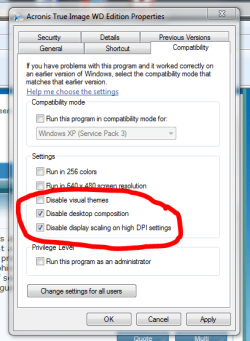
Have you tried running SAP under "Compatibility" mode?

1. Right-click SAP icon, and select "Properties".
2. Select the "Compatibility" tab.
3. Choose the two options shown below:

Note : this example is from a different program, but I have come across similar "graphics errors" with other programs before, and "Compatibility" mode has solved the issues.

Regards,
Golden
 

Attachments

  • Capture.PNG
    Capture.PNG
    24.3 KB · Views: 69

My Computer My Computer

Computer type
PC/Desktop
Computer Manufacturer/Model Number
Golden Mk. I.4
OS
Windows 10 Pro x64 ; Xubuntu x64
CPU
Intel i7 860 @ 2.80 GHz O/C'ed to 4.0GHz
Motherboard
Gigabyte P55A-UD3R Rev.1. Award BIOS F13
Memory
16GB Corsair Vengance DDR3 @ 661 MHz Dual Channel (9-9-9-24)
Graphics Card(s)
EVGA NVidia GTX 560 1024MB
Sound Card
Realtek Integrated
Monitor(s) Displays
Dual Samsung SyncMaster 2494HS
Screen Resolution
1920*1080 and 1920*1080
Hard Drives
1*Samsung 840 EVO 120GB SSD;
1*OCZ Vertex 2 60GB SSD;
2*Samsung F3 SpinPoint 1TB in RAID0;
1*Samsung F1 SpinPoint 1TB;
2*Western Digital 1TB External USB 3.0
1*Western Digital 500GB External USB 3.0
1*Seagate 500GB External USB 2.0
PSU
Thermaltake ToughPower QFan 750W
Case
Thermaltake Element S VK60001W2Z
Cooling
Corsair H60 Water Cooling, 2*230mm and 2*80mm case fans
Keyboard
Logitech G110
Mouse
Logitech MX518
Thank you, Golden, for your prompt response and suggestion.

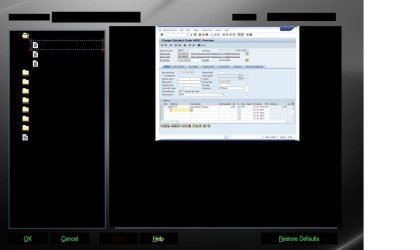
Well, I couldn't get to any sort of configuration for it, actually here's the screen capture of what the Configuration screen comes up with. SAP used to work and then it started to do this.

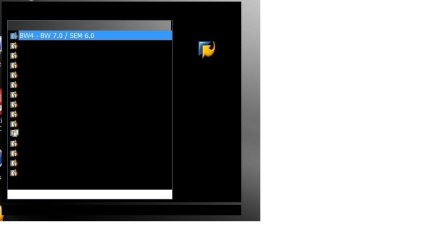
The second picture is what the SAP login window comes up as.
 

Attachments

  • SAPConfig.jpg
    SAPConfig.jpg
    24.4 KB · Views: 86
  • SAPLogon.jpg
    SAPLogon.jpg
    12.9 KB · Views: 63

My Computer My Computer

Computer Manufacturer/Model Number
Dell Inspiron 14R
OS
Windows 7 Home Premium 64bit
CPU
Intel Core i3
Graphics Card(s)
Intel HD Graphics
Mmmm....so you don't open it with a shortcut on the Desktop? Could you create a shortcut and try the suggestions?
 

My Computer My Computer

Computer type
PC/Desktop
Computer Manufacturer/Model Number
Golden Mk. I.4
OS
Windows 10 Pro x64 ; Xubuntu x64
CPU
Intel i7 860 @ 2.80 GHz O/C'ed to 4.0GHz
Motherboard
Gigabyte P55A-UD3R Rev.1. Award BIOS F13
Memory
16GB Corsair Vengance DDR3 @ 661 MHz Dual Channel (9-9-9-24)
Graphics Card(s)
EVGA NVidia GTX 560 1024MB
Sound Card
Realtek Integrated
Monitor(s) Displays
Dual Samsung SyncMaster 2494HS
Screen Resolution
1920*1080 and 1920*1080
Hard Drives
1*Samsung 840 EVO 120GB SSD;
1*OCZ Vertex 2 60GB SSD;
2*Samsung F3 SpinPoint 1TB in RAID0;
1*Samsung F1 SpinPoint 1TB;
2*Western Digital 1TB External USB 3.0
1*Western Digital 500GB External USB 3.0
1*Seagate 500GB External USB 2.0
PSU
Thermaltake ToughPower QFan 750W
Case
Thermaltake Element S VK60001W2Z
Cooling
Corsair H60 Water Cooling, 2*230mm and 2*80mm case fans
Keyboard
Logitech G110
Mouse
Logitech MX518
When I right click on the desktop shortcut link, I clicked on Properties, but there is not a Compatibility tab. I went through the available tabs and did not see a Compatibility area anywhere.
 

My Computer My Computer

Computer Manufacturer/Model Number
Dell Inspiron 14R
OS
Windows 7 Home Premium 64bit
CPU
Intel Core i3
Graphics Card(s)
Intel HD Graphics
Mmmm. OK, now I'm stumped. I'll look into this a bit more, since I use SAP here at work under Windows 7 64 Pro, but haven't seen this problem.

Can you give me the details of your graphics card please?
 

My Computer My Computer

Computer type
PC/Desktop
Computer Manufacturer/Model Number
Golden Mk. I.4
OS
Windows 10 Pro x64 ; Xubuntu x64
CPU
Intel i7 860 @ 2.80 GHz O/C'ed to 4.0GHz
Motherboard
Gigabyte P55A-UD3R Rev.1. Award BIOS F13
Memory
16GB Corsair Vengance DDR3 @ 661 MHz Dual Channel (9-9-9-24)
Graphics Card(s)
EVGA NVidia GTX 560 1024MB
Sound Card
Realtek Integrated
Monitor(s) Displays
Dual Samsung SyncMaster 2494HS
Screen Resolution
1920*1080 and 1920*1080
Hard Drives
1*Samsung 840 EVO 120GB SSD;
1*OCZ Vertex 2 60GB SSD;
2*Samsung F3 SpinPoint 1TB in RAID0;
1*Samsung F1 SpinPoint 1TB;
2*Western Digital 1TB External USB 3.0
1*Western Digital 500GB External USB 3.0
1*Seagate 500GB External USB 2.0
PSU
Thermaltake ToughPower QFan 750W
Case
Thermaltake Element S VK60001W2Z
Cooling
Corsair H60 Water Cooling, 2*230mm and 2*80mm case fans
Keyboard
Logitech G110
Mouse
Logitech MX518
It's an Intel HD Graphics (Core i3) and I just installed the latest drivers, 8.15.10.226, as per the Intel website. Video BIOS 1926.1 and Current Graphics Mode: 1366 by 768.
 

My Computer My Computer

Computer Manufacturer/Model Number
Dell Inspiron 14R
OS
Windows 7 Home Premium 64bit
CPU
Intel Core i3
Graphics Card(s)
Intel HD Graphics
OK. I've asked around, and the consensus seems to be the Compatibility mode.....however, you don't see that on your shortcut.

Are you logged in as an administrator? Someone suggested this might be why you don't see the compatibility mode.
 

My Computer My Computer

Computer type
PC/Desktop
Computer Manufacturer/Model Number
Golden Mk. I.4
OS
Windows 10 Pro x64 ; Xubuntu x64
CPU
Intel i7 860 @ 2.80 GHz O/C'ed to 4.0GHz
Motherboard
Gigabyte P55A-UD3R Rev.1. Award BIOS F13
Memory
16GB Corsair Vengance DDR3 @ 661 MHz Dual Channel (9-9-9-24)
Graphics Card(s)
EVGA NVidia GTX 560 1024MB
Sound Card
Realtek Integrated
Monitor(s) Displays
Dual Samsung SyncMaster 2494HS
Screen Resolution
1920*1080 and 1920*1080
Hard Drives
1*Samsung 840 EVO 120GB SSD;
1*OCZ Vertex 2 60GB SSD;
2*Samsung F3 SpinPoint 1TB in RAID0;
1*Samsung F1 SpinPoint 1TB;
2*Western Digital 1TB External USB 3.0
1*Western Digital 500GB External USB 3.0
1*Seagate 500GB External USB 2.0
PSU
Thermaltake ToughPower QFan 750W
Case
Thermaltake Element S VK60001W2Z
Cooling
Corsair H60 Water Cooling, 2*230mm and 2*80mm case fans
Keyboard
Logitech G110
Mouse
Logitech MX518
same problem here.....

It's an Intel HD Graphics (Core i3) and I just installed the latest drivers, 8.15.10.226, as per the Intel website. Video BIOS 1926.1 and Current Graphics Mode: 1366 by 768.

if got the same error here and i really dont know what do more (after reinstalling, clearing registry and all the things, and i dont want to clean the hole maschine from scratch).
i know, this thread is very old....but i have it actually....:(:(:(

thanks

Sascha
 

My Computer My Computer

OS
Windows 7 Professional x64
Two things to try.

1. Roll back the driver to the previous version.
2. If you have a Restore point before the problem you could try a system restore.
 

My Computer My Computer

Computer type
Laptop
Computer Manufacturer/Model Number
Hewlett-Packard/G62-107SA Notebook
OS
Microsoft Windows 7 Home Premium 64-bit Service Pack 1
CPU
Intel(R) Core(TM) i3 CPU M 330 @ 2.13GHz
Motherboard
Hewlett-Packard 1425
Memory
8 GB DDR3
Graphics Card(s)
Intel(R) HD Graphics
Sound Card
Realtek High Definition Audio
Monitor(s) Displays
Builtin
Screen Resolution
1366 x 768 x 32 bits (4294967296 colors) @ 60 Hz
Hard Drives
250 GB SATA Hard Disk Drive 7200 rpm
2TB Seagate GoFlex USB 2 Drive
1TB Iomega Prestige USB 2 Drive
1.5TB Iomega Prestige USB 2 Drive (Samsung)
2TB WD MyBook Live NAS.
Mouse
Logitech Anywhere MX
Internet Speed
152 Mbs download 10 Mbs upload
Antivirus
Norton 360
Browser
Chrome
just download msxml.msi sp3, that should fix it
 

My Computer My Computer

Computer type
PC/Desktop
Computer Manufacturer/Model Number
dell
OS
64
CPU
4
Motherboard
intel
Memory
8
Graphics Card(s)
none
Hard Drives
1t
Back
Top