SAS Controller Problems

wints

New member
Local time
7:19 AM
Messages
20
Hope this is the right forum for this, right where do I start, all I wanted to do was to replace a small ssd (c Drive) with a bigger one which in most part has gone ok but here's the rest, My pc that I bought all configured in the way I'm about to tell you is
6 drives (1 x ssd 4 x hdd 1 x blu-ray) connected to the sata ports on the mother board no problem there all there in windows 7 but here's what's driving me to the point of kicking this pc round the house is it also has a SAS controller card plugged in to the motherboard which normally has 2 more hdd's attached but for some reason if I try to plug them in when in
windows I get a BSOD and have to restart and if I leave the drives plugged in whilst it tries to boot it either just hangs after post with black screen or I get the message about trying to fix windows which it will not until I remove the 2 hdd's from the SAS? any ideas as to what I need to do? as I say it was all great before the new drive and fresh install of windows.
Never had to configure anything like this before so I fell out of my depth at the minute, Thanks for any help and guidance.

Motherboard : Gigabyte PH6-UD3
OS : Windows 7
SAS Controller Identified as : Marvell 64xx / 63xx

Anything else you need let me know and I'll see if I can provide it lol
 

My Computer

Computer type
PC/Desktop
Computer Manufacturer/Model Number
Custom Build
OS
Windows 7 Home Premium x64
CPU
Intell i5 - 2300
Motherboard
Gigabyte PH6-UD3-B3
Memory
8gb (2 x 4 gb) DDR3 Corsair XMS 3
Graphics Card(s)
MSI R9 280X
Hard Drives
250gb Samsung SSD 850 EVO
6 x Seagate Barracuda Hdd's
1x Blu-Ray
Antivirus
MSE
Browser
FireFox
Are you setting boot order in BIOS? Are you sure it supports hot-plug, since you are getting a BSOD in Windows? Is the SATA Operation Mode in BIOS set as RAID or AHCI?
 

My Computer

Computer type
PC/Desktop
Computer Manufacturer/Model Number
Custom Build
OS
Windows 7 Ultimate x64 SP1
CPU
AMD Phenom 2 1090T
Motherboard
Gigabyte GA-890FXA-UD5
Memory
2x8GB Kingston HyperX Fury Black 1600Mhz Unganged
Graphics Card(s)
MSI GTX 970 Gaming 4G
Sound Card
Realtek On-Board HD 7.1 Audio / Logitech G35
Monitor(s) Displays
3xAcer GD245HQ
Screen Resolution
1920x1080
Hard Drives
Samsung 850 Pro 512GB SSD - OS /
WD Caviar Black SATA 3 - 1 TBx2 - Dynamic RAID 0 /
WD Caviar Green SATA 2 - 640GBx2 - Dynamic RAID 0 /
WD Caviar Green SATA 2 - 640GB - Internal Backup /
Seagate Barracude SATA 3 - 3TB - External Backup/ Sync
PSU
HighPower 1000W
Case
Cooler Master HAF 932
Cooling
Noctua NH-D14
Keyboard
Logitech G19
Mouse
Logitech G500
Internet Speed
100/4 Mbit Cable (100GB quota)
Antivirus
ZoneAlarm Extreme Security / MBAM Pro / MBAE Free / SAS Free
Browser
IE 11 - Firefox - Chrome
Other Info
Logitech F710/ G27/ G940/ Z5500 // TrackIR 5 // Nvidia 3D Surround Vision
Hi thanks for replying, ok boot order is set for CD-ROM first and second device disabled, just found out that the SAS does support hot plug but I have to execute a cmd not quite sure how to do that, SATA Opertaion Mode is set to IDE tried AHCI but will not boot just hangs at black screen after post
 

My Computer

Computer type
PC/Desktop
Computer Manufacturer/Model Number
Custom Build
OS
Windows 7 Home Premium x64
CPU
Intell i5 - 2300
Motherboard
Gigabyte PH6-UD3-B3
Memory
8gb (2 x 4 gb) DDR3 Corsair XMS 3
Graphics Card(s)
MSI R9 280X
Hard Drives
250gb Samsung SSD 850 EVO
6 x Seagate Barracuda Hdd's
1x Blu-Ray
Antivirus
MSE
Browser
FireFox

My Computer

Computer type
PC/Desktop
Computer Manufacturer/Model Number
Custom Build
OS
Windows 7 Ultimate x64 SP1
CPU
AMD Phenom 2 1090T
Motherboard
Gigabyte GA-890FXA-UD5
Memory
2x8GB Kingston HyperX Fury Black 1600Mhz Unganged
Graphics Card(s)
MSI GTX 970 Gaming 4G
Sound Card
Realtek On-Board HD 7.1 Audio / Logitech G35
Monitor(s) Displays
3xAcer GD245HQ
Screen Resolution
1920x1080
Hard Drives
Samsung 850 Pro 512GB SSD - OS /
WD Caviar Black SATA 3 - 1 TBx2 - Dynamic RAID 0 /
WD Caviar Green SATA 2 - 640GBx2 - Dynamic RAID 0 /
WD Caviar Green SATA 2 - 640GB - Internal Backup /
Seagate Barracude SATA 3 - 3TB - External Backup/ Sync
PSU
HighPower 1000W
Case
Cooler Master HAF 932
Cooling
Noctua NH-D14
Keyboard
Logitech G19
Mouse
Logitech G500
Internet Speed
100/4 Mbit Cable (100GB quota)
Antivirus
ZoneAlarm Extreme Security / MBAM Pro / MBAE Free / SAS Free
Browser
IE 11 - Firefox - Chrome
Other Info
Logitech F710/ G27/ G940/ Z5500 // TrackIR 5 // Nvidia 3D Surround Vision
Ok tried that but will not boot after post just get one two flashes but then just hangs at black screen
 

My Computer

Computer type
PC/Desktop
Computer Manufacturer/Model Number
Custom Build
OS
Windows 7 Home Premium x64
CPU
Intell i5 - 2300
Motherboard
Gigabyte PH6-UD3-B3
Memory
8gb (2 x 4 gb) DDR3 Corsair XMS 3
Graphics Card(s)
MSI R9 280X
Hard Drives
250gb Samsung SSD 850 EVO
6 x Seagate Barracuda Hdd's
1x Blu-Ray
Antivirus
MSE
Browser
FireFox
The method in the tutorial is tried and true and has worked for hundreds of thousands of PC. But...You MUST follow it EXACTLY. No shortcuts in the steps. Try it again. Disable your AV before changing the Registry. Perhaps it's overriding the change or you didn't run Regedit as administrator.
 

My Computer

Computer type
PC/Desktop
Computer Manufacturer/Model Number
Built 2/11/2011
OS
Windows 7 Pro-x64
CPU
i7-2600 3.4GHz - 3.8GHz Turbo
Motherboard
Intel DH67BL-B3
Memory
8Gb - 2x4GB, Muskin 991770 PC3-1333
Graphics Card(s)
Integrated Intel HD 2000
Sound Card
Integrated Intel 10.1 HD, RealTek ALC892
Monitor(s) Displays
Asus LCD VH222H, Haier HL24XSL2a
Screen Resolution
1920x1080, 1920x1080
Hard Drives
Crucial SSD C300-128Gb,
Western Digital WD5002AALX - 500Gb,
Western Digital WD7501AALS - 750Gb
PSU
Seasonic 650W 80+ Gold Modular
Case
Rosewill Defender
Cooling
Stock CPU, Four 120mm case fans, PCH fan added
Keyboard
Logitech EX100 Y-RBH94 Wireless
Mouse
Logitech EX100 M-RCE95 Wireless
Internet Speed
3.0/1.5 Mbs
Antivirus
Microsoft Security Essentials
Browser
Microsoft Internet Explorer 11
Other Info
Antec Veris Premier-Multimedia IR Station,
Cyber Accoustics-3602 Speakers,
AFT XM-5U Card Reader,
Hauppauge TV-HVR-2250,
Sony LX300 USB Turntable
Tried again but this time got a Boot disk failure error-Insert system disk which I did which it couldn't repair so had to reboot back into Bios back to IDE unplug all drives accept ssd then I could get back to windows this was with AV off and no shortcuts
 

My Computer

Computer type
PC/Desktop
Computer Manufacturer/Model Number
Custom Build
OS
Windows 7 Home Premium x64
CPU
Intell i5 - 2300
Motherboard
Gigabyte PH6-UD3-B3
Memory
8gb (2 x 4 gb) DDR3 Corsair XMS 3
Graphics Card(s)
MSI R9 280X
Hard Drives
250gb Samsung SSD 850 EVO
6 x Seagate Barracuda Hdd's
1x Blu-Ray
Antivirus
MSE
Browser
FireFox
Can you post photo screenshots of BIOS screens where you set the SATA Operation Mode, and this SAS Controller you talk of please?

Also boot order, with all your drives attached.
 

My Computer

Computer type
PC/Desktop
Computer Manufacturer/Model Number
Custom Build
OS
Windows 7 Ultimate x64 SP1
CPU
AMD Phenom 2 1090T
Motherboard
Gigabyte GA-890FXA-UD5
Memory
2x8GB Kingston HyperX Fury Black 1600Mhz Unganged
Graphics Card(s)
MSI GTX 970 Gaming 4G
Sound Card
Realtek On-Board HD 7.1 Audio / Logitech G35
Monitor(s) Displays
3xAcer GD245HQ
Screen Resolution
1920x1080
Hard Drives
Samsung 850 Pro 512GB SSD - OS /
WD Caviar Black SATA 3 - 1 TBx2 - Dynamic RAID 0 /
WD Caviar Green SATA 2 - 640GBx2 - Dynamic RAID 0 /
WD Caviar Green SATA 2 - 640GB - Internal Backup /
Seagate Barracude SATA 3 - 3TB - External Backup/ Sync
PSU
HighPower 1000W
Case
Cooler Master HAF 932
Cooling
Noctua NH-D14
Keyboard
Logitech G19
Mouse
Logitech G500
Internet Speed
100/4 Mbit Cable (100GB quota)
Antivirus
ZoneAlarm Extreme Security / MBAM Pro / MBAE Free / SAS Free
Browser
IE 11 - Firefox - Chrome
Other Info
Logitech F710/ G27/ G940/ Z5500 // TrackIR 5 // Nvidia 3D Surround Vision

My Computer

Computer type
PC/Desktop
Computer Manufacturer/Model Number
Custom Build
OS
Windows 7 Home Premium x64
CPU
Intell i5 - 2300
Motherboard
Gigabyte PH6-UD3-B3
Memory
8gb (2 x 4 gb) DDR3 Corsair XMS 3
Graphics Card(s)
MSI R9 280X
Hard Drives
250gb Samsung SSD 850 EVO
6 x Seagate Barracuda Hdd's
1x Blu-Ray
Antivirus
MSE
Browser
FireFox
Ok, lets try some stuff:

- you already enabled AHCI in registry, right?
- remove all HDD
- attach SSD to the first SATA port (SATA0 or 1 - check motherboard manual)
- SATA Control Mode - AHCI
- Second Boot Device: Harddisk
- Hard disk Boot Priority: SSD as 1st.

Try to boot now, and report back
 

My Computer

Computer type
PC/Desktop
Computer Manufacturer/Model Number
Custom Build
OS
Windows 7 Ultimate x64 SP1
CPU
AMD Phenom 2 1090T
Motherboard
Gigabyte GA-890FXA-UD5
Memory
2x8GB Kingston HyperX Fury Black 1600Mhz Unganged
Graphics Card(s)
MSI GTX 970 Gaming 4G
Sound Card
Realtek On-Board HD 7.1 Audio / Logitech G35
Monitor(s) Displays
3xAcer GD245HQ
Screen Resolution
1920x1080
Hard Drives
Samsung 850 Pro 512GB SSD - OS /
WD Caviar Black SATA 3 - 1 TBx2 - Dynamic RAID 0 /
WD Caviar Green SATA 2 - 640GBx2 - Dynamic RAID 0 /
WD Caviar Green SATA 2 - 640GB - Internal Backup /
Seagate Barracude SATA 3 - 3TB - External Backup/ Sync
PSU
HighPower 1000W
Case
Cooler Master HAF 932
Cooling
Noctua NH-D14
Keyboard
Logitech G19
Mouse
Logitech G500
Internet Speed
100/4 Mbit Cable (100GB quota)
Antivirus
ZoneAlarm Extreme Security / MBAM Pro / MBAE Free / SAS Free
Browser
IE 11 - Firefox - Chrome
Other Info
Logitech F710/ G27/ G940/ Z5500 // TrackIR 5 // Nvidia 3D Surround Vision
Ok tried that but still the same will not boot after post just black screen
 

My Computer

Computer type
PC/Desktop
Computer Manufacturer/Model Number
Custom Build
OS
Windows 7 Home Premium x64
CPU
Intell i5 - 2300
Motherboard
Gigabyte PH6-UD3-B3
Memory
8gb (2 x 4 gb) DDR3 Corsair XMS 3
Graphics Card(s)
MSI R9 280X
Hard Drives
250gb Samsung SSD 850 EVO
6 x Seagate Barracuda Hdd's
1x Blu-Ray
Antivirus
MSE
Browser
FireFox

My Computer

Computer type
PC/Desktop
Computer Manufacturer/Model Number
Home made Desktop
OS
Windows 10 Pro. 64/ version 1709 Windows 7 Pro/64
CPU
Intel i7-6800K @ 4.3
Motherboard
ASUS X-99 Deluxe II
Memory
Corsair Platinum 16 gig @2400
Graphics Card(s)
EVGA GTX 1070 OC
Monitor(s) Displays
Asus 27" LED LCD/VE278Q
Screen Resolution
1920-1080 or 1280-720 HDMI
Hard Drives
INTEL SSD 730-240 Gb Sata 3.0/
PSU
EVGA Platium 1200W
Case
Phanteks Luxe Tempered Glass 8 fans/ one radiator
Cooling
XSPC/ Water Cooled CPU
Keyboard
Das 4 Professional
Mouse
Logitech M705/MX Anywhere 2-S
Internet Speed
100 mbits
Antivirus
Microsoft Security Essentials/ Malwarebytes Premium 3.0/ SAS
Browser
I.E. 11 default/Firefox/ ISP Time Warner Cable/Spectrum
Other Info
LG BluRay Burner/
Sound system-KLipsch-THX/
Icy Dock ssd Hot Swap bays.
You have everything disabled to boot in the BIOS boot order except your CD drive. Why would you expect anything else to boot?

The only EFI setting I see is for DVD choice. Do you have an EFI install which requires Windows boot manager to be set first to boot?

As stated you cannot hot plug drives without AHCI setting and must use Safely Remove Hardware. Read the card's Support Downloads Manual as to how it's enabled.

Let us see a shot of http://www.sevenforums.com/tutorial...nt-post-screen-capture-image.html#post2261610.
 
You have everything disabled to boot in the BIOS boot order except your CD drive. Why would you expect anything else to boot?

The only EFI setting I see is for DVD choice. Do you have an EFI install which requires Windows boot manager to be set first to boot?

As stated you cannot hot plug drives without AHCI setting and must use Safely Remove Hardware. Read the card's Support Downloads Manual as to how it's enabled.

Let us see a shot of http://www.sevenforums.com/tutorial...nt-post-screen-capture-image.html#post2261610.

Well first off only having the CD drive enabled was a last ditch effort to get this working and forgot to put it back, like I said in my first post I bought this pc already configured until now had no reason to go into the Bios so how its set now is how it was before I put the new drive in, I have no idea what EFI is so should it be set or not?
Only tried the hot swap once and now I know you have to execute a cmd in order to that I'll have to see how I go about that.
 

Attachments

  • Capture.PNG
    Capture.PNG
    19.4 KB · Views: 3

My Computer

Computer type
PC/Desktop
Computer Manufacturer/Model Number
Custom Build
OS
Windows 7 Home Premium x64
CPU
Intell i5 - 2300
Motherboard
Gigabyte PH6-UD3-B3
Memory
8gb (2 x 4 gb) DDR3 Corsair XMS 3
Graphics Card(s)
MSI R9 280X
Hard Drives
250gb Samsung SSD 850 EVO
6 x Seagate Barracuda Hdd's
1x Blu-Ray
Antivirus
MSE
Browser
FireFox
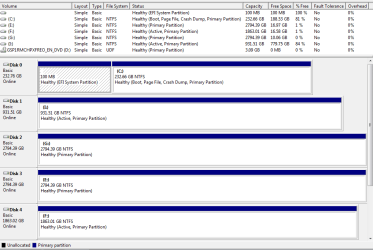
You have an EFI install which uses the GPT disc format.


You accomplished this by booting the DVD as an EFI device.

Are there other OS' installed on the PC? The reason I ask is because there are partitions marked active which means a different MBR format but which should only be marked Active if they are booting an OS. I would mark those partitions Inactive now. http://www.sevenforums.com/tutorials/197157-partition-mark-inactive.html

Absent compatibility settings in the bios the drives should not interfere otherwise with each other. However the card may be a different matter. I would ask myself if I really need it. You have more drives than almost anyone we see here.
 
I wonder if that SAS card requires RAID to set in the BIOS? After all, that's what it's for. RAID includes AHCI.

It's trying to boot off Drive F:
 
Last edited:

My Computer

Computer type
PC/Desktop
Computer Manufacturer/Model Number
Built 2/11/2011
OS
Windows 7 Pro-x64
CPU
i7-2600 3.4GHz - 3.8GHz Turbo
Motherboard
Intel DH67BL-B3
Memory
8Gb - 2x4GB, Muskin 991770 PC3-1333
Graphics Card(s)
Integrated Intel HD 2000
Sound Card
Integrated Intel 10.1 HD, RealTek ALC892
Monitor(s) Displays
Asus LCD VH222H, Haier HL24XSL2a
Screen Resolution
1920x1080, 1920x1080
Hard Drives
Crucial SSD C300-128Gb,
Western Digital WD5002AALX - 500Gb,
Western Digital WD7501AALS - 750Gb
PSU
Seasonic 650W 80+ Gold Modular
Case
Rosewill Defender
Cooling
Stock CPU, Four 120mm case fans, PCH fan added
Keyboard
Logitech EX100 Y-RBH94 Wireless
Mouse
Logitech EX100 M-RCE95 Wireless
Internet Speed
3.0/1.5 Mbs
Antivirus
Microsoft Security Essentials
Browser
Microsoft Internet Explorer 11
Other Info
Antec Veris Premier-Multimedia IR Station,
Cyber Accoustics-3602 Speakers,
AFT XM-5U Card Reader,
Hauppauge TV-HVR-2250,
Sony LX300 USB Turntable
Are there other OS' installed on the PC? The reason I ask is because there are partitions marked active which means a different MBR format but which should only be marked Active if they are booting an OS. I would mark those partitions Inactive now. http://www.sevenforums.com/tutorials/197157-partition-mark-inactive.html

Ha this might be because (maybe) before the new ssd went in all the hdds accept (I drive) where as one using flexraid and that is what i was going to carry on using after the install and everything setup, and by the way guys really do appreciate your time and efforts
 

My Computer

Computer type
PC/Desktop
Computer Manufacturer/Model Number
Custom Build
OS
Windows 7 Home Premium x64
CPU
Intell i5 - 2300
Motherboard
Gigabyte PH6-UD3-B3
Memory
8gb (2 x 4 gb) DDR3 Corsair XMS 3
Graphics Card(s)
MSI R9 280X
Hard Drives
250gb Samsung SSD 850 EVO
6 x Seagate Barracuda Hdd's
1x Blu-Ray
Antivirus
MSE
Browser
FireFox
Do you think a fresh install of windows with everything unplugged accept ssd and cd drive might do the trick, just in case something got messed up on the first install?
 

My Computer

Computer type
PC/Desktop
Computer Manufacturer/Model Number
Custom Build
OS
Windows 7 Home Premium x64
CPU
Intell i5 - 2300
Motherboard
Gigabyte PH6-UD3-B3
Memory
8gb (2 x 4 gb) DDR3 Corsair XMS 3
Graphics Card(s)
MSI R9 280X
Hard Drives
250gb Samsung SSD 850 EVO
6 x Seagate Barracuda Hdd's
1x Blu-Ray
Antivirus
MSE
Browser
FireFox
It should still work, but I guess you need to remove SAS card (not just the HDD attached to it). And make sure boot order is OK.
 

My Computer

Computer type
PC/Desktop
Computer Manufacturer/Model Number
Custom Build
OS
Windows 7 Ultimate x64 SP1
CPU
AMD Phenom 2 1090T
Motherboard
Gigabyte GA-890FXA-UD5
Memory
2x8GB Kingston HyperX Fury Black 1600Mhz Unganged
Graphics Card(s)
MSI GTX 970 Gaming 4G
Sound Card
Realtek On-Board HD 7.1 Audio / Logitech G35
Monitor(s) Displays
3xAcer GD245HQ
Screen Resolution
1920x1080
Hard Drives
Samsung 850 Pro 512GB SSD - OS /
WD Caviar Black SATA 3 - 1 TBx2 - Dynamic RAID 0 /
WD Caviar Green SATA 2 - 640GBx2 - Dynamic RAID 0 /
WD Caviar Green SATA 2 - 640GB - Internal Backup /
Seagate Barracude SATA 3 - 3TB - External Backup/ Sync
PSU
HighPower 1000W
Case
Cooler Master HAF 932
Cooling
Noctua NH-D14
Keyboard
Logitech G19
Mouse
Logitech G500
Internet Speed
100/4 Mbit Cable (100GB quota)
Antivirus
ZoneAlarm Extreme Security / MBAM Pro / MBAE Free / SAS Free
Browser
IE 11 - Firefox - Chrome
Other Info
Logitech F710/ G27/ G940/ Z5500 // TrackIR 5 // Nvidia 3D Surround Vision
ok went ahead and unplugged all drives accept ssd and cd drives re-installed windows everything went fine then did the changes in regedit from 3 to 0 rebooted went into Bios changed from IDE to AHCI rebooted went straight into windows where windows then went on to install the drivers and now i have AHCI :) but the problem still remains if i try to connect the 2 drives to SAS controller hangs after post or gives me am MBR error 1 :(
 

My Computer

Computer type
PC/Desktop
Computer Manufacturer/Model Number
Custom Build
OS
Windows 7 Home Premium x64
CPU
Intell i5 - 2300
Motherboard
Gigabyte PH6-UD3-B3
Memory
8gb (2 x 4 gb) DDR3 Corsair XMS 3
Graphics Card(s)
MSI R9 280X
Hard Drives
250gb Samsung SSD 850 EVO
6 x Seagate Barracuda Hdd's
1x Blu-Ray
Antivirus
MSE
Browser
FireFox
Back
Top