
Solved SAS Error

techmonkey74

Banned
Local time
8:16 AM
Messages
155
Location
North Bay California
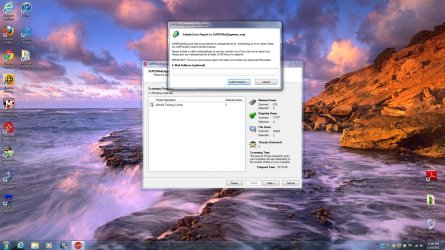
I bought a brand new computer for my wife (the specs listed in my profile are not hers) but it is WIN 7 64 bit. Anyway I installed Norton Internet Security 2011, Malwarebytes, Superantispyware, and Spyware Blaster. I did scans with NIS 2001 and Malwarebytes and they were both clean. When I try to do a scan with SAS I get an error it has encountered a problem. I have tried three times and I did un/reinstall once. This is a brand new computer so I can imagine it being infected. Anyone have any ideas?
 

Attachments
  • SAS Error.jpg
    SAS Error.jpg
    261.1 KB · Views: 30

My Computer

Computer Manufacturer/Model Number
HP p6680t
OS
Windows 7 Home Premium 64bit-HP OEM SP1 Installed
CPU
Intel Core i5-650 3.2GHz
Motherboard
MS-7613 (Iona-GL8E) Intel H57 Express Chipset
Memory
6GB DDR3 1333Mhz SDRAM
Graphics Card(s)
Intergrated Intel H57
Sound Card
Intergrated Realtek 7/1
Monitor(s) Displays
HP 3310m 23" diagonal widescreen flat panel monitor
Screen Resolution
1920 x 1080
Hard Drives
1 TB (7,200) SATA 3Gb/s
1.5 TB External
PSU
300W
Case
HP Piano Black
Cooling
Couple Fans
Keyboard
HP USB
Mouse
HP Optical
Internet Speed
3-6.0 Mbps Average around 5.0 Mbps AT&T DSL
Other Info
Security Includes NIS 2011, Malwarebytes, Superantispyware, & SpywareBlaster. Acronis True Home Image 2011 for Backup
Try submitting the error report and see if the developers e-mail you back. There's not much to go off as there isn't an error code or even a description of the problem. Sorry...
 

My Computer

Computer Manufacturer/Model Number
Custom Build
OS
Windows 7 Ultimate x64/Windows 8 Consumer Preview x64/Ubuntu 11.04
CPU
Intel Pentium Dual Core E6700 3.2GHz
Motherboard
ASUS P5G41T-M LX
Memory
Strontium 8192MB DDR3 1333Mhz
Graphics Card(s)
msi GeForce N560GTX-M2D1GD5 1GB
Sound Card
Realtek HD Audio
Monitor(s) Displays
CHIMEI CMV 221D 22"
Screen Resolution
1680x1050
Hard Drives
Seagate Barracuda LP Green 3.5'' 2TB Internal HDD 5900RPM + WD Elements Desktop 1TB External HDD 7200RPM
PSU
SHAW Viper-1500w Gaming PSU
Case
Black eMaxx ATX Mini Tower Case
Keyboard
Microsoft Wireless Keyboard 1000
Mouse
Microsoft Wireless Optical Mouse 2000
Internet Speed
100GB @ 4.76Mbps
Try submitting the error report and see if the developers e-mail you back. There's not much to go off as there isn't an error code or even a description of the problem. Sorry...

Yeah I did submit the error report and nothing is listed at the time the error occurred in my event viewer.
 
Last edited:

My Computer

Computer Manufacturer/Model Number
HP p6680t
OS
Windows 7 Home Premium 64bit-HP OEM SP1 Installed
CPU
Intel Core i5-650 3.2GHz
Motherboard
MS-7613 (Iona-GL8E) Intel H57 Express Chipset
Memory
6GB DDR3 1333Mhz SDRAM
Graphics Card(s)
Intergrated Intel H57
Sound Card
Intergrated Realtek 7/1
Monitor(s) Displays
HP 3310m 23" diagonal widescreen flat panel monitor
Screen Resolution
1920 x 1080
Hard Drives
1 TB (7,200) SATA 3Gb/s
1.5 TB External
PSU
300W
Case
HP Piano Black
Cooling
Couple Fans
Keyboard
HP USB
Mouse
HP Optical
Internet Speed
3-6.0 Mbps Average around 5.0 Mbps AT&T DSL
Other Info
Security Includes NIS 2011, Malwarebytes, Superantispyware, & SpywareBlaster. Acronis True Home Image 2011 for Backup

My Computer

Computer Manufacturer/Model Number
HP p6680t
OS
Windows 7 Home Premium 64bit-HP OEM SP1 Installed
CPU
Intel Core i5-650 3.2GHz
Motherboard
MS-7613 (Iona-GL8E) Intel H57 Express Chipset
Memory
6GB DDR3 1333Mhz SDRAM
Graphics Card(s)
Intergrated Intel H57
Sound Card
Intergrated Realtek 7/1
Monitor(s) Displays
HP 3310m 23" diagonal widescreen flat panel monitor
Screen Resolution
1920 x 1080
Hard Drives
1 TB (7,200) SATA 3Gb/s
1.5 TB External
PSU
300W
Case
HP Piano Black
Cooling
Couple Fans
Keyboard
HP USB
Mouse
HP Optical
Internet Speed
3-6.0 Mbps Average around 5.0 Mbps AT&T DSL
Other Info
Security Includes NIS 2011, Malwarebytes, Superantispyware, & SpywareBlaster. Acronis True Home Image 2011 for Backup
A little more info that I remembered. The first scan that failed stopped on a file on my D partitioned drive that has my OEM windows files (I do not have a windows disk) this is an HP computer.

The next two scans I excluded the D drive and it hung on C:\windows\write.exe that is shown in the picture above. I am still going to try the fix above when I get home but was wondering if I exclude the options in the suggestion am I still really getting a good scan?
 

My Computer

Computer Manufacturer/Model Number
HP p6680t
OS
Windows 7 Home Premium 64bit-HP OEM SP1 Installed
CPU
Intel Core i5-650 3.2GHz
Motherboard
MS-7613 (Iona-GL8E) Intel H57 Express Chipset
Memory
6GB DDR3 1333Mhz SDRAM
Graphics Card(s)
Intergrated Intel H57
Sound Card
Intergrated Realtek 7/1
Monitor(s) Displays
HP 3310m 23" diagonal widescreen flat panel monitor
Screen Resolution
1920 x 1080
Hard Drives
1 TB (7,200) SATA 3Gb/s
1.5 TB External
PSU
300W
Case
HP Piano Black
Cooling
Couple Fans
Keyboard
HP USB
Mouse
HP Optical
Internet Speed
3-6.0 Mbps Average around 5.0 Mbps AT&T DSL
Other Info
Security Includes NIS 2011, Malwarebytes, Superantispyware, & SpywareBlaster. Acronis True Home Image 2011 for Backup
techmonkey74
I have been using SuperAntiSpyware { free & now Pro / paid version} for years.

I suggest you use this facility
-


This service I recommend.
Answers have always been prompt & polite. "Problems" have been corrected.


{Should the above not work for some reason try this way -
SUPERAntiSpyware.com - Customer Service and Product Support
Refer bottom left hand side.}


My Computer

Computer Manufacturer/Model Number
LAPTOP. HP Pavilion dv7-4010TX .
OS
Win 7 Ultimate 64-bit. SP1.
CPU
Intel i7 -720QM.[1.6GHz Turbo Boost 2.8GHz. 6MB Cache.]
Memory
8 DDR 3 RAM. 1066MHZ
Graphics Card(s)
ATI 1024 MB. DDR3. Radeon HD5650
Monitor(s) Displays
17.3" High Definition Brightview LCD. LED Backlit.
Screen Resolution
1600 x 900.
Hard Drives
640GB
Case
Laptop / notebook.
Mouse
Logitech Anywhere mouse. MX.
Internet Speed
ADSL [ but too slow ]
Well the fix from above worked :D Does anyone know if I leave the option unchecked if I am still getting a very good scan? I unchecked Kernel Direct & Direct Disk Access. What exactly is it doing or should I say NOT doing during a scan? I might submit a problem ticket but if making the tweaks I already did is good enough I will leave it alone.
 

My Computer

Computer Manufacturer/Model Number
HP p6680t
OS
Windows 7 Home Premium 64bit-HP OEM SP1 Installed
CPU
Intel Core i5-650 3.2GHz
Motherboard
MS-7613 (Iona-GL8E) Intel H57 Express Chipset
Memory
6GB DDR3 1333Mhz SDRAM
Graphics Card(s)
Intergrated Intel H57
Sound Card
Intergrated Realtek 7/1
Monitor(s) Displays
HP 3310m 23" diagonal widescreen flat panel monitor
Screen Resolution
1920 x 1080
Hard Drives
1 TB (7,200) SATA 3Gb/s
1.5 TB External
PSU
300W
Case
HP Piano Black
Cooling
Couple Fans
Keyboard
HP USB
Mouse
HP Optical
Internet Speed
3-6.0 Mbps Average around 5.0 Mbps AT&T DSL
Other Info
Security Includes NIS 2011, Malwarebytes, Superantispyware, & SpywareBlaster. Acronis True Home Image 2011 for Backup
Back
Top