sata drive problem

moults

New member
Local time
9:36 AM
Messages
19
I have windows 7 Pro installed on a 500gb Western Digital Sata drive which works fine until i connect another sata drive (Samsung 250gb) then the system won't boot at all. My mobo is a P6N sli rev2. Unfortunately i need to access the second sata drive as it has a back up image of my system i need to reinstall.
 

My Computer

Computer Manufacturer/Model Number
OWN BUILT
OS
windows 7
CPU
2.40 INTEL CORE 2 DUO
Motherboard
MSI MS-7346 1.0
Memory
4GB
Graphics Card(s)
RADEON X1950 PRO
Sound Card
ON BOARD
Monitor(s) Displays
SAMSUNG SYNCMASTER 226
Hard Drives
1 X 80GB IDE
1 X 250GB IDE
1 X 250GB SATA
PSU
550W
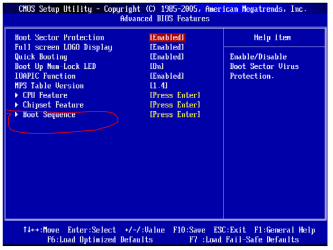
You need to tell your computer to boot from the specific drive, i.e., the 500GB drive.

You need to enter your bios and find the setting for Boot.
You then need to specify the drive to boot from, which will be listed, more than likely, by manufacturer name.

Once you get into the boot menu, the sub menu named 1st/2nd/3rd Boot Device is where you'll specify the 500GB hard drive (probably by manufacturer name)
 

Attachments

  • ms7346a.PNG
    ms7346a.PNG
    25.2 KB · Views: 13

My Computer

Computer Manufacturer/Model Number
Rig 1
OS
Windows 7 Ultimate x64
CPU
AMD Phenom II X4 940 Black Edition @ 3.4GHz (AM2+)
Motherboard
Gigabyte GA-MA790X-UD4P (AM2+)
Memory
Corsair CM2X4096-8500C5 (4 X 2GB)
Graphics Card(s)
XFX Radeon HD 5770 / Diamond Radeon HD 5770 CrossFireX
Sound Card
Asus Xonar DS (PCI)
Monitor(s) Displays
Samsung SyncMaster 932bw+ (3)
Screen Resolution
4320x900
Hard Drives
OCZ Vertex 2 80 GB - Windows 7 System --
WD Caviar Black 1TB - Music, Movies, Vids, Pics --
WD Caviar Black 640GB - User Profiles & Games --
WD My Book 320GB external
PSU
Corsair CMPSU-750TX
Case
Cooler Master HAF 932
Cooling
Corsair Hydro Series H50
Keyboard
Logitech Desktop Wave
Mouse
Logitech LX8 Laser
Internet Speed
20 down / 2 up
Other Info
LG GGC-H20L Blu-Ray / HDDVD combo --
Hauppauge HVR-1250 --
Silverstone MFP-51 --
Logitech Webcam C600
My mistake i should have been clearer i have been into the bios and set the boot order, that isn't the problem. I only jhave a problem when i connect the 2nd sata drive even though my boot sequence is correct.
 

My Computer

Computer Manufacturer/Model Number
OWN BUILT
OS
windows 7
CPU
2.40 INTEL CORE 2 DUO
Motherboard
MSI MS-7346 1.0
Memory
4GB
Graphics Card(s)
RADEON X1950 PRO
Sound Card
ON BOARD
Monitor(s) Displays
SAMSUNG SYNCMASTER 226
Hard Drives
1 X 80GB IDE
1 X 250GB IDE
1 X 250GB SATA
PSU
550W
This is an internal drive, right?

And you're stating that you can't boot when you have the second SATA drive connected, right? What specifically happens or what error message displays? Have you verified that when the drive in question is connected and you enter the bios that the boot order still the same?
 

My Computer

Computer Manufacturer/Model Number
Rig 1
OS
Windows 7 Ultimate x64
CPU
AMD Phenom II X4 940 Black Edition @ 3.4GHz (AM2+)
Motherboard
Gigabyte GA-MA790X-UD4P (AM2+)
Memory
Corsair CM2X4096-8500C5 (4 X 2GB)
Graphics Card(s)
XFX Radeon HD 5770 / Diamond Radeon HD 5770 CrossFireX
Sound Card
Asus Xonar DS (PCI)
Monitor(s) Displays
Samsung SyncMaster 932bw+ (3)
Screen Resolution
4320x900
Hard Drives
OCZ Vertex 2 80 GB - Windows 7 System --
WD Caviar Black 1TB - Music, Movies, Vids, Pics --
WD Caviar Black 640GB - User Profiles & Games --
WD My Book 320GB external
PSU
Corsair CMPSU-750TX
Case
Cooler Master HAF 932
Cooling
Corsair Hydro Series H50
Keyboard
Logitech Desktop Wave
Mouse
Logitech LX8 Laser
Internet Speed
20 down / 2 up
Other Info
LG GGC-H20L Blu-Ray / HDDVD combo --
Hauppauge HVR-1250 --
Silverstone MFP-51 --
Logitech Webcam C600
There are no error messages but the system just won't boot with 2 sata drives attached. Bios boot order is correct. I have managed to access the 2nd sata drive by booting into 7 from a spare ide drive i had, this enabled me to recover all the data and format the drive. There must be some kind of conflict between the sata drives as all is well until i have more than 1 sata drive attached.
 

My Computer

Computer Manufacturer/Model Number
OWN BUILT
OS
windows 7
CPU
2.40 INTEL CORE 2 DUO
Motherboard
MSI MS-7346 1.0
Memory
4GB
Graphics Card(s)
RADEON X1950 PRO
Sound Card
ON BOARD
Monitor(s) Displays
SAMSUNG SYNCMASTER 226
Hard Drives
1 X 80GB IDE
1 X 250GB IDE
1 X 250GB SATA
PSU
550W
Yes this is the same motherboard. I have the system running now but had to format both drives. Unfortunately my back up image had a corrupt file so i managed to lose all my information.
 

My Computer

Computer Manufacturer/Model Number
OWN BUILT
OS
windows 7
CPU
2.40 INTEL CORE 2 DUO
Motherboard
MSI MS-7346 1.0
Memory
4GB
Graphics Card(s)
RADEON X1950 PRO
Sound Card
ON BOARD
Monitor(s) Displays
SAMSUNG SYNCMASTER 226
Hard Drives
1 X 80GB IDE
1 X 250GB IDE
1 X 250GB SATA
PSU
550W
Yes this is the same motherboard. I have the system running now but had to format both drives. Unfortunately my back up image had a corrupt file so i managed to lose all my information.
Welcome to Windows 7 Support.
Moults, when you initially built your system how did you configure the first HDD in bios? SATA/IDE?
There maybe conflict when the 2nd HDD was installed, I suspect a Redundant AKA RAID issue?
 

My Computer

Computer Manufacturer/Model Number
Custom Build
OS
Windows 7 7600 1 X64
CPU
AMD PHENOM II X 550 PROCESSOR 3.1 ghz
Motherboard
ASUS M4A78-TE
Memory
Corsair 4 gig ddr 3
Graphics Card(s)
ati radeon 3300
Sound Card
ati hd
Monitor(s) Displays
syncmaster 2033sw
Screen Resolution
1600X900 60 hz refresh
Hard Drives
twin_seagates SATA's 1 TB & 500 Gig, hitachi_slimline 160 gig
PSU
antec_550 watt
Case
cooler master GLite
Cooling
stock_heat sink
Internet Speed
20mbs up/ 1.5mbs down
Other Info
favorite child "stewie"
favorite dog "brian"
Although i only now have 2 sata drives they are configured as ide in bios.
 

My Computer

Computer Manufacturer/Model Number
OWN BUILT
OS
windows 7
CPU
2.40 INTEL CORE 2 DUO
Motherboard
MSI MS-7346 1.0
Memory
4GB
Graphics Card(s)
RADEON X1950 PRO
Sound Card
ON BOARD
Monitor(s) Displays
SAMSUNG SYNCMASTER 226
Hard Drives
1 X 80GB IDE
1 X 250GB IDE
1 X 250GB SATA
PSU
550W
Back
Top