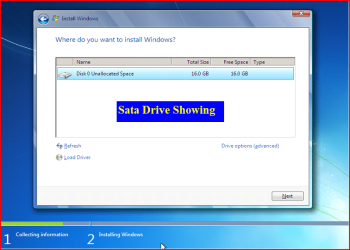
SATA Driver - Load in Windows 7 or Vista Setup

How to Load SATA Driver in Windows 7 or Vista Setup

When you install Vista or Win 7, setup can not find your Hard Drive.
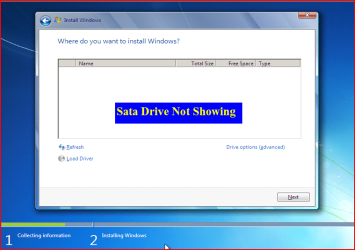

1.PNG


1) Copy your SATA drivers to a disk. (Floppy, CD, USB)
NOTE: Keep this disk in a safe place, as it will be need to use in the Recovery Console.
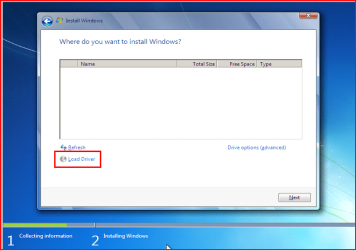
2.PNG

2) Click Load Drivers.
3.PNG
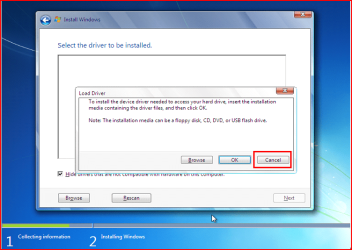
3) Click Cancel
4.PNG
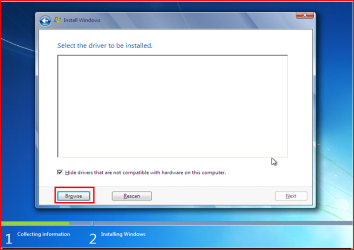
4) Click Browse.
5.PNG
6.PNG
7.PNG
8.PNG
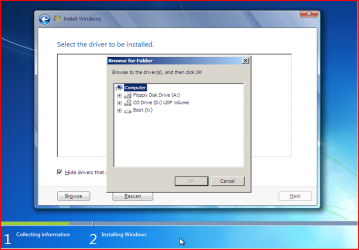
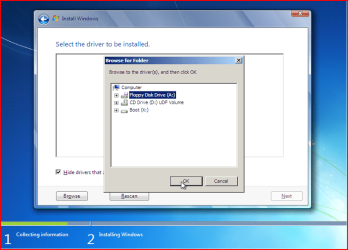
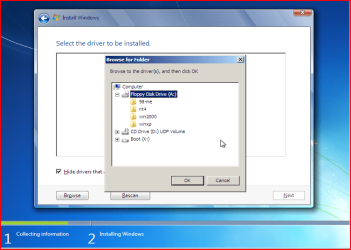
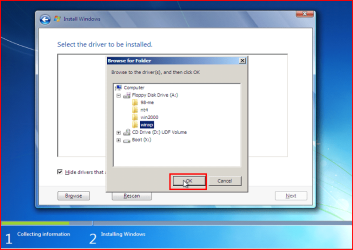
5) Choose your Sata Controller. Click OK
NOTE: for this example, I am using Promise Fastrak 376.
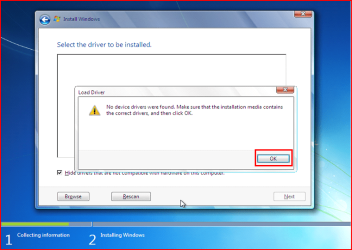
9.PNG
6) Click OK.
10.PNG
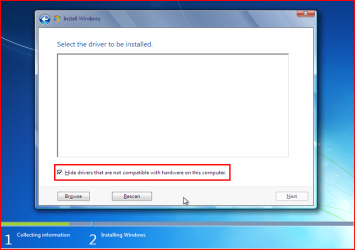
7) Click Unhide.
11.PNG
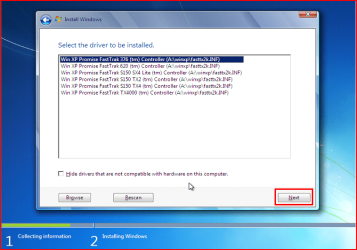
8) Choose your Sata Controller. Click Next.
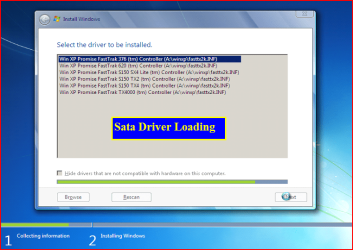
12.PNG
13.PNG
9) Continue with setup.


Last edited by a moderator:
I wanted to add Windows 7 loaded, got to a screen that showed my HDD and I selected install to that drive and it started. It looked like it was working and then came back with "Could not find HDD?
 

My Computer My Computer

At a glance

XP Pro and Windows 71.7 Celeron3 gig
Computer Manufacturer/Model Number
Acer Aspire 5315 Notebook
OS
XP Pro and Windows 7
CPU
1.7 Celeron
Motherboard
Acer
Memory
3 gig
Hard Drives
320gig Samsung SP
80 gig Hitachi (Factory Acer)?
If I can do a clean Win 7 install without the use of XP then I don't need SATA drivers. These are included on the Windows 7 driver database? I should be able to stick in the disk, run it, load it and then udate it. I assume ACER uses a standard Intel HDD controller? This should be no problem. I have installed many HDD's even though they were mostly IDE's.
 

My Computer My Computer

At a glance

XP Pro and Windows 71.7 Celeron3 gig
Computer Manufacturer/Model Number
Acer Aspire 5315 Notebook
OS
XP Pro and Windows 7
CPU
1.7 Celeron
Motherboard
Acer
Memory
3 gig
Hard Drives
320gig Samsung SP
80 gig Hitachi (Factory Acer)?
I wanted to add Windows 7 loaded, got to a screen that showed my HDD and I selected install to that drive and it started. It looked like it was working and then came back with "Could not find HDD?

Check your cables.
 

My Computer My Computer

At a glance

ME/XP/Vista/Win7
OS
ME/XP/Vista/Win7
Hi, a newbie here. I am pulling my hair out trying to install Win 7 on my Dell Dimension 5150. I cannot find any drivers that support the onboard Western Digital 250gb SATA drive. I had to reformat the drive due to previous failure. I can see drivers on my USB stick using the process above but none of the ones I've discovered show the drive, any help appreciated...
 

My Computer My Computer

At a glance

Win XP
OS
Win XP
Hi alarober

You will need drivers for your Sata Controller, NOT DRIVERS FOR YOUR HD.

As you have a Intel download from here:
http://downloadcenter.intel.com/SearchResult.aspx?lang=eng&ProductFamily=Chipsets&ProductLine=Chipset+Software&ProductProduct=Intel%c2%ae+Rapid+Storage+Technology+(Intel%c2%ae+RST

As you have had a HD failure try this first:

Check your HD.
http://www.sevenforums.com/tutorials/433-disk-check.html

Check with a hard drive diagnostic tools.
Hard Drive Diagnostics Tools and Utilities (Storage) - TACKtech Corp.
 

My Computer My Computer

At a glance

ME/XP/Vista/Win7
OS
ME/XP/Vista/Win7
Thx...
 

My Computer My Computer

At a glance

Windows 7 UltimateCore I7 3.33Ghz8GB DDR3XFX Nvidia Gforce GTX295
OS
Windows 7 Ultimate
CPU
Core I7 3.33Ghz
Motherboard
Intel DX58SO
Memory
8GB DDR3
Graphics Card(s)
XFX Nvidia Gforce GTX295
Sound Card
Ative 7.1
Monitor(s) Displays
DELL 24" LCD
Hard Drives
2.TB Seagate Sata 7200RPM
PSU
Epsilon 1010W
Case
DELL
how to copy sata driver??
 

My Computer My Computer

At a glance

windows 7 ultimateIntel(R) Core(TM)2 Duo CPU [email protected]1GB DDR2 766MHzGeForce 7050/nForce 610
OS
windows 7 ultimate
CPU
Intel(R) Core(TM)2 Duo CPU [email protected]
Motherboard
Zotac nForce 610i Value
Memory
1GB DDR2 766MHz
Graphics Card(s)
GeForce 7050/nForce 610
Monitor(s) Displays
Samsung 19" SyncMaster 933BW
Screen Resolution
1440 x 900
Hard Drives
Maxtor STM3250310AS ATA Device
Internet Speed
Cecom Broadband 3.6 MBps
good tutorial
 

My Computer My Computer

At a glance

Windows 8 Professional x64core 2 duo T55504 GBGMA X3100
Computer Manufacturer/Model Number
aspire 5920
OS
Windows 8 Professional x64
CPU
core 2 duo T5550
Memory
4 GB
Graphics Card(s)
GMA X3100
Hard Drives
160 GB + 320 GB
Internet Speed
2 mbps

My Computer My Computer

At a glance

ME/XP/Vista/Win7
OS
ME/XP/Vista/Win7
hai admin

please can you send the link to download the SATA Driver - Load in Windows 7 , send as soon as possible
 

My Computer My Computer

At a glance

windows 7 Ultimate x64
OS
windows 7 Ultimate x64

My Computer My Computer

At a glance

ME/XP/Vista/Win7
OS
ME/XP/Vista/Win7
Hi.

I followed this tutorial step by step and when I press "Next" to install the drivers, after a few seconds, this error comes in "No new devices could be found. Make sure the driver files are correct and located on the driver installation media."

The specs of my conmputer are:
Asus P7H55-M
Intel i3 540
Western Digital 10EARS - 1 TB

I'm using the drivers downloaded from the asus website for windows 7 64-bit and "SATA" tab.

Any solution to my problem?
 

My Computer My Computer

At a glance

Windows 7 Professional 64-bit
OS
Windows 7 Professional 64-bit
Hi.

I followed this tutorial step by step and when I press "Next" to install the drivers, after a few seconds, this error comes in "No new devices could be found. Make sure the driver files are correct and located on the driver installation media."

The specs of my conmputer are:
Asus P7H55-M
Intel i3 540
Western Digital 10EARS - 1 TB

I'm using the drivers downloaded from the asus website for windows 7 64-bit and "SATA" tab.

Any solution to my problem?

Will the HD drive show in BIOS?

Will the HD drive show in Diskpart?

http://www.sevenforums.com/tutorials/119713-diskpart-pc-startup.html
 

My Computer My Computer

At a glance

ME/XP/Vista/Win7
OS
ME/XP/Vista/Win7
Hi.

I followed this tutorial step by step and when I press "Next" to install the drivers, after a few seconds, this error comes in "No new devices could be found. Make sure the driver files are correct and located on the driver installation media."

The specs of my conmputer are:
Asus P7H55-M
Intel i3 540
Western Digital 10EARS - 1 TB

I'm using the drivers downloaded from the asus website for windows 7 64-bit and "SATA" tab.

Any solution to my problem?

Will the HD drive show in BIOS?

Will the HD drive show in Diskpart?

http://www.sevenforums.com/tutorials/119713-diskpart-pc-startup.html

Yes. The disk show in BIOS and in Diskpart.
I followed the tutorial to open Diskpart (thanks for the link) and when I was in Diskpart I used the command "list disk" and the disk appeared on the screen. Then I used "select disk 0" and then "detail disk" and on the screen it appeared both partitions on the disk and the status "Healthy" in both.

Thanks for the quick reply.
 

My Computer My Computer

At a glance

Windows 7 Professional 64-bit
OS
Windows 7 Professional 64-bit
Hi.

I followed this tutorial step by step and when I press "Next" to install the drivers, after a few seconds, this error comes in "No new devices could be found. Make sure the driver files are correct and located on the driver installation media."

The specs of my conmputer are:
Asus P7H55-M
Intel i3 540
Western Digital 10EARS - 1 TB

I'm using the drivers downloaded from the asus website for windows 7 64-bit and "SATA" tab.

Any solution to my problem?

Will the HD drive show in BIOS?

Will the HD drive show in Diskpart?

http://www.sevenforums.com/tutorials/119713-diskpart-pc-startup.html

Yes. The disk show in BIOS and in Diskpart.
I followed the tutorial to open Diskpart (thanks for the link) and when I was in Diskpart I used the command "list disk" and the disk appeared on the screen. Then I used "select disk 0" and then "detail disk" and on the screen it appeared both partitions on the disk and the status "Healthy" in both.

Thanks for the quick reply.

Try a full clean & full format in command prompt.
http://www.sevenforums.com/tutorials/91339-ssd-hdd-optimize-windows-reinstallation.html
 

My Computer My Computer

At a glance

ME/XP/Vista/Win7
OS
ME/XP/Vista/Win7
Back
Top