SATA Drivers - Load in Windows XP Setup on Dual Boot

How to Load SATA Drivers in Windows XP Setup on your Dual Boot PC with Vista or Windows 7

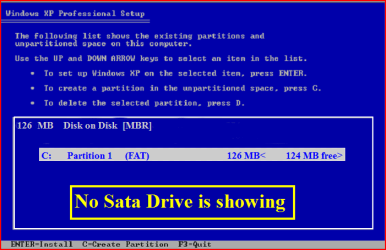
When you install Win XP, setup can not find your Hard Drive.
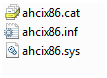
1.PNG

2.PNG
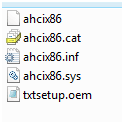
1) Copy your SATA drivers to a floppy disk.
NOTE: Keep this disk in a safe place, as it will be need to use in the Recovery Console.
NOTE: You cannot use a USB flash drive for this.

2) Press F6 at the first screen.
3.PNG
3) When you get to the load drive screen, Press S
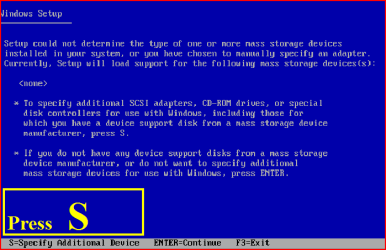
4.PNG
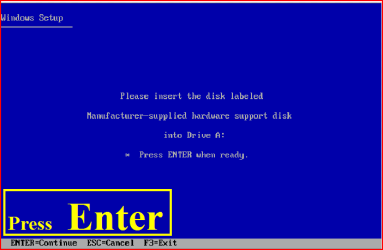
4) Next screen, Press Enter
5.PNG
5) Choose your Sata Controller. Press Enter
NOTE: For this example, I am using Promise Fastrak 376.
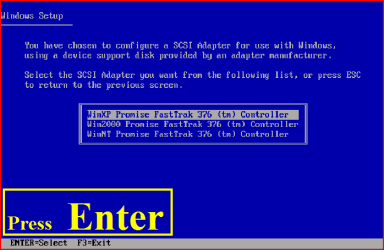
6.PNG
7.PNG
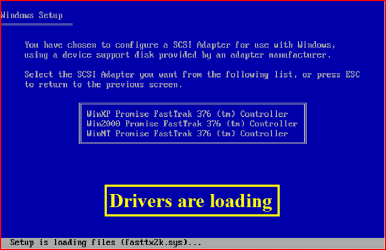
6) When drivers have load, press Enter
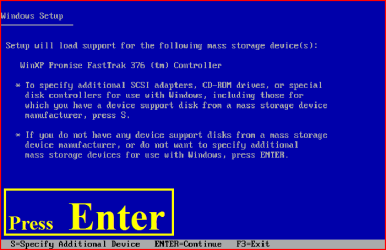
8.PNG
9.PNG
7) Continue with setup here:

A connected USB floppy disk drive does not work when you press F6 to install mass storage drivers during the Windows XP installation process
Dual Boot Installation with Windows 7 and XP

OR

Dual Boot Installation with Windows Vista and XP - Vista Forums

 
Last edited:
Quick question, will a USB external floppy drive work for this or does it have to be internal?

Purchased new HPE 150t and want to dual boot XP for older games that may be glitchy under windows 7. Would like to make it less complicated as possible and already have external floppy, but I see you mentioned USB flash drives won't work so just curious, thanks!
 

My Computer My Computer

At a glance

Windows 7 Home Premium 64-bitIntel Core i7-860 quad-core processor 2.8GHz6GB DDR3-1333MHz SDRAM1.8GB NVIDIA Geforce GTX 260
Computer Manufacturer/Model Number
HP Pavilion Elite HPE-150t
OS
Windows 7 Home Premium 64-bit
CPU
Intel Core i7-860 quad-core processor 2.8GHz
Memory
6GB DDR3-1333MHz SDRAM
Graphics Card(s)
1.8GB NVIDIA Geforce GTX 260
Sound Card
Integrated 7.1 channel sound
Hard Drives
640GB 7200 rpm SATA 3Gb/s hard drive
Quick question, will a USB external floppy drive work for this or does it have to be internal?

Purchased new HPE 150t and want to dual boot XP for older games that may be glitchy under windows 7. Would like to make it less complicated as possible and already have external floppy, but I see you mentioned USB flash drives won't work so just curious, thanks!

Yes, USB external floppy is Ok,but same newer one will not work.
 

My Computer My Computer

At a glance

ME/XP/Vista/Win7
OS
ME/XP/Vista/Win7
Hello, i have a situation here... i have tried to install XP SP3 x86 in my laptop HP Pavilion 3063cl, i downloaded the AMD SATA AHCI Controller and driver from HP but didn't works i slipstreamed this files in nlite with multiple driver folder option... when de xp install is running loading some files suddenly a blue screen error appears...

Someone who can help me please!!!, it is make me crazy, sorry for my bad english.

HD: ST9500420AS ATA Device
Chipset: AMD 785GX
Southbridge: ID439D

... i used the drivers listed in this page General XP Downgrade Guide for HP Laptops - HP Support Forum
 

My Computer My Computer

At a glance

7/xp
OS
7/xp
Hello, i have a situation here... i have tried to install XP SP3 x86 in my laptop HP Pavilion 3063cl, i downloaded the AMD SATA AHCI Controller and driver from HP but didn't works i slipstreamed this files in nlite with multiple driver folder option... when de xp install is running loading some files suddenly a blue screen error appears...

Someone who can help me please!!!, it is make me crazy, sorry for my bad english.

HD: ST9500420AS ATA Device
Chipset: AMD 785GX
Southbridge: ID439D

... i used the drivers listed in this page General XP Downgrade Guide for HP Laptops - HP Support Forum

Your HP Pavilion 3063cl is not listed, in the link.
You may be downloading the wrong drivers.
 

My Computer My Computer

At a glance

ME/XP/Vista/Win7
OS
ME/XP/Vista/Win7
Hi, sorry the inconveniences and the late reply... my laptop is a DV7. The model is not listed in the link but in the part 3 for ''Difficult Models'' says that DV7 are difficult to downgrade, it is possible task but needs many efforts... I have looking for SATA drivers for days in many forums but i just have found the drivers in the link of the last reply...

AMD SATA AHCI Controller: 32bit_ATI_SB7xx_RAID&AHCI_driver_v9-4_WHQL.zip - Windows Live

AMD SATA AHCI Driver from HP: ftp://ftp.hp.com/pub/softpaq/sp43501-44000/sp43839.exe

HD: ST9500420AS ATA Device
Chipset: AMD 785GX
Southbridge: ID439D

Some pious soul that can help me to find the SATA drivers for xp...

I have a doubt... the chipset drivers are needed for XP instalation wheather in external usb floppy or slipstreaming? ... i don't know if i told it well... i expect anxiously your answer !
 

My Computer My Computer

At a glance

7/xp
OS
7/xp
Hi, sorry the inconveniences and the late reply... my laptop is a DV7. The model is not listed in the link but in the part 3 for ''Difficult Models'' says that DV7 are difficult to downgrade, it is possible task but needs many efforts... I have looking for SATA drivers for days in many forums but i just have found the drivers in the link of the last reply...

AMD SATA AHCI Controller: 32bit_ATI_SB7xx_RAID&AHCI_driver_v9-4_WHQL.zip - Windows Live

AMD SATA AHCI Driver from HP: ftp://ftp.hp.com/pub/softpaq/sp43501-44000/sp43839.exe

HD: ST9500420AS ATA Device
Chipset: AMD 785GX
Southbridge: ID439D

Some pious soul that can help me to find the SATA drivers for xp...

I have a doubt... the chipset drivers are needed for XP instalation wheather in external usb floppy or slipstreaming? ... i don't know if i told it well... i expect anxiously your answer !

Both have the same drivers when unziped.

AMD SATA AHCI Controller: 32bit_ATI_SB7xx_RAID&AHCI_driver_v9-4_WHQL.zip - Windows Live

Capture.PNG

AMD SATA AHCI Driver from HP: ftp://ftp.hp.com/pub/softpaq/sp43501-44000/sp43839.exe

Capture1.PNG
 

My Computer My Computer

At a glance

ME/XP/Vista/Win7
OS
ME/XP/Vista/Win7
AMD SB8XX AHCI XP Drivers

plz find the attachment,.
its an AMD SB8XX AHCI XP Driver

Regards
 

Attachments

My Computer My Computer

At a glance

Windows 7AMD Phenom II X4 925A-DATA 2GB DDR3ATI 4200 256MB
Computer Manufacturer/Model Number
AMD.ATI.ASUS
OS
Windows 7
CPU
AMD Phenom II X4 925
Motherboard
Asus M4A785T-M
Memory
A-DATA 2GB DDR3
Graphics Card(s)
ATI 4200 256MB
Sound Card
VIA Vinyl HD Audio
Monitor(s) Displays
Samsung 22" 2233
Hard Drives
WD Sata II 500GB X2 (RAID 0)
PSU
VIP 400W Gold
Case
iBall Gamer
Cooling
AMD Cooler
Keyboard
Logitech Wired
Mouse
Logitech Wired
Internet Speed
512kbps Unlimited
plz find the attachment,.
its an AMD SB8XX AHCI XP Driver

Regards

Hi EverWin

Your driver attachment is same as Yomero both links.
 

My Computer My Computer

At a glance

ME/XP/Vista/Win7
OS
ME/XP/Vista/Win7
One of the demerit of AMD chipset when downgrading to windows XP.

when you integrate an AMD AHCI driver ver. bla bla & create a XP DISC

& you again Integrate new/old version of AHCI driver, trust me it never works.

its not sata driver problem.

you need to start over again from start.

Get Windows XP SP3 Virgin DISC & Add only one of the AMD AHCI driver & try again.
 

My Computer My Computer

At a glance

Windows 7AMD Phenom II X4 925A-DATA 2GB DDR3ATI 4200 256MB
Computer Manufacturer/Model Number
AMD.ATI.ASUS
OS
Windows 7
CPU
AMD Phenom II X4 925
Motherboard
Asus M4A785T-M
Memory
A-DATA 2GB DDR3
Graphics Card(s)
ATI 4200 256MB
Sound Card
VIA Vinyl HD Audio
Monitor(s) Displays
Samsung 22" 2233
Hard Drives
WD Sata II 500GB X2 (RAID 0)
PSU
VIP 400W Gold
Case
iBall Gamer
Cooling
AMD Cooler
Keyboard
Logitech Wired
Mouse
Logitech Wired
Internet Speed
512kbps Unlimited
Question about the drivers for xp in a dual boot with windows 7

I see that the process says you need to have a floppy drive. My two systems that I am working with do not have floppies. But maybe I do not need it. Here is my plan. Please tell me if I'm nuts.

I currently have an xp pro machine running on a sata drive. Home grown.
I have since built a newer faster machine also with sata drives running windows 7 64 bit.

I really would like to keep this xp pro machine too since it has a bunch of apps that I am afraid will not run under windows 7 and even if they did I am not sure where the downloads are that I got them from.

OK so here is my idea. I take out the C drive from the xp machine and put it in with the other sata drives in my new win 7 machine. Go do the dual boot and tell it to point to the drive that has the xp pro on it. Being that it already has sata drivers will it work?

I have never done a dual boot but am not a total virgin to hardware and software. Just really do not want to have to load the windows 7 all over again as I have it running pretty good with a ton of adobe software.

Any ideas if I should just trash this idea or go for it. I have EasyBCD but have never used it. If someone who maybe has done this before could hold my hand or at the least point me to somewhere that has some instructions.

Thanks
 

My Computer My Computer

At a glance

Windows 7 64bitIntel i5-7508GigATI 5750
Computer Manufacturer/Model Number
Home Grown
OS
Windows 7 64bit
CPU
Intel i5-750
Motherboard
Gigbyte P55 4P
Memory
8Gig
Graphics Card(s)
ATI 5750
Sound Card
on board
Monitor(s) Displays
asus 19" flat screens (2)
Hard Drives
2 sata drives 2 ide
PSU
650W
Case
cooler master
Cooling
3 fans and a big thing on the cpu...aftermarket
I see that the process says you need to have a floppy drive. My two systems that I am working with do not have floppies. But maybe I do not need it. Here is my plan. Please tell me if I'm nuts.

I currently have an xp pro machine running on a sata drive. Home grown.
I have since built a newer faster machine also with sata drives running windows 7 64 bit.

I really would like to keep this xp pro machine too since it has a bunch of apps that I am afraid will not run under windows 7 and even if they did I am not sure where the downloads are that I got them from.

OK so here is my idea. I take out the C drive from the xp machine and put it in with the other sata drives in my new win 7 machine. Go do the dual boot and tell it to point to the drive that has the xp pro on it. Being that it already has sata drivers will it work?

I have never done a dual boot but am not a total virgin to hardware and software. Just really do not want to have to load the windows 7 all over again as I have it running pretty good with a ton of adobe software.

Any ideas if I should just trash this idea or go for it. I have EasyBCD but have never used it. If someone who maybe has done this before could hold my hand or at the least point me to somewhere that has some instructions.

Thanks

First check for all the Win XP drivers for your hardware.
If your Win XP CD, does not support your Sata Controller, you will need to load drivers at F6.
Load Sata Controller drivers with a floppy disk is the best way.
or can http://www.sevenforums.com/tutorials/72185-sata-drivers-slipstream-into-windows-xp-cd.html

You will need to do a repair or clean install of Win XP.

How To Repair Install Or Clean Install Win XP, Tutorials:
How to Install Windows XP
XP Clean Install
How to Perform a Windows XP Repair Install
Repair Windows XP - How to Perform a Repair Installation of Windows XP - Part 1 of 2
 

My Computer My Computer

At a glance

ME/XP/Vista/Win7
OS
ME/XP/Vista/Win7
I am in a conundrum. I am using Pavilion Magnesium Gray Edition p6540f. There are no SATA Drivers for XP. How do I dual boot without it?
 

My Computer My Computer

At a glance

Windows 7 Home Premium 64 bitAMD Phenom II8GBATI Radeon HD
Computer Manufacturer/Model Number
P6540F
OS
Windows 7 Home Premium 64 bit
CPU
AMD Phenom II
Motherboard
H-RS880-uATX
Memory
8GB
Graphics Card(s)
ATI Radeon HD
Sound Card
RealTek
Monitor(s) Displays
HP 2010i
Hard Drives
1TB
PSU
Antec Basiq 500W
I am in a conundrum. I am using Pavilion Magnesium Gray Edition p6540f. There are no SATA Drivers for XP. How do I dual boot without it?

First check for all the Win XP drivers for your hardware.
HP Support & Drivers

If your Win XP CD, does not support your Sata Controller, you will need to load drivers to uses at F6.

Load Sata Controller drivers with a floppy disk is the best way.
http://www.sevenforums.com/tutorials/66010-sata-drivers-load-windows-xp-setup-dual-boot.html
OR
http://www.sevenforums.com/tutorials/72185-sata-drivers-slipstream-into-windows-xp-cd.html

You can download your F6 Sata Controller drivers from here:
General XP Downgrade Guide for HP Laptops - HP Support Forum
 

My Computer My Computer

At a glance

ME/XP/Vista/Win7
OS
ME/XP/Vista/Win7
I found the AMD SATA AHCI Controller Driver from the link you provided. It will work on a desktop since I noticed it is all based on laptops.
 

My Computer My Computer

At a glance

Windows 7 Home Premium 64 bitAMD Phenom II8GBATI Radeon HD
Computer Manufacturer/Model Number
P6540F
OS
Windows 7 Home Premium 64 bit
CPU
AMD Phenom II
Motherboard
H-RS880-uATX
Memory
8GB
Graphics Card(s)
ATI Radeon HD
Sound Card
RealTek
Monitor(s) Displays
HP 2010i
Hard Drives
1TB
PSU
Antec Basiq 500W
Sata Drivers

I am trying to load XP on a dual boot so I can use IPX, go figure MS thinks no one still uses IPX.

So how do I load SAT drivers when I can't use a USB?
 

My Computer My Computer

At a glance

7
OS
7
I am trying to load XP on a dual boot so I can use IPX, go figure MS thinks no one still uses IPX.

So how do I load SAT drivers when I can't use a USB?

First check for all the Win XP drivers for your hardware.
If your Win XP CD, does not support your Sata Controller, you will need to load drivers to uses at F6.
Load Sata Controller drivers with a floppy disk is the best way.

http://www.sevenforums.com/tutorials/66010-sata-drivers-load-windows-xp-setup-dual-boot.html
OR
http://www.sevenforums.com/tutorials/72185-sata-drivers-slipstream-into-windows-xp-cd.html
 

My Computer My Computer

At a glance

ME/XP/Vista/Win7
OS
ME/XP/Vista/Win7
I am going to dual-boot install XP Professional 32 bit SP2 on a 64 bit Gateway laptop with Intel i5-460m and ATI Radeon HD 5650 Graphics. I can't find the SATA drivers on the Gateway site and I'm not sure what I should be downloading from the Intel site... nothing says SATA driver.

Also, does using a floppy disk mean you have to go back to those squarish plastic things?
 

My Computer My Computer

At a glance

Windows 7 Home Premium 64bit
Computer Manufacturer/Model Number
Gateway
OS
Windows 7 Home Premium 64bit
Motherboard
Intel i5-460m
Hi qwerty

First check for all the Win XP drivers for your hardware.
If your Win XP CD, does not support your Sata Controller, you will need to load drivers to uses at F6.
Load Sata Controller drivers with a floppy disk is the best way.

http://www.sevenforums.com/tutorials/66010-sata-drivers-load-windows-xp-setup-dual-boot.html
OR
http://www.sevenforums.com/tutorials/72185-sata-drivers-slipstream-into-windows-xp-cd.html

If your Gateway has a Intel Sata Controller.
You can download your F6 Sata Controller drivers from here:

Intel Sata Controller Drivers

Can you post your specs.
http://www.sevenforums.com/general-discussion/22550-filling-out-system-specs.html
http://www.sevenforums.com/hardware-devices/6936-dont-know-what-hardware-you-have.html
VistaForums SysInfo Tool - Vista Forums
 
Last edited:

My Computer My Computer

At a glance

ME/XP/Vista/Win7
OS
ME/XP/Vista/Win7
Thanks...

It appears that Intel Driver version 9.6.0.1014 is what I need for XP Pro 32 and it is also the driver that is currently in use on my Gateway laptop. Does that mean I won't need to be ready with a driver on floppy at F6?

I have the Intel(R) 5 Series 4 Port SATA AHCI Controller.
The processor is Intel(R) Core (TM) i5 CPU [email protected]
ATI Mobility Radeon HD 5650 1GB VRAM
 

My Computer My Computer

At a glance

Windows 7 Home Premium 64bit
Computer Manufacturer/Model Number
Gateway
OS
Windows 7 Home Premium 64bit
Motherboard
Intel i5-460m
Thanks...

It appears that Intel Driver version 9.6.0.1014 is what I need for XP Pro 32 and it is also the driver that is currently in use on my Gateway laptop. Does that mean I won't need to be ready with a driver on floppy at F6?

I have the Intel(R) 5 Series 4 Port SATA AHCI Controller.
The processor is Intel(R) Core (TM) i5 CPU [email protected]
ATI Mobility Radeon HD 5650 1GB VRAM

You will still need the F6 drivers.
 

My Computer My Computer

At a glance

ME/XP/Vista/Win7
OS
ME/XP/Vista/Win7
Back
Top