SATA Drivers - Load in Windows XP Setup on Dual Boot

How to Load SATA Drivers in Windows XP Setup on your Dual Boot PC with Vista or Windows 7

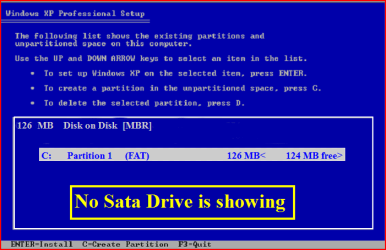
When you install Win XP, setup can not find your Hard Drive.
1.PNG

2.PNG
1) Copy your SATA drivers to a floppy disk.
NOTE: Keep this disk in a safe place, as it will be need to use in the Recovery Console.
NOTE: You cannot use a USB flash drive for this.

2) Press F6 at the first screen.
3.PNG
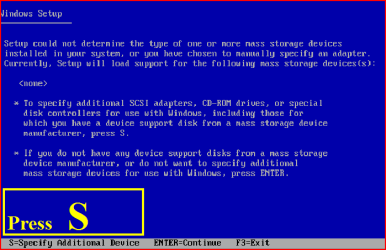
3) When you get to the load drive screen, Press S
4.PNG
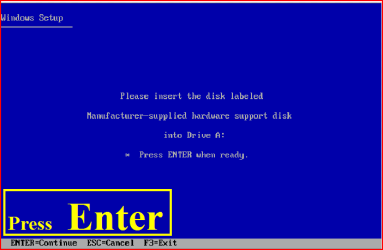
4) Next screen, Press Enter
5.PNG
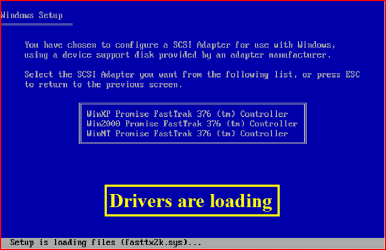
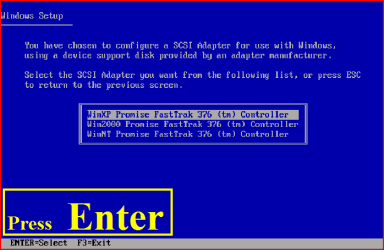
5) Choose your Sata Controller. Press Enter
NOTE: For this example, I am using Promise Fastrak 376.
6.PNG
7.PNG
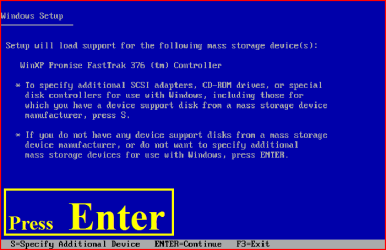
6) When drivers have load, press Enter
8.PNG
9.PNG
7) Continue with setup here:

A connected USB floppy disk drive does not work when you press F6 to install mass storage drivers during the Windows XP installation process
Dual Boot Installation with Windows 7 and XP

OR

Dual Boot Installation with Windows Vista and XP - Vista Forums

 
Last edited:
Hi larrym29

Download from Dell.

Unzip download file.

Open folder,copy files to floppy disk.

Thank you very much. This helped me find some XP drivers. My Dell laptop is a Studo 1558, but hardware listed in the 1555 is the same.
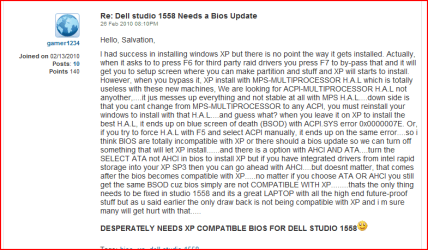
So I went and downloaded the SATA drivers installer (Matrix Storage Manager). Extracted files to floppy, then ran windowsXP setup. After F6 I was actually shown 4 different contollers I started at the top and worked my way through all 4. Each time I ended with same BSOD acpi.sys.
During my search for Studio15 XP drivers I did run across a thread in Dell forum, where a person was trying to setup a WIn7/XP dual boot on a Studio 1558. There was a response from another MEMBER stating that the 1558 Bios would not allow WindowsXP install.
So now I'm not sure where to go from here. I am debating flashing my Studio 1558 with the 1555 bios if that is even possible. As I stated the 1555 has the exact same hardware options as my 1558, but I have never messed with bios before and am a little leary!

Do not use the BIOS update for 1555 in a 1558.

Yes after posting this it took about 30 seconds of research to figure out that was a bad idea.

Thanks
 

My Computer My Computer

At a glance

windows7I3Radeon 4500 series
Computer Manufacturer/Model Number
Dell Studio Laptop
OS
windows7
CPU
I3
Graphics Card(s)
Radeon 4500 series
Floppy Drive

When you refer to a Floppy Drive in this tutorial, I assume you are also including CD optical drive. Am I correct?

Ron Harries
 

My Computer My Computer

At a glance

Windows 7 Professional
OS
Windows 7 Professional
When you refer to a Floppy Drive in this tutorial, I assume you are also including CD optical drive. Am I correct?

Ron Harries

You can only use Floppy Disk in this Tutorial.
 

My Computer My Computer

At a glance

ME/XP/Vista/Win7
OS
ME/XP/Vista/Win7
Is there no way around using a floppy drive. The requirement makes it impossible to install a windows dual boot on a laptop.

Ron Harries
 

My Computer My Computer

At a glance

Windows 7 Professional
OS
Windows 7 Professional
wouldnt it be an idea to include one on how to slipstream the drivers with the XP ISO? for those of us who dont have floppy disk drives (ie basically everybody)
 
Last edited:

My Computer My Computer

At a glance

Windows 10 Pro x64Intel Core i5 7400 @ 3.00GHz8GB 2133Mhz DDR4 (OEM supplied)Gygabyte Windforce GTX 1050Ti (Factory Overcl...
Computer type
PC/Desktop
Computer Manufacturer/Model Number
Medion Erazer (note to self: insert model number) - with custom additions
OS
Windows 10 Pro x64
CPU
Intel Core i5 7400 @ 3.00GHz
Motherboard
OEM supllied with PC
Memory
8GB 2133Mhz DDR4 (OEM supplied)
Graphics Card(s)
Gygabyte Windforce GTX 1050Ti (Factory Overclocked)
Sound Card
Realtek
Monitor(s) Displays
Acer Al1980 + HKC
Screen Resolution
1360*768(HKC) / 1280*1024(Acer)
Hard Drives
1TB Toshiba
1TB WD Caviar Green
120GB Samsung Evo 840
PSU
OEM supplied (no power rating on case)
Case
OEM Supplied
Cooling
Stock
Keyboard
Logitech Wireless
Mouse
Logitect Wireless
Internet Speed
40Mb/s Down 10Mb/s Up
Antivirus
Defender
Browser
Firefox
Is there any alternative to using a Floppy Drive to load these, or does it require slipstream in that case?
 
Is there no way around using a floppy drive. The requirement makes it impossible to install a windows dual boot on a laptop.

Ron Harries

If you do not have a floopy Drive, the alternative is slipstream.
 

My Computer My Computer

At a glance

ME/XP/Vista/Win7
OS
ME/XP/Vista/Win7
Hello everybody,

I'm actually in the same boat as many of you. I'm trying to install Windows XP 64bits on dual boot with Windows 7.
My laptop is a Dell Studio 1555, 64bits. I think I've figured most of what I need to do, however I still haven't been able to find a suitable SATA driver for my Dell laptop, that's suitable for 64bits.
I've searched all over the place, an all I can find are XP SATA drivers that are 32 bits compatible only (including Dell's website).

Does anyone know where can I find a SATA driver that can work with my Dell Studio 1555, 64 bits?

Thanks for your help!

Cheers!
 

My Computer My Computer

At a glance

windows 7intel Core 2 Duo P8700 2.53GHz4GBATI 512MB
Computer Manufacturer/Model Number
Dell Studio 1555
OS
windows 7
CPU
intel Core 2 Duo P8700 2.53GHz
Memory
4GB
Graphics Card(s)
ATI 512MB
Hello everybody,

I'm actually in the same boat as many of you. I'm trying to install Windows XP 64bits on dual boot with Windows 7.
My laptop is a Dell Studio 1555, 64bits. I think I've figured most of what I need to do, however I still haven't been able to find a suitable SATA driver for my Dell laptop, that's suitable for 64bits.
I've searched all over the place, an all I can find are XP SATA drivers that are 32 bits compatible only (including Dell's website).

Does anyone know where can I find a SATA driver that can work with my Dell Studio 1555, 64 bits?

Thanks for your help!


Cheers!

Try here:

http://support.dell.com/support/dow...abIndex=&scanSupported=True&scanConsent=Falsehttp://support.dell.com/support/dow...abIndex=&scanSupported=True&scanConsent=False
 

Attachments

  • dell.PNG
    dell.PNG
    8.8 KB · Views: 714

My Computer My Computer

At a glance

ME/XP/Vista/Win7
OS
ME/XP/Vista/Win7
Hello
1) Copy your SATA drivers to a floppy disk.
NOTE: Keep this disk in a safe place, as it will be need to use in the Recovery Console.
NOTE: You cannot use a USB flash drive for this.

Please can anyone tell me so what to do if i want to do with laptop and sure no floppy
 

My Computer My Computer

At a glance

Win 7
OS
Win 7

My Computer My Computer

At a glance

ME/XP/Vista/Win7
OS
ME/XP/Vista/Win7

I have the HP Pavilion dv7 3079wm, and it has the AMD Turion CPU and AMD chipset. I can't find the drivers for the SATA drives anywhere. Any suggestions?
 

My Computer My Computer

At a glance

XP/7
OS
XP/7
I searched it before there is only hp quick launch buttons driver for xp for my laptop. What i have to do then if there is no driver ?

If you have the Intel one you can use this one here:

64-bit Floppy Configuration Utility


32-bit Floppy Configuration Utility

I have the HP Pavilion dv7 3079wm, and it has the AMD Turion CPU and AMD chipset. I can't find the drivers for the SATA drives anywhere. Any suggestions?

Try here:

General XP Downgrade Guide for HP Laptops - HP Support Forum
 

My Computer My Computer

At a glance

ME/XP/Vista/Win7
OS
ME/XP/Vista/Win7
I am using Maxtor Not SATA

HDD MAXTOR 20GB OLD TECHNOLOGY DONT HAVE SATA LIKE SMALL CABLES IT HAS BIG WHITE COLOR POWER CABLE AND ANOTHER ELONGATED BLACK DATA CABLE...

Moreover where can i download Drivers for Maxtor and Can i use CD for it. I dont have Floppy Drive ...
 

My Computer My Computer

At a glance

Window 7Intel(R) Core(TM)2 Duo CPU E7400 @ 2.80GHz (2...2048MB RAMIntel(R) G33/G31 Express Chipset Family (Micr...
Computer Manufacturer/Model Number
INTEL
OS
Window 7
CPU
Intel(R) Core(TM)2 Duo CPU E7400 @ 2.80GHz (2 CPUs), ~
Motherboard
DG31PR
Memory
2048MB RAM
Graphics Card(s)
Intel(R) G33/G31 Express Chipset Family (Microsoft Corporati
Sound Card
Digital Audio (S/PDIF) (High Definition Audio Device)
Monitor(s) Displays
Generic PnP Monitor G75f
Screen Resolution
1024 x 768(p) (75.029Hz)
No floppy drive

Is there a way to install the Sata drivers without a floopy? My new HP does not have one.
 

My Computer My Computer

At a glance

win 7
OS
win 7
Back
Top