Solved SATA DVD not bootable in BIOS

rap33042

Senior Moment
Guru
Local time
8:54 AM
Messages
570
Location
Osceola, WI
Hi All:

I recently got a new SATA DVD drive.

I have an IDE optical installed as well.

The IDE DVD shows up in BIOS as a bootable device, but not the SATA DVD.

FYI: I have two SSDs installed with one as the boot drive.

TIA!
Richard
 

My Computer My Computer

Computer Manufacturer/Model Number
OEM - Me
OS
Windows 7 Home Premium x64
CPU
AMD Phenom II X6 1600T
Motherboard
GigaByte GZ-990FXA-UD3
Memory
16GB PC3-10700 (1342MHz)
Graphics Card(s)
ATI Radeon 5770 HD (x2) CrossFire
Sound Card
On-board RealTek chipset
Monitor(s) Displays
3x Hanns-G 1920x1080 Monitors
Screen Resolution
3x Hanns-G 1920x1080 Monitors
Hard Drives
Intel 25-V SSD 40GB: 218 MB/s AT: 0.1ms
Intel X-25M SSD 80GB: 230MB/s AT: 0.1ms
Seagate 750GB: 133 MB/s AT: 13ms (perpendicular storage)
Buffalo HD-PCTU3 1TB External drive
PSU
OCZ Stealth X Stream 750W
Case
Cheap (unknown)
Cooling
Stock
Keyboard
HP USB
Mouse
LogiTech USB
Internet Speed
1.5 Mbps - Slow - At the tail-end of a rural network
Other Info
Printer: Epson Stylus C-84
Scanner: HP 3500C Flatbed
DVD-RW: Plextor
DVD-ROM: Unknown
WEI: 7.4
Is the controller that the new drive is connected too set as SATA mode or IDE mode? If SATA mode set it to run in IDE mode and it will likely show up as a boot device.
 

My Computer My Computer

Computer type
PC/Desktop
Computer Manufacturer/Model Number
Me
OS
Win 7 Ultimate x64
CPU
FX-8350 @ 4.6 GHz so far
Motherboard
Asus M5A97 EVO
Memory
ADATA XPG V1 Series Black 8GB DDR3 1600
Graphics Card(s)
Sapphire R9 270x Dual-X
Sound Card
Xonar DGX w/ Corsair Vengence 1300
Monitor(s) Displays
Acer S232HL Abid
Screen Resolution
1920x1080
Hard Drives
120 GB OCZ Vertex 3
500 GB Seagate 7200.12
PSU
Antec Earthwatts 650W Green
Case
Antec Three Hundred
Cooling
Cooler Master 212 EVO
Keyboard
Logitech G510
Mouse
Logitech G500s
Internet Speed
35000/3000
stormy13:

Thanks for the quick reply.

Doesn't that kind of defeat the purpose of buying a SATA drive?
Will I lose throughput? Any other negative side-effects?

Just asking,
Richard
 

My Computer My Computer

Computer Manufacturer/Model Number
OEM - Me
OS
Windows 7 Home Premium x64
CPU
AMD Phenom II X6 1600T
Motherboard
GigaByte GZ-990FXA-UD3
Memory
16GB PC3-10700 (1342MHz)
Graphics Card(s)
ATI Radeon 5770 HD (x2) CrossFire
Sound Card
On-board RealTek chipset
Monitor(s) Displays
3x Hanns-G 1920x1080 Monitors
Screen Resolution
3x Hanns-G 1920x1080 Monitors
Hard Drives
Intel 25-V SSD 40GB: 218 MB/s AT: 0.1ms
Intel X-25M SSD 80GB: 230MB/s AT: 0.1ms
Seagate 750GB: 133 MB/s AT: 13ms (perpendicular storage)
Buffalo HD-PCTU3 1TB External drive
PSU
OCZ Stealth X Stream 750W
Case
Cheap (unknown)
Cooling
Stock
Keyboard
HP USB
Mouse
LogiTech USB
Internet Speed
1.5 Mbps - Slow - At the tail-end of a rural network
Other Info
Printer: Epson Stylus C-84
Scanner: HP 3500C Flatbed
DVD-RW: Plextor
DVD-ROM: Unknown
WEI: 7.4

My Computer My Computer

Computer type
PC/Desktop
Computer Manufacturer/Model Number
Me
OS
Win 7 Ultimate x64
CPU
FX-8350 @ 4.6 GHz so far
Motherboard
Asus M5A97 EVO
Memory
ADATA XPG V1 Series Black 8GB DDR3 1600
Graphics Card(s)
Sapphire R9 270x Dual-X
Sound Card
Xonar DGX w/ Corsair Vengence 1300
Monitor(s) Displays
Acer S232HL Abid
Screen Resolution
1920x1080
Hard Drives
120 GB OCZ Vertex 3
500 GB Seagate 7200.12
PSU
Antec Earthwatts 650W Green
Case
Antec Three Hundred
Cooling
Cooler Master 212 EVO
Keyboard
Logitech G510
Mouse
Logitech G500s
Internet Speed
35000/3000
Informative and thanks stormy13!
I'll give it a try,
 

My Computer My Computer

Computer Manufacturer/Model Number
OEM - Me
OS
Windows 7 Home Premium x64
CPU
AMD Phenom II X6 1600T
Motherboard
GigaByte GZ-990FXA-UD3
Memory
16GB PC3-10700 (1342MHz)
Graphics Card(s)
ATI Radeon 5770 HD (x2) CrossFire
Sound Card
On-board RealTek chipset
Monitor(s) Displays
3x Hanns-G 1920x1080 Monitors
Screen Resolution
3x Hanns-G 1920x1080 Monitors
Hard Drives
Intel 25-V SSD 40GB: 218 MB/s AT: 0.1ms
Intel X-25M SSD 80GB: 230MB/s AT: 0.1ms
Seagate 750GB: 133 MB/s AT: 13ms (perpendicular storage)
Buffalo HD-PCTU3 1TB External drive
PSU
OCZ Stealth X Stream 750W
Case
Cheap (unknown)
Cooling
Stock
Keyboard
HP USB
Mouse
LogiTech USB
Internet Speed
1.5 Mbps - Slow - At the tail-end of a rural network
Other Info
Printer: Epson Stylus C-84
Scanner: HP 3500C Flatbed
DVD-RW: Plextor
DVD-ROM: Unknown
WEI: 7.4
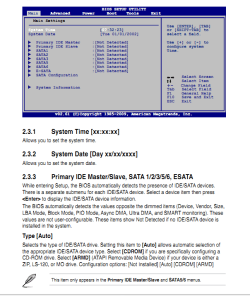
From your moboard manual.

ASUSTeK Computer Inc. - Motherboards- ASUS M4A785TD-V EVO/U3S6

2.3.3 TYPE - The note under this by pen or feather? whatever it is.

It would appear you need the CD drive plugged into SATA port 5 or 6 then select is as CD/Rom.

Then of course select it in Boot options to use it for the boot CD drive if wanted.

That is what I understand from reading through the manual. It isn't as straightforward in explanations as it could be.
I could be wrong.

Yes I downloaded manual. I have Asus board myself and the manuals are a bit ???? on some info. Sometimes need a decrypter to understand them. :confused: :(
 

Attachments

  • CD-Rom.PNG
    CD-Rom.PNG
    38.6 KB · Views: 376

My Computer My Computer

Computer Manufacturer/Model Number
Hopalong/ Godzilla
OS
Windows7 Pro 64bit SP-1; Windows XP Pro 32bit
CPU
Intel Core i7-870 Lynnfield 2.93GHz LGA 1156 95W Quad-Core
Motherboard
ASUS P7P55D-E PRO
Memory
8GB@1400MHz Crucial Ballistix DDR3-1600 4x2GB
Graphics Card(s)
ASUS ENGTX460 DirectCU/2DI/1GD5 1GB 256-bit GDDR5
Sound Card
VIA Onboard
Monitor(s) Displays
Asus VS248H-P 24"; Samsung SyncMaster 941BW 19"ws
Screen Resolution
1920x1080; 1440x900
Hard Drives
Samsung 830 120GB SSD
Intel 320 120GB SSD
Western Digital Caviar Black WD7501AALS 750GB 7200 RPM SATA 3.0Gb/s
Western Digital Caviar Black WD6401AALS 640GB 7200 RPM SATA 3.0Gb/s
PSU
COOLER MASTER Silent Pro RS850-AMBAJ3-US 850W Modular
Case
COOLER MASTER HAF 932 RC-932-KKN5-GP Black
Cooling
Scythe "Mugen-2 Rev.B" (2 ScytheKaze-Jyuni PWM fans)
Keyboard
Logitech K-320
Mouse
Kensington
Antivirus
Avast Inernet Suite
Browser
IE 9 ; Chrome
@Hopalong X:
You're surely right about those lousy things they call manuals these days.
The reason I never look at them is because they end up confusing more than helping.

I see what you're saying in the settings and I will do that.

My manual is so thin I could use it as a spark plug gapping tool.

Thanks!
 

My Computer My Computer

Computer Manufacturer/Model Number
OEM - Me
OS
Windows 7 Home Premium x64
CPU
AMD Phenom II X6 1600T
Motherboard
GigaByte GZ-990FXA-UD3
Memory
16GB PC3-10700 (1342MHz)
Graphics Card(s)
ATI Radeon 5770 HD (x2) CrossFire
Sound Card
On-board RealTek chipset
Monitor(s) Displays
3x Hanns-G 1920x1080 Monitors
Screen Resolution
3x Hanns-G 1920x1080 Monitors
Hard Drives
Intel 25-V SSD 40GB: 218 MB/s AT: 0.1ms
Intel X-25M SSD 80GB: 230MB/s AT: 0.1ms
Seagate 750GB: 133 MB/s AT: 13ms (perpendicular storage)
Buffalo HD-PCTU3 1TB External drive
PSU
OCZ Stealth X Stream 750W
Case
Cheap (unknown)
Cooling
Stock
Keyboard
HP USB
Mouse
LogiTech USB
Internet Speed
1.5 Mbps - Slow - At the tail-end of a rural network
Other Info
Printer: Epson Stylus C-84
Scanner: HP 3500C Flatbed
DVD-RW: Plextor
DVD-ROM: Unknown
WEI: 7.4
I had to decipher my manual when I built this last August. :confused:

I have learned to decipher their manuals better as I have learned here on the forum.
Even so it is often a guess as to the meaning or action to take.

Now all you have to do is find 5 and 6 on the board. On mine 1-2 are marked and seperate but 3-6 are in a 4 plug array and individually unmarked.

Let us know if that works.
Mike
 

My Computer My Computer

Computer Manufacturer/Model Number
Hopalong/ Godzilla
OS
Windows7 Pro 64bit SP-1; Windows XP Pro 32bit
CPU
Intel Core i7-870 Lynnfield 2.93GHz LGA 1156 95W Quad-Core
Motherboard
ASUS P7P55D-E PRO
Memory
8GB@1400MHz Crucial Ballistix DDR3-1600 4x2GB
Graphics Card(s)
ASUS ENGTX460 DirectCU/2DI/1GD5 1GB 256-bit GDDR5
Sound Card
VIA Onboard
Monitor(s) Displays
Asus VS248H-P 24"; Samsung SyncMaster 941BW 19"ws
Screen Resolution
1920x1080; 1440x900
Hard Drives
Samsung 830 120GB SSD
Intel 320 120GB SSD
Western Digital Caviar Black WD7501AALS 750GB 7200 RPM SATA 3.0Gb/s
Western Digital Caviar Black WD6401AALS 640GB 7200 RPM SATA 3.0Gb/s
PSU
COOLER MASTER Silent Pro RS850-AMBAJ3-US 850W Modular
Case
COOLER MASTER HAF 932 RC-932-KKN5-GP Black
Cooling
Scythe "Mugen-2 Rev.B" (2 ScytheKaze-Jyuni PWM fans)
Keyboard
Logitech K-320
Mouse
Kensington
Antivirus
Avast Inernet Suite
Browser
IE 9 ; Chrome
I marked this as solved prematurely and don't know how to 'Unsolve' it.

In any case, I tried various combinations of the IDE vs AHCI and Auto vs CD-ROM settings in BIOS- to no avail.
In fact, when I set the CD-ROM option I got an error at boot-up telling me about ATAPI incompatibility.

So, I'm still at a loss on how to boot from my SATA DVD.
 

My Computer My Computer

Computer Manufacturer/Model Number
OEM - Me
OS
Windows 7 Home Premium x64
CPU
AMD Phenom II X6 1600T
Motherboard
GigaByte GZ-990FXA-UD3
Memory
16GB PC3-10700 (1342MHz)
Graphics Card(s)
ATI Radeon 5770 HD (x2) CrossFire
Sound Card
On-board RealTek chipset
Monitor(s) Displays
3x Hanns-G 1920x1080 Monitors
Screen Resolution
3x Hanns-G 1920x1080 Monitors
Hard Drives
Intel 25-V SSD 40GB: 218 MB/s AT: 0.1ms
Intel X-25M SSD 80GB: 230MB/s AT: 0.1ms
Seagate 750GB: 133 MB/s AT: 13ms (perpendicular storage)
Buffalo HD-PCTU3 1TB External drive
PSU
OCZ Stealth X Stream 750W
Case
Cheap (unknown)
Cooling
Stock
Keyboard
HP USB
Mouse
LogiTech USB
Internet Speed
1.5 Mbps - Slow - At the tail-end of a rural network
Other Info
Printer: Epson Stylus C-84
Scanner: HP 3500C Flatbed
DVD-RW: Plextor
DVD-ROM: Unknown
WEI: 7.4
I didn't find anything useful to me to help you further from the manual.

So I am at a loss at the moment also.

I'll post back if I think or find any additional info.

Mike
 
Last edited:

My Computer My Computer

Computer Manufacturer/Model Number
Hopalong/ Godzilla
OS
Windows7 Pro 64bit SP-1; Windows XP Pro 32bit
CPU
Intel Core i7-870 Lynnfield 2.93GHz LGA 1156 95W Quad-Core
Motherboard
ASUS P7P55D-E PRO
Memory
8GB@1400MHz Crucial Ballistix DDR3-1600 4x2GB
Graphics Card(s)
ASUS ENGTX460 DirectCU/2DI/1GD5 1GB 256-bit GDDR5
Sound Card
VIA Onboard
Monitor(s) Displays
Asus VS248H-P 24"; Samsung SyncMaster 941BW 19"ws
Screen Resolution
1920x1080; 1440x900
Hard Drives
Samsung 830 120GB SSD
Intel 320 120GB SSD
Western Digital Caviar Black WD7501AALS 750GB 7200 RPM SATA 3.0Gb/s
Western Digital Caviar Black WD6401AALS 640GB 7200 RPM SATA 3.0Gb/s
PSU
COOLER MASTER Silent Pro RS850-AMBAJ3-US 850W Modular
Case
COOLER MASTER HAF 932 RC-932-KKN5-GP Black
Cooling
Scythe "Mugen-2 Rev.B" (2 ScytheKaze-Jyuni PWM fans)
Keyboard
Logitech K-320
Mouse
Kensington
Antivirus
Avast Inernet Suite
Browser
IE 9 ; Chrome
Apart from the boot up problem does the drive show up in windows?
 

My Computer My Computer

Computer Manufacturer/Model Number
Something I threw together
OS
Windows 7 Ultimate x64
CPU
Intel Core i7-2600K
Motherboard
Asus P8P67
Memory
16 GB G Skill F3-10666 CL9D-4GBRL
Graphics Card(s)
ATI Radeon HD 6870
Sound Card
ATI Radeon HDMI / Realtek ALC892
Monitor(s) Displays
2 x 22" standard monitors / LG32LC56v TV to watch films
Screen Resolution
1920 x1080
Hard Drives
2 x OCZ Vertex2 111.79GB
3 x Samsung103SJ
1 x Samsung103UJ
1 x WD3200BEVT
1 x Hitachi5K320-160
PSU
Thermaltake Toughpower Cable Management 750W
Case
Antec 300
Cooling
Noctua NH-U12P SE2 and 5 120mm Case fans
Keyboard
Microsoft Comfort Curve Keyboard 2000
Mouse
Hama M3110 / Logitech M305
Internet Speed
16000
Other Info
I have also used Fedora, Suse, Ubuntu Linux
And all other Windows from 95 to date except ME
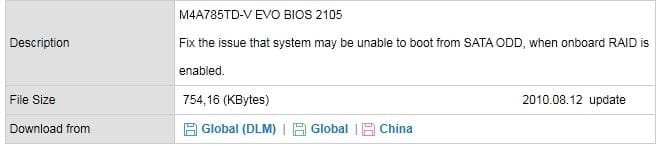
I have just found this I believe you are not using RAID but it is still rather coincidental
 

Attachments

  • Capture.JPG
    Capture.JPG
    18.8 KB · Views: 41

My Computer My Computer

Computer Manufacturer/Model Number
Something I threw together
OS
Windows 7 Ultimate x64
CPU
Intel Core i7-2600K
Motherboard
Asus P8P67
Memory
16 GB G Skill F3-10666 CL9D-4GBRL
Graphics Card(s)
ATI Radeon HD 6870
Sound Card
ATI Radeon HDMI / Realtek ALC892
Monitor(s) Displays
2 x 22" standard monitors / LG32LC56v TV to watch films
Screen Resolution
1920 x1080
Hard Drives
2 x OCZ Vertex2 111.79GB
3 x Samsung103SJ
1 x Samsung103UJ
1 x WD3200BEVT
1 x Hitachi5K320-160
PSU
Thermaltake Toughpower Cable Management 750W
Case
Antec 300
Cooling
Noctua NH-U12P SE2 and 5 120mm Case fans
Keyboard
Microsoft Comfort Curve Keyboard 2000
Mouse
Hama M3110 / Logitech M305
Internet Speed
16000
Other Info
I have also used Fedora, Suse, Ubuntu Linux
And all other Windows from 95 to date except ME
In view of my last post I hope this is a typo lol. A snip from your MOBO manual. No mention of a SATA ODD :shock:
 

Attachments

  • Capture2.JPG
    Capture2.JPG
    59.7 KB · Views: 39

My Computer My Computer

Computer Manufacturer/Model Number
Something I threw together
OS
Windows 7 Ultimate x64
CPU
Intel Core i7-2600K
Motherboard
Asus P8P67
Memory
16 GB G Skill F3-10666 CL9D-4GBRL
Graphics Card(s)
ATI Radeon HD 6870
Sound Card
ATI Radeon HDMI / Realtek ALC892
Monitor(s) Displays
2 x 22" standard monitors / LG32LC56v TV to watch films
Screen Resolution
1920 x1080
Hard Drives
2 x OCZ Vertex2 111.79GB
3 x Samsung103SJ
1 x Samsung103UJ
1 x WD3200BEVT
1 x Hitachi5K320-160
PSU
Thermaltake Toughpower Cable Management 750W
Case
Antec 300
Cooling
Noctua NH-U12P SE2 and 5 120mm Case fans
Keyboard
Microsoft Comfort Curve Keyboard 2000
Mouse
Hama M3110 / Logitech M305
Internet Speed
16000
Other Info
I have also used Fedora, Suse, Ubuntu Linux
And all other Windows from 95 to date except ME
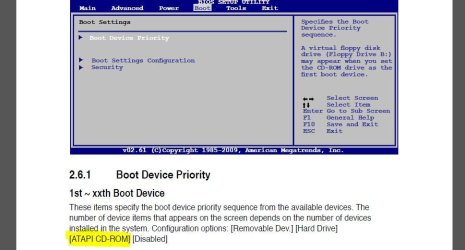
If you set the Bios as we discussed the other day to CD per below manual Snip with CD plugged to Port 5 or 6 change the CD Bios setting to Auto and let the Bios configure the CD player.
That is what my board did automatically. Set to Auto and recognized as CD.
I plugged it in the designated port and let the Bios recognize it.
Of course you may have already tried this.

Also unplugging the old CD player and just letting the SATA CD player be recognized and see if it works properly. If it is then replug the old one.
Could be a conflict with both until the newer one is installed properly.

It is a bit of a guess and long shot but that is all I have at the moment.
 

My Computer My Computer

Computer Manufacturer/Model Number
Hopalong/ Godzilla
OS
Windows7 Pro 64bit SP-1; Windows XP Pro 32bit
CPU
Intel Core i7-870 Lynnfield 2.93GHz LGA 1156 95W Quad-Core
Motherboard
ASUS P7P55D-E PRO
Memory
8GB@1400MHz Crucial Ballistix DDR3-1600 4x2GB
Graphics Card(s)
ASUS ENGTX460 DirectCU/2DI/1GD5 1GB 256-bit GDDR5
Sound Card
VIA Onboard
Monitor(s) Displays
Asus VS248H-P 24"; Samsung SyncMaster 941BW 19"ws
Screen Resolution
1920x1080; 1440x900
Hard Drives
Samsung 830 120GB SSD
Intel 320 120GB SSD
Western Digital Caviar Black WD7501AALS 750GB 7200 RPM SATA 3.0Gb/s
Western Digital Caviar Black WD6401AALS 640GB 7200 RPM SATA 3.0Gb/s
PSU
COOLER MASTER Silent Pro RS850-AMBAJ3-US 850W Modular
Case
COOLER MASTER HAF 932 RC-932-KKN5-GP Black
Cooling
Scythe "Mugen-2 Rev.B" (2 ScytheKaze-Jyuni PWM fans)
Keyboard
Logitech K-320
Mouse
Kensington
Antivirus
Avast Inernet Suite
Browser
IE 9 ; Chrome
Hey Pooch.

I was typing while you were posting.

I knew I saw something about ATAPI the other day but didn't find it this morning.

I see you did find it.
 

My Computer My Computer

Computer Manufacturer/Model Number
Hopalong/ Godzilla
OS
Windows7 Pro 64bit SP-1; Windows XP Pro 32bit
CPU
Intel Core i7-870 Lynnfield 2.93GHz LGA 1156 95W Quad-Core
Motherboard
ASUS P7P55D-E PRO
Memory
8GB@1400MHz Crucial Ballistix DDR3-1600 4x2GB
Graphics Card(s)
ASUS ENGTX460 DirectCU/2DI/1GD5 1GB 256-bit GDDR5
Sound Card
VIA Onboard
Monitor(s) Displays
Asus VS248H-P 24"; Samsung SyncMaster 941BW 19"ws
Screen Resolution
1920x1080; 1440x900
Hard Drives
Samsung 830 120GB SSD
Intel 320 120GB SSD
Western Digital Caviar Black WD7501AALS 750GB 7200 RPM SATA 3.0Gb/s
Western Digital Caviar Black WD6401AALS 640GB 7200 RPM SATA 3.0Gb/s
PSU
COOLER MASTER Silent Pro RS850-AMBAJ3-US 850W Modular
Case
COOLER MASTER HAF 932 RC-932-KKN5-GP Black
Cooling
Scythe "Mugen-2 Rev.B" (2 ScytheKaze-Jyuni PWM fans)
Keyboard
Logitech K-320
Mouse
Kensington
Antivirus
Avast Inernet Suite
Browser
IE 9 ; Chrome
@pooch: you're right- no RAID set up at the moment

@Hopalong X: I guess I can try unplugging the IDE DVD; this is turning into kind of a pain. Why can't anything be simple in Computer World? :rolleyes:

I'll try this, maybe tomorrow, and get back here with the results...
 

My Computer My Computer

Computer Manufacturer/Model Number
OEM - Me
OS
Windows 7 Home Premium x64
CPU
AMD Phenom II X6 1600T
Motherboard
GigaByte GZ-990FXA-UD3
Memory
16GB PC3-10700 (1342MHz)
Graphics Card(s)
ATI Radeon 5770 HD (x2) CrossFire
Sound Card
On-board RealTek chipset
Monitor(s) Displays
3x Hanns-G 1920x1080 Monitors
Screen Resolution
3x Hanns-G 1920x1080 Monitors
Hard Drives
Intel 25-V SSD 40GB: 218 MB/s AT: 0.1ms
Intel X-25M SSD 80GB: 230MB/s AT: 0.1ms
Seagate 750GB: 133 MB/s AT: 13ms (perpendicular storage)
Buffalo HD-PCTU3 1TB External drive
PSU
OCZ Stealth X Stream 750W
Case
Cheap (unknown)
Cooling
Stock
Keyboard
HP USB
Mouse
LogiTech USB
Internet Speed
1.5 Mbps - Slow - At the tail-end of a rural network
Other Info
Printer: Epson Stylus C-84
Scanner: HP 3500C Flatbed
DVD-RW: Plextor
DVD-ROM: Unknown
WEI: 7.4
Hey Pooch.

I was typing while you were posting.

I knew I saw something about ATAPI the other day but didn't find it this morning.

I see you did find it.
:D lol I still hope its a typo


@pooch: you're right- no RAID set up at the moment
I think it still might be a good move to do the BIOS upgrade as I said, it is some coincidence that you cannot boot from your ODD even if you are not using RAID
 

My Computer My Computer

Computer Manufacturer/Model Number
Something I threw together
OS
Windows 7 Ultimate x64
CPU
Intel Core i7-2600K
Motherboard
Asus P8P67
Memory
16 GB G Skill F3-10666 CL9D-4GBRL
Graphics Card(s)
ATI Radeon HD 6870
Sound Card
ATI Radeon HDMI / Realtek ALC892
Monitor(s) Displays
2 x 22" standard monitors / LG32LC56v TV to watch films
Screen Resolution
1920 x1080
Hard Drives
2 x OCZ Vertex2 111.79GB
3 x Samsung103SJ
1 x Samsung103UJ
1 x WD3200BEVT
1 x Hitachi5K320-160
PSU
Thermaltake Toughpower Cable Management 750W
Case
Antec 300
Cooling
Noctua NH-U12P SE2 and 5 120mm Case fans
Keyboard
Microsoft Comfort Curve Keyboard 2000
Mouse
Hama M3110 / Logitech M305
Internet Speed
16000
Other Info
I have also used Fedora, Suse, Ubuntu Linux
And all other Windows from 95 to date except ME
I think Pooch found the problem not me.

The Bios update.

Use the EZ Flash2 utility at ASUS and all should go well.
Follow directions exactly! Save the old Bios first as suggested.


Good luck
Mike
 

My Computer My Computer

Computer Manufacturer/Model Number
Hopalong/ Godzilla
OS
Windows7 Pro 64bit SP-1; Windows XP Pro 32bit
CPU
Intel Core i7-870 Lynnfield 2.93GHz LGA 1156 95W Quad-Core
Motherboard
ASUS P7P55D-E PRO
Memory
8GB@1400MHz Crucial Ballistix DDR3-1600 4x2GB
Graphics Card(s)
ASUS ENGTX460 DirectCU/2DI/1GD5 1GB 256-bit GDDR5
Sound Card
VIA Onboard
Monitor(s) Displays
Asus VS248H-P 24"; Samsung SyncMaster 941BW 19"ws
Screen Resolution
1920x1080; 1440x900
Hard Drives
Samsung 830 120GB SSD
Intel 320 120GB SSD
Western Digital Caviar Black WD7501AALS 750GB 7200 RPM SATA 3.0Gb/s
Western Digital Caviar Black WD6401AALS 640GB 7200 RPM SATA 3.0Gb/s
PSU
COOLER MASTER Silent Pro RS850-AMBAJ3-US 850W Modular
Case
COOLER MASTER HAF 932 RC-932-KKN5-GP Black
Cooling
Scythe "Mugen-2 Rev.B" (2 ScytheKaze-Jyuni PWM fans)
Keyboard
Logitech K-320
Mouse
Kensington
Antivirus
Avast Inernet Suite
Browser
IE 9 ; Chrome
From your moboard manual.

ASUSTeK Computer Inc. - Motherboards- ASUS M4A785TD-V EVO/U3S6

2.3.3 TYPE - The note under this by pen or feather? whatever it is.

It would appear you need the CD drive plugged into SATA port 5 or 6 then select is as CD/Rom.

Then of course select it in Boot options to use it for the boot CD drive if wanted.

That is what I understand from reading through the manual. It isn't as straightforward in explanations as it could be.
I could be wrong.

Yes I downloaded manual. I have Asus board myself and the manuals are a bit ???? on some info. Sometimes need a decrypter to understand them. :confused: :(

there are only 5 not 6 sata on board, plus 1 esata. i would reset the bios to default and try once again. your mobo is new enough to have usb 3.0 so it should not have any problems with the sata dvd. i would say it is something with the dvd.
 

My Computer My Computer

OS
Windows 7 Ultimate
CPU
Core2Duo E8400
Motherboard
Asus Rampage Formula Rev. 1
Memory
5 Gigs
Graphics Card(s)
Asus Nvidia 9500 Gt
Sound Card
Creative X-Fi Extreme Audio
Monitor(s) Displays
18 Inch LCD
Screen Resolution
1366x768
Hard Drives
c: wd 300 gig velociaptor, wd 1tb, wd 500 gig, wd 320 gig, and 2 wd 40 gig ide drives
PSU
600 watts
Other than a smaller cable SATA is of little to no benefit on an optical drive as they are still far too slow to take advantage of it. In fact,

LG DVD Burner GSA-H62N SATA vs GSA-H50N IDE - Overclockers Club

Hi there
Also on most MOBOS you have a LOT of SATA connections -- it's much easier adding hardware than struggling with the old large IDE ribbons and the power connections.

In fact on typical domestic (i.e Cheap) Disk drives SATA vs IDE / vs USB doesn't make a lot of speed difference -- you might as well leave the BIOS to IDE mode unless you have excellent reasons for changing it.

SSD's etc are another matter.

Cheers
jimbo
 

My Computer My Computer

Computer type
PC/Desktop
Computer Manufacturer/Model Number
Custom built, several laptops HP/ASUS
OS
Linux CENTOS 7 / various Windows OS'es and servers
CPU
Intel i7 Intel i5
Memory
8GB, 16GB
Graphics Card(s)
On Motherboard
Sound Card
Realtek HD audio
Monitor(s) Displays
Apple Cinema display, Samsung LCD
Screen Resolution
1920 X 1080
Hard Drives
4 X 1TB SATA
Mouse
Toshiba wireless laser
Internet Speed
> 20MB up
Back
Top