
I have three SATA hard drives :
QUESTION 1.
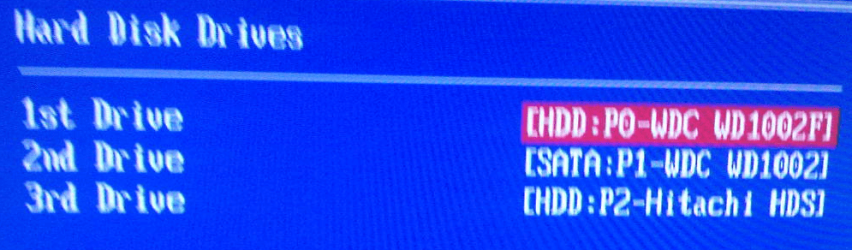
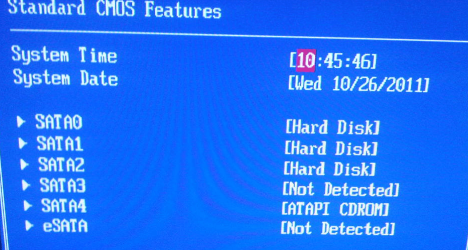
All three drives reporr correctly in the BIOS, and in the right order, but why is it that only one of the drive (the one on SATA port 1) has a "SATA:" prefix and the others have a "HDD:" prefix ?
QUESTION 2,
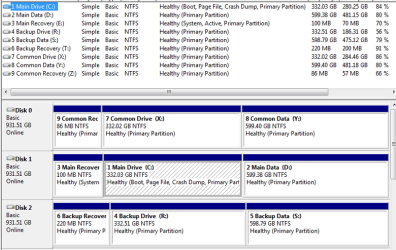
Why is it that the assignment of Disk #0, 1, 2 ( as seen in Disk Maanger or DiskPart) does not seem to have nay rhyme or reason?
I would have expected:
- the hardrive connected to SATA port O, to be assigned as Disk 0
- the hardrive connected to SATA port 1, to be assigned as Disk 1
- the hardrive connected to SATA port 2, to be assigned as Disk 2
but instead, I have:
- the hardrive connected to SATA port 2, is assigned as Disk 0
- the hardrive connected to SATA port 0, is assigned as Disk 1
- the hardrive connected to SATA port 1, is assigned as Disk 2
Just curious why that is.
I am assuming there is no way to chagne this. Its not something I would dream of reinstalling Windows 7 to correct ( even if it did correct it).
- Main system/boot drive , WD Caviar Black 1 TB, connected to the SATA 0 port
- A backup drive, identical WD Caviar Black 1 TB, connected to the SATA 1 port
- Another dirve, Hitachi 1 TB, connected to the SATA 2 port
QUESTION 1.
All three drives reporr correctly in the BIOS, and in the right order, but why is it that only one of the drive (the one on SATA port 1) has a "SATA:" prefix and the others have a "HDD:" prefix ?
QUESTION 2,
Why is it that the assignment of Disk #0, 1, 2 ( as seen in Disk Maanger or DiskPart) does not seem to have nay rhyme or reason?
I would have expected:
- the hardrive connected to SATA port O, to be assigned as Disk 0
- the hardrive connected to SATA port 1, to be assigned as Disk 1
- the hardrive connected to SATA port 2, to be assigned as Disk 2
but instead, I have:
- the hardrive connected to SATA port 2, is assigned as Disk 0
- the hardrive connected to SATA port 0, is assigned as Disk 1
- the hardrive connected to SATA port 1, is assigned as Disk 2
Just curious why that is.
I am assuming there is no way to chagne this. Its not something I would dream of reinstalling Windows 7 to correct ( even if it did correct it).
Attachments
My Computer
At a glance
DELL Win 7 Home Premium 64 BitIntel Core i7-930 (8MB L2, 2.8GHz) // ntel Co...16GB // 18GB DDR3 SDRAM 1333Mhhz 6 DIMMS (3x2...AMD HD7570 // AMD Radeon HD6750 // ATI Radeon...
- Computer type
- PC/Desktop
- Computer Manufacturer/Model Number
- DELL XPS 8500 // DELL XPS Studio 9100 // DELL Dim 9200
- OS
- DELL Win 7 Home Premium 64 Bit
- CPU
- Intel Core i7-930 (8MB L2, 2.8GHz) // ntel Core 2 Quad Q6600
- Motherboard
- ?? // Dell A02 BIOS // ??
- Memory
- 16GB // 18GB DDR3 SDRAM 1333Mhhz 6 DIMMS (3x2, 3x4) //4 GB
- Graphics Card(s)
- AMD HD7570 // AMD Radeon HD6750 // ATI Radeon HD5670 1 GB GD
- Sound Card
- ?? // THX TruStudio PC //?
- Monitor(s) Displays
- Dual Dell 2405 WFP-HC24 //SAmsung 27" // Triple 19" LCD
- Screen Resolution
- 1900 x 1200
- Hard Drives
- Main :WD Caviar Black 1 TB SATA WD1002FAEX
Backup :WD Caviar Black 1 TB SATA WD1002FAEX
- PSU
- ?? // Ultra 900W // ??


 The issues with clean installs are indeed a more serious consequence of this disc enumeration "quirk." (That was largely the focus of one of my later posts.)


