
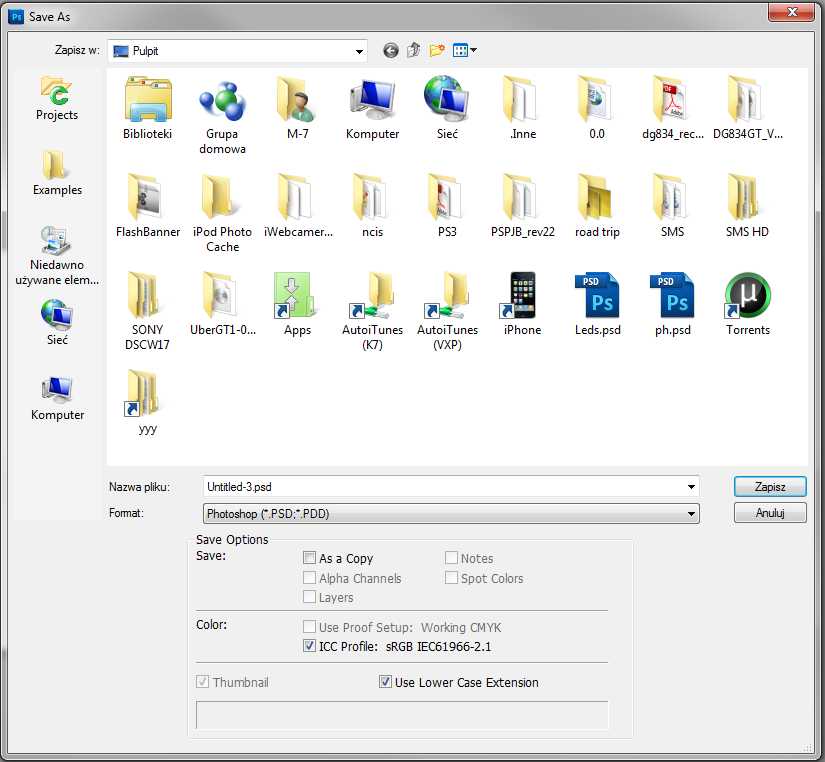
Save as... window and its buttons on the left

zYx

Member of Mayday
Member
Local time
3:05 AM
Messages
71
Location
EU
I have just installed a program called CCS Compiler and I associated hex files with this program. Since then, I get the following window in various places like Save As... Two top buttons on the left: Projects and examples.


Click picture to enlarge ;)

I have uninstalled this program now as I don't need it, but I'm still getting it. How can I manually tweak it?

Not only that, but the "Desktop" button seems to be missing in certain areas/windows, which I can't describe now as I can't remember, but in Vista the Desktop button was where I needed it. I've never bothered finding out more about it, but now this is getting annoying.

Any ideas how can I restore/customize it?

Windows 7 X64

Regards ;)
 

My Computer My Computer

At a glance

7 64-bit Ultimatei7-2600KCorsair 1866MHz 8GBSapphire ATI HD6990
Computer Manufacturer/Model Number
zYxMa Computers, Inc. iFixYourPC.co
OS
7 64-bit Ultimate
CPU
i7-2600K
Motherboard
ASUS Maximus IV Extreme
Memory
Corsair 1866MHz 8GB
Graphics Card(s)
Sapphire ATI HD6990
Sound Card
HD6990 + Yamaha RX-V467
Monitor(s) Displays
Dell U3011 | Panasonic P50VT20 3D
Screen Resolution
30" 2560x1600 | 50" 1920x1080 3D
Hard Drives
OCZ HybridDrive 1TB | OCZ Agility 3 - OS | Hitachi 250GB - Random | WD 1TB - Files | Seagate 1TB - Files | WD 1.5TB - Files
PSU
Cooler Master Silent Pro Gold 1200W
Case
CoolerMaster Cosmos-II
Cooling
Liquid-cooled
Keyboard
Logitech Illuminated K800 + diNovo Mini
Mouse
RAT9 + MX Revolution + MX Air + Harmony One
Internet Speed
18mbps
Other Info
iPhone 4S 64GB
Hi there zyx. you mean those two folders. Before you dig through the registry I would try and see if you don't have a system restore point that lies before the installation of CCS.

-DG
 

My Computer My Computer

At a glance

Windows 7 Ultimate x86DualCore AMD Athlon 64 X2, 2600 MHz 5200+Samsung 2GB DDR2Onboard NVIDIA GeForce 6150SE nForce 430
Computer Manufacturer/Model Number
HP m8000n
OS
Windows 7 Ultimate x86
CPU
DualCore AMD Athlon 64 X2, 2600 MHz 5200+
Motherboard
Asus M2N68-LA (Narra)
Memory
Samsung 2GB DDR2
Graphics Card(s)
Onboard NVIDIA GeForce 6150SE nForce 430
Sound Card
Onboard nVIDIA nForce 6100-430 (MCP61P)
Monitor(s) Displays
Westinghouse 19" LED
Screen Resolution
1280x1024
Hard Drives
SATA II Seagate Barracuda 500GB
USB II WD Elements 500GB
USB II WD My Book 1TB
USB II WD My Book 2TB
PSU
Stock (HP)
Case
Stock (HP)
Cooling
Stock
Keyboard
Logitech Classic KB 200
Mouse
Standard HP opticle USB mouse
Hi there zyx. you mean those two folders. Before you dig through the registry I would try and see if you don't have a system restore point that lies before the installation of CCS.

-DG

I do, but I did too many changes now and I don't really want to go back now. I am more than happy to play with the registry. Just guide me :)

Thanks

edit: No I don't have any restore points prior to CCS installation so it looks like I have to play with the registry. I think the program didn't uninstall properly, because HEX files are still associated with a "software" and whenever I double click on HEX it shows me error "please reinstall the software.

I found an installation LOG
Code:
***  Installation Started 09/13/2010 22:46  ***
Title: IDE Utilities Installation
Source: F:\Stuff\Desktop\PS3\CCS_PICC_CP_4084\CCS.PIC.C.Compiler.PCWHD.v4.084-OiNK\ideutilsupd.exe
File Copy: C:\Program Files (x86)\PICC\Pconvert.exe
File Copy: C:\Program Files (x86)\PICC\Chipedit.exe
File Copy: C:\Program Files (x86)\PICC\ccscoff.exe
File Copy: C:\Program Files (x86)\PICC\flowcharter.exe
File Copy: C:\Program Files (x86)\PICC\rtfeditor.exe
File Copy: C:\Program Files (x86)\PICC\documentationgenerator.exe
File Copy: C:\Program Files (x86)\PICC\american.adm
File Copy: C:\Program Files (x86)\PICC\Siow.exe
File Copy: C:\Program Files (x86)\PICC\pcwwiz.exe
File Copy: C:\Program Files (x86)\PICC\Spb.bmp
File Copy: C:\Program Files (x86)\PICC\Spbu.bmp
File Copy: C:\Program Files (x86)\PICC\Icd.exe
File Copy: C:\Program Files (x86)\PICC\Icd.chm
RegDB Key: Software\Microsoft\Windows\CurrentVersion\Uninstall\IDE Utilities
RegDB Val: 4.x
RegDB Name: DisplayVersion
RegDB Root: 2
RegDB Key: Software\Microsoft\Windows\CurrentVersion\Uninstall\IDE Utilities
RegDB Val: 262-797-0455
RegDB Name: HelpTelephone
RegDB Root: 2
RegDB Key: Software\Microsoft\Windows\CurrentVersion\Uninstall\IDE Utilities
RegDB Val: CCS
RegDB Name: Publisher
RegDB Root: 2
RegDB Key: Software\Microsoft\Windows\CurrentVersion\Uninstall\IDE Utilities
RegDB Val: http://www.ccsinfo.com/picc
RegDB Name: URLInfoAbout
RegDB Root: 2

The above seems to be a separate program and it can't be uninstalled in a normal way, so I'm going to try removing these Reg values and see what happens.

edit:

deleting all this didn't help :(

Now those two buttons Projects and Examples are gone now and there's only 3 buttons left now: Recently used, Computer and Network.

I'd like to use a tweak to add some custom buttons.
 
Last edited:

My Computer My Computer

At a glance

7 64-bit Ultimatei7-2600KCorsair 1866MHz 8GBSapphire ATI HD6990
Computer Manufacturer/Model Number
zYxMa Computers, Inc. iFixYourPC.co
OS
7 64-bit Ultimate
CPU
i7-2600K
Motherboard
ASUS Maximus IV Extreme
Memory
Corsair 1866MHz 8GB
Graphics Card(s)
Sapphire ATI HD6990
Sound Card
HD6990 + Yamaha RX-V467
Monitor(s) Displays
Dell U3011 | Panasonic P50VT20 3D
Screen Resolution
30" 2560x1600 | 50" 1920x1080 3D
Hard Drives
OCZ HybridDrive 1TB | OCZ Agility 3 - OS | Hitachi 250GB - Random | WD 1TB - Files | Seagate 1TB - Files | WD 1.5TB - Files
PSU
Cooler Master Silent Pro Gold 1200W
Case
CoolerMaster Cosmos-II
Cooling
Liquid-cooled
Keyboard
Logitech Illuminated K800 + diNovo Mini
Mouse
RAT9 + MX Revolution + MX Air + Harmony One
Internet Speed
18mbps
Other Info
iPhone 4S 64GB

My Computer My Computer

At a glance

7 64-bit Ultimatei7-2600KCorsair 1866MHz 8GBSapphire ATI HD6990
Computer Manufacturer/Model Number
zYxMa Computers, Inc. iFixYourPC.co
OS
7 64-bit Ultimate
CPU
i7-2600K
Motherboard
ASUS Maximus IV Extreme
Memory
Corsair 1866MHz 8GB
Graphics Card(s)
Sapphire ATI HD6990
Sound Card
HD6990 + Yamaha RX-V467
Monitor(s) Displays
Dell U3011 | Panasonic P50VT20 3D
Screen Resolution
30" 2560x1600 | 50" 1920x1080 3D
Hard Drives
OCZ HybridDrive 1TB | OCZ Agility 3 - OS | Hitachi 250GB - Random | WD 1TB - Files | Seagate 1TB - Files | WD 1.5TB - Files
PSU
Cooler Master Silent Pro Gold 1200W
Case
CoolerMaster Cosmos-II
Cooling
Liquid-cooled
Keyboard
Logitech Illuminated K800 + diNovo Mini
Mouse
RAT9 + MX Revolution + MX Air + Harmony One
Internet Speed
18mbps
Other Info
iPhone 4S 64GB
Back
Top