Solved Save Documents

chuckhig

New member
Power User
VIP
Local time
6:17 PM
Messages
186
Location
Adirondack Mountains..upstate New York
Sorry that I did not save a screenshot. I will if a am not clear enough. Here goes. When I click on save as...it gets saved where I want it ,ie ,my documents .ok so far. When I go the my documents and open what I just saved I get ,, in the last case , over 95 items in the folder. For example I tried to save a news item and the folder shows "header",and other titles like that with no way to read it. If I have to provide a picture I will do over and re-post. Sorry for my ignorance...Chuck
 

My Computer

OS
Windows 7 Home Premium 64 bit
Sorry that I did not save a screenshot. I will if a am not clear enough. Here goes. When I click on save as...it gets saved where I want it ,ie ,my documents .ok so far. When I go the my documents and open what I just saved I get ,, in the last case , over 95 items in the folder. For example I tried to save a news item and the folder shows "header",and other titles like that with no way to read it. If I have to provide a picture I will do over and re-post. Sorry for my ignorance...Chuck
It never stops amazing me how people with issues are not willing to give relevant information. "I have a problem but I am not willing to give you more information. Please solve it!"

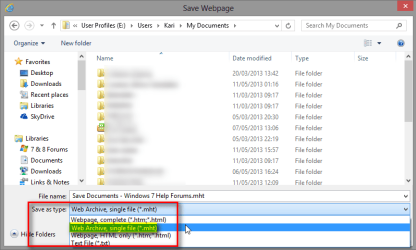
That being said, when you save a document it most certainly does not save 95 items. However, if you save a webpage selecting Save As: Webpage, complete (*.htm;*.html)(*) then it is only natural that system saves a lot of items as every button, image and so on will be saved to allow offline viewing of said page.

If you want to save a webpage as single file, you must select Save As Type: Web Archive, single file (*.mht)(*)

2013-05-11_161701.png

Kari

(*) Examples from IE 9 & 10. Other browsers might have similar feature but use slightly different wording. Opera and Maxthon browser for instance have the save as .mht feature, Chrome and Firefox not.
 
Last edited:

My Computer

Computer type
Laptop
Computer Manufacturer/Model Number
HP ENVY 17-1150eg
OS
Windows 10 Pro x64 EN-GB
CPU
1.6 GHz Intel Core i7-720QM Processor
Memory
6 GB
Graphics Card(s)
ATI Mobility Radeon HD 5850 Graphics
Sound Card
Beats sound system with integrated subwoofer
Monitor(s) Displays
17" laptop display, 22" LED and 32" Full HD TV through HDMI
Screen Resolution
1600*900 (1), 1920*1080 (2&3)
Hard Drives
Internal: 2 x 500 GB SATA Hard Disk Drive 7200 rpm
External: 2TB for backups, 3TB USB3 network drive for media
Cooling
As Envy runs a bit warm, I have it on a Cooler Master pad
Keyboard
Logitech diNovo Media Desktop Laser (bluetooth)
Mouse
Logitech Performance Mouse MX
Internet Speed
50/10 Mbps VDSL
Antivirus
Windows Defender 4.3.9431.0
Browser
Maxthon 3.5.2., IE11
Sorry that I did not save a screenshot. I will if a am not clear enough. Here goes. When I click on save as...it gets saved where I want it ,ie ,my documents .ok so far. When I go the my documents and open what I just saved I get ,, in the last case , over 95 items in the folder. For example I tried to save a news item and the folder shows "header",and other titles like that with no way to read it. If I have to provide a picture I will do over and re-post. Sorry for my ignorance...Chuck

I find using a PDF printer driver is the best way to save a web page. Two of the best known and "Free" are 995 PDF and Cute PDF.

HTH
 

My Computer

Computer type
PC/Desktop
Computer Manufacturer/Model Number
Custom Built
OS
Windows 7 Professional x64
CPU
Intel i5 quad processor
Motherboard
DP67BG
Memory
16 GB
Graphics Card(s)
Radeon HD 5770
Sound Card
Realtek High Definition Audio
Monitor(s) Displays
Samsung SyncMaster
Screen Resolution
1920X1080
Hard Drives
WD 2TB (SATA Internal)
WD 1TB (USB External)
PSU
Corsair GS800
Case
Tower (Generic)
Cooling
3 Internal Fans
Keyboard
MS Wireless
Mouse
MS Optical Wired
Internet Speed
54 mbps
Antivirus
Emsisoft
Browser
IE-Version 9, Palemoon-Version 24.2.0
Sorry that I did not save a screenshot. I will if a am not clear enough. Here goes. When I click on save as...it gets saved where I want it ,ie ,my documents .ok so far. When I go the my documents and open what I just saved I get ,, in the last case , over 95 items in the folder. For example I tried to save a news item and the folder shows "header",and other titles like that with no way to read it. If I have to provide a picture I will do over and re-post. Sorry for my ignorance...Chuck

I find using a PDF printer driver is the best way to save a web page. Two of the best known and "Free" are 995 PDF and Cute PDF.

HTH
Check the Single File *.mht as Save As Type, it's absolutely the easiest and fastest, most practical way. IE, Opera and Maxthon allow this.
 
Last edited:

My Computer

Computer type
Laptop
Computer Manufacturer/Model Number
HP ENVY 17-1150eg
OS
Windows 10 Pro x64 EN-GB
CPU
1.6 GHz Intel Core i7-720QM Processor
Memory
6 GB
Graphics Card(s)
ATI Mobility Radeon HD 5850 Graphics
Sound Card
Beats sound system with integrated subwoofer
Monitor(s) Displays
17" laptop display, 22" LED and 32" Full HD TV through HDMI
Screen Resolution
1600*900 (1), 1920*1080 (2&3)
Hard Drives
Internal: 2 x 500 GB SATA Hard Disk Drive 7200 rpm
External: 2TB for backups, 3TB USB3 network drive for media
Cooling
As Envy runs a bit warm, I have it on a Cooler Master pad
Keyboard
Logitech diNovo Media Desktop Laser (bluetooth)
Mouse
Logitech Performance Mouse MX
Internet Speed
50/10 Mbps VDSL
Antivirus
Windows Defender 4.3.9431.0
Browser
Maxthon 3.5.2., IE11
Sorry that I did not save a screenshot. I will if a am not clear enough. Here goes. When I click on save as...it gets saved where I want it ,ie ,my documents .ok so far. When I go the my documents and open what I just saved I get ,, in the last case , over 95 items in the folder. For example I tried to save a news item and the folder shows "header",and other titles like that with no way to read it. If I have to provide a picture I will do over and re-post. Sorry for my ignorance...Chuck

I find using a PDF printer driver is the best way to save a web page. Two of the best known and "Free" are 995 PDF and Cute PDF.

HTH

It's been a while so I don't remember exactly why, but I did not like 995 PDF. Cute PDF is much better and is easy to use. I prefer using PDFCreator, which is also free, for simple PDFs because it has more options and a better output. PDFCreator can also create other kinds of graphics files. For more complex PDF creation (combining multiple files, especially of varying file types, page orientation, and page sizes, etc.) or for editing PDFs (cropping, page reordering, page rotation, etc.) , I use Adobe Acrobat Standard (I upgraded from version 9 to XI last fall) but that is a bit expensive for most people's needs.
 

My Computer

Computer type
PC/Desktop
Computer Manufacturer/Model Number
Custom Build
OS
Win 7 Ultimate 64 bit
CPU
Intel i7-3930K
Motherboard
ASUS P9X79 WS
Memory
Kingston HyperX Genesis 32GB Kit (8x4GB Modules) 1600MHz DDR
Graphics Card(s)
MSI R7850 Twin Frozr 2GD5/OC Radeon HD 7850 2GB 256-bit GDDR
Sound Card
Asus Xonar Essence STX
Monitor(s) Displays
3x Asus VG248QE 24", Vizio 32" TV
Screen Resolution
1920 x 1080, ?
Hard Drives
Samsung 128GB 840 Pro SSD (1),
Samsung 4TB 850 EVO SSDs (4)
Samsung 4TB 850 EVO SSDs (16) external backup drives used in 2.5" hot swap bays in the computer.
PSU
Corsair HX750w
Case
Antec Two Hundred v2 (modified)
Cooling
Cooler Master GeminII S524 120mm (fan replaced with a 140mm)
Keyboard
Logitech G510s
Mouse
Logitech M525 (two in use)
Internet Speed
=< 32Mbps down, 8Mbps up
Antivirus
AVAST!, MBAM, SAS, Spybot S&D (all but MBAM free) Glary Util
Browser
IE11
Other Info
LSI 9211-8i HBA card (8 SATA III ports), 2.5" & 3.5" Hot Swap Bays, HooToo HT-CR001 PCI-E to USB 3.0 Internal Hub + 6 Slot Card Reader, and LG Model CH12LS28 BD-ROM Optical Drive. Also, ScanSnap S1500 ADF duplexing scanner, Canon 9000F flat bed scanner, Corsair SP2500 2.1 speakers, Samsung CLP 415nw laser color printer, Cyberpower PP2200SW UPS
If you want to save a webpage as single file, you must select Save As Type: Web Archive, single file (*.mht)(*)Kari

(*) Examples from IE 9 & 10. Other browsers might use slightly different wording but all browsers allow saving webpage as a single *.mht file.

I run FF 20.0.1 and that doesn't have an mht option!
I have to use Web Page HTML only (*.htm, *.html) to save as single page.
And Chrome will only save to an HTM
 

My Computer

Computer type
PC/Desktop
OS
Microsoft Windows 7 Home Premium 64-bit 7601 Multiprocessor Free Service Pack 1
CPU
Intel(R) Core(TM) i7-3770 CPU @ 3.40GHz
Motherboard
ASUSTeK COMPUTER INC. P8H77-M
Memory
8.00 GB
Graphics Card(s)
Intel(R) HD Graphics 4000
Sound Card
On Board
Monitor(s) Displays
Dell 24"
Screen Resolution
1920 x 1080
Hard Drives
(1) INTEL SSDSC2CT180A3 ATA Device (2) ST500DM002-1BD142 ATA Device (3) WDC WD3200AAKS-75L9A0 ATA Device (4) Generic- Compact Flash USB Device (5) Generic- MS/MS-Pro USB Device (6) Generic- SD/MMC USB Device (7) Generic- SM/xD-Picture USB
PSU
500w Corsair
Case
Cooler Master
Cooling
3 Fans
Keyboard
Logitech MK300
Mouse
Logitech WOM
Internet Speed
75Mb
Antivirus
Norton 360
Browser
Firefox, Opera, IE
If you want to save a webpage as single file, you must select Save As Type: Web Archive, single file (*.mht)(*)Kari

(*) Examples from IE 9 & 10. Other browsers might use slightly different wording but all browsers allow saving webpage as a single *.mht file.

I run FF 20.0.1 and that doesn't have an mht option!
I have to use Web Page HTML only (*.htm, *.html) to save as single page.
And Chrome will only save to an HTM
That's a lesson for me, I should check better :mad:. I only checked IE, Maxthon and Opera, all those allow pages to be saved as single *.mht.

I did not check FF and Chrome and of course (Murphy's Law), both of them do not have this option.

Original post edited accordingly, thanks for noticing my mistake.

Kari
 

My Computer

Computer type
Laptop
Computer Manufacturer/Model Number
HP ENVY 17-1150eg
OS
Windows 10 Pro x64 EN-GB
CPU
1.6 GHz Intel Core i7-720QM Processor
Memory
6 GB
Graphics Card(s)
ATI Mobility Radeon HD 5850 Graphics
Sound Card
Beats sound system with integrated subwoofer
Monitor(s) Displays
17" laptop display, 22" LED and 32" Full HD TV through HDMI
Screen Resolution
1600*900 (1), 1920*1080 (2&3)
Hard Drives
Internal: 2 x 500 GB SATA Hard Disk Drive 7200 rpm
External: 2TB for backups, 3TB USB3 network drive for media
Cooling
As Envy runs a bit warm, I have it on a Cooler Master pad
Keyboard
Logitech diNovo Media Desktop Laser (bluetooth)
Mouse
Logitech Performance Mouse MX
Internet Speed
50/10 Mbps VDSL
Antivirus
Windows Defender 4.3.9431.0
Browser
Maxthon 3.5.2., IE11

My Computer

Computer type
Laptop
Computer Manufacturer/Model Number
HP ENVY 17-1150eg
OS
Windows 10 Pro x64 EN-GB
CPU
1.6 GHz Intel Core i7-720QM Processor
Memory
6 GB
Graphics Card(s)
ATI Mobility Radeon HD 5850 Graphics
Sound Card
Beats sound system with integrated subwoofer
Monitor(s) Displays
17" laptop display, 22" LED and 32" Full HD TV through HDMI
Screen Resolution
1600*900 (1), 1920*1080 (2&3)
Hard Drives
Internal: 2 x 500 GB SATA Hard Disk Drive 7200 rpm
External: 2TB for backups, 3TB USB3 network drive for media
Cooling
As Envy runs a bit warm, I have it on a Cooler Master pad
Keyboard
Logitech diNovo Media Desktop Laser (bluetooth)
Mouse
Logitech Performance Mouse MX
Internet Speed
50/10 Mbps VDSL
Antivirus
Windows Defender 4.3.9431.0
Browser
Maxthon 3.5.2., IE11
chuckhig by chance have you had the time to read the wealth of information given in this thread just to help you.
 

My Computer

Computer type
PC/Desktop
Computer Manufacturer/Model Number
Home made Desktop
OS
Windows 10 Pro. 64/ version 1709 Windows 7 Pro/64
CPU
Intel i7-6800K @ 4.3
Motherboard
ASUS X-99 Deluxe II
Memory
Corsair Platinum 16 gig @2400
Graphics Card(s)
EVGA GTX 1070 OC
Monitor(s) Displays
Asus 27" LED LCD/VE278Q
Screen Resolution
1920-1080 or 1280-720 HDMI
Hard Drives
INTEL SSD 730-240 Gb Sata 3.0/
PSU
EVGA Platium 1200W
Case
Phanteks Luxe Tempered Glass 8 fans/ one radiator
Cooling
XSPC/ Water Cooled CPU
Keyboard
Das 4 Professional
Mouse
Logitech M705/MX Anywhere 2-S
Internet Speed
100 mbits
Antivirus
Microsoft Security Essentials/ Malwarebytes Premium 3.0/ SAS
Browser
I.E. 11 default/Firefox/ ISP Time Warner Cable/Spectrum
Other Info
LG BluRay Burner/
Sound system-KLipsch-THX/
Icy Dock ssd Hot Swap bays.

My Computer

Computer type
PC/Desktop
OS
Microsoft Windows 7 Home Premium 64-bit 7601 Multiprocessor Free Service Pack 1
CPU
Intel(R) Core(TM) i7-3770 CPU @ 3.40GHz
Motherboard
ASUSTeK COMPUTER INC. P8H77-M
Memory
8.00 GB
Graphics Card(s)
Intel(R) HD Graphics 4000
Sound Card
On Board
Monitor(s) Displays
Dell 24"
Screen Resolution
1920 x 1080
Hard Drives
(1) INTEL SSDSC2CT180A3 ATA Device (2) ST500DM002-1BD142 ATA Device (3) WDC WD3200AAKS-75L9A0 ATA Device (4) Generic- Compact Flash USB Device (5) Generic- MS/MS-Pro USB Device (6) Generic- SD/MMC USB Device (7) Generic- SM/xD-Picture USB
PSU
500w Corsair
Case
Cooler Master
Cooling
3 Fans
Keyboard
Logitech MK300
Mouse
Logitech WOM
Internet Speed
75Mb
Antivirus
Norton 360
Browser
Firefox, Opera, IE
I'm glad this will work for you!
 

My Computer

Computer Manufacturer/Model Number
Dell Inspiron 580s
OS
Windows 7 Home Premium SP1
CPU
i3
Memory
6 GB
Graphics Card(s)
ATI Radeon
Back
Top