Save location is limited to desktop, how do I change.

brooke212

New member
Local time
2:33 PM
Messages
4
Hello, When I save something, it automatically goes to the desktop. There is no other location to save.
Each item saved has 2 files with the same name. One has the Mozilla icon, the other a folder with the name.
How do I save to my computer and not the desktop?
How do I move the items from the desktop. Please?
I have included on item that is on the desktop
 

Attachments

  • austin.JPG
    austin.JPG
    10 KB · Views: 18

My Computer My Computer

At a glance

Windows7 home
Computer type
PC/Desktop
Computer Manufacturer/Model Number
Asus
OS
Windows7 home
Browser
Mozilla
Hi Brooke,
open Tools in Mozilla >> Options >>select General >> change the download destination from there,
It can be specific, ie desktop or Ask me Everytime.

Roy
 

My Computer My Computer

At a glance

W7 home premium 32bit/W7HP 64bit/w10 tp insid...E5300 dual core3gbNvidia Geforce 7100 Nforce 630i
Computer type
PC/Desktop
Computer Manufacturer/Model Number
medionl/Aspire 6930G/acer x55a
OS
W7 home premium 32bit/W7HP 64bit/w10 tp insider ring
CPU
E5300 dual core
Motherboard
medion MS7366
Memory
3gb
Graphics Card(s)
Nvidia Geforce 7100 Nforce 630i
Monitor(s) Displays
avixc
Internet Speed
n (isp resticted to 72)
Antivirus
mse/pands
Browser
palemoon
Other Info
Belkin Fd7050 n USB using Railink RT2870 drivers, more upto date
Save location is limited to desktop.

Hi Roy,

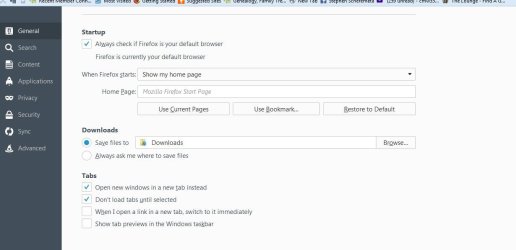
Thanks. I checked the Firefox and have included what I saw.
Perhaps I misunderstood, but I have no options here as to where to save.
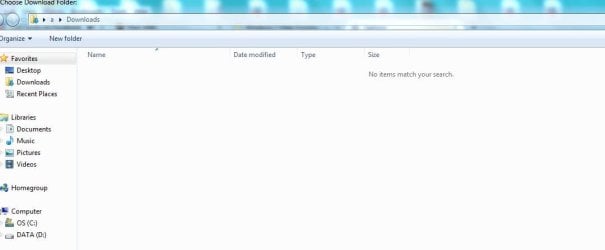
When I went to the Downloads file, nothing is there.
It is all in Desktop. This is recent.
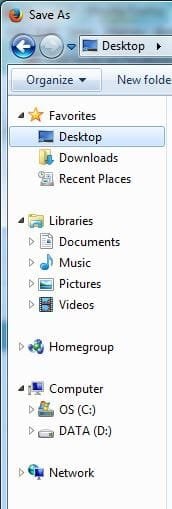
I included a few snippets, including the Save As Page. Maybe something is missing there?

I appreciate your help.
 

Attachments

  • mozilla.JPG
    mozilla.JPG
    51.1 KB · Views: 1
  • downloads.JPG
    downloads.JPG
    30.9 KB · Views: 1
  • save as.JPG
    save as.JPG
    21.6 KB · Views: 14
Last edited:

My Computer My Computer

At a glance

Windows7 home
Computer type
PC/Desktop
Computer Manufacturer/Model Number
Asus
OS
Windows7 home
Browser
Mozilla
Hi Brooke,
Try switching it to the ask me every time option, (just click on it), so the blue dot is there.
Close Firefox restart
select anything you want to download Does it give you a choice, save to (browse ??).

If not then i suspect that the FF install is corrupt
To Reset it Tools >> options >> troubleshoot >> reset.

Roy
 

My Computer My Computer

At a glance

W7 home premium 32bit/W7HP 64bit/w10 tp insid...E5300 dual core3gbNvidia Geforce 7100 Nforce 630i
Computer type
PC/Desktop
Computer Manufacturer/Model Number
medionl/Aspire 6930G/acer x55a
OS
W7 home premium 32bit/W7HP 64bit/w10 tp insider ring
CPU
E5300 dual core
Motherboard
medion MS7366
Memory
3gb
Graphics Card(s)
Nvidia Geforce 7100 Nforce 630i
Monitor(s) Displays
avixc
Internet Speed
n (isp resticted to 72)
Antivirus
mse/pands
Browser
palemoon
Other Info
Belkin Fd7050 n USB using Railink RT2870 drivers, more upto date
Hi Roy,

That did not seem to work.
When I went to reset FF, I do not have troubleshooting as an option.
Thank you
 

My Computer My Computer

At a glance

Windows7 home
Computer type
PC/Desktop
Computer Manufacturer/Model Number
Asus
OS
Windows7 home
Browser
Mozilla
In that case,
Can you Download PaleMoon, its an off shoot browser of Firefox, i run it myself.
Set it up like you have FF, (nearly exactly the same option set-up screens).
Try a download from that if that works then it points to FF being corrupt.

Then use Revo Unistaller to totally remove FF.

Reboot.

Download a complete version of FF >>> not a STUB << use this link
Completely clean install firefox, no offers | Firefox Support Forum | Mozilla Support

Set up Firefox and try a download.
Remove PaleMoon if you want.

Roy
 

My Computer My Computer

At a glance

W7 home premium 32bit/W7HP 64bit/w10 tp insid...E5300 dual core3gbNvidia Geforce 7100 Nforce 630i
Computer type
PC/Desktop
Computer Manufacturer/Model Number
medionl/Aspire 6930G/acer x55a
OS
W7 home premium 32bit/W7HP 64bit/w10 tp insider ring
CPU
E5300 dual core
Motherboard
medion MS7366
Memory
3gb
Graphics Card(s)
Nvidia Geforce 7100 Nforce 630i
Monitor(s) Displays
avixc
Internet Speed
n (isp resticted to 72)
Antivirus
mse/pands
Browser
palemoon
Other Info
Belkin Fd7050 n USB using Railink RT2870 drivers, more upto date
Hi Roy,

Thanks for your help. I am able to save them to a documents folder.
 

My Computer My Computer

At a glance

Windows7 home
Computer type
PC/Desktop
Computer Manufacturer/Model Number
Asus
OS
Windows7 home
Browser
Mozilla
Another option you could have used is clicking Help \ Troubleshooting Information. Under Give Firefox a tune up click Refresh Firefox. This should fix most issues that you'll have with FF.
 

My Computer My Computer

At a glance

Windows 10 Pro 64 bitAMD FX 9590 8 Core Black EditionCorsair Vengeance 16GB DDR3AMD Radeon (TM) R9 380 Gaming Series
Computer type
PC/Desktop
Computer Manufacturer/Model Number
Custom Built By Me.
OS
Windows 10 Pro 64 bit
CPU
AMD FX 9590 8 Core Black Edition
Motherboard
MSI 990FXA GAMING (MS-7893)
Memory
Corsair Vengeance 16GB DDR3
Graphics Card(s)
AMD Radeon (TM) R9 380 Gaming Series
Sound Card
AMD High Definition
Monitor(s) Displays
Samsung 32" 60Hz 4ms Curved PLS LED
Screen Resolution
1920 X 1080
Hard Drives
C: 223 GB SSD = E: 465 GB HDD = F: 931 GB HDD = G: 149 GB HDD = H: 931 GB HDD
PSU
EVGA Supernova NEX750B 750W ATX EPS12V 80PLUS Bronze
Case
Cool Master
Cooling
Noctua NH-D15 Premium Cooler with 2x NF-A15 PWM 140mm Fan
Internet Speed
Fiber Optic: Download 332.7 Mbps / Upload 331.5 Mbps
Antivirus
Windows Defender
Browser
Slimjet (64bit)
Back
Top