Save room on SSD

irbullet

BulletsModz
Member
VIP
Local time
2:10 PM
Messages
202
I have an intel 330 60Gb SSD and I have about 28GB free, is there anything I can do to save some space?
Thanks
 

My Computer

Computer type
PC/Desktop
Computer Manufacturer/Model Number
Custom
OS
Windows 7 Ultimate x64
CPU
Intel i7 3770K 4.5GHz
Motherboard
MSI Z77A-GD65
Memory
8GB DDR3
Graphics Card(s)
MSI Twin Frozr 7950 (x2) crossfire
Monitor(s) Displays
AOC I2421VWH, LG 27EA63, ASUS VE247H
Screen Resolution
1920x1080 1920x1080 1920x1080
Hard Drives
Intel 330 60GB SSD, Western Digital 1TB, Seagate 1TB
PSU
Rosewill Capstone 750w
Case
Phantom 410
Cooling
IBP-Z001 for CPU and case fans
Keyboard
CM Storm Quickfire Pro
Mouse
Razer Naga 2012
Internet Speed
50 Mbps down, 20 Mbps upload
Antivirus
Microsoft Security Essentials
Browser
Google Chrome
Get rid of the hiberfile. The command is powercfg -h off

Reduce the pagefile to 2GB

Move all user data to the spinner

That's all I would do. Do NOT move system files to the spinner
 

My Computer

Computer Manufacturer/Model Number
HP, Dell, Gateway, Toshiba - 4 laptops and 2 desktops
OS
Vista, Windows7, Mint Mate, Zorin, Windows 8
CPU
from 1.6GHz Duo to i7
Monitor(s) Displays
2x HP w2207
Hard Drives
5x HDD, 7x SSD, 12x Externals
Keyboard
with trackball - no mices
Mouse
Trackball mice
Internet Speed
DSL 6000
Get rid of the hiberfile. The command is powercfg -h off

Reduce the pagefile to 2GB

Move all user data to the spinner

That's all I would do. Do NOT move system files to the spinner

Already did all that when I got my SSD
 

My Computer

Computer type
PC/Desktop
Computer Manufacturer/Model Number
Custom
OS
Windows 7 Ultimate x64
CPU
Intel i7 3770K 4.5GHz
Motherboard
MSI Z77A-GD65
Memory
8GB DDR3
Graphics Card(s)
MSI Twin Frozr 7950 (x2) crossfire
Monitor(s) Displays
AOC I2421VWH, LG 27EA63, ASUS VE247H
Screen Resolution
1920x1080 1920x1080 1920x1080
Hard Drives
Intel 330 60GB SSD, Western Digital 1TB, Seagate 1TB
PSU
Rosewill Capstone 750w
Case
Phantom 410
Cooling
IBP-Z001 for CPU and case fans
Keyboard
CM Storm Quickfire Pro
Mouse
Razer Naga 2012
Internet Speed
50 Mbps down, 20 Mbps upload
Antivirus
Microsoft Security Essentials
Browser
Google Chrome
Apparently your system is at appr. 30GBs. That is somewhat bigger than default with a normal selection of programs installed. Do you have very big programs - e.g. games ??

Btw: You can easily live with 28GBs of free space. One problem you might notice is that your winsxs folder grows constantly. That happens when you install and uninstall programs all the time. The .dlls that those programs bring will stay on your system.

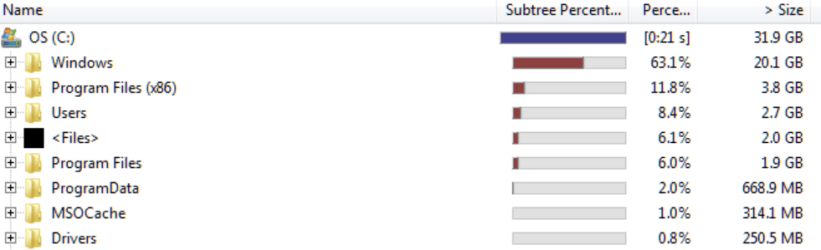
If you want to have a close look what's on the SSD, run WinDirStat. Also check your shadowstorage. The command is vssadmin list shadowstorage. Look for Allocated.

This is my WinDirStat. My winsxs is 8.4GB (which is a bit bigger than default which is appr. 5GB)
 

Attachments

  • 2012-12-24_1409.png
    2012-12-24_1409.png
    21.4 KB · Views: 17

My Computer

Computer Manufacturer/Model Number
HP, Dell, Gateway, Toshiba - 4 laptops and 2 desktops
OS
Vista, Windows7, Mint Mate, Zorin, Windows 8
CPU
from 1.6GHz Duo to i7
Monitor(s) Displays
2x HP w2207
Hard Drives
5x HDD, 7x SSD, 12x Externals
Keyboard
with trackball - no mices
Mouse
Trackball mice
Internet Speed
DSL 6000
The only other option you have left is to get a bigger SSD. I wouldn't use anything less than 256 GB SSD.
 

My Computer

Computer Manufacturer/Model Number
Custom built
OS
Windows 7 Ultimate 64 bit
CPU
AMD Phenom II X4 965 Black Edition
Motherboard
Gigabyte GA-MA790X-DS4
Memory
GSkill 4 X 2 GB PC 8500
Graphics Card(s)
XFX Radeon HD 6790 D
Sound Card
On board RealTek HD
Monitor(s) Displays
Dual monitors:Samsung SyncMaster S20B300
Screen Resolution
1600 X 900
Hard Drives
Seagate Barracuda 1TB (primary)
Seagate Barracuda 2 X 320 GB
PSU
Ultra X4 750 watt fully modular
Case
Thermaltake Overseer RX 1 full tower
Cooling
Core-Contact 92 mm CPU Cooler
Keyboard
Logitech G510
Mouse
Razor DeathAdder
Internet Speed
50/5 Mbps UL/DL
Other Info
Optical: Super Muliti DVD burner w/lightscribe, Hauppauge WinTV HVR-1800
The only other option you have left is to get a bigger SSD. I wouldn't use anything less than 256 GB SSD.
Not really required. All my 3 desktops run on 60GB SSDs - the oldest since 4 years.
 

My Computer

Computer Manufacturer/Model Number
HP, Dell, Gateway, Toshiba - 4 laptops and 2 desktops
OS
Vista, Windows7, Mint Mate, Zorin, Windows 8
CPU
from 1.6GHz Duo to i7
Monitor(s) Displays
2x HP w2207
Hard Drives
5x HDD, 7x SSD, 12x Externals
Keyboard
with trackball - no mices
Mouse
Trackball mice
Internet Speed
DSL 6000
The only other option you have left is to get a bigger SSD. I wouldn't use anything less than 256 GB SSD.
Not really required. All my 3 desktops run on 60GB SSDs - the oldest since 4 years.

I agree, but most PC users out there don't have the concept like we do when utilizing more than one hard drive and how to properly setup and save data from drive to drive. That being said is why I suggested a larger drive. It's the most logical option for the most common novice user who doesn't want to be bothered with what data should go where and to what location.

Hell, I can't get my wife to save pictures to the picture folder, documents to the documents folder and on and on.....there's stuff every where. She, like most users just click save and not paying attention to where it's being saved to.
 

My Computer

Computer Manufacturer/Model Number
Custom built
OS
Windows 7 Ultimate 64 bit
CPU
AMD Phenom II X4 965 Black Edition
Motherboard
Gigabyte GA-MA790X-DS4
Memory
GSkill 4 X 2 GB PC 8500
Graphics Card(s)
XFX Radeon HD 6790 D
Sound Card
On board RealTek HD
Monitor(s) Displays
Dual monitors:Samsung SyncMaster S20B300
Screen Resolution
1600 X 900
Hard Drives
Seagate Barracuda 1TB (primary)
Seagate Barracuda 2 X 320 GB
PSU
Ultra X4 750 watt fully modular
Case
Thermaltake Overseer RX 1 full tower
Cooling
Core-Contact 92 mm CPU Cooler
Keyboard
Logitech G510
Mouse
Razor DeathAdder
Internet Speed
50/5 Mbps UL/DL
Other Info
Optical: Super Muliti DVD burner w/lightscribe, Hauppauge WinTV HVR-1800
Users like your wife should use paper and pen - not computers, LOL. Fortunately they do not do much damage to others like drivers that don't know how to drive.
 

My Computer

Computer Manufacturer/Model Number
HP, Dell, Gateway, Toshiba - 4 laptops and 2 desktops
OS
Vista, Windows7, Mint Mate, Zorin, Windows 8
CPU
from 1.6GHz Duo to i7
Monitor(s) Displays
2x HP w2207
Hard Drives
5x HDD, 7x SSD, 12x Externals
Keyboard
with trackball - no mices
Mouse
Trackball mice
Internet Speed
DSL 6000

My Computer

Computer type
PC/Desktop
Computer Manufacturer/Model Number
Self built custom
OS
64-bit Windows 11 Pro for Workstations
CPU
Intel i7-8700K OC'd to 5 GHz
Motherboard
ASUS ROG Maximus XI Formula Z390
Memory
64 GB (4x16GB) G.SKILL TridentZ RGB DDR4 3600 MHz
Graphics Card(s)
ASUS ROG-STRIX-GTX1080TI-O11G-GAMING
Sound Card
Integrated
Monitor(s) Displays
2 x Samsung Odyssey G7 27"
Screen Resolution
2560x1440
Hard Drives
1TB Samsung 990 PRO M.2,
4TB Samsung 990 PRO PRO M.2,
TerraMaster F8 SSD Plus NAS
PSU
Seasonic Prime Titanium 850W
Case
Thermaltake Core P3
Cooling
Corsair Hydro H115i
Keyboard
Logitech wireless K800
Mouse
Logitech MX Master 4
Internet Speed
2 Gb/s Download and 100 Mb/s Upload
Antivirus
Malwarebyte Anti-Malware Premium
Browser
Google Chrome
Other Info
Logitech Z625 speaker system,
Logitech BRIO 4K Pro webcam,
HP Color LaserJet Pro MFP M477fdn,
APC SMART-UPS RT 1000 XL - SURT1000XLI,
Galaxy S23 Plus phone
LOL Shawn, once he has done all that, his system will be down to 10 bytes. But then he won't be using the PC any more because he will be old.
 

My Computer

Computer Manufacturer/Model Number
HP, Dell, Gateway, Toshiba - 4 laptops and 2 desktops
OS
Vista, Windows7, Mint Mate, Zorin, Windows 8
CPU
from 1.6GHz Duo to i7
Monitor(s) Displays
2x HP w2207
Hard Drives
5x HDD, 7x SSD, 12x Externals
Keyboard
with trackball - no mices
Mouse
Trackball mice
Internet Speed
DSL 6000
LOL Shawn, once he has done all that, his system will be down to 10 bytes. But then he won't be using the PC any more because he will be old.

:roflmao:
 
Last edited:

My Computer

Computer type
PC/Desktop
Computer Manufacturer/Model Number
Self built custom
OS
64-bit Windows 11 Pro for Workstations
CPU
Intel i7-8700K OC'd to 5 GHz
Motherboard
ASUS ROG Maximus XI Formula Z390
Memory
64 GB (4x16GB) G.SKILL TridentZ RGB DDR4 3600 MHz
Graphics Card(s)
ASUS ROG-STRIX-GTX1080TI-O11G-GAMING
Sound Card
Integrated
Monitor(s) Displays
2 x Samsung Odyssey G7 27"
Screen Resolution
2560x1440
Hard Drives
1TB Samsung 990 PRO M.2,
4TB Samsung 990 PRO PRO M.2,
TerraMaster F8 SSD Plus NAS
PSU
Seasonic Prime Titanium 850W
Case
Thermaltake Core P3
Cooling
Corsair Hydro H115i
Keyboard
Logitech wireless K800
Mouse
Logitech MX Master 4
Internet Speed
2 Gb/s Download and 100 Mb/s Upload
Antivirus
Malwarebyte Anti-Malware Premium
Browser
Google Chrome
Other Info
Logitech Z625 speaker system,
Logitech BRIO 4K Pro webcam,
HP Color LaserJet Pro MFP M477fdn,
APC SMART-UPS RT 1000 XL - SURT1000XLI,
Galaxy S23 Plus phone
The only other option you have left is to get a bigger SSD. I wouldn't use anything less than 256 GB SSD.
Not really required. All my 3 desktops run on 60GB SSDs - the oldest since 4 years.

I agree, but most PC users out there don't have the concept like we do when utilizing more than one hard drive and how to properly setup and save data from drive to drive. That being said is why I suggested a larger drive. It's the most logical option for the most common novice user who doesn't want to be bothered with what data should go where and to what location.

Hell, I can't get my wife to save pictures to the picture folder, documents to the documents folder and on and on.....there's stuff every where. She, like most users just click save and not paying attention to where it's being saved to.

I really hope you didn't just say I'm like most of the PC users out there that are idiots, did you?
I just don't know much about this / don't have experience with this kind of stuff and don't want to mess up my PC by deleting / disabling something that needs to be there.
 

My Computer

Computer type
PC/Desktop
Computer Manufacturer/Model Number
Custom
OS
Windows 7 Ultimate x64
CPU
Intel i7 3770K 4.5GHz
Motherboard
MSI Z77A-GD65
Memory
8GB DDR3
Graphics Card(s)
MSI Twin Frozr 7950 (x2) crossfire
Monitor(s) Displays
AOC I2421VWH, LG 27EA63, ASUS VE247H
Screen Resolution
1920x1080 1920x1080 1920x1080
Hard Drives
Intel 330 60GB SSD, Western Digital 1TB, Seagate 1TB
PSU
Rosewill Capstone 750w
Case
Phantom 410
Cooling
IBP-Z001 for CPU and case fans
Keyboard
CM Storm Quickfire Pro
Mouse
Razer Naga 2012
Internet Speed
50 Mbps down, 20 Mbps upload
Antivirus
Microsoft Security Essentials
Browser
Google Chrome
Did you check with WinDirStat and the vssadmin command what the situation is. Can you post pictures of the results. I think you are OK, but it is always good to check.
 

My Computer

Computer Manufacturer/Model Number
HP, Dell, Gateway, Toshiba - 4 laptops and 2 desktops
OS
Vista, Windows7, Mint Mate, Zorin, Windows 8
CPU
from 1.6GHz Duo to i7
Monitor(s) Displays
2x HP w2207
Hard Drives
5x HDD, 7x SSD, 12x Externals
Keyboard
with trackball - no mices
Mouse
Trackball mice
Internet Speed
DSL 6000
Back
Top