
save taskbar thumbnail previews - what does it do?

terrorist96

New member
Member
VIP
Local time
6:33 PM
Messages
221
Okay, so I did a lot of searching and I thought I figured out what this option does (in the performance options within system properties). I thought it kept the thumbnail previews in the cache so when I hibernate or sleep, the previews will still be there. But that doesn't appear to be the case.

Usually, when I hibernate or sleep the computer, some of the previews don't show up and instead just shows the application's icon until I click on it and the preview gets saved again.

So basically, I see no difference between having this option checked vs not checked. Can anyone help?

Thanks!
(Specs are below, in case)
 

My Computer

Computer type
Laptop
Computer Manufacturer/Model Number
Sager NP2650 (Clevo W650SZ) - Custom Built
OS
Windows 7 Ultimate 64 bit (6.1, Build 7601) Service Pack 1
CPU
Intel Core i7 (4700MQ, 2.4Ghz-3.4Ghz, 6MB Cache - Haswell)
Memory
16GB (DDR3 1600MHz Dual Channel Memory - 2 SODIMMS)
Graphics Card(s)
Intel HD 4600 Graphics
Sound Card
Sound Blaster Compatible 3D Audio
Monitor(s) Displays
15.6” LED IPS, Super Clear Matte
Screen Resolution
1920x1080p
Hard Drives
Crucial m4 128GB SSD [mSATA - 128MB L2 Cache] (CT128M4SSD3) | Samsung 860 EVO 1TB SSD [SATA 6Gb/s] (MZ-76E1T0B/AM) | Seagate Momentus 750GB HDD [SATA 3Gb/s, 7200RPM, 16MB Cache] | Western Digital Caviar Black 1TB HDD [SATA 3Gb/s, 7200RPM, 32MB Cache]
Cooling
Stock OEM Thermal Compound
Keyboard
Standard Sager/Clevo Non Chiclet Keyboard
Mouse
Microsoft Wireless Mobile Mouse 4000
Antivirus
Microsoft Security Essentials
Browser
Google Chrome | Firefox/Waterfox | Opera
Other Info
Built-in 802.11 Wireless B/G/N - Stock Wireless Card + Bluetooth™ 4.0 | Internal 9-in-1 Card Reader (MMC/RSMMC/SD/Mini SD/SDHC/SDXC/MS/MS Pro/MS Duo) | Built in 2.0 Megapixel Camera | Rosewill RX-358-S BLACK 3.5" SATA to eSATA External Enclosure with Internal 80mm fan
Hello terrorist,

It's basically to have the taskbar thumbnail preview windows above the icon to be saved to a cache to help the image in the thumbnail preview load quicker. If you don't have it turned on, then the thumbnail preview is loaded fresh each time when you hover over a icon on the taskbar of an opened window instead of from the faster cache.

http://www.sevenforums.com/tutorials/127881-taskbar-thumbnail-previews-save.html

Hope this helps, :)
Shawn
 

My Computer

Computer type
PC/Desktop
Computer Manufacturer/Model Number
Self built custom
OS
64-bit Windows 11 Pro for Workstations
CPU
Intel i7-8700K OC'd to 5 GHz
Motherboard
ASUS ROG Maximus XI Formula Z390
Memory
64 GB (4x16GB) G.SKILL TridentZ RGB DDR4 3600 MHz
Graphics Card(s)
ASUS ROG-STRIX-GTX1080TI-O11G-GAMING
Sound Card
Integrated
Monitor(s) Displays
2 x Samsung Odyssey G7 27"
Screen Resolution
2560x1440
Hard Drives
1TB Samsung 990 PRO M.2,
4TB Samsung 990 PRO PRO M.2,
TerraMaster F8 SSD Plus NAS
PSU
Seasonic Prime Titanium 850W
Case
Thermaltake Core P3
Cooling
Corsair Hydro H115i
Keyboard
Logitech wireless K800
Mouse
Logitech MX Master 4
Internet Speed
2 Gb/s Download and 100 Mb/s Upload
Antivirus
Malwarebyte Anti-Malware Premium
Browser
Google Chrome
Other Info
Logitech Z625 speaker system,
Logitech BRIO 4K Pro webcam,
HP Color LaserJet Pro MFP M477fdn,
APC SMART-UPS RT 1000 XL - SURT1000XLI,
Galaxy S23 Plus phone
Thanks for the reply. Yeah, I saw your thread there but my assumption was that the main difference would be that if the preview had been cached once it wouldn't have to be reloaded again, but that doesn't seem to be the case. As I said, regardless of whether or not I have the option turned on or off, when I hibernate/sleep (sometimes, not all of the time), some previews don't show up and I have to open the window for it to show up.

So I really don't see any difference in keeping it on or off because when I hover over a window and it shows the preview, it seems to show it at the same speed both times.
Could you give me any more detail?
Thank you
 

My Computer

Computer type
Laptop
Computer Manufacturer/Model Number
Sager NP2650 (Clevo W650SZ) - Custom Built
OS
Windows 7 Ultimate 64 bit (6.1, Build 7601) Service Pack 1
CPU
Intel Core i7 (4700MQ, 2.4Ghz-3.4Ghz, 6MB Cache - Haswell)
Memory
16GB (DDR3 1600MHz Dual Channel Memory - 2 SODIMMS)
Graphics Card(s)
Intel HD 4600 Graphics
Sound Card
Sound Blaster Compatible 3D Audio
Monitor(s) Displays
15.6” LED IPS, Super Clear Matte
Screen Resolution
1920x1080p
Hard Drives
Crucial m4 128GB SSD [mSATA - 128MB L2 Cache] (CT128M4SSD3) | Samsung 860 EVO 1TB SSD [SATA 6Gb/s] (MZ-76E1T0B/AM) | Seagate Momentus 750GB HDD [SATA 3Gb/s, 7200RPM, 16MB Cache] | Western Digital Caviar Black 1TB HDD [SATA 3Gb/s, 7200RPM, 32MB Cache]
Cooling
Stock OEM Thermal Compound
Keyboard
Standard Sager/Clevo Non Chiclet Keyboard
Mouse
Microsoft Wireless Mobile Mouse 4000
Antivirus
Microsoft Security Essentials
Browser
Google Chrome | Firefox/Waterfox | Opera
Other Info
Built-in 802.11 Wireless B/G/N - Stock Wireless Card + Bluetooth™ 4.0 | Internal 9-in-1 Card Reader (MMC/RSMMC/SD/Mini SD/SDHC/SDXC/MS/MS Pro/MS Duo) | Built in 2.0 Megapixel Camera | Rosewill RX-358-S BLACK 3.5" SATA to eSATA External Enclosure with Internal 80mm fan
Yeah, the window will have to be open to be able to have a taskbar thumbnail preview of it.

If you have a fast system, then you probably won't notice any difference between a live VS cache loaded image of the opened taskbar thumbnail preview.
 

My Computer

Computer type
PC/Desktop
Computer Manufacturer/Model Number
Self built custom
OS
64-bit Windows 11 Pro for Workstations
CPU
Intel i7-8700K OC'd to 5 GHz
Motherboard
ASUS ROG Maximus XI Formula Z390
Memory
64 GB (4x16GB) G.SKILL TridentZ RGB DDR4 3600 MHz
Graphics Card(s)
ASUS ROG-STRIX-GTX1080TI-O11G-GAMING
Sound Card
Integrated
Monitor(s) Displays
2 x Samsung Odyssey G7 27"
Screen Resolution
2560x1440
Hard Drives
1TB Samsung 990 PRO M.2,
4TB Samsung 990 PRO PRO M.2,
TerraMaster F8 SSD Plus NAS
PSU
Seasonic Prime Titanium 850W
Case
Thermaltake Core P3
Cooling
Corsair Hydro H115i
Keyboard
Logitech wireless K800
Mouse
Logitech MX Master 4
Internet Speed
2 Gb/s Download and 100 Mb/s Upload
Antivirus
Malwarebyte Anti-Malware Premium
Browser
Google Chrome
Other Info
Logitech Z625 speaker system,
Logitech BRIO 4K Pro webcam,
HP Color LaserJet Pro MFP M477fdn,
APC SMART-UPS RT 1000 XL - SURT1000XLI,
Galaxy S23 Plus phone
The windows are open. Come on, gimmie some credit :P
And I do have a pretty fast system as you can see from my specs.
This is what I mean when I say it doesn't display the thumbnail previews regardless of having the box checked or not.
 

Attachments

  • cdfasdsadsa.png
    cdfasdsadsa.png
    73.2 KB · Views: 7

My Computer

Computer type
Laptop
Computer Manufacturer/Model Number
Sager NP2650 (Clevo W650SZ) - Custom Built
OS
Windows 7 Ultimate 64 bit (6.1, Build 7601) Service Pack 1
CPU
Intel Core i7 (4700MQ, 2.4Ghz-3.4Ghz, 6MB Cache - Haswell)
Memory
16GB (DDR3 1600MHz Dual Channel Memory - 2 SODIMMS)
Graphics Card(s)
Intel HD 4600 Graphics
Sound Card
Sound Blaster Compatible 3D Audio
Monitor(s) Displays
15.6” LED IPS, Super Clear Matte
Screen Resolution
1920x1080p
Hard Drives
Crucial m4 128GB SSD [mSATA - 128MB L2 Cache] (CT128M4SSD3) | Samsung 860 EVO 1TB SSD [SATA 6Gb/s] (MZ-76E1T0B/AM) | Seagate Momentus 750GB HDD [SATA 3Gb/s, 7200RPM, 16MB Cache] | Western Digital Caviar Black 1TB HDD [SATA 3Gb/s, 7200RPM, 32MB Cache]
Cooling
Stock OEM Thermal Compound
Keyboard
Standard Sager/Clevo Non Chiclet Keyboard
Mouse
Microsoft Wireless Mobile Mouse 4000
Antivirus
Microsoft Security Essentials
Browser
Google Chrome | Firefox/Waterfox | Opera
Other Info
Built-in 802.11 Wireless B/G/N - Stock Wireless Card + Bluetooth™ 4.0 | Internal 9-in-1 Card Reader (MMC/RSMMC/SD/Mini SD/SDHC/SDXC/MS/MS Pro/MS Duo) | Built in 2.0 Megapixel Camera | Rosewill RX-358-S BLACK 3.5" SATA to eSATA External Enclosure with Internal 80mm fan
LOL, yeah I know, but just had to make sure.

I'm afraid this is a Chrome issue instead of a Windows issue. In the latest Chrome versions, only the active tab shows now. :(
 

My Computer

Computer type
PC/Desktop
Computer Manufacturer/Model Number
Self built custom
OS
64-bit Windows 11 Pro for Workstations
CPU
Intel i7-8700K OC'd to 5 GHz
Motherboard
ASUS ROG Maximus XI Formula Z390
Memory
64 GB (4x16GB) G.SKILL TridentZ RGB DDR4 3600 MHz
Graphics Card(s)
ASUS ROG-STRIX-GTX1080TI-O11G-GAMING
Sound Card
Integrated
Monitor(s) Displays
2 x Samsung Odyssey G7 27"
Screen Resolution
2560x1440
Hard Drives
1TB Samsung 990 PRO M.2,
4TB Samsung 990 PRO PRO M.2,
TerraMaster F8 SSD Plus NAS
PSU
Seasonic Prime Titanium 850W
Case
Thermaltake Core P3
Cooling
Corsair Hydro H115i
Keyboard
Logitech wireless K800
Mouse
Logitech MX Master 4
Internet Speed
2 Gb/s Download and 100 Mb/s Upload
Antivirus
Malwarebyte Anti-Malware Premium
Browser
Google Chrome
Other Info
Logitech Z625 speaker system,
Logitech BRIO 4K Pro webcam,
HP Color LaserJet Pro MFP M477fdn,
APC SMART-UPS RT 1000 XL - SURT1000XLI,
Galaxy S23 Plus phone
Is it an Adobe Reader issue as well? Cuz I've had it happen there as well.
 

My Computer

Computer type
Laptop
Computer Manufacturer/Model Number
Sager NP2650 (Clevo W650SZ) - Custom Built
OS
Windows 7 Ultimate 64 bit (6.1, Build 7601) Service Pack 1
CPU
Intel Core i7 (4700MQ, 2.4Ghz-3.4Ghz, 6MB Cache - Haswell)
Memory
16GB (DDR3 1600MHz Dual Channel Memory - 2 SODIMMS)
Graphics Card(s)
Intel HD 4600 Graphics
Sound Card
Sound Blaster Compatible 3D Audio
Monitor(s) Displays
15.6” LED IPS, Super Clear Matte
Screen Resolution
1920x1080p
Hard Drives
Crucial m4 128GB SSD [mSATA - 128MB L2 Cache] (CT128M4SSD3) | Samsung 860 EVO 1TB SSD [SATA 6Gb/s] (MZ-76E1T0B/AM) | Seagate Momentus 750GB HDD [SATA 3Gb/s, 7200RPM, 16MB Cache] | Western Digital Caviar Black 1TB HDD [SATA 3Gb/s, 7200RPM, 32MB Cache]
Cooling
Stock OEM Thermal Compound
Keyboard
Standard Sager/Clevo Non Chiclet Keyboard
Mouse
Microsoft Wireless Mobile Mouse 4000
Antivirus
Microsoft Security Essentials
Browser
Google Chrome | Firefox/Waterfox | Opera
Other Info
Built-in 802.11 Wireless B/G/N - Stock Wireless Card + Bluetooth™ 4.0 | Internal 9-in-1 Card Reader (MMC/RSMMC/SD/Mini SD/SDHC/SDXC/MS/MS Pro/MS Duo) | Built in 2.0 Megapixel Camera | Rosewill RX-358-S BLACK 3.5" SATA to eSATA External Enclosure with Internal 80mm fan

Not sure about Adobe Reader since I don't use it. I just know that Chrome has this issue.

How does it work with the default programs in Windows? For example: Notepad, mspaint, etc....
 

My Computer

Computer type
PC/Desktop
Computer Manufacturer/Model Number
Self built custom
OS
64-bit Windows 11 Pro for Workstations
CPU
Intel i7-8700K OC'd to 5 GHz
Motherboard
ASUS ROG Maximus XI Formula Z390
Memory
64 GB (4x16GB) G.SKILL TridentZ RGB DDR4 3600 MHz
Graphics Card(s)
ASUS ROG-STRIX-GTX1080TI-O11G-GAMING
Sound Card
Integrated
Monitor(s) Displays
2 x Samsung Odyssey G7 27"
Screen Resolution
2560x1440
Hard Drives
1TB Samsung 990 PRO M.2,
4TB Samsung 990 PRO PRO M.2,
TerraMaster F8 SSD Plus NAS
PSU
Seasonic Prime Titanium 850W
Case
Thermaltake Core P3
Cooling
Corsair Hydro H115i
Keyboard
Logitech wireless K800
Mouse
Logitech MX Master 4
Internet Speed
2 Gb/s Download and 100 Mb/s Upload
Antivirus
Malwarebyte Anti-Malware Premium
Browser
Google Chrome
Other Info
Logitech Z625 speaker system,
Logitech BRIO 4K Pro webcam,
HP Color LaserJet Pro MFP M477fdn,
APC SMART-UPS RT 1000 XL - SURT1000XLI,
Galaxy S23 Plus phone
I haven't seen it happen in Notepad, but I have noticed it in Microsoft Word.
 

My Computer

Computer type
Laptop
Computer Manufacturer/Model Number
Sager NP2650 (Clevo W650SZ) - Custom Built
OS
Windows 7 Ultimate 64 bit (6.1, Build 7601) Service Pack 1
CPU
Intel Core i7 (4700MQ, 2.4Ghz-3.4Ghz, 6MB Cache - Haswell)
Memory
16GB (DDR3 1600MHz Dual Channel Memory - 2 SODIMMS)
Graphics Card(s)
Intel HD 4600 Graphics
Sound Card
Sound Blaster Compatible 3D Audio
Monitor(s) Displays
15.6” LED IPS, Super Clear Matte
Screen Resolution
1920x1080p
Hard Drives
Crucial m4 128GB SSD [mSATA - 128MB L2 Cache] (CT128M4SSD3) | Samsung 860 EVO 1TB SSD [SATA 6Gb/s] (MZ-76E1T0B/AM) | Seagate Momentus 750GB HDD [SATA 3Gb/s, 7200RPM, 16MB Cache] | Western Digital Caviar Black 1TB HDD [SATA 3Gb/s, 7200RPM, 32MB Cache]
Cooling
Stock OEM Thermal Compound
Keyboard
Standard Sager/Clevo Non Chiclet Keyboard
Mouse
Microsoft Wireless Mobile Mouse 4000
Antivirus
Microsoft Security Essentials
Browser
Google Chrome | Firefox/Waterfox | Opera
Other Info
Built-in 802.11 Wireless B/G/N - Stock Wireless Card + Bluetooth™ 4.0 | Internal 9-in-1 Card Reader (MMC/RSMMC/SD/Mini SD/SDHC/SDXC/MS/MS Pro/MS Duo) | Built in 2.0 Megapixel Camera | Rosewill RX-358-S BLACK 3.5" SATA to eSATA External Enclosure with Internal 80mm fan
Personally, I would leave this option unchecked to always have the taskbar thumbnail previews load live instead of from a cache. Caches have a tendency to get corrupted at times.

It appears that for these few programs they must be refreshed to show on the taskbar thumbnail preview again.
 
Last edited:

My Computer

Computer type
PC/Desktop
Computer Manufacturer/Model Number
Self built custom
OS
64-bit Windows 11 Pro for Workstations
CPU
Intel i7-8700K OC'd to 5 GHz
Motherboard
ASUS ROG Maximus XI Formula Z390
Memory
64 GB (4x16GB) G.SKILL TridentZ RGB DDR4 3600 MHz
Graphics Card(s)
ASUS ROG-STRIX-GTX1080TI-O11G-GAMING
Sound Card
Integrated
Monitor(s) Displays
2 x Samsung Odyssey G7 27"
Screen Resolution
2560x1440
Hard Drives
1TB Samsung 990 PRO M.2,
4TB Samsung 990 PRO PRO M.2,
TerraMaster F8 SSD Plus NAS
PSU
Seasonic Prime Titanium 850W
Case
Thermaltake Core P3
Cooling
Corsair Hydro H115i
Keyboard
Logitech wireless K800
Mouse
Logitech MX Master 4
Internet Speed
2 Gb/s Download and 100 Mb/s Upload
Antivirus
Malwarebyte Anti-Malware Premium
Browser
Google Chrome
Other Info
Logitech Z625 speaker system,
Logitech BRIO 4K Pro webcam,
HP Color LaserJet Pro MFP M477fdn,
APC SMART-UPS RT 1000 XL - SURT1000XLI,
Galaxy S23 Plus phone
I'll take that advice. :)
Thanks
 

My Computer

Computer type
Laptop
Computer Manufacturer/Model Number
Sager NP2650 (Clevo W650SZ) - Custom Built
OS
Windows 7 Ultimate 64 bit (6.1, Build 7601) Service Pack 1
CPU
Intel Core i7 (4700MQ, 2.4Ghz-3.4Ghz, 6MB Cache - Haswell)
Memory
16GB (DDR3 1600MHz Dual Channel Memory - 2 SODIMMS)
Graphics Card(s)
Intel HD 4600 Graphics
Sound Card
Sound Blaster Compatible 3D Audio
Monitor(s) Displays
15.6” LED IPS, Super Clear Matte
Screen Resolution
1920x1080p
Hard Drives
Crucial m4 128GB SSD [mSATA - 128MB L2 Cache] (CT128M4SSD3) | Samsung 860 EVO 1TB SSD [SATA 6Gb/s] (MZ-76E1T0B/AM) | Seagate Momentus 750GB HDD [SATA 3Gb/s, 7200RPM, 16MB Cache] | Western Digital Caviar Black 1TB HDD [SATA 3Gb/s, 7200RPM, 32MB Cache]
Cooling
Stock OEM Thermal Compound
Keyboard
Standard Sager/Clevo Non Chiclet Keyboard
Mouse
Microsoft Wireless Mobile Mouse 4000
Antivirus
Microsoft Security Essentials
Browser
Google Chrome | Firefox/Waterfox | Opera
Other Info
Built-in 802.11 Wireless B/G/N - Stock Wireless Card + Bluetooth™ 4.0 | Internal 9-in-1 Card Reader (MMC/RSMMC/SD/Mini SD/SDHC/SDXC/MS/MS Pro/MS Duo) | Built in 2.0 Megapixel Camera | Rosewill RX-358-S BLACK 3.5" SATA to eSATA External Enclosure with Internal 80mm fan
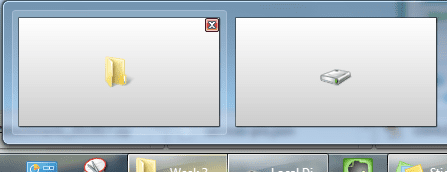
Happens in Explorer too. Can't get anymore native than that.

Edit: Though this is after I unchecked the option.
 

Attachments

  • fdsafafsadfsa.png
    fdsafafsadfsa.png
    39.6 KB · Views: 4

My Computer

Computer type
Laptop
Computer Manufacturer/Model Number
Sager NP2650 (Clevo W650SZ) - Custom Built
OS
Windows 7 Ultimate 64 bit (6.1, Build 7601) Service Pack 1
CPU
Intel Core i7 (4700MQ, 2.4Ghz-3.4Ghz, 6MB Cache - Haswell)
Memory
16GB (DDR3 1600MHz Dual Channel Memory - 2 SODIMMS)
Graphics Card(s)
Intel HD 4600 Graphics
Sound Card
Sound Blaster Compatible 3D Audio
Monitor(s) Displays
15.6” LED IPS, Super Clear Matte
Screen Resolution
1920x1080p
Hard Drives
Crucial m4 128GB SSD [mSATA - 128MB L2 Cache] (CT128M4SSD3) | Samsung 860 EVO 1TB SSD [SATA 6Gb/s] (MZ-76E1T0B/AM) | Seagate Momentus 750GB HDD [SATA 3Gb/s, 7200RPM, 16MB Cache] | Western Digital Caviar Black 1TB HDD [SATA 3Gb/s, 7200RPM, 32MB Cache]
Cooling
Stock OEM Thermal Compound
Keyboard
Standard Sager/Clevo Non Chiclet Keyboard
Mouse
Microsoft Wireless Mobile Mouse 4000
Antivirus
Microsoft Security Essentials
Browser
Google Chrome | Firefox/Waterfox | Opera
Other Info
Built-in 802.11 Wireless B/G/N - Stock Wireless Card + Bluetooth™ 4.0 | Internal 9-in-1 Card Reader (MMC/RSMMC/SD/Mini SD/SDHC/SDXC/MS/MS Pro/MS Duo) | Built in 2.0 Megapixel Camera | Rosewill RX-358-S BLACK 3.5" SATA to eSATA External Enclosure with Internal 80mm fan
Back
Top