save to d partition as default

gerribol

New member
Local time
9:14 PM
Messages
22
Location
Australia
When I bought my computer the HDD was already partitioned into 'c' and 'd'. I did not understand the reason for this. I had been saving all 'my documents' to C:\my documents..... As the 'c' partition was nearly full I have now moved my documents to the 'd' partition.

How can I get Excel and Word to save by default to the new my documents in 'd' partition.

I hope I am explaining this properly

Thanks in advance
 

My Computer

Computer type
Laptop
Computer Manufacturer/Model Number
Toshiba Sattelite C850/02D
OS
Microsoft Windows 7 Home Premium 64-bit 7601 Multiprocessor Free Service Pack 1
CPU
Intel(R) Core(TM) i5-2450M CPU @ 2.50GHz
Motherboard
Type2 - Board Vendor Name1 Type2 - Board Product Name1
Memory
4.00 GB
Graphics Card(s)
AMD Radeon HD 7610M
Sound Card
(1) AMD High Definition Audio Device (2) Realtek High Defi
Hard Drives
TOSHIBA MK5075GSX
On some computers like Dell, the D partion is the backup or restore partition. If that is the case, here, you do not want to make changes. It is used to restore to factory settings if you have a problem,
 

My Computer

Computer type
PC/Desktop
Computer Manufacturer/Model Number
Dell XPS 420
OS
Windows 10, Home Clean Install
CPU
Intel Core2 processsor Q8200(2.33Ghz 1333FSB) Quad Core Tech
Motherboard
Dell
Memory
6 gb
Graphics Card(s)
ATI Radeon 256MB HD3650
Sound Card
Intergrated 7.1 Channel Audio
Monitor(s) Displays
Dell SP2009W 20"
Hard Drives
640 GB Serial ATA Hard drive
Cooling
Fan
Keyboard
Dell USB Keyboard
Mouse
Dell Premium Optical USB
Internet Speed
DSL 2.85
Thankyou for your quick reply.

I am still confused. The computer I have is an ASUS K52F with 320GB HDD.

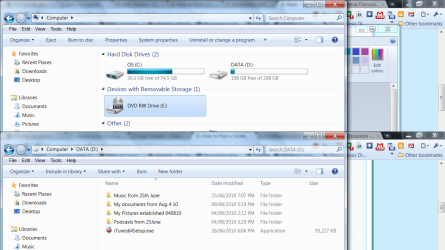
The way it was set up when I bought it was OS (C) with 74GB of space and Data (D) with 208GB free.

There is virtually nothing on D so therefore I have started saving to D instead of C. If I can only use the C partition that would mean that I have effectively bought a 74GB instead of a 320GB.

I realise I could change the partitions but I am reluctant to do this as I am a fairly inexperienced user.

Hoping for further help.
 

My Computer

Computer type
Laptop
Computer Manufacturer/Model Number
Toshiba Sattelite C850/02D
OS
Microsoft Windows 7 Home Premium 64-bit 7601 Multiprocessor Free Service Pack 1
CPU
Intel(R) Core(TM) i5-2450M CPU @ 2.50GHz
Motherboard
Type2 - Board Vendor Name1 Type2 - Board Product Name1
Memory
4.00 GB
Graphics Card(s)
AMD Radeon HD 7610M
Sound Card
(1) AMD High Definition Audio Device (2) Realtek High Defi
Hard Drives
TOSHIBA MK5075GSX
If D is a DATA drive, you can move all your personal folders to it.
I would move them all. Document, Pictures, Videos, Music

Make Folders for them on the D Drive. 9You may wish to make a folder structure such as "User name" then the DATA folders inside in the case of multiple users. Your Choice.

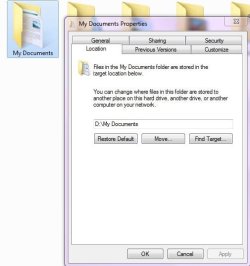
Click Start/ "user name" then right click My Documents.
Choose properties and then location tab.
Then "Move" and choose that location on the D Drive.

If you move them in this manner, all programs will still save to default loaction 'Documents" but in the new location.

**EDIT**
http://www.sevenforums.com/tutorials/18629-user-folders-change-default-location.html?ltr=U
Tutorial on how to :)
 

Attachments

  • docs.JPG
    docs.JPG
    34.5 KB · Views: 34

My Computer

Computer Manufacturer/Model Number
Custom (Self Build)
OS
Windows 7 Home Premium 64bit
CPU
Intel Core i7 2700k
Motherboard
eVGA P67 SLI
Memory
8GB Mushkin Redline Ridgebacks @1866
Graphics Card(s)
EVGA GTX570 SC
Sound Card
XiFi Titanium HD
Monitor(s) Displays
LG W2453V
Screen Resolution
1920x1080
Hard Drives
Intel 320 80GB -- Intel X25-V 40GB --WD Black 1TB x2 -- WD Blue 640GB
PSU
Seasonic x750
Case
Corsair 600T SE White
Cooling
eVGA Superclocked CPU Cooler
Keyboard
Saitek Cyborg
Antivirus
Kaspersky
Browser
IE
Other Info
LG BD/DVD
When I bought my computer the HDD was already partitioned into 'c' and 'd'. I did not understand the reason for this. I had been saving all 'my documents' to C:\my documents..... As the 'c' partition was nearly full I have now moved my documents to the 'd' partition.

How can I get Excel and Word to save by default to the new my documents in 'd' partition.

I hope I am explaining this properly

Thanks in advance

What Windows version do you use? :)

In Windows 7 the default "My Documents" folder is located at "C:\Users\[username]\Documents" with [username] is your username.

By default, MS Office apps save all the documents created by them into this path. To change this, you have to open each MS Office apps and modify the settings. Example for MS Word 2010:
1. Click tab Files.
2. Click Options.
3. On the left collumn, select Save.
4. Look for "Default file location" on the right panel, click Browse, and then browse to your own documents folder.
5. Then click OK > OK > restart MS Word 2010 and try :).

By the way, what MS Office version do you use?
 

My Computer

Computer Manufacturer/Model Number
Asus Notebook F80L Series
OS
Windows 7 Professional (x86)
CPU
Intel Core2 Duo T5750 @ 2.00 GHz
Motherboard
Asus Notebook F80L
Memory
2x 1GB DDR2-SDRAM @ 667 MHz (dual channel)
Graphics Card(s)
Intel GMA X3100
Sound Card
Realtek High Definition Audio
Monitor(s) Displays
Generic 14.1" Notebook LCD
Screen Resolution
1280x800
Hard Drives
Hitachi 160 GB SATA 1.5 Gbps hard disk drive
Keyboard
Generic Notebook keyboard
Mouse
Synaptic Touchpad
By default, MS Office apps save all the documents created by them into this path. To change this, you have to open each MS Office apps and modify the settings. Example for MS Word 2010:
1. Click tab Files.

I'm trying! Can you please explain how I can get to the <1. Click tab Files window>

I am using Win 7 and MS Office 2007
 

My Computer

Computer type
Laptop
Computer Manufacturer/Model Number
Toshiba Sattelite C850/02D
OS
Microsoft Windows 7 Home Premium 64-bit 7601 Multiprocessor Free Service Pack 1
CPU
Intel(R) Core(TM) i5-2450M CPU @ 2.50GHz
Motherboard
Type2 - Board Vendor Name1 Type2 - Board Product Name1
Memory
4.00 GB
Graphics Card(s)
AMD Radeon HD 7610M
Sound Card
(1) AMD High Definition Audio Device (2) Realtek High Defi
Hard Drives
TOSHIBA MK5075GSX
screen shots.png

I have unorthodox names for my folders!

Still can't work out how to get new MS Office docs to save to my new documents folder by default. I have tried properties but cannot see the file tab mentioned by an earlier poster.
 

My Computer

Computer type
Laptop
Computer Manufacturer/Model Number
Toshiba Sattelite C850/02D
OS
Microsoft Windows 7 Home Premium 64-bit 7601 Multiprocessor Free Service Pack 1
CPU
Intel(R) Core(TM) i5-2450M CPU @ 2.50GHz
Motherboard
Type2 - Board Vendor Name1 Type2 - Board Product Name1
Memory
4.00 GB
Graphics Card(s)
AMD Radeon HD 7610M
Sound Card
(1) AMD High Definition Audio Device (2) Realtek High Defi
Hard Drives
TOSHIBA MK5075GSX
I have worked out how to do what I was asking now.

thanks
 

My Computer

Computer type
Laptop
Computer Manufacturer/Model Number
Toshiba Sattelite C850/02D
OS
Microsoft Windows 7 Home Premium 64-bit 7601 Multiprocessor Free Service Pack 1
CPU
Intel(R) Core(TM) i5-2450M CPU @ 2.50GHz
Motherboard
Type2 - Board Vendor Name1 Type2 - Board Product Name1
Memory
4.00 GB
Graphics Card(s)
AMD Radeon HD 7610M
Sound Card
(1) AMD High Definition Audio Device (2) Realtek High Defi
Hard Drives
TOSHIBA MK5075GSX
Back
Top