Solved Saving Files Below Each Other on Windows 7's Desktop

Rynn21

New member
Local time
8:09 PM
Messages
11
Location
California
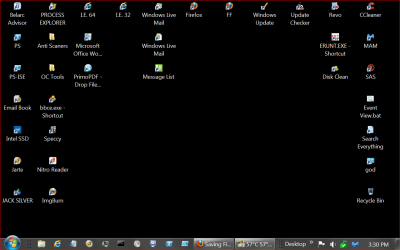
Unlike with XP, half of the time I save files onto my desktop the files save between my default icons (Computer, Recycle Bin, etc.) and mess up my icon layout. I want them to always save at the bottom of my default icons
 

My Computer My Computer

At a glance

Windows 7 Professional 64biti78GBRadeon HD Series
Computer type
PC/Desktop
Computer Manufacturer/Model Number
Custom Build
OS
Windows 7 Professional 64bit
CPU
i7
Memory
8GB
Graphics Card(s)
Radeon HD Series
Screen Resolution
1440x900
Hard Drives
Four
Keyboard
Logitech
Mouse
Logitech
Antivirus
AVG 2013
Browser
Firefox
Other Info
High-end gaming machine
I'm not sure about this, but I think this might be done by disabling "Auto arrange icons". So right-click the desktop and navigate to View and deselect "Auto arrange icons".
 

My Computer My Computer

Computer type
PC/Desktop
That only unsticks the icons, allowing the icons to be placed anywhere on the desktop. It's the same with XP. Unfortunately, that isn't what I was looking for.
 

My Computer My Computer

At a glance

Windows 7 Professional 64biti78GBRadeon HD Series
Computer type
PC/Desktop
Computer Manufacturer/Model Number
Custom Build
OS
Windows 7 Professional 64bit
CPU
i7
Memory
8GB
Graphics Card(s)
Radeon HD Series
Screen Resolution
1440x900
Hard Drives
Four
Keyboard
Logitech
Mouse
Logitech
Antivirus
AVG 2013
Browser
Firefox
Other Info
High-end gaming machine
That only unsticks the icons, allowing the icons to be placed anywhere on the desktop. It's the same with XP. Unfortunately, that isn't what I was looking for.

Oh, wait. Maybe try Sort by > Date modified.
 

My Computer My Computer

Computer type
PC/Desktop
Ok I managed to figure it out. I disabled sort/auto-arrange by right-clicking on the desktop. Still getting used to Win7.
 

My Computer My Computer

At a glance

Windows 7 Professional 64biti78GBRadeon HD Series
Computer type
PC/Desktop
Computer Manufacturer/Model Number
Custom Build
OS
Windows 7 Professional 64bit
CPU
i7
Memory
8GB
Graphics Card(s)
Radeon HD Series
Screen Resolution
1440x900
Hard Drives
Four
Keyboard
Logitech
Mouse
Logitech
Antivirus
AVG 2013
Browser
Firefox
Other Info
High-end gaming machine
So does this mean that disabling Auto Arrange makes it behave the way you want? Or did you also have to make it sort by Date Modified?
 

My Computer My Computer

Computer type
PC/Desktop
Just what I did worked, disabling auto-arrange.
 

My Computer My Computer

At a glance

Windows 7 Professional 64biti78GBRadeon HD Series
Computer type
PC/Desktop
Computer Manufacturer/Model Number
Custom Build
OS
Windows 7 Professional 64bit
CPU
i7
Memory
8GB
Graphics Card(s)
Radeon HD Series
Screen Resolution
1440x900
Hard Drives
Four
Keyboard
Logitech
Mouse
Logitech
Antivirus
AVG 2013
Browser
Firefox
Other Info
High-end gaming machine
"I'm surpised that this thread has not had more traffic. I have this issue on multiple Windows 7 machines. When I save or move something to my desktop it invariably saves it at the top left of the screen, rather than under the other desktop icons, as it has done on every other version of Windows I've used over the past 20 years. Auto arrange and Align to grid both selected, but no sort options. Really irritating! None of the solutions that I've seen suggested work: maybe MS regard it as normal behavior rather than a bug, but it's certainly a regression to me."
Does ANYONE know of a hack, work-around, etc. to fix this problem? I need a professional who has fixed this issue to solve this for me. My previous work-around didn't do much to fix this problem. Others are annoyed with the problem too. From what I can see is Win7 likes to organize files automatically by file type and name. For me, that's just irritating, because it places newly saved files in between my Computer, Documents, etc. rather than at the bottom of that icon list.
 

My Computer My Computer

At a glance

Windows 7 Professional 64biti78GBRadeon HD Series
Computer type
PC/Desktop
Computer Manufacturer/Model Number
Custom Build
OS
Windows 7 Professional 64bit
CPU
i7
Memory
8GB
Graphics Card(s)
Radeon HD Series
Screen Resolution
1440x900
Hard Drives
Four
Keyboard
Logitech
Mouse
Logitech
Antivirus
AVG 2013
Browser
Firefox
Other Info
High-end gaming machine
I don't sort any thing. All I do is select View choose the icon size and show desktop. Then right click desktop again and select refresh. I put my icons where I want them and they stay there.
Now when you apply a new icon through right clicking a program and (create a desktop short cut) it will be applied in the same location on the desktop. Then you will have to move it where you want it and then select Refresh again.
Their is nothing to be fixed. That is the way it works on both of my Windows 7 computers.

Desktop 6 22.PNG

Thats where I want them and that is where they stay.
 

My Computer My Computer

At a glance

Windows 10 Pro. 64/ version 1709 Windows 7 Pr...Intel i7-6800K @ 4.3Corsair Platinum 16 gig @2400EVGA GTX 1070 OC
Computer type
PC/Desktop
Computer Manufacturer/Model Number
Home made Desktop
OS
Windows 10 Pro. 64/ version 1709 Windows 7 Pro/64
CPU
Intel i7-6800K @ 4.3
Motherboard
ASUS X-99 Deluxe II
Memory
Corsair Platinum 16 gig @2400
Graphics Card(s)
EVGA GTX 1070 OC
Monitor(s) Displays
Asus 27" LED LCD/VE278Q
Screen Resolution
1920-1080 or 1280-720 HDMI
Hard Drives
INTEL SSD 730-240 Gb Sata 3.0/
PSU
EVGA Platium 1200W
Case
Phanteks Luxe Tempered Glass 8 fans/ one radiator
Cooling
XSPC/ Water Cooled CPU
Keyboard
Das 4 Professional
Mouse
Logitech M705/MX Anywhere 2-S
Internet Speed
100 mbits
Antivirus
Microsoft Security Essentials/ Malwarebytes Premium 3.0/ SAS
Browser
I.E. 11 default/Firefox/ ISP Time Warner Cable/Spectrum
Other Info
LG BluRay Burner/
Sound system-KLipsch-THX/
Icy Dock ssd Hot Swap bays.
I don't sort any thing. All I do is select View choose the icon size and show desktop. Then right click desktop again and select refresh. I put my icons where I want them and they stay there.
Now when you apply a new icon through right clicking a program and (create a desktop short cut) it will be applied in the same location on the desktop. Then you will have to move it where you want it and then select Refresh again.
Their is nothing to be fixed. That is the way it works on both of my Windows 7 computers.

View attachment 273670

Thats where I want them and that is where they stay.

But the problem comes when he's saving something to the desktop from within a program.
 

My Computer My Computer

Computer type
PC/Desktop
Create a New Folder on the Desktop. Put what ever you are saving from a program and put in a the New Folder.
Maybe I don't understand the problem.
 

My Computer My Computer

At a glance

Windows 10 Pro. 64/ version 1709 Windows 7 Pr...Intel i7-6800K @ 4.3Corsair Platinum 16 gig @2400EVGA GTX 1070 OC
Computer type
PC/Desktop
Computer Manufacturer/Model Number
Home made Desktop
OS
Windows 10 Pro. 64/ version 1709 Windows 7 Pro/64
CPU
Intel i7-6800K @ 4.3
Motherboard
ASUS X-99 Deluxe II
Memory
Corsair Platinum 16 gig @2400
Graphics Card(s)
EVGA GTX 1070 OC
Monitor(s) Displays
Asus 27" LED LCD/VE278Q
Screen Resolution
1920-1080 or 1280-720 HDMI
Hard Drives
INTEL SSD 730-240 Gb Sata 3.0/
PSU
EVGA Platium 1200W
Case
Phanteks Luxe Tempered Glass 8 fans/ one radiator
Cooling
XSPC/ Water Cooled CPU
Keyboard
Das 4 Professional
Mouse
Logitech M705/MX Anywhere 2-S
Internet Speed
100 mbits
Antivirus
Microsoft Security Essentials/ Malwarebytes Premium 3.0/ SAS
Browser
I.E. 11 default/Firefox/ ISP Time Warner Cable/Spectrum
Other Info
LG BluRay Burner/
Sound system-KLipsch-THX/
Icy Dock ssd Hot Swap bays.
Fences by stardock might be more feasible
 

My Computer My Computer

At a glance

Windows 7 Professional 64bitAMD Athlon II X3 44012.0 GB Dual-Channel DDR3 @ 669MHzAMD Radeon HD 6850
OS
Windows 7 Professional 64bit
CPU
AMD Athlon II X3 440
Motherboard
ASUS M4A77TD
Memory
12.0 GB Dual-Channel DDR3 @ 669MHz
Graphics Card(s)
AMD Radeon HD 6850
Sound Card
AMD High Definition Audio Device
Monitor(s) Displays
Dell 317FP, Generic PnP Monitor
Screen Resolution
1920x1080
Hard Drives
112GB OCZ OCZ-AGIL ITY3 SATA Disk Device (SSD)
932GB Western Digital WDC WD10 01FALS-00E3A0 SATA Disk Device (SATA)
466GB Western Digital WDC WD50 01AALS-00L3B2 SATA Disk Device (SATA)
Case
ANTEC 300 ILLUSION
Cooling
CoolerMaster Hyper 212 plus
Other Info
I have two 4GB Corsair XMS3 modules and two 2GB Corsair XMS3 modules.
Create a New Folder on the Desktop. Put what ever you are saving from a program and put in a the New Folder.
Maybe I don't understand the problem.

This is the problem:

When saving a file to the desktop from a program or from a web browser, it seems to be placed anywhere at random among the files that are already there. The desired behavior is for it to end up after the last icon.
 

My Computer My Computer

Computer type
PC/Desktop
Thanks TwoCables I think I understand now. Mine always go to the lower left corner of my desktop and then I move them. It's handy that way because I don't have to search for them. I will have to think a little more.
 

My Computer My Computer

At a glance

Windows 10 Pro. 64/ version 1709 Windows 7 Pr...Intel i7-6800K @ 4.3Corsair Platinum 16 gig @2400EVGA GTX 1070 OC
Computer type
PC/Desktop
Computer Manufacturer/Model Number
Home made Desktop
OS
Windows 10 Pro. 64/ version 1709 Windows 7 Pro/64
CPU
Intel i7-6800K @ 4.3
Motherboard
ASUS X-99 Deluxe II
Memory
Corsair Platinum 16 gig @2400
Graphics Card(s)
EVGA GTX 1070 OC
Monitor(s) Displays
Asus 27" LED LCD/VE278Q
Screen Resolution
1920-1080 or 1280-720 HDMI
Hard Drives
INTEL SSD 730-240 Gb Sata 3.0/
PSU
EVGA Platium 1200W
Case
Phanteks Luxe Tempered Glass 8 fans/ one radiator
Cooling
XSPC/ Water Cooled CPU
Keyboard
Das 4 Professional
Mouse
Logitech M705/MX Anywhere 2-S
Internet Speed
100 mbits
Antivirus
Microsoft Security Essentials/ Malwarebytes Premium 3.0/ SAS
Browser
I.E. 11 default/Firefox/ ISP Time Warner Cable/Spectrum
Other Info
LG BluRay Burner/
Sound system-KLipsch-THX/
Icy Dock ssd Hot Swap bays.

My Computer My Computer

At a glance

Windows 10 Pro. 64/ version 1709 Windows 7 Pr...Intel i7-6800K @ 4.3Corsair Platinum 16 gig @2400EVGA GTX 1070 OC
Computer type
PC/Desktop
Computer Manufacturer/Model Number
Home made Desktop
OS
Windows 10 Pro. 64/ version 1709 Windows 7 Pro/64
CPU
Intel i7-6800K @ 4.3
Motherboard
ASUS X-99 Deluxe II
Memory
Corsair Platinum 16 gig @2400
Graphics Card(s)
EVGA GTX 1070 OC
Monitor(s) Displays
Asus 27" LED LCD/VE278Q
Screen Resolution
1920-1080 or 1280-720 HDMI
Hard Drives
INTEL SSD 730-240 Gb Sata 3.0/
PSU
EVGA Platium 1200W
Case
Phanteks Luxe Tempered Glass 8 fans/ one radiator
Cooling
XSPC/ Water Cooled CPU
Keyboard
Das 4 Professional
Mouse
Logitech M705/MX Anywhere 2-S
Internet Speed
100 mbits
Antivirus
Microsoft Security Essentials/ Malwarebytes Premium 3.0/ SAS
Browser
I.E. 11 default/Firefox/ ISP Time Warner Cable/Spectrum
Other Info
LG BluRay Burner/
Sound system-KLipsch-THX/
Icy Dock ssd Hot Swap bays.
Trust me, as an IT technician, I don't have issues with my computer. It's more of a trivial annoyance that is my problem.
tommyg562000 has the best advice from what I've read. I had hoped there was an internal workaround, but oh well. I know of several people who prefer to manually place icons in various places on their desktop, but I don't. Even though Fences costs, at least it fixes my icon/desktop issue and was an option, which Microsoft never bothered to carry over from XP to Win7. Thanks. :)
 

My Computer My Computer

At a glance

Windows 7 Professional 64biti78GBRadeon HD Series
Computer type
PC/Desktop
Computer Manufacturer/Model Number
Custom Build
OS
Windows 7 Professional 64bit
CPU
i7
Memory
8GB
Graphics Card(s)
Radeon HD Series
Screen Resolution
1440x900
Hard Drives
Four
Keyboard
Logitech
Mouse
Logitech
Antivirus
AVG 2013
Browser
Firefox
Other Info
High-end gaming machine
I don't have fences, yet everything I save to the desktop from any program (including Firefox) goes right after the last file. I have auto arrange enabled, align to grid enabled, and my desktop is sorted by name. Yet, even a document beginning with the letter 'a' shows up after the last file.

I've never done anything to make it do that; it has always done it.
 

My Computer My Computer

Computer type
PC/Desktop
I too had the exact same things enabled and it didn't react that way. Guess you're just lucky. The same issue has happened for many people. Fences was the best solution for me. I love it. Thanks again tommyg562000.
 

My Computer My Computer

At a glance

Windows 7 Professional 64biti78GBRadeon HD Series
Computer type
PC/Desktop
Computer Manufacturer/Model Number
Custom Build
OS
Windows 7 Professional 64bit
CPU
i7
Memory
8GB
Graphics Card(s)
Radeon HD Series
Screen Resolution
1440x900
Hard Drives
Four
Keyboard
Logitech
Mouse
Logitech
Antivirus
AVG 2013
Browser
Firefox
Other Info
High-end gaming machine
Back
Top