Saving Mouse Settings

So1dier

New member
Local time
12:15 AM
Messages
54
So I just got a new computer with all new hardware(including mouse/keyboard) and windows 7.

Every time I restart my computer my mouse starts on like the 3rd slowest setting for speed. Is there a way to make it so it saves the settings for mouse speed so I don't have to adjust it every time I log in? I am using the Razer Imperator.
 

My Computer

OS
Microsoft Windows 7 Home Premium 64-bit
CPU
AMD Phenom II X4 955 Black Edition Deneb 3.2GHz
Motherboard
GIGABYTE GA-790XTA-UD4
Memory
G.SKILL 4GB (2 x 2GB) 240-Pin DDR3 SDRAM DDR3 1600 (PC3 1280
Graphics Card(s)
ASUS 5870
Sound Card
Creative Sound Blaster X-Fi Titanium Fatal1ty Champion Serie
Monitor(s) Displays
Acer P235Hbmid Black 23" 5ms HDMI Widescreen LCD Monitor
Screen Resolution
1920x1080
Hard Drives
SAMSUNG Spinpoint F3 HD103SJ 1TB 7200 RPM SATA 3.0Gb/s 3.5"
PSU
Antec TruePower New TP-750 Blue 750W
Case
Antec Nine Hundred Two
Cooling
4 case fans
Keyboard
Razer Arctosa
Mouse
Razer Imperator
Internet Speed
Cable 10Gbs
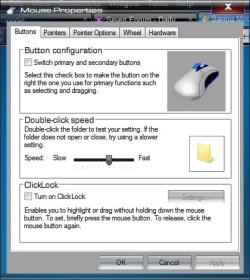
Did the mouse come with it's own software? Here is the mouse settings page in windows:

Mouse.jpg

Start> Type mouse in search box> Click on mouse in search results above

A Guy
 

My Computer

Computer type
PC/Desktop
OS
Windows 10 Home x64
CPU
INTEL Core i5-750 Quad-Core 3.37GHz
Motherboard
ASUS P7P55D
Memory
HyperX Fury Black Series 8GB (2 x 4GB) 1866Mhz
Graphics Card(s)
EVGA GeForce GTX 750 Superclocked 1GB 128-Bit GDDR5
Monitor(s) Displays
LG 32MA68HY 32" IPS
Screen Resolution
1920 x 1080
Hard Drives
Samsung 840 Evo 120GB, SEAGATE 500GB Barracuda® 7200.12, SATA 3 Gb/s, 7200 RPM, 16MB cache
PSU
ANTEC TruePower New TP-550, 80 PLUS, 550W
Case
ANTEC Three Hundred Illusion
Cooling
COOLER MASTER Hyper 212 Plus, 4 x 120mm 1 x 140mm Noctua's
Internet Speed
85 + Mbps
Antivirus
Avast
Browser
Vivaldi
So I just got a new computer with all new hardware(including mouse/keyboard) and windows 7.

Every time I restart my computer my mouse starts on like the 3rd slowest setting for speed. Is there a way to make it so it saves the settings for mouse speed so I don't have to adjust it every time I log in? I am using the Razer Imperator.

I know this does not make sense but I have seen this work.

- Shutdown and power off your computer.
- Power it back on and logon on. DO NOT DO ANYTHING, don’t start any programs just let it boot to the desktop (wait 30 seconds or a minute).
- Once the hard drive has stopped go to your mouse and keyboard settings. Set them the way you want. Close the settings. Re-open the settings to verify they are the way you want them.
- Let the computer sit for 1 minute. DO NOT DO ANYTHING, don’t start any programs just let it sit there.
- Shutdown and power off your computer.
- Power the machine back on logon and check the settings. If they are correct you are done.
 

My Computer

Computer type
PC/Desktop
Computer Manufacturer/Model Number
Dell OP7010
OS
Windows 7 Enterprise (x64); Windows Server 2008 R2 (x64)
Memory
16GB
Monitor(s) Displays
4 Dell 24" LCD
Screen Resolution
1280x1024
Keyboard
Dell
Mouse
Dell Optical
Internet Speed
40meg
Back
Top