SB Audigy Support Pack 2.18.0001W7 (01/10/2009)

Neilsouth

New member
Local time
5:43 AM
Messages
123
SB Audigy Support Pack 2.18.0001W7 (01/10/2009)

Supports all models of the following Sound Blaster cards (based on Emu10kx DSP):

- Audigy

- Audigy 2

- Audigy 2 ZS

- Audigy 4


For host-based Audigy SE/LS/Value and Live! 24-bit cards on:


- Windows 7, use Windows Update to install a basic driver (Vista driver crashes your system).

- Windows XP / Server 2003 / Vista / Server 2008, click here.

Operating systems supported (32-bit and 64-bit editions):


- Windows XP

- Windows Server 2003

- Windows Vista

- Windows Server 2008

- Windows 7 Beta

Included in the pack:

- Audigy series driver 2.18.0001.8 (latest beta)
- Audio Console 1.20.57
- EAX Console 3.00.56 (Windows XP only)
- Graphic Equalizer 2.00.60
- MediaSource DVD-Audio Player 2.00.78
- SoundFont Bank Manager 3.20.34
- Speaker Settings 2.00.60
- Surround Mixer 4.00.63 (Windows XP only)

Fixes and improvements:

- CMSS works properly on Windows 7 Beta

- All setup scripts were modified to detect Windows 7 Beta

- Unlocks CMSS2 and Stereo Surround on Windows 7 / Vista

- Fixes speaker configuration resetting back to 2.1 speakers on Windows 7 / Vista

- Includes working Graphic Equalizer

SB Audigy Support Pack 2.18.0001W7 (01/10/2009) - Sound Blaster - Creative Labs

MEGAUPLOAD - The leading online storage and file delivery service

RapidShare: Easy Filehosting
 

My Computer My Computer

At a glance

Win 7 Ultimate 64 RTMQ6600 @ 3.03GHZ8GB @ 338MHZPalit GTX260 @ 707/1544/1200
OS
Win 7 Ultimate 64 RTM
CPU
Q6600 @ 3.03GHZ
Motherboard
ASRock Penryn1600SLI-110d
Memory
8GB @ 338MHZ
Graphics Card(s)
Palit GTX260 @ 707/1544/1200
Sound Card
[4.1 ] - Creative Labs XFI-GAMER
Monitor(s) Displays
SyncMaster T240 24" Dvi/HDMi
Screen Resolution
1920x1200
Hard Drives
Hitachi 500GB
PSU
Winpower 750Watt
Case
Thermaltake Soprano
Cooling
Oem Cooler
Keyboard
HP Keyboard
Mouse
Optical Microsoft Mouse
Internet Speed
3MBIT 350kb/s+
Nice. Daniel's drivers usually rock!
 

My Computer My Computer

At a glance

Windows 7, Windows Vista Ultimate, Ubuntu 9.042.4 Core24 GBnVidia 7950 GT
Computer Manufacturer/Model Number
Home made/ MSI Neo-F P965 Express
OS
Windows 7, Windows Vista Ultimate, Ubuntu 9.04
CPU
2.4 Core2
Motherboard
MSI P965 Neo
Memory
4 GB
Graphics Card(s)
nVidia 7950 GT
Sound Card
Audigy 4 with Klipsch Promedia THX 2.1
Monitor(s) Displays
Samsung 930b
Screen Resolution
1280 x 1024
Hard Drives
260 GB SATA, 500 GB SATA (Data)
PSU
400 W
Case
Ultra something or another
Cooling
Fans
Keyboard
Dell quite-key
Mouse
MS Optical USB
Internet Speed
Comcast Broadband 13 MBPS
anyone have any luck with the drivers?

it's not working for me. I have a Audigy LS soundcard.
 

My Computer My Computer

At a glance

Windows Vista & Windows 7 Beta Dual Boot
OS
Windows Vista & Windows 7 Beta Dual Boot
They worked on my Audigy 4, but didn't resolve my buzzing issue.
 

My Computer My Computer

At a glance

Windows 7, Windows Vista Ultimate, Ubuntu 9.042.4 Core24 GBnVidia 7950 GT
Computer Manufacturer/Model Number
Home made/ MSI Neo-F P965 Express
OS
Windows 7, Windows Vista Ultimate, Ubuntu 9.04
CPU
2.4 Core2
Motherboard
MSI P965 Neo
Memory
4 GB
Graphics Card(s)
nVidia 7950 GT
Sound Card
Audigy 4 with Klipsch Promedia THX 2.1
Monitor(s) Displays
Samsung 930b
Screen Resolution
1280 x 1024
Hard Drives
260 GB SATA, 500 GB SATA (Data)
PSU
400 W
Case
Ultra something or another
Cooling
Fans
Keyboard
Dell quite-key
Mouse
MS Optical USB
Internet Speed
Comcast Broadband 13 MBPS
The current (latest) driver for my Audigy 4 loaded from the Creative site with a bunch of crackling/buzzing - still some of the same problem with the Audigy Support Pack 2.18.001W7.
 

My Computer My Computer

At a glance

Windows 7 Home Premium 64BIT6GB
Computer Manufacturer/Model Number
Dell Studio 540
OS
Windows 7 Home Premium 64BIT
Memory
6GB
Any idea if these will work with my old "SB Live! Value" card?
 

My Computer My Computer

At a glance

Windows 7 & XP Pro
OS
Windows 7 & XP Pro
If it is a 24bit live , perhaps ;)
 

My Computer My Computer

At a glance

Win 7 Ultimate 64 RTMQ6600 @ 3.03GHZ8GB @ 338MHZPalit GTX260 @ 707/1544/1200
OS
Win 7 Ultimate 64 RTM
CPU
Q6600 @ 3.03GHZ
Motherboard
ASRock Penryn1600SLI-110d
Memory
8GB @ 338MHZ
Graphics Card(s)
Palit GTX260 @ 707/1544/1200
Sound Card
[4.1 ] - Creative Labs XFI-GAMER
Monitor(s) Displays
SyncMaster T240 24" Dvi/HDMi
Screen Resolution
1920x1200
Hard Drives
Hitachi 500GB
PSU
Winpower 750Watt
Case
Thermaltake Soprano
Cooling
Oem Cooler
Keyboard
HP Keyboard
Mouse
Optical Microsoft Mouse
Internet Speed
3MBIT 350kb/s+
Possible fix

I have not tried these drivers yet, but I do have an Audigy 4, and I did have the distortion and crackling. What I did was go into the SB control panel and turn off exclusive mode for the device and sound enhancements. No more problems after that.
 

My Computer My Computer

At a glance

Windows 7
OS
Windows 7
I have not tried these drivers yet, but I do have an Audigy 4, and I did have the distortion and crackling. What I did was go into the SB control panel and turn off exclusive mode for the device and sound enhancements. No more problems after that.

Thanks for the tip, I tried this, but I still get random fuzz in anything that makes sound.
 

My Computer My Computer

At a glance

Windows 7, Windows Vista Ultimate, Ubuntu 9.042.4 Core24 GBnVidia 7950 GT
Computer Manufacturer/Model Number
Home made/ MSI Neo-F P965 Express
OS
Windows 7, Windows Vista Ultimate, Ubuntu 9.04
CPU
2.4 Core2
Motherboard
MSI P965 Neo
Memory
4 GB
Graphics Card(s)
nVidia 7950 GT
Sound Card
Audigy 4 with Klipsch Promedia THX 2.1
Monitor(s) Displays
Samsung 930b
Screen Resolution
1280 x 1024
Hard Drives
260 GB SATA, 500 GB SATA (Data)
PSU
400 W
Case
Ultra something or another
Cooling
Fans
Keyboard
Dell quite-key
Mouse
MS Optical USB
Internet Speed
Comcast Broadband 13 MBPS
I might have solved my buzzing issue

Not 100% sure yet since it's only been a day and a half but changing the audio quality to 24 bit, 48000 hz (studio quality) seemed to have solved my buzzing problem (at least for now - I will update if it comes back). I'm using the latest vista drivers btw. To get to the quality settings go to the 'advanced' tab of the speaker property dialog box.

Note: I have an audigy 4 so some other versions may not have 24 bit capability. In that case try the highest settings available. Good luck and report back here with the results.
 

My Computer My Computer

At a glance

windows 7 (beta-7000 build)
OS
windows 7 (beta-7000 build)
Not 100% sure yet since it's only been a day and a half but changing the audio quality to 24 bit, 48000 hz (studio quality) seemed to have solved my buzzing problem (at least for now - I will update if it comes back). I'm using the latest vista drivers btw. To get to the quality settings go to the 'advanced' tab of the speaker property dialog box.

Note: I have an audigy 4 so some other versions may not have 24 bit capability. In that case try the highest settings available. Good luck and report back here with the results.

Even though I have higher settings available, I chose what you said, and so far, so good. Played some music for a half hour with no buzz. You're my new hero!

Audigy 4, Analog 2.1, latest Creative drivers for Vista version 6.0.1.1361.
 
Last edited:

My Computer My Computer

At a glance

Windows 7, Windows Vista Ultimate, Ubuntu 9.042.4 Core24 GBnVidia 7950 GT
Computer Manufacturer/Model Number
Home made/ MSI Neo-F P965 Express
OS
Windows 7, Windows Vista Ultimate, Ubuntu 9.04
CPU
2.4 Core2
Motherboard
MSI P965 Neo
Memory
4 GB
Graphics Card(s)
nVidia 7950 GT
Sound Card
Audigy 4 with Klipsch Promedia THX 2.1
Monitor(s) Displays
Samsung 930b
Screen Resolution
1280 x 1024
Hard Drives
260 GB SATA, 500 GB SATA (Data)
PSU
400 W
Case
Ultra something or another
Cooling
Fans
Keyboard
Dell quite-key
Mouse
MS Optical USB
Internet Speed
Comcast Broadband 13 MBPS
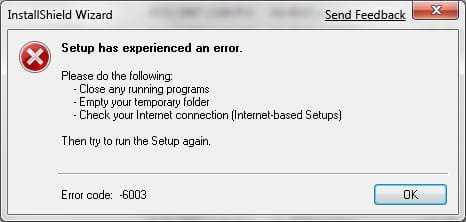
I'm still having issues with this pack. I can install the driver fine, but when I try to install anything else [Audio Console, Speaker Setup, ... ], I get the attached error...

I've tried rebooting, running as an admin, running it in XP compatibility mode, and rebooting, and nothing... I'm trying to get these programs installed so I can hopefully get my other 4 speakers to work. I have a 6.1 system and it's running the 2 front left/right speakers.


Windows 7 7000 64-bit
Audigy 2ZS
 

Attachments

  • error.jpg
    error.jpg
    30.5 KB · Views: 32

My Computer My Computer

At a glance

Windows 7 Pro x64Intel Core i7-860 @ 2.98GHzG.Skill Trident DDR3 2000 (4x2GB)EVGA nVidia GeForce 260GTX Core 216
OS
Windows 7 Pro x64
CPU
Intel Core i7-860 @ 2.98GHz
Motherboard
EVGA P55 LE
Memory
G.Skill Trident DDR3 2000 (4x2GB)
Graphics Card(s)
EVGA nVidia GeForce 260GTX Core 216
Sound Card
On-Board
Monitor(s) Displays
ASUS VW246H 24" 1080p
Screen Resolution
1920x1080
Hard Drives
2 x 74GB Western Digital 10,000 RPM Raptors [Raid-0]
Western Digital Caviar Black 1TB
Western Digital Caviar 750GB - SATA
Maxtor OneTouch 250GB Firewire/USB
PSU
Corsair TX750W
Case
Chenming 602 [Black]
Keyboard
Microsoft Digital Media Pro
Mouse
Logitech MX510 [Blue]
Internet Speed
Cable - 10MB/s
^^^If there is a Vista driver posted on creative's website, try using that instead. Run it as administrator in compatibility mode for vista. Then run every other component in the same mode if need be. I know you have an audigy 2 but for the audigy 4 no extra driver or component is needed for the speaker setup.

When you go to control panel>Hardware and Sound>Sound>Speakers, isn't there a configure button on the lower left. That's where the surround configuration is for me. Hopefully it's the same for you.

Only the vista driver gave me 5.1 surround, the others didn't seem to work.
 

My Computer My Computer

At a glance

windows 7 (beta-7000 build)
OS
windows 7 (beta-7000 build)
Thanks for the quick response darreno1.

Unfortunately, the error was due to a user error. :rolleyes: Must be the snowfall coupled with a day off work, but I had the exe extract to a directory with files already in it, and didn't realize it contained the program folders, plus a setup.exe file that installed the whole thing. I just saw the specific directories for each individual program, and tried to install them from there. The drivers worked, but none of the programs did...

Now, everything works, and I have full 6.1 sound!
 

My Computer My Computer

At a glance

Windows 7 Pro x64Intel Core i7-860 @ 2.98GHzG.Skill Trident DDR3 2000 (4x2GB)EVGA nVidia GeForce 260GTX Core 216
OS
Windows 7 Pro x64
CPU
Intel Core i7-860 @ 2.98GHz
Motherboard
EVGA P55 LE
Memory
G.Skill Trident DDR3 2000 (4x2GB)
Graphics Card(s)
EVGA nVidia GeForce 260GTX Core 216
Sound Card
On-Board
Monitor(s) Displays
ASUS VW246H 24" 1080p
Screen Resolution
1920x1080
Hard Drives
2 x 74GB Western Digital 10,000 RPM Raptors [Raid-0]
Western Digital Caviar Black 1TB
Western Digital Caviar 750GB - SATA
Maxtor OneTouch 250GB Firewire/USB
PSU
Corsair TX750W
Case
Chenming 602 [Black]
Keyboard
Microsoft Digital Media Pro
Mouse
Logitech MX510 [Blue]
Internet Speed
Cable - 10MB/s
Hi there

I am having similar problems as CES973

I am getting no problem from the sound card itself when the Win7 drivers are installed, but when trying to install the upgrade pack (subject line above posts) I get an error report saying that it does not recognise my hardware.

Should I uninstall the device in Devince manager and then relocate the Win7 drivers from the Win32 folder and then use the setup as per the upgrade pack or manually install the driver as per the 'drivers' folder in the upgrade pack followed by manual installs of the EAX/CMSS/Speaker software?

My 7.1 surround works when configuring it in Win7, but I really am just trying to get the software to play my music in CMSS and EAX to work in the games.

Thanks!
 

My Computer My Computer

At a glance

Windows 7 Beta
OS
Windows 7 Beta
Audigy 2ZS, I was getting the crackling distortion so i reinstalled, we'll see what happens.
 

My Computer My Computer

At a glance

Win 7 64bitAMD Athlon X 3 450 3.2GHzCorsair 4G XMS3 TW3X4G1333C9A GXFX Radeon HD5770
Computer Manufacturer/Model Number
custom
OS
Win 7 64bit
CPU
AMD Athlon X 3 450 3.2GHz
Motherboard
GIGABYTE GA-970A-UD3
Memory
Corsair 4G XMS3 TW3X4G1333C9A G
Graphics Card(s)
XFX Radeon HD5770
Sound Card
CREATIVE SB X-Fi Titanium
Monitor(s) Displays
Dell UltraSharp U2412M
Hard Drives
500GB WD Caviar Black
PSU
Corsair 650TX 650W
Cooling
ARCTIC COOLING Freezer 7 Pro Rev.2
I downloaded these 2 nights ago and while they are an improvement than the ones from Windows update, I still get some static and other sound anomalies.
Much better than before but not fully fixed.
 

My Computer My Computer

At a glance

Windows 7 Home Premium 64-BitIntel® Core™2 Quad Q6600 G04GB OCZ DDR2 800EVGA GeForce GTX 460 1024MB
Computer Manufacturer/Model Number
Custom Built
OS
Windows 7 Home Premium 64-Bit
CPU
Intel® Core™2 Quad Q6600 G0
Motherboard
Asus P5K
Memory
4GB OCZ DDR2 800
Graphics Card(s)
EVGA GeForce GTX 460 1024MB
Sound Card
Mobo Built-in
Monitor(s) Displays
Benq V2400W
Screen Resolution
1920x1200
Hard Drives
1TB
PSU
Corsair HX620
Case
Coolermaster Cosmos 1000
Cooling
Air
Keyboard
Logitech G15 Gaming Keyboard
Mouse
Logitech Gaming Mouse G500
Internet Speed
Roger's Extreme
Other Info
Logitech Z-5500 THX® Certified 5.1
System crash

Ok, so I've tried everything I can think of and still can't get my Creative Sound Blaster Audigy Gamer card to work (that would be Audigy 1).

I've tried the Vista drivers from the Creative site, I've tried the Windows update driver, and I've tried the 2.18 support pack -- they all do the same thing: install fine and sound works perfect, but once I restart it gets to where it says "Windows 7 is starting" and it just freezes there. So reboot, try start-up recovery -- same problem. Reboot, try system restore -- same problem. By the third attend to fix it the screen just starts going blank entirely without giving me the option to try anything else and I have to format and start again.

I've been through about 7 formats so far. I'm running with no sound now, and no problems either. It's just the sound card that causing problems.

Any ideas? I'd really like to get this going, not only to have sound, but also because the card has a firewire port in it that I use for an external drive.
 

My Computer My Computer

At a glance

Windows 7 RC1AMD Athlon 64 X2 Dual Core 4200+2GB OCZ DDR PC3200NVidia GeForce 8600 GT 256MB
Computer Manufacturer/Model Number
PC MUTT
OS
Windows 7 RC1
CPU
AMD Athlon 64 X2 Dual Core 4200+
Motherboard
ASRock 939Dual SATA-2
Memory
2GB OCZ DDR PC3200
Graphics Card(s)
NVidia GeForce 8600 GT 256MB
Sound Card
Creative Sound Blaster Audigy Gamer
Monitor(s) Displays
LG Flatron W2242T 22-inch LCD widescreen
Screen Resolution
1600 x 1050
Hard Drives
80GB IDE Seagate HDD -- Windows 7
80GB IDE Western Digital HDD -- Windows XP SP3
500GB Western Digital external HDD x2
Keyboard
Logitech Wireless Wave
Mouse
Logitech Wireless Wave
Internet Speed
High-speed cable
Ok, so I've tried everything I can think of and still can't get my Creative Sound Blaster Audigy Gamer card to work (that would be Audigy 1).

I've tried the Vista drivers from the Creative site, I've tried the Windows update driver, and I've tried the 2.18 support pack -- they all do the same thing: install fine and sound works perfect, but once I restart it gets to where it says "Windows 7 is starting" and it just freezes there. So reboot, try start-up recovery -- same problem. Reboot, try system restore -- same problem. By the third attend to fix it the screen just starts going blank entirely without giving me the option to try anything else and I have to format and start again.

I've been through about 7 formats so far. I'm running with no sound now, and no problems either. It's just the sound card that causing problems.

Any ideas? I'd really like to get this going, not only to have sound, but also because the card has a firewire port in it that I use for an external drive.

Did you try a different PCI slot? Common issue when XP came out, cards that worked great in 95/98 had to be moved.
 

My Computer My Computer

At a glance

Windows 7, Windows Vista Ultimate, Ubuntu 9.042.4 Core24 GBnVidia 7950 GT
Computer Manufacturer/Model Number
Home made/ MSI Neo-F P965 Express
OS
Windows 7, Windows Vista Ultimate, Ubuntu 9.04
CPU
2.4 Core2
Motherboard
MSI P965 Neo
Memory
4 GB
Graphics Card(s)
nVidia 7950 GT
Sound Card
Audigy 4 with Klipsch Promedia THX 2.1
Monitor(s) Displays
Samsung 930b
Screen Resolution
1280 x 1024
Hard Drives
260 GB SATA, 500 GB SATA (Data)
PSU
400 W
Case
Ultra something or another
Cooling
Fans
Keyboard
Dell quite-key
Mouse
MS Optical USB
Internet Speed
Comcast Broadband 13 MBPS
Ok, so I've tried everything I can think of and still can't get my Creative Sound Blaster Audigy Gamer card to work (that would be Audigy 1).

I've tried the Vista drivers from the Creative site, I've tried the Windows update driver, and I've tried the 2.18 support pack -- they all do the same thing: install fine and sound works perfect, but once I restart it gets to where it says "Windows 7 is starting" and it just freezes there. So reboot, try start-up recovery -- same problem. Reboot, try system restore -- same problem. By the third attend to fix it the screen just starts going blank entirely without giving me the option to try anything else and I have to format and start again.

I've been through about 7 formats so far. I'm running with no sound now, and no problems either. It's just the sound card that causing problems.

Any ideas? I'd really like to get this going, not only to have sound, but also because the card has a firewire port in it that I use for an external drive.

Well I'm going to assume you're using the new win7 rc1 and not the beta. If not, I'd recommend installing that since it takes care of a multitude of driver issues.

Your issue seems to point more in the direction of a hardware problem than software. It's like the system is trying initialize the sound card at boot up but can't assign it the resources it needs...... maybe because of an irq problem (which is pretty much a thing of the past with the new mainboards and OSs)or faulty hardware.

I agree with Momalle's suggestion as the first step to troubleshooting. Another thing to try is updating your mainboard's bios to the latest version. This can be a little risky so be sure to consult all the documentation available if you're going to attempt it. You can also reinstall the card, then right after loading the drivers, go to the device manager and check the irq it was assigned and possibly change it to something else(although it's been years since I've ever had to play with irqs in device manager).

Good luck and keep us up to date.
 

My Computer My Computer

At a glance

windows 7 (beta-7000 build)
OS
windows 7 (beta-7000 build)
Back
Top