Solved SB Hub Power Exceeded - error

GARoss

New member
Power User
VIP
Local time
10:04 AM
Messages
359
Location
Michigan - USA
USB Hub Power Exceeded - error

This isn't a big deal but one of those you wonder how to fix.

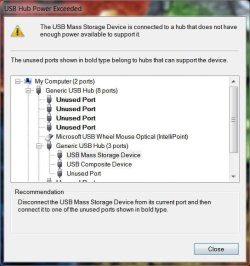
I had an extra Apple wired keyboard (model # MB110LL/A) so I decided to use it on my new built PC (Windows 7 64-bit). I get this error when plugging in my USB flash memory into the keyboard's side USB port; USB Hub Power Exceeded. I never get this error on my iMac with the same keyboard so I'm thinking it might be the generic driver Windows installed when I plugged it in (HID Keyboard Device 6.1.7601.17514 Microsoft 2006).

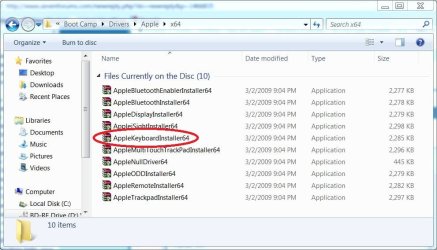
I've searched Google a number of ways but not finding Apple drives for Windows other than, possibly, their Bootcamp option. I do have my iMac install disc & the driver might be on the disc. I don't know if that disc would work on my new PC.

It's not that big of a deal since I have several other USB ports, though not as convenient, but just wondering why I get the error. :huh:

As always, I appreciate your help.
 

Attachments

  • Capture.JPG
    Capture.JPG
    19.2 KB · Views: 26
  • Capture-2.JPG
    Capture-2.JPG
    51 KB · Views: 29

My Computer

Computer type
PC/Desktop
Computer Manufacturer/Model Number
Custom built 2011
OS
Windows 7 64-bit
CPU
Intel Core i5-2500K 3300 Mhz
Motherboard
Gigabyte P67A-UD3-B3
Memory
16Gb Patriot PC3-12800 1600 Mhz
Graphics Card(s)
EVGA GeForce GTX 560 Ti (Fermi)
Sound Card
On Motherboard
Monitor(s) Displays
Dell U2412M & NEC EA232WMi
Screen Resolution
DELL 1920x1200 - NEC 1920x1080
Hard Drives
Crucial 128 Gb SSD
Hitachi Deskstar 2Tb 7200 RPM 32MB Cache
Seagate Barracuda 500Gb 7200 RPM
Hitachi GST Deskstar 1.5TB 7200 RPM 64MB Cache
PSU
Seasonic M1211-620 Bronze
Case
Antec Solo
Cooling
Tuniq Tower 120 Extreme Rev 1
Keyboard
Apple
Mouse
Microsoft
Internet Speed
5mbs
Other Info
Sunbeam PL-RS-3 Rheosmart 3 Fan Controller 3.5" Bay 3 Channel 30W Fan Controller Panel
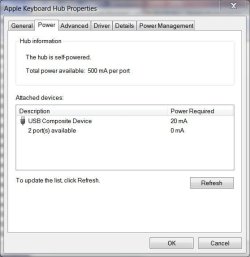
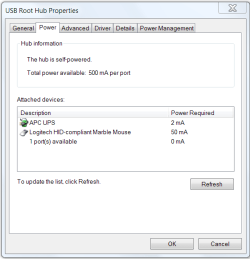
In Device Manager look at the properties of your Root Hubs and check the Power tab and it will show what each device is drawing and what is available.

USB Power.PNG

Jim :geek:
 

My Computer

Computer type
PC/Desktop
Computer Manufacturer/Model Number
Home Built
OS
Windows 8.1 Pro w/Media Center 64bit, Windows 7 HP 64bit
CPU
Phenom II X6 1100T
Motherboard
ASUS M5A99X EVO
Memory
Crucial Balistic 8gb DDR3-1866 CL9
Graphics Card(s)
MSI R6850 Cyclone IGD5 PE
Sound Card
On Board
Monitor(s) Displays
ASUS VE258Q 25" LED with DVI-HDMI-DisplayPort
Screen Resolution
1920 x 1080
Hard Drives
Two WD Cavier Black 2TB Sata III, WD My Book Essential 2TB USB 3.0
PSU
Seasonic X650 80 Plus GOLD Modular
Case
Corsair 400R
Cooling
Antec Kuhler H2O 620, Two 120mm and four 140mm
Keyboard
Logitech K120
Mouse
Logitech Marble Mouse USB, Logitech Precision Game Pad
Internet Speed
15MB
Antivirus
Norton IS 2013, Malwarebytes Pro Beta 2
Browser
IE-11, FF-27
Other Info
APC UPS ES 750, Netgear WNR3500L Gigabit & Wireless N Router with SamKnows Test Program, Motorola SB6120 Gigabit Cable Modem. Brother HL-2170W Laser Printer, Epson V300 Scanner
In Device Manager look at the properties of your Root Hubs and check the Power tab and it will show what each device is drawing and what is available.

View attachment 161985

Jim :geek:

Thanks Jim,

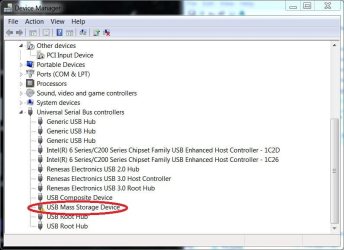
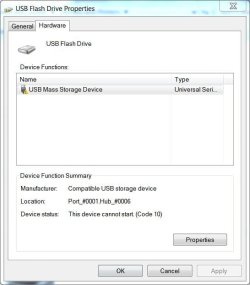
The keyboard is a USB type & has 2 extra USB ports - one located on each side. As soon as the flash drive is plugged in, that port is disabled so it only shows the yellow exclamation point & zero power. It's listed as Port_#0001.Hub_#0006 (see attached). I do have USB 3.0 but don't know if that would make a difference.

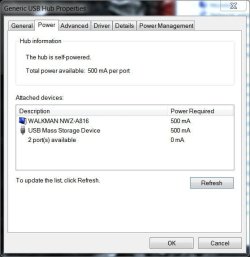
My monitor has 4 USBs & the last pic shows the flash drive & a Walkman plugged in - both @ the max of 500mA per port. If this is correct why would a port on the keyboard port that accepts 500mA crash? :confused:
 

Attachments

  • Capture3.JPG
    Capture3.JPG
    38 KB · Views: 38
  • Capture4.JPG
    Capture4.JPG
    76.8 KB · Views: 19
  • Capture5.JPG
    Capture5.JPG
    39.5 KB · Views: 18

My Computer

Computer type
PC/Desktop
Computer Manufacturer/Model Number
Custom built 2011
OS
Windows 7 64-bit
CPU
Intel Core i5-2500K 3300 Mhz
Motherboard
Gigabyte P67A-UD3-B3
Memory
16Gb Patriot PC3-12800 1600 Mhz
Graphics Card(s)
EVGA GeForce GTX 560 Ti (Fermi)
Sound Card
On Motherboard
Monitor(s) Displays
Dell U2412M & NEC EA232WMi
Screen Resolution
DELL 1920x1200 - NEC 1920x1080
Hard Drives
Crucial 128 Gb SSD
Hitachi Deskstar 2Tb 7200 RPM 32MB Cache
Seagate Barracuda 500Gb 7200 RPM
Hitachi GST Deskstar 1.5TB 7200 RPM 64MB Cache
PSU
Seasonic M1211-620 Bronze
Case
Antec Solo
Cooling
Tuniq Tower 120 Extreme Rev 1
Keyboard
Apple
Mouse
Microsoft
Internet Speed
5mbs
Other Info
Sunbeam PL-RS-3 Rheosmart 3 Fan Controller 3.5" Bay 3 Channel 30W Fan Controller Panel
I've been thinking about this USB Hub Power Exceeded error. The issue must be in the keyboard driver. That is, the keyboard is the hub in question. This must be a driver issue.

Here's the thing. My monitor acts as a hub; it has 4 USB outlets. It's plugged into the motherboard's USB port just like the keyboard is. But, I don't get an error plugging the flash drive into the monitor's USB. It registers 500mA. But, plug the flash into the keyboard & I get USB Hub Power Exceeded - error.

This must be a driver issue.
 

My Computer

Computer type
PC/Desktop
Computer Manufacturer/Model Number
Custom built 2011
OS
Windows 7 64-bit
CPU
Intel Core i5-2500K 3300 Mhz
Motherboard
Gigabyte P67A-UD3-B3
Memory
16Gb Patriot PC3-12800 1600 Mhz
Graphics Card(s)
EVGA GeForce GTX 560 Ti (Fermi)
Sound Card
On Motherboard
Monitor(s) Displays
Dell U2412M & NEC EA232WMi
Screen Resolution
DELL 1920x1200 - NEC 1920x1080
Hard Drives
Crucial 128 Gb SSD
Hitachi Deskstar 2Tb 7200 RPM 32MB Cache
Seagate Barracuda 500Gb 7200 RPM
Hitachi GST Deskstar 1.5TB 7200 RPM 64MB Cache
PSU
Seasonic M1211-620 Bronze
Case
Antec Solo
Cooling
Tuniq Tower 120 Extreme Rev 1
Keyboard
Apple
Mouse
Microsoft
Internet Speed
5mbs
Other Info
Sunbeam PL-RS-3 Rheosmart 3 Fan Controller 3.5" Bay 3 Channel 30W Fan Controller Panel
The port that the keyboard is plugged into, what does it show before plugging anything into the keyboard ports? And what does it show afterwards?
Also I would think that the monitor is furnishing the power to its ports while the keyboard is drawing power from the port it is plugged into.

Jim :geek:
 

My Computer

Computer type
PC/Desktop
Computer Manufacturer/Model Number
Home Built
OS
Windows 8.1 Pro w/Media Center 64bit, Windows 7 HP 64bit
CPU
Phenom II X6 1100T
Motherboard
ASUS M5A99X EVO
Memory
Crucial Balistic 8gb DDR3-1866 CL9
Graphics Card(s)
MSI R6850 Cyclone IGD5 PE
Sound Card
On Board
Monitor(s) Displays
ASUS VE258Q 25" LED with DVI-HDMI-DisplayPort
Screen Resolution
1920 x 1080
Hard Drives
Two WD Cavier Black 2TB Sata III, WD My Book Essential 2TB USB 3.0
PSU
Seasonic X650 80 Plus GOLD Modular
Case
Corsair 400R
Cooling
Antec Kuhler H2O 620, Two 120mm and four 140mm
Keyboard
Logitech K120
Mouse
Logitech Marble Mouse USB, Logitech Precision Game Pad
Internet Speed
15MB
Antivirus
Norton IS 2013, Malwarebytes Pro Beta 2
Browser
IE-11, FF-27
Other Info
APC UPS ES 750, Netgear WNR3500L Gigabit & Wireless N Router with SamKnows Test Program, Motorola SB6120 Gigabit Cable Modem. Brother HL-2170W Laser Printer, Epson V300 Scanner
Also I would think that the monitor is furnishing the power to its ports while the keyboard is drawing power from the port it is plugged into.

Jim :geek:

Thanks,

So, on a Mac, this keyboard works perfectly because the Mac OS supplies power to it? And, on Windows it doesn't? Wouldn't that have something to do with the driver for the keyboard?

I installed a driver for the keyboard from my Mac install CD but it's a .sys file whereas Windows wants an .inf file. I'm not sure how to fix that (rename maybe?). Not sure what the differences are.

The port that the keyboard is plugged into, what does it show before plugging anything into the keyboard ports? And what does it show afterwards?

I've attached 2 before & after photos, the one with a red circle is what pops up after plugging in the flash drive. As I said, the hub powers off & it doesn't read anything unless it's plugged into a powered USB port.
 

Attachments

  • Capture4.JPG
    Capture4.JPG
    76.8 KB · Views: 14
  • Capture6.JPG
    Capture6.JPG
    63.4 KB · Views: 19

My Computer

Computer type
PC/Desktop
Computer Manufacturer/Model Number
Custom built 2011
OS
Windows 7 64-bit
CPU
Intel Core i5-2500K 3300 Mhz
Motherboard
Gigabyte P67A-UD3-B3
Memory
16Gb Patriot PC3-12800 1600 Mhz
Graphics Card(s)
EVGA GeForce GTX 560 Ti (Fermi)
Sound Card
On Motherboard
Monitor(s) Displays
Dell U2412M & NEC EA232WMi
Screen Resolution
DELL 1920x1200 - NEC 1920x1080
Hard Drives
Crucial 128 Gb SSD
Hitachi Deskstar 2Tb 7200 RPM 32MB Cache
Seagate Barracuda 500Gb 7200 RPM
Hitachi GST Deskstar 1.5TB 7200 RPM 64MB Cache
PSU
Seasonic M1211-620 Bronze
Case
Antec Solo
Cooling
Tuniq Tower 120 Extreme Rev 1
Keyboard
Apple
Mouse
Microsoft
Internet Speed
5mbs
Other Info
Sunbeam PL-RS-3 Rheosmart 3 Fan Controller 3.5" Bay 3 Channel 30W Fan Controller Panel
What I am saying is that the monitor has AC power and furnishes its usb ports with power. The keyboard draws its power from the motherboard usb port which is limited to 500ma and shares that power with itself and its ports. The keyboard uses part of that 500ma to power itself and so less then that is available to its ports so you can not use a 500ma flash drive on the keyboard. I do not know what a MAC supplies.

Jim :geek:
 

My Computer

Computer type
PC/Desktop
Computer Manufacturer/Model Number
Home Built
OS
Windows 8.1 Pro w/Media Center 64bit, Windows 7 HP 64bit
CPU
Phenom II X6 1100T
Motherboard
ASUS M5A99X EVO
Memory
Crucial Balistic 8gb DDR3-1866 CL9
Graphics Card(s)
MSI R6850 Cyclone IGD5 PE
Sound Card
On Board
Monitor(s) Displays
ASUS VE258Q 25" LED with DVI-HDMI-DisplayPort
Screen Resolution
1920 x 1080
Hard Drives
Two WD Cavier Black 2TB Sata III, WD My Book Essential 2TB USB 3.0
PSU
Seasonic X650 80 Plus GOLD Modular
Case
Corsair 400R
Cooling
Antec Kuhler H2O 620, Two 120mm and four 140mm
Keyboard
Logitech K120
Mouse
Logitech Marble Mouse USB, Logitech Precision Game Pad
Internet Speed
15MB
Antivirus
Norton IS 2013, Malwarebytes Pro Beta 2
Browser
IE-11, FF-27
Other Info
APC UPS ES 750, Netgear WNR3500L Gigabit & Wireless N Router with SamKnows Test Program, Motorola SB6120 Gigabit Cable Modem. Brother HL-2170W Laser Printer, Epson V300 Scanner
What I am saying is that the monitor has AC power and furnishes its usb ports with power. The keyboard draws its power from the motherboard usb port which is limited to 500ma and shares that power with itself and its ports. The keyboard uses part of that 500ma to power itself and so less then that is available to its ports so you can not use a 500ma flash drive on the keyboard. I do not know what a MAC supplies.

Jim :geek:

Thanks Jim,

This looks to be unresolvable. Somehow, Mac OS driver (or whatever) supplies power to this keyboard & the generic Microsoft driver does not. On my Mac OS X Install DVD I was able to find & install a Bootcamp Windows 64-bit keyboard driver called KeyMagic.sys. But, I cannot replace the generic Windows driver because Windows wants an .inf file. It was worth a try. :cry:
 

Attachments

  • Apple.JPG
    Apple.JPG
    80.8 KB · Views: 38
  • Apple2.JPG
    Apple2.JPG
    78.2 KB · Views: 30

My Computer

Computer type
PC/Desktop
Computer Manufacturer/Model Number
Custom built 2011
OS
Windows 7 64-bit
CPU
Intel Core i5-2500K 3300 Mhz
Motherboard
Gigabyte P67A-UD3-B3
Memory
16Gb Patriot PC3-12800 1600 Mhz
Graphics Card(s)
EVGA GeForce GTX 560 Ti (Fermi)
Sound Card
On Motherboard
Monitor(s) Displays
Dell U2412M & NEC EA232WMi
Screen Resolution
DELL 1920x1200 - NEC 1920x1080
Hard Drives
Crucial 128 Gb SSD
Hitachi Deskstar 2Tb 7200 RPM 32MB Cache
Seagate Barracuda 500Gb 7200 RPM
Hitachi GST Deskstar 1.5TB 7200 RPM 64MB Cache
PSU
Seasonic M1211-620 Bronze
Case
Antec Solo
Cooling
Tuniq Tower 120 Extreme Rev 1
Keyboard
Apple
Mouse
Microsoft
Internet Speed
5mbs
Other Info
Sunbeam PL-RS-3 Rheosmart 3 Fan Controller 3.5" Bay 3 Channel 30W Fan Controller Panel
I don't think the keyboard driver has anything to do with it. It is a limit of what the usb ports can supply.

Jim :geek:
 

My Computer

Computer type
PC/Desktop
Computer Manufacturer/Model Number
Home Built
OS
Windows 8.1 Pro w/Media Center 64bit, Windows 7 HP 64bit
CPU
Phenom II X6 1100T
Motherboard
ASUS M5A99X EVO
Memory
Crucial Balistic 8gb DDR3-1866 CL9
Graphics Card(s)
MSI R6850 Cyclone IGD5 PE
Sound Card
On Board
Monitor(s) Displays
ASUS VE258Q 25" LED with DVI-HDMI-DisplayPort
Screen Resolution
1920 x 1080
Hard Drives
Two WD Cavier Black 2TB Sata III, WD My Book Essential 2TB USB 3.0
PSU
Seasonic X650 80 Plus GOLD Modular
Case
Corsair 400R
Cooling
Antec Kuhler H2O 620, Two 120mm and four 140mm
Keyboard
Logitech K120
Mouse
Logitech Marble Mouse USB, Logitech Precision Game Pad
Internet Speed
15MB
Antivirus
Norton IS 2013, Malwarebytes Pro Beta 2
Browser
IE-11, FF-27
Other Info
APC UPS ES 750, Netgear WNR3500L Gigabit & Wireless N Router with SamKnows Test Program, Motorola SB6120 Gigabit Cable Modem. Brother HL-2170W Laser Printer, Epson V300 Scanner
I checked to see if the mouse would work if plugged into the keyboard's side USB & it does. Windows must power their USBs differently than Mac because it works like a charm on a Mac.

In fairness, this keyboard is not listed as a Windows compatible.

Windows 7 Compatibility for apple: Drivers, Updates, Downloads

I can type; I'm happy. No point kicking a dead horse anymore! ;)
Thanks.
 

My Computer

Computer type
PC/Desktop
Computer Manufacturer/Model Number
Custom built 2011
OS
Windows 7 64-bit
CPU
Intel Core i5-2500K 3300 Mhz
Motherboard
Gigabyte P67A-UD3-B3
Memory
16Gb Patriot PC3-12800 1600 Mhz
Graphics Card(s)
EVGA GeForce GTX 560 Ti (Fermi)
Sound Card
On Motherboard
Monitor(s) Displays
Dell U2412M & NEC EA232WMi
Screen Resolution
DELL 1920x1200 - NEC 1920x1080
Hard Drives
Crucial 128 Gb SSD
Hitachi Deskstar 2Tb 7200 RPM 32MB Cache
Seagate Barracuda 500Gb 7200 RPM
Hitachi GST Deskstar 1.5TB 7200 RPM 64MB Cache
PSU
Seasonic M1211-620 Bronze
Case
Antec Solo
Cooling
Tuniq Tower 120 Extreme Rev 1
Keyboard
Apple
Mouse
Microsoft
Internet Speed
5mbs
Other Info
Sunbeam PL-RS-3 Rheosmart 3 Fan Controller 3.5" Bay 3 Channel 30W Fan Controller Panel
Phone Man, here's the fix! Check it out. :party:

YouTube - ‪Apple Keyboard Hack - Fully-powered USB ports on a PC!‬‏

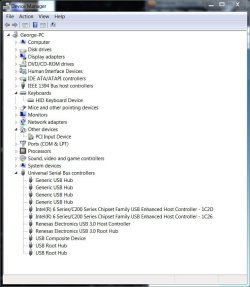
The author, who goes by MSC, explains that Mac OS recognizes this keyboard for what it is; a powered USB hub, whereas, Windows sees it as a non powered or at least a limited powered hub of 100mA. In order for Windows to treat it as a powered USB hub changes in the registry need to be made. I followed his instructions & Device Manager now reads 500mA per hub.

Works great.:D
 

Attachments

  • Device Mgr.JPG
    Device Mgr.JPG
    36.5 KB · Views: 17

My Computer

Computer type
PC/Desktop
Computer Manufacturer/Model Number
Custom built 2011
OS
Windows 7 64-bit
CPU
Intel Core i5-2500K 3300 Mhz
Motherboard
Gigabyte P67A-UD3-B3
Memory
16Gb Patriot PC3-12800 1600 Mhz
Graphics Card(s)
EVGA GeForce GTX 560 Ti (Fermi)
Sound Card
On Motherboard
Monitor(s) Displays
Dell U2412M & NEC EA232WMi
Screen Resolution
DELL 1920x1200 - NEC 1920x1080
Hard Drives
Crucial 128 Gb SSD
Hitachi Deskstar 2Tb 7200 RPM 32MB Cache
Seagate Barracuda 500Gb 7200 RPM
Hitachi GST Deskstar 1.5TB 7200 RPM 64MB Cache
PSU
Seasonic M1211-620 Bronze
Case
Antec Solo
Cooling
Tuniq Tower 120 Extreme Rev 1
Keyboard
Apple
Mouse
Microsoft
Internet Speed
5mbs
Other Info
Sunbeam PL-RS-3 Rheosmart 3 Fan Controller 3.5" Bay 3 Channel 30W Fan Controller Panel
Back
Top