SB Titanium will not work under Win7

TheHeadhunter

Banned
Local time
5:32 PM
Messages
11
I've posted elsewhere here about my Win7 upgrade. I run a Dell XPS 420. Upgraded to Win7 x64 Ultimate (no regrets overall - love it!). But my SoundBlaster X-Fi Extreme Audio would no longer record "What U Hear." Creative admitted that X-Fi Audio cards will not record What U Hear under Win7. They suggested I get a Titanium, which I did. Just installed it.

I used the newest drivers and software from the Creative site. They tell you to first run the Product ID tool to ensure the PC will recognize the SB card.

No go. The PID utility gives an error -- tells me I'm not running Win7! (My Win7 is legal tender...)

It won't take the new Win7 drivers, either. It makes like they installed just fine and tells me to reboot... but checking Device Driver, there's no SB. Doing Run/msinfo32 shows NO SoundBlaster as well.

I'm really fed up with Creative. Has anyone solved this? Anyone running a SB Titanium (I have the vanilla unit, not Fatality - model SB0880) under Win7 x64 successfully? If yes, how did you install it? Hardware first, then software or vice versa or what?

Thanks for ANY insight/advice!
 

My Computer

OS
Win7
They tell you to first run the Product ID tool to ensure the PC will recognize the SB card.

What Product ID tool? Can you post an image?

I'm running the X-Fi Titanium Fatal1ty Professional without issue under W7 x64.

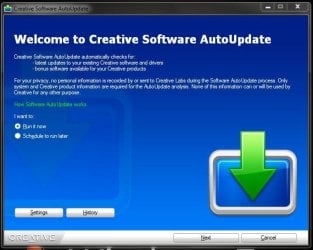
Try this - Install everything from the CD first, then use the Creative Auto Update panel to update all the software you chose to install.

Creative Auto Update.JPG

I had "weird" issues installing the software myself untill I installed from the CD first.

Let me know how it goes.
 

My Computer

Computer type
PC/Desktop
Computer Manufacturer/Model Number
Custom built by me.
OS
Windows 10 Pro
CPU
Intel Core i7-4770K (3.5Ghz)
Motherboard
Gigabyte G1 Sniper 5 (F10 Bios)
Memory
32 gig Corsair Dominator Platinum (4x8Gig)
Graphics Card(s)
Sapphire Tri-X R9 Fury
Sound Card
Soundblaster ZXR
Monitor(s) Displays
NEC PA242W 24" LCD Monitor
Screen Resolution
1920 x 1200
Hard Drives
Primary - Samsung 850 Pro (512gig), Samsung 840 Pro (256gig), 2TB WD Caviar Black.
PSU
EVGA Supernova 1000 G2
Case
Cooler Master HAF X
Cooling
Corsair H100i with Corsair Air Series SP120 Quiet Fans
Keyboard
Logitech Wireless Wave
Mouse
Logitech Performance MX
Internet Speed
High Speed Cable
Antivirus
Norton Security
Browser
IE11
Other Info
Memory Timings - 1866MHz @ 9-9-9-27-1T @ 1.5 volts
So you violated the instructions about Win7 from Creative and ran the CD... I love it. Thanks for this obvious suggestion. I hadn't tried that! Will report back. I don't imagine there's much difference between Titanium "Vanilla" and Fatality... I'll be back here soon... Thanks again! You've given me some hope...
 

My Computer

OS
Win7
PS - To answer your question about the PID: Apparently many Win7 users encounter an error when trying to install the X-Fi drivers. It says there's no qualified product installed so drivers won't install. Creative issued a fix named PID_W7PCAPP_US_2_11_01.exe - "Device Detection" or "Product Identification" utility. You're supposed to run it if the driver installer doesn't recognize the card. When I tried to run it it told me I didn't have Win7 installed... go figure... I just ran the X-Fi CD... time to reboot and see what happens. I'll take your suggestion and use the Auto Update Panel... tho' I've read elsewhere that THAT doesn't always work, either!
 

My Computer

OS
Win7
Well, no dice. I installed what was on the X-Fi CD ROM. Checked Device Manager -- no SB listed. Just the generic "Hi-Def Audio Device" and the MSFT drivers. Then I ran the Auto Update from the panel... and it tells me "Creative Software AutoUpdate was unable to detect any Creative products attached to your computer."

I tried running the PID utility again -- it won't run. Doesn't acknowledge that Win7 is here.

Go figure. I know the board is seated properly and that it works -- I've got my speakers plugged into it and the built-in MSFT drivers give me rudimentary sound. WinAmp plays tunes, though it's clear it's not going through a sound card. Something's wrong.

Thanks anyway! Not sure what I'm gonna do next. I've got a support e-mail in to Creative. If they screw me around I'm just gonna send the card back and try another brand... I keep reading about Asus Xonar. Ever hear of it?
 

My Computer

OS
Win7
Please list your system specs.

Also, does your MB have on-board sound? Did you disable it?

PS....

So you violated the instructions about Win7 from Creative and ran the CD... I love it.

I didn't realize this was a violation. Must have missed that when I signed my contract with Creative :sarc:

Let me know about my questions.
 

My Computer

Computer type
PC/Desktop
Computer Manufacturer/Model Number
Custom built by me.
OS
Windows 10 Pro
CPU
Intel Core i7-4770K (3.5Ghz)
Motherboard
Gigabyte G1 Sniper 5 (F10 Bios)
Memory
32 gig Corsair Dominator Platinum (4x8Gig)
Graphics Card(s)
Sapphire Tri-X R9 Fury
Sound Card
Soundblaster ZXR
Monitor(s) Displays
NEC PA242W 24" LCD Monitor
Screen Resolution
1920 x 1200
Hard Drives
Primary - Samsung 850 Pro (512gig), Samsung 840 Pro (256gig), 2TB WD Caviar Black.
PSU
EVGA Supernova 1000 G2
Case
Cooler Master HAF X
Cooling
Corsair H100i with Corsair Air Series SP120 Quiet Fans
Keyboard
Logitech Wireless Wave
Mouse
Logitech Performance MX
Internet Speed
High Speed Cable
Antivirus
Norton Security
Browser
IE11
Other Info
Memory Timings - 1866MHz @ 9-9-9-27-1T @ 1.5 volts
Dell XPS 420 (about a year old), Win7 x64
Intel Core2 Duo E8500 3Ghz
8GB RAM (upgraded from 3GB after I installed Win7)
GeForce 6800 video card
Audio was X-Fi Xtreme Audio - worked fine under Win7 except What U Hear (couldn't record)
Not sure what else you need

I disabled onboard audio when I couldn't get the Titanium to work
 

My Computer

OS
Win7
I disabled onboard audio when I couldn't get the Titanium to work

This should have been done before installing the Titanium. Try installing the software again. Use the Product ID tool then go from there.

Let me know.
 

My Computer

Computer type
PC/Desktop
Computer Manufacturer/Model Number
Custom built by me.
OS
Windows 10 Pro
CPU
Intel Core i7-4770K (3.5Ghz)
Motherboard
Gigabyte G1 Sniper 5 (F10 Bios)
Memory
32 gig Corsair Dominator Platinum (4x8Gig)
Graphics Card(s)
Sapphire Tri-X R9 Fury
Sound Card
Soundblaster ZXR
Monitor(s) Displays
NEC PA242W 24" LCD Monitor
Screen Resolution
1920 x 1200
Hard Drives
Primary - Samsung 850 Pro (512gig), Samsung 840 Pro (256gig), 2TB WD Caviar Black.
PSU
EVGA Supernova 1000 G2
Case
Cooler Master HAF X
Cooling
Corsair H100i with Corsair Air Series SP120 Quiet Fans
Keyboard
Logitech Wireless Wave
Mouse
Logitech Performance MX
Internet Speed
High Speed Cable
Antivirus
Norton Security
Browser
IE11
Other Info
Memory Timings - 1866MHz @ 9-9-9-27-1T @ 1.5 volts
Uninstall all the software and then reboot. Make sure the bios is set to what you have and want to run! Then download and reinstall the software. Once you reboot everything should work as described!
Right now you sound like what you have a problem with is the MB does not know what to use first. So it defaults to the MB and disregards the added card. Today's video cards gave much more audio added and conflict with settings unless you tell it what to do.
 

My Computer

Computer type
PC/Desktop
Computer Manufacturer/Model Number
Self made
OS
windows 7 home premium 64, and Windows 10 64 bit
CPU
I7 940
Motherboard
ASUS P6TX58D Premium- BIOS VERSION 1402
Memory
12 GB Dominator 3 channel 1600
Graphics Card(s)
Radeon R9 Fury Nitro
Sound Card
Z1
Monitor(s) Displays
50 Inch Panasonic TV
Screen Resolution
1920x1080
Hard Drives
Main drive OCZ Revodrive V2 and 8 TB multi drives
PSU
Coolermaster 1000
Case
CoolerMaster 932
Cooling
Coolermaster Dual fan
Keyboard
mx 5500 revolution
Mouse
mx 5500 revolution
Internet Speed
12 mb
Browser
Chrome
Other Info
set up for 3D Blue Ray applications with a surround room of 12 speaker Definitive Technology and multi amps, main is driven by yamaha M-65
@Techymike: How do I uninstall the main drivers which installed themselves via a Creative .exe file (XFTI_PCDRV_LB_2_17_0007.exe)? Can't disable or uninstall them in Device Manager because the SB doesn't show up there. Where are they?

Re: setting BIOS to what I have and want to run, the only options in Setup are on, off, auto for onboard sound. While I had my X-Fi Xtreme Audio card working, it was set to Auto. I set it to off yesterday, then turned it back on so I could work. What do you suggest?

Thanks!
 

My Computer

OS
Win7
Have you tried using a driver cleaner? Uninstall all creative drivers and run the driver cleaner in windows safe mode. Also do not install the x-fi drivers from windows update. Hide the update asap to make sure windows doesn't install it either.

Guru3D - Driver Sweeper (Setup) download from Guru3D.com

Edit- You can also try moving the x-fi to another slot if all fails.
 
Last edited:

My Computer

Computer type
PC/Desktop
Computer Manufacturer/Model Number
Elsa
OS
windows 8.1 Pro x64
CPU
intel [email protected]
Motherboard
msi mpower max ac
Memory
2x8gb ripjaws x @2133
Graphics Card(s)
asus r9-290@1100/1300
Sound Card
creative sbz
Monitor(s) Displays
dell u3011
Hard Drives
840 evo 250 & 8.5tb
PSU
evga supernova p2-1000
Case
corsair air 540
Cooling
corsair h100
Keyboard
logitech g710+
Mouse
logitech g502
Internet Speed
50/10
Antivirus
avg
Browser
firefox
Re: setting BIOS to what I have and want to run, the only options in Setup are on, off, auto for onboard sound. While I had my X-Fi Xtreme Audio card working, it was set to Auto. I set it to off yesterday, then turned it back on so I could work. What do you suggest?

Thanks!

If you're going to use the X-FI Titanium card then the on-board sound needs to be "off".

As to removing the software, check "Programs and Features" under "Control Panel". If you don't see any Creative software installed, you're good, if you do, uninstall. If you have trouble uninstalling, try reinstalling the software as I described the first time.

Good luck.
 

My Computer

Computer type
PC/Desktop
Computer Manufacturer/Model Number
Custom built by me.
OS
Windows 10 Pro
CPU
Intel Core i7-4770K (3.5Ghz)
Motherboard
Gigabyte G1 Sniper 5 (F10 Bios)
Memory
32 gig Corsair Dominator Platinum (4x8Gig)
Graphics Card(s)
Sapphire Tri-X R9 Fury
Sound Card
Soundblaster ZXR
Monitor(s) Displays
NEC PA242W 24" LCD Monitor
Screen Resolution
1920 x 1200
Hard Drives
Primary - Samsung 850 Pro (512gig), Samsung 840 Pro (256gig), 2TB WD Caviar Black.
PSU
EVGA Supernova 1000 G2
Case
Cooler Master HAF X
Cooling
Corsair H100i with Corsair Air Series SP120 Quiet Fans
Keyboard
Logitech Wireless Wave
Mouse
Logitech Performance MX
Internet Speed
High Speed Cable
Antivirus
Norton Security
Browser
IE11
Other Info
Memory Timings - 1866MHz @ 9-9-9-27-1T @ 1.5 volts
@sygnus21 & Techymike: Success! You guys rock!

I usually "follow instructions" but my new Titanium card came from Buy.com in a ziploc bag with a CD. No instructions at all. So I used what I know... and it wasn't good enough.

Key things you guys suggested that got the card to work:

1. Turning off onboard sound on my pc.
2. Installing the card without any Creative software or drivers on the pc.

Where I went wrong to begin with:

1. I popped the card in and installed the drivers without turning off onboard sound and without deleting the old Creative software.
2. It all went downhill from there.

For others who might benefit (I hope I can give something back to this forum, which is the ONLY place I got advice that actually helped):

1. Before installing the SB (in my case a vanilla Titanium), pull any old sound card (obviously) and delete all Creative sofware and drivers thru Control Panel/Programs (add/remove). Don't forget to look under both "Creative" AND "Soundblaster." I had Creative apps in both categories and after I removed the Creative stuff I thought it was all gone -- there was more under Soundblaster farther down in the list.

2. Reboot your pc. During booting, hit F2 to go to Setup. Open the section that includes onboard sound. Turn OFF onboard sound. Reboot the pc.

3. Turn the pc off. Install the Soundblaster adapter. (Failing to do (1), (2) and (3) from the start led me to waste hours of my time. Turn the pc back on.

4. In my case, Win7 Updater automatically went out and found the SB drivers. Some suggest disabling Win7 Updater, but in my case it worked fine. As soon as Win7 installed the Creative drivers, it asked me to reboot, which I did.

5. As soon as I rebooted, the Creative Upater came up and I used it to find latest drivers. These got installed by the Updater. Took quite a bit of time -- there's a lot of stuff! I checked the version numbers, and it had installed the correct drivers for Win7. So did the sound work? ... nope...

6. Now here's where my three-day frustration got the better of me. When you get frustrated you start to rush, and when you rush you make mistakes. After all these steps, Device Manager recognized the adapater AND the drivers were all loaded -- versions were correct for a Win7 system. But still no sound. So I calmed myself down -- at least the card was now recognized and you guys had gotten me farther than I'd gotten before. Why was I getting no sound? Well... I eat humble pie on this, guys, but I figure by admitting it someone else might not have to eat it... Listen carefully: It turns out that installing/uninstalling that Titanium card so many times and plugging/unplugging my speaker cable into the card made me sloppy, and the last time I did it I plugged my speakers into the LINE IN jack... you can stop shaking your heads at the dope now... Speakers don't work unless they're plugging into the SPEAKER/OUT jack...

7. Everything works. The Titanium is recognized in Device Manager, I get sound, the Creative apps work and I can record What U Hear (that's what started this whole thing...).

I can't think you guys enough. Creative and Buy.com could have saved me a lot of hassle (and you the time you so generously gave me) if they'd included a slip of paper with some simple installation instructions -- turn off onboard sound, delete old SB software before physically installing the card.

I hope that something I've shared helps out someone else.

Now all I need to figure out is how to disable the boot message that tells me my "front panel" isn't working... That's the mic and headphone jacks on the front of my Dell XPS. The old SB had a cable that connected to those jacks... the Titanium has a set of "front panel" pins on the card for this same purpose, but only 5 pins (vs 8 on the Xtreme Audio adapter), so I can't make the connection. Is this a standard cable I can buy? Think I'll call Dell... It's a minor annoyance because I have to hit F1 during boot to bring the system up...

Thanks again!

 

My Computer

OS
Win7
Thanks. I'm glad we were able to help.

Happy listening :)
 

My Computer

Computer type
PC/Desktop
Computer Manufacturer/Model Number
Custom built by me.
OS
Windows 10 Pro
CPU
Intel Core i7-4770K (3.5Ghz)
Motherboard
Gigabyte G1 Sniper 5 (F10 Bios)
Memory
32 gig Corsair Dominator Platinum (4x8Gig)
Graphics Card(s)
Sapphire Tri-X R9 Fury
Sound Card
Soundblaster ZXR
Monitor(s) Displays
NEC PA242W 24" LCD Monitor
Screen Resolution
1920 x 1200
Hard Drives
Primary - Samsung 850 Pro (512gig), Samsung 840 Pro (256gig), 2TB WD Caviar Black.
PSU
EVGA Supernova 1000 G2
Case
Cooler Master HAF X
Cooling
Corsair H100i with Corsair Air Series SP120 Quiet Fans
Keyboard
Logitech Wireless Wave
Mouse
Logitech Performance MX
Internet Speed
High Speed Cable
Antivirus
Norton Security
Browser
IE11
Other Info
Memory Timings - 1866MHz @ 9-9-9-27-1T @ 1.5 volts
OOPs! Already been posted.

Glad to hear you got it fixed, sorry to be repsponding so late!
 

My Computer

Computer type
PC/Desktop
Computer Manufacturer/Model Number
Self made
OS
windows 7 home premium 64, and Windows 10 64 bit
CPU
I7 940
Motherboard
ASUS P6TX58D Premium- BIOS VERSION 1402
Memory
12 GB Dominator 3 channel 1600
Graphics Card(s)
Radeon R9 Fury Nitro
Sound Card
Z1
Monitor(s) Displays
50 Inch Panasonic TV
Screen Resolution
1920x1080
Hard Drives
Main drive OCZ Revodrive V2 and 8 TB multi drives
PSU
Coolermaster 1000
Case
CoolerMaster 932
Cooling
Coolermaster Dual fan
Keyboard
mx 5500 revolution
Mouse
mx 5500 revolution
Internet Speed
12 mb
Browser
Chrome
Other Info
set up for 3D Blue Ray applications with a surround room of 12 speaker Definitive Technology and multi amps, main is driven by yamaha M-65
Back
Top