"Scan with Microsoft Security Essentials" - Add or Remove Context Menu

"Scan with Microsoft Security Essentials" - Add or Remove Context Menu

How to Add or Remove "Scan with Microsoft Security Essentials" from Context Menu in Windows

   Information
When you have Microsoft Security Essentials (MSE) installed, it adds "Scan with Microsoft Security Essentials" to the context menu of files, folders, and drives by default to make it easier to scan them on demand.

This tutorial will show you how to add or remove "Scan with Microsoft Security Essentials" from the context menu of all users in XP (SP3), Vista, and Windows 7.

You must be logged in as an administrator to be able to do the steps in this tutorial.


   Note

  • You cannot install Microsoft Security Essentials in Windows 8 since the default Windows Defender in Windows 8 is the new Microsoft Security Essentials and used instead. This tutorial will not work in Windows 8.
  • Even if you removed "Scan with Microsoft Security Essentials" context meu item, Microsoft Security Essentials progam updates may add it back. If it does, you'll just need to remove it again.
EXAMPLE: "Scan with Microsoft Security Essentials" in Context Menu
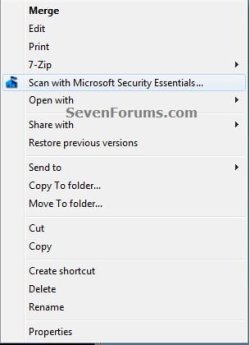
Context_Menu.jpg


Here's How:

1. Do step 2 or 3 below for what you would like to do.

2. To Add "Scan with Microsoft Security Essentials" to Context Menu
NOTE: This is the default setting. Microsoft Security Essentials must already be installed for this to work.
A) Click on the download button below to download the file below, and go to step 4 below.
Add_Scan_with_Microsoft_Security_Essentials.reg

Download


3. To Remove "Scan with Microsoft Security Essentials" from Context Menu
A) Click on the download button below to download the file below, and go to step 4 below.
Remove_Scan_with_Microsoft_Security_Essentials.reg

Download


4. Save the .reg file to the desktop.

5. Right click on the downloaded .reg file, and click on Merge.

6. When prompted, click on Run, Yes (UAC-Windows 7) or Continue (UAC-Vista), Yes, and OK to approve merging the .reg file.

7. You can now delete the downloaded .reg file if you like.


That's it,
Shawn


Attachments

cool another handy context tool :)
 

My Computer My Computer

At a glance

Operating System : Windows 7 Home Premium Edi...Processor : Intel Core 2 Quad Q8300 @ 2500 MHzPhysical Memory :8GB Corsair4x 2GB 800MHz C5 ...Video Card : XFX 6700 AMD
Computer Manufacturer/Model Number
packard bell IXTREME M5722
OS
Operating System : Windows 7 Home Premium Edition 6.01.7600 SP1 (x64)
CPU
Processor : Intel Core 2 Quad Q8300 @ 2500 MHz
Motherboard
Mainboard : Packard Bell (Acer EG43M )
Memory
Physical Memory :8GB Corsair4x 2GB 800MHz C5 DDR2
Graphics Card(s)
Video Card : XFX 6700 AMD
Monitor(s) Displays
Maestro 234DL - BenQ V2220 - BenQ VW2420H
Screen Resolution
Current Display :1920x1080p pixels at 60 Hz in HD LED
Hard Drives
Hard Disks : WDC (1000 GB)
Drive C: (Hard Disk) : 428 GB available on 491 GB
Drive D: (Hard Disk) : 426 GB available on 492 GB
SAMSUNG spinpoint HD103SJ 1000.2 GB
(X 2) KINGSTON SSD NOW V 30GB
PSU
XFX ProSeries 550W PSU
Case
PACKARD BELL IXTREME
Cooling
System Blower Current: 150mA Air Flow16CFM ;Akasa 90mm rear
Keyboard
Gigabyte Aivia K8100
Mouse
TRUST-Wireless Laser Mouse - Carbon edition MI-7770C
Internet Speed
TP-LINK > TL-WN951N / AV500 Gigabit Powerline Adapters
Browser
chrome dev
Other Info
EXTRA COOLING>(FAN CONTROLLER) PC Bay Cooler 3 x 40mm fans; Akasa AK-HD-BL Blue hard drive cooler 2 x 40 mm fan 4500 rpm 29.7 dBA
Bios> American Megatrends Inc.
Version : P01-A1
Date : 08/31/2009
Thanks for the tutorial. It's nice to have that removed. Unfortunately I want it back and merging the "Add Scan With Microsoft Security Essentials" reg file didn't work!
I have also done a couple of other Right-Click mods and wonder if I've somehow messed up.
I had wondered if there was a way to rename "Scan with Microsoft Security Essentials" to "Scan with MSE" at one point, but did not find anything on that before finding this add/remove tutorial. I looked again at the .reg files, and in regedit at the locations for some clue, thinking that maybe i DID see the actual menu title and renamed it, but i don't see anything that would have tempted me, and i am sure i would have backed it up before doing something like that...but my memory is not perfect , and my discipline maybe less so :D
I don't know much about the registry except to back it up every time I change something, but since this seemed a pretty simple thing i did not do one just before I merged. I do have other backups, but they are older and I guess it's best, if i want to get the menu back, to do a reinstall of MSE?
Any idea of something common which might cause this?

============= SOLVED ===============
I had used SHEXVIEW to disable several things, among them MSE.
I had done this while using REGSHOT to compare what changes were made, but saved the registry backups to other than my normal location!
LESSON: Leave bread crumbs!
 
Last edited:

My Computer My Computer

At a glance

Windows Microsoft Windows 7 Professional 64-b...Intel(R) Core(TM)2 Quad CPU Q6600 @ 2.40GHz6.00 GBSapphire HD7870 with one glitched fan
Computer type
PC/Desktop
Computer Manufacturer/Model Number
Gateway DX-4710-05
OS
Windows Microsoft Windows 7 Professional 64-bit 7601 Multiprocessor Free Service Pack 17 Pro 64
CPU
Intel(R) Core(TM)2 Quad CPU Q6600 @ 2.40GHz
Motherboard
Gateway G33M05G1 Bios Phoenix - AwardBIOS v6.00PG 8/7/2008
Memory
6.00 GB
Graphics Card(s)
Sapphire HD7870 with one glitched fan
Sound Card
MS High Definition Audio Device
Monitor(s) Displays
Samsung Syncmaster T260 HD
Screen Resolution
1920 x 1200 x 32
PSU
Thermaltake Sp-650P
Case
Gateway
Cooling
Stock
Keyboard
Saitek Eclipse 2
Mouse
SteelSeries Xai with dead LCD
Antivirus
MSE, MBAM
Browser
Google Chrome
Other Info
Libraries Disabled - Startups, Context Menus, etc. customized thanks to Sevenforums!
Hello Phil,

Yes, reinstalling MSE to essentially perform a repair install of it should restore the context menu. :)
 

My Computer My Computer

At a glance

64-bit Windows 11 Pro for WorkstationsIntel i7-8700K OC'd to 5 GHz64 GB (4x16GB) G.SKILL TridentZ RGB DDR4 3600...ASUS ROG-STRIX-GTX1080TI-O11G-GAMING
Computer type
PC/Desktop
Computer Manufacturer/Model Number
Self built custom
OS
64-bit Windows 11 Pro for Workstations
CPU
Intel i7-8700K OC'd to 5 GHz
Motherboard
ASUS ROG Maximus XI Formula Z390
Memory
64 GB (4x16GB) G.SKILL TridentZ RGB DDR4 3600 MHz
Graphics Card(s)
ASUS ROG-STRIX-GTX1080TI-O11G-GAMING
Sound Card
Integrated
Monitor(s) Displays
2 x Samsung Odyssey G7 27"
Screen Resolution
2560x1440
Hard Drives
1TB Samsung 990 PRO M.2,
4TB Samsung 990 PRO PRO M.2,
TerraMaster F8 SSD Plus NAS
PSU
Seasonic Prime Titanium 850W
Case
Thermaltake Core P3
Cooling
Corsair Hydro H115i
Keyboard
Logitech wireless K800
Mouse
Logitech MX Master 4
Internet Speed
2 Gb/s Download and 100 Mb/s Upload
Antivirus
Malwarebyte Anti-Malware Premium
Browser
Google Chrome
Other Info
Logitech Z625 speaker system,
Logitech BRIO 4K Pro webcam,
HP Color LaserJet Pro MFP M477fdn,
APC SMART-UPS RT 1000 XL - SURT1000XLI,
Galaxy S23 Plus phone
Thanks again, Brink.
This glitch prompted me to find several other things of interest and I've been learning things i hope to never HAVE to do! :geek:
 

My Computer My Computer

At a glance

Windows Microsoft Windows 7 Professional 64-b...Intel(R) Core(TM)2 Quad CPU Q6600 @ 2.40GHz6.00 GBSapphire HD7870 with one glitched fan
Computer type
PC/Desktop
Computer Manufacturer/Model Number
Gateway DX-4710-05
OS
Windows Microsoft Windows 7 Professional 64-bit 7601 Multiprocessor Free Service Pack 17 Pro 64
CPU
Intel(R) Core(TM)2 Quad CPU Q6600 @ 2.40GHz
Motherboard
Gateway G33M05G1 Bios Phoenix - AwardBIOS v6.00PG 8/7/2008
Memory
6.00 GB
Graphics Card(s)
Sapphire HD7870 with one glitched fan
Sound Card
MS High Definition Audio Device
Monitor(s) Displays
Samsung Syncmaster T260 HD
Screen Resolution
1920 x 1200 x 32
PSU
Thermaltake Sp-650P
Case
Gateway
Cooling
Stock
Keyboard
Saitek Eclipse 2
Mouse
SteelSeries Xai with dead LCD
Antivirus
MSE, MBAM
Browser
Google Chrome
Other Info
Libraries Disabled - Startups, Context Menus, etc. customized thanks to Sevenforums!
You're most welcome Phil. :)
 

My Computer My Computer

At a glance

64-bit Windows 11 Pro for WorkstationsIntel i7-8700K OC'd to 5 GHz64 GB (4x16GB) G.SKILL TridentZ RGB DDR4 3600...ASUS ROG-STRIX-GTX1080TI-O11G-GAMING
Computer type
PC/Desktop
Computer Manufacturer/Model Number
Self built custom
OS
64-bit Windows 11 Pro for Workstations
CPU
Intel i7-8700K OC'd to 5 GHz
Motherboard
ASUS ROG Maximus XI Formula Z390
Memory
64 GB (4x16GB) G.SKILL TridentZ RGB DDR4 3600 MHz
Graphics Card(s)
ASUS ROG-STRIX-GTX1080TI-O11G-GAMING
Sound Card
Integrated
Monitor(s) Displays
2 x Samsung Odyssey G7 27"
Screen Resolution
2560x1440
Hard Drives
1TB Samsung 990 PRO M.2,
4TB Samsung 990 PRO PRO M.2,
TerraMaster F8 SSD Plus NAS
PSU
Seasonic Prime Titanium 850W
Case
Thermaltake Core P3
Cooling
Corsair Hydro H115i
Keyboard
Logitech wireless K800
Mouse
Logitech MX Master 4
Internet Speed
2 Gb/s Download and 100 Mb/s Upload
Antivirus
Malwarebyte Anti-Malware Premium
Browser
Google Chrome
Other Info
Logitech Z625 speaker system,
Logitech BRIO 4K Pro webcam,
HP Color LaserJet Pro MFP M477fdn,
APC SMART-UPS RT 1000 XL - SURT1000XLI,
Galaxy S23 Plus phone
Not working for me

Hi,

i tried the suggested procedure to add the "Scan with Microsoft Security Essentials" to Context Menu in Windows (register merging), but it does not work, although with regedit I was able to check that the items were added to registry. Even a PC reboot does not work. My system runs Windows 7 Home Premium 64 bits.

Actually, the voice was present in the menu, but a couple of days ago I discovered that it was suddendly gone. I made a PC scan with ComboFix first, and then with AdwCleaner, maybe this is the cause for the item to have disappeared?

And about the failing fix, could it be related to the fact that the system language is Italian, and not English?
 

My Computer My Computer

At a glance

Windows 7 Home Premium 64bit
Computer type
Laptop
Computer Manufacturer/Model Number
Olivetti
OS
Windows 7 Home Premium 64bit

My Computer My Computer

At a glance

64-bit Windows 11 Pro for WorkstationsIntel i7-8700K OC'd to 5 GHz64 GB (4x16GB) G.SKILL TridentZ RGB DDR4 3600...ASUS ROG-STRIX-GTX1080TI-O11G-GAMING
Computer type
PC/Desktop
Computer Manufacturer/Model Number
Self built custom
OS
64-bit Windows 11 Pro for Workstations
CPU
Intel i7-8700K OC'd to 5 GHz
Motherboard
ASUS ROG Maximus XI Formula Z390
Memory
64 GB (4x16GB) G.SKILL TridentZ RGB DDR4 3600 MHz
Graphics Card(s)
ASUS ROG-STRIX-GTX1080TI-O11G-GAMING
Sound Card
Integrated
Monitor(s) Displays
2 x Samsung Odyssey G7 27"
Screen Resolution
2560x1440
Hard Drives
1TB Samsung 990 PRO M.2,
4TB Samsung 990 PRO PRO M.2,
TerraMaster F8 SSD Plus NAS
PSU
Seasonic Prime Titanium 850W
Case
Thermaltake Core P3
Cooling
Corsair Hydro H115i
Keyboard
Logitech wireless K800
Mouse
Logitech MX Master 4
Internet Speed
2 Gb/s Download and 100 Mb/s Upload
Antivirus
Malwarebyte Anti-Malware Premium
Browser
Google Chrome
Other Info
Logitech Z625 speaker system,
Logitech BRIO 4K Pro webcam,
HP Color LaserJet Pro MFP M477fdn,
APC SMART-UPS RT 1000 XL - SURT1000XLI,
Galaxy S23 Plus phone
Hi, thank you very much!
:)
Yes, I have MSE installed.
 

My Computer My Computer

At a glance

Windows 7 Home Premium 64bit
Computer type
Laptop
Computer Manufacturer/Model Number
Olivetti
OS
Windows 7 Home Premium 64bit
The context menu should be added by default.

I'll do some testing a VM in a bit to see what may have changed, and will post back. :)
 
Last edited:

My Computer My Computer

At a glance

64-bit Windows 11 Pro for WorkstationsIntel i7-8700K OC'd to 5 GHz64 GB (4x16GB) G.SKILL TridentZ RGB DDR4 3600...ASUS ROG-STRIX-GTX1080TI-O11G-GAMING
Computer type
PC/Desktop
Computer Manufacturer/Model Number
Self built custom
OS
64-bit Windows 11 Pro for Workstations
CPU
Intel i7-8700K OC'd to 5 GHz
Motherboard
ASUS ROG Maximus XI Formula Z390
Memory
64 GB (4x16GB) G.SKILL TridentZ RGB DDR4 3600 MHz
Graphics Card(s)
ASUS ROG-STRIX-GTX1080TI-O11G-GAMING
Sound Card
Integrated
Monitor(s) Displays
2 x Samsung Odyssey G7 27"
Screen Resolution
2560x1440
Hard Drives
1TB Samsung 990 PRO M.2,
4TB Samsung 990 PRO PRO M.2,
TerraMaster F8 SSD Plus NAS
PSU
Seasonic Prime Titanium 850W
Case
Thermaltake Core P3
Cooling
Corsair Hydro H115i
Keyboard
Logitech wireless K800
Mouse
Logitech MX Master 4
Internet Speed
2 Gb/s Download and 100 Mb/s Upload
Antivirus
Malwarebyte Anti-Malware Premium
Browser
Google Chrome
Other Info
Logitech Z625 speaker system,
Logitech BRIO 4K Pro webcam,
HP Color LaserJet Pro MFP M477fdn,
APC SMART-UPS RT 1000 XL - SURT1000XLI,
Galaxy S23 Plus phone
It's still working for me, so it may be a language issue.

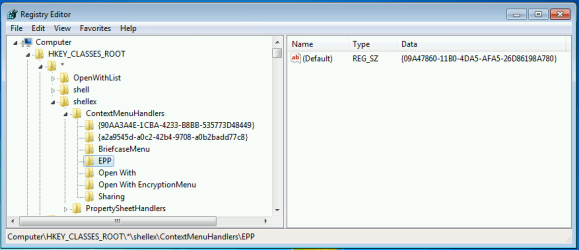
Let's see what you have for the registry key below to see if it's the same.

HKEY_CLASSES_ROOT\*\shellex\ContextMenuHandlers

reg.png
 

My Computer My Computer

At a glance

64-bit Windows 11 Pro for WorkstationsIntel i7-8700K OC'd to 5 GHz64 GB (4x16GB) G.SKILL TridentZ RGB DDR4 3600...ASUS ROG-STRIX-GTX1080TI-O11G-GAMING
Computer type
PC/Desktop
Computer Manufacturer/Model Number
Self built custom
OS
64-bit Windows 11 Pro for Workstations
CPU
Intel i7-8700K OC'd to 5 GHz
Motherboard
ASUS ROG Maximus XI Formula Z390
Memory
64 GB (4x16GB) G.SKILL TridentZ RGB DDR4 3600 MHz
Graphics Card(s)
ASUS ROG-STRIX-GTX1080TI-O11G-GAMING
Sound Card
Integrated
Monitor(s) Displays
2 x Samsung Odyssey G7 27"
Screen Resolution
2560x1440
Hard Drives
1TB Samsung 990 PRO M.2,
4TB Samsung 990 PRO PRO M.2,
TerraMaster F8 SSD Plus NAS
PSU
Seasonic Prime Titanium 850W
Case
Thermaltake Core P3
Cooling
Corsair Hydro H115i
Keyboard
Logitech wireless K800
Mouse
Logitech MX Master 4
Internet Speed
2 Gb/s Download and 100 Mb/s Upload
Antivirus
Malwarebyte Anti-Malware Premium
Browser
Google Chrome
Other Info
Logitech Z625 speaker system,
Logitech BRIO 4K Pro webcam,
HP Color LaserJet Pro MFP M477fdn,
APC SMART-UPS RT 1000 XL - SURT1000XLI,
Galaxy S23 Plus phone
Hi,

the menu was present until a week ago, now it has disappeared. I ran a PC check with ComboFix first, and then with AdwCleaner. Maybe a registry cleaner cancelled the item? But it is in the Windows registry now, and still not appearing. I also used CCleaner to check if the item was in the menu, but disabled, but even CCleaner says it is not present in the Context Menu.
 

My Computer My Computer

At a glance

Windows 7 Home Premium 64bit
Computer type
Laptop
Computer Manufacturer/Model Number
Olivetti
OS
Windows 7 Home Premium 64bit
As a test, see if reinstalling MSE may help.
 

My Computer My Computer

At a glance

64-bit Windows 11 Pro for WorkstationsIntel i7-8700K OC'd to 5 GHz64 GB (4x16GB) G.SKILL TridentZ RGB DDR4 3600...ASUS ROG-STRIX-GTX1080TI-O11G-GAMING
Computer type
PC/Desktop
Computer Manufacturer/Model Number
Self built custom
OS
64-bit Windows 11 Pro for Workstations
CPU
Intel i7-8700K OC'd to 5 GHz
Motherboard
ASUS ROG Maximus XI Formula Z390
Memory
64 GB (4x16GB) G.SKILL TridentZ RGB DDR4 3600 MHz
Graphics Card(s)
ASUS ROG-STRIX-GTX1080TI-O11G-GAMING
Sound Card
Integrated
Monitor(s) Displays
2 x Samsung Odyssey G7 27"
Screen Resolution
2560x1440
Hard Drives
1TB Samsung 990 PRO M.2,
4TB Samsung 990 PRO PRO M.2,
TerraMaster F8 SSD Plus NAS
PSU
Seasonic Prime Titanium 850W
Case
Thermaltake Core P3
Cooling
Corsair Hydro H115i
Keyboard
Logitech wireless K800
Mouse
Logitech MX Master 4
Internet Speed
2 Gb/s Download and 100 Mb/s Upload
Antivirus
Malwarebyte Anti-Malware Premium
Browser
Google Chrome
Other Info
Logitech Z625 speaker system,
Logitech BRIO 4K Pro webcam,
HP Color LaserJet Pro MFP M477fdn,
APC SMART-UPS RT 1000 XL - SURT1000XLI,
Galaxy S23 Plus phone
Same here as fabl63. Had the right click context menu just a couple of days ago and now it's gone. Used the method from OP and it hasn't showed up. Checked the registry entry as stated a couple of posts above and have it. I'm going to try reinstalling now and report back if it works.

EDIt: Reinstalling didn't make it come back but after updating (or a restart of the computer I'm not sure) it came back.
 
Last edited:

My Computer My Computer

At a glance

Windows 7 Professional x64 SP1Intel Core 2 Quad Q6600 @ 2.40GHzOCZ DDR2 6 GB (2x1 GB + 2x2 GB)Radeon HD 5800 Series 1024 MB
Computer type
PC/Desktop
Computer Manufacturer/Model Number
Custom build
OS
Windows 7 Professional x64 SP1
CPU
Intel Core 2 Quad Q6600 @ 2.40GHz
Motherboard
ASUSTeK P5K
Memory
OCZ DDR2 6 GB (2x1 GB + 2x2 GB)
Graphics Card(s)
Radeon HD 5800 Series 1024 MB
Sound Card
Realtek High Definition Audio
Monitor(s) Displays
Samsung SyncMaster 206BW
Screen Resolution
1680x1050
Hard Drives
256 Samsung SSD
1 TB Samsung HDD
Antivirus
Microsoft Security Essentials
Browser
Firefox (always updated)
Just adding that it disappeared again. Losing patience. >_<
 

My Computer My Computer

At a glance

Windows 7 Professional x64 SP1Intel Core 2 Quad Q6600 @ 2.40GHzOCZ DDR2 6 GB (2x1 GB + 2x2 GB)Radeon HD 5800 Series 1024 MB
Computer type
PC/Desktop
Computer Manufacturer/Model Number
Custom build
OS
Windows 7 Professional x64 SP1
CPU
Intel Core 2 Quad Q6600 @ 2.40GHz
Motherboard
ASUSTeK P5K
Memory
OCZ DDR2 6 GB (2x1 GB + 2x2 GB)
Graphics Card(s)
Radeon HD 5800 Series 1024 MB
Sound Card
Realtek High Definition Audio
Monitor(s) Displays
Samsung SyncMaster 206BW
Screen Resolution
1680x1050
Hard Drives
256 Samsung SSD
1 TB Samsung HDD
Antivirus
Microsoft Security Essentials
Browser
Firefox (always updated)
Do you have any 3rd party tweaking type program installed that may be removing it?
 

My Computer My Computer

At a glance

64-bit Windows 11 Pro for WorkstationsIntel i7-8700K OC'd to 5 GHz64 GB (4x16GB) G.SKILL TridentZ RGB DDR4 3600...ASUS ROG-STRIX-GTX1080TI-O11G-GAMING
Computer type
PC/Desktop
Computer Manufacturer/Model Number
Self built custom
OS
64-bit Windows 11 Pro for Workstations
CPU
Intel i7-8700K OC'd to 5 GHz
Motherboard
ASUS ROG Maximus XI Formula Z390
Memory
64 GB (4x16GB) G.SKILL TridentZ RGB DDR4 3600 MHz
Graphics Card(s)
ASUS ROG-STRIX-GTX1080TI-O11G-GAMING
Sound Card
Integrated
Monitor(s) Displays
2 x Samsung Odyssey G7 27"
Screen Resolution
2560x1440
Hard Drives
1TB Samsung 990 PRO M.2,
4TB Samsung 990 PRO PRO M.2,
TerraMaster F8 SSD Plus NAS
PSU
Seasonic Prime Titanium 850W
Case
Thermaltake Core P3
Cooling
Corsair Hydro H115i
Keyboard
Logitech wireless K800
Mouse
Logitech MX Master 4
Internet Speed
2 Gb/s Download and 100 Mb/s Upload
Antivirus
Malwarebyte Anti-Malware Premium
Browser
Google Chrome
Other Info
Logitech Z625 speaker system,
Logitech BRIO 4K Pro webcam,
HP Color LaserJet Pro MFP M477fdn,
APC SMART-UPS RT 1000 XL - SURT1000XLI,
Galaxy S23 Plus phone
None.

As per this topic/post, it's an issue (or a "feature") with the latest version of MSE.
 

My Computer My Computer

At a glance

Windows 7 Professional x64 SP1Intel Core 2 Quad Q6600 @ 2.40GHzOCZ DDR2 6 GB (2x1 GB + 2x2 GB)Radeon HD 5800 Series 1024 MB
Computer type
PC/Desktop
Computer Manufacturer/Model Number
Custom build
OS
Windows 7 Professional x64 SP1
CPU
Intel Core 2 Quad Q6600 @ 2.40GHz
Motherboard
ASUSTeK P5K
Memory
OCZ DDR2 6 GB (2x1 GB + 2x2 GB)
Graphics Card(s)
Radeon HD 5800 Series 1024 MB
Sound Card
Realtek High Definition Audio
Monitor(s) Displays
Samsung SyncMaster 206BW
Screen Resolution
1680x1050
Hard Drives
256 Samsung SSD
1 TB Samsung HDD
Antivirus
Microsoft Security Essentials
Browser
Firefox (always updated)
Hopefully a new version of MSE will be released soon to correct this.
 

My Computer My Computer

At a glance

64-bit Windows 11 Pro for WorkstationsIntel i7-8700K OC'd to 5 GHz64 GB (4x16GB) G.SKILL TridentZ RGB DDR4 3600...ASUS ROG-STRIX-GTX1080TI-O11G-GAMING
Computer type
PC/Desktop
Computer Manufacturer/Model Number
Self built custom
OS
64-bit Windows 11 Pro for Workstations
CPU
Intel i7-8700K OC'd to 5 GHz
Motherboard
ASUS ROG Maximus XI Formula Z390
Memory
64 GB (4x16GB) G.SKILL TridentZ RGB DDR4 3600 MHz
Graphics Card(s)
ASUS ROG-STRIX-GTX1080TI-O11G-GAMING
Sound Card
Integrated
Monitor(s) Displays
2 x Samsung Odyssey G7 27"
Screen Resolution
2560x1440
Hard Drives
1TB Samsung 990 PRO M.2,
4TB Samsung 990 PRO PRO M.2,
TerraMaster F8 SSD Plus NAS
PSU
Seasonic Prime Titanium 850W
Case
Thermaltake Core P3
Cooling
Corsair Hydro H115i
Keyboard
Logitech wireless K800
Mouse
Logitech MX Master 4
Internet Speed
2 Gb/s Download and 100 Mb/s Upload
Antivirus
Malwarebyte Anti-Malware Premium
Browser
Google Chrome
Other Info
Logitech Z625 speaker system,
Logitech BRIO 4K Pro webcam,
HP Color LaserJet Pro MFP M477fdn,
APC SMART-UPS RT 1000 XL - SURT1000XLI,
Galaxy S23 Plus phone
I reinstalled MSE, and now the item is presnt again in the context menu.
 

My Computer My Computer

At a glance

Windows 7 Home Premium 64bit
Computer type
Laptop
Computer Manufacturer/Model Number
Olivetti
OS
Windows 7 Home Premium 64bit
It will probably be gone after updating MSE to the latest version. The same happened with me.
 

My Computer My Computer

At a glance

Windows 7 Professional x64 SP1Intel Core 2 Quad Q6600 @ 2.40GHzOCZ DDR2 6 GB (2x1 GB + 2x2 GB)Radeon HD 5800 Series 1024 MB
Computer type
PC/Desktop
Computer Manufacturer/Model Number
Custom build
OS
Windows 7 Professional x64 SP1
CPU
Intel Core 2 Quad Q6600 @ 2.40GHz
Motherboard
ASUSTeK P5K
Memory
OCZ DDR2 6 GB (2x1 GB + 2x2 GB)
Graphics Card(s)
Radeon HD 5800 Series 1024 MB
Sound Card
Realtek High Definition Audio
Monitor(s) Displays
Samsung SyncMaster 206BW
Screen Resolution
1680x1050
Hard Drives
256 Samsung SSD
1 TB Samsung HDD
Antivirus
Microsoft Security Essentials
Browser
Firefox (always updated)
Back
Top