Scheduled Windows BackUp Won't Run

y2ken

New member
Local time
7:35 AM
Messages
11
I'm using Win7 64bit Home Premium.
I'm trying to schedule a backup to run automatically on a schedule.
I set the schedule up with the BackUp & Restore wizard but when the time comes for the backup to run, it doesn't. But as soon as I resume from sleep and log-in with my password the back-up starts to run!
I checked the Power Options thinking that something was keeping my PC from coming out of sleep to run the backup and noticed that there actually is an option under Sleep to enable Wake Timers. I enabled Wake Timers thinking for sure that was the problem but backup still won't run on the schedule!
Any other ideas?
 

My Computer My Computer

Computer Manufacturer/Model Number
Self Built
OS
Windows 7 Home Premium x64
CPU
Intel Core 2 Quad 9550
Motherboard
Asus P5B
Memory
4 Gigs Mushkin Enhanced Redline PC28000 / DDR2 1000
Graphics Card(s)
Radeon HD3870
Monitor(s) Displays
Westinghouse 25.5 LCD
Screen Resolution
1920 x 1200
Hard Drives
HHD #1 Seagate 500G
HHD #2 Western Digital 500G
HHD #3 Western Digtial 500G
PSU
OCZ 750W xTreme Gamer
Case
Thermaltake Tsunami Dream
Check your BIOS for a wake setting.
 

My Computer My Computer

Computer Manufacturer/Model Number
Custom
OS
Windows 7 Professional x64
CPU
Intel i7 2600K OC'd @ 4620 MHz
Motherboard
Asus P8Z68-V Pro
Memory
16GB GSkill Sniper 2133 Mhz (4x4GB)
Graphics Card(s)
EVGA GeForce GTX 480 SuperClocked+
Sound Card
Realtek High Definition Audio
Monitor(s) Displays
2x Acer S273HLbmii 27"
Screen Resolution
2 x 1920x1080
Hard Drives
64GB Crucial M4 SSD

Storage: Hitachi 1TB 5400RPM, Samsung 1.5TB 5400RPM
PSU
Corsair HW Series 750w (modular)
Case
Cooler Master HAF 932 Advanced Blue Edition
Cooling
CM Hyper 212+ CPU cooler, 3x 230mm + 1x 140mm case fans
Keyboard
Logitech MK320 (wireless)
Mouse
Logitech MK320 (wireless)
Internet Speed
30 Mb/s : 2 Mb/s
Thank you for the reply. I checked the BIOS & MOBO. There are jumpers on the MOBO that can be set to enable waking via USB devices, which wouldn't be the case here. The only other power setting in BIOS is to set the Sleep Mode to either S1 or AUTO. It is presently set to AUTO. I will try it on S1 and see what happens but I don't think that will do the trick because waking from Sleep to run programs worked OK in Vista 32bit. Seems to be a Win7 thing.
Thanks again for the reply.
 

My Computer My Computer

Computer Manufacturer/Model Number
Self Built
OS
Windows 7 Home Premium x64
CPU
Intel Core 2 Quad 9550
Motherboard
Asus P5B
Memory
4 Gigs Mushkin Enhanced Redline PC28000 / DDR2 1000
Graphics Card(s)
Radeon HD3870
Monitor(s) Displays
Westinghouse 25.5 LCD
Screen Resolution
1920 x 1200
Hard Drives
HHD #1 Seagate 500G
HHD #2 Western Digital 500G
HHD #3 Western Digtial 500G
PSU
OCZ 750W xTreme Gamer
Case
Thermaltake Tsunami Dream
Just an update.
I changed my BIOS settings to "enable ACPI 2.0 support" since it was set to "Disabled".
Also, I noticed that my "Windows BackUp" service was set to "Manual" so I changed it to "Automatic".
The "Task Scheduler" service was already set to "Auto".

None of the changes fixed the problem.
BackUp still will not run according to the schedule.
I have my PC set to prompt for a password when resuming from Sleep and the BackUp won't start to run until I log-in.

I even tried Acronis True Image BackUp and it won't run on a schedule either. And Acronis even asks me for my log-in password during set-up specifically so it can run while I'm logged off.

No other ideas?
 

My Computer My Computer

Computer Manufacturer/Model Number
Self Built
OS
Windows 7 Home Premium x64
CPU
Intel Core 2 Quad 9550
Motherboard
Asus P5B
Memory
4 Gigs Mushkin Enhanced Redline PC28000 / DDR2 1000
Graphics Card(s)
Radeon HD3870
Monitor(s) Displays
Westinghouse 25.5 LCD
Screen Resolution
1920 x 1200
Hard Drives
HHD #1 Seagate 500G
HHD #2 Western Digital 500G
HHD #3 Western Digtial 500G
PSU
OCZ 750W xTreme Gamer
Case
Thermaltake Tsunami Dream
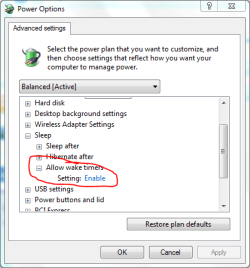
How about in Power Options. Enable Wake Timers should be set to Enabled.
wake.PNG
 

My Computer My Computer

Computer Manufacturer/Model Number
Custom
OS
Windows 7 Professional x64
CPU
Intel i7 2600K OC'd @ 4620 MHz
Motherboard
Asus P8Z68-V Pro
Memory
16GB GSkill Sniper 2133 Mhz (4x4GB)
Graphics Card(s)
EVGA GeForce GTX 480 SuperClocked+
Sound Card
Realtek High Definition Audio
Monitor(s) Displays
2x Acer S273HLbmii 27"
Screen Resolution
2 x 1920x1080
Hard Drives
64GB Crucial M4 SSD

Storage: Hitachi 1TB 5400RPM, Samsung 1.5TB 5400RPM
PSU
Corsair HW Series 750w (modular)
Case
Cooler Master HAF 932 Advanced Blue Edition
Cooling
CM Hyper 212+ CPU cooler, 3x 230mm + 1x 140mm case fans
Keyboard
Logitech MK320 (wireless)
Mouse
Logitech MK320 (wireless)
Internet Speed
30 Mb/s : 2 Mb/s
Thanks, sorry so late for replying. Yes, I did enable 'wake timers' and it didn't help.
The only way I was able to get things to run on a schedule was to disable 'sleep' altogether. Everything is working fine now, (except that I can't use 'sleep' mode).
 

My Computer My Computer

Computer Manufacturer/Model Number
Self Built
OS
Windows 7 Home Premium x64
CPU
Intel Core 2 Quad 9550
Motherboard
Asus P5B
Memory
4 Gigs Mushkin Enhanced Redline PC28000 / DDR2 1000
Graphics Card(s)
Radeon HD3870
Monitor(s) Displays
Westinghouse 25.5 LCD
Screen Resolution
1920 x 1200
Hard Drives
HHD #1 Seagate 500G
HHD #2 Western Digital 500G
HHD #3 Western Digtial 500G
PSU
OCZ 750W xTreme Gamer
Case
Thermaltake Tsunami Dream
Welcome back!

I don't know the answer; let me get some more help for you.
 

My Computer My Computer

Computer Manufacturer/Model Number
Custom
OS
Windows 7 Professional x64
CPU
Intel i7 2600K OC'd @ 4620 MHz
Motherboard
Asus P8Z68-V Pro
Memory
16GB GSkill Sniper 2133 Mhz (4x4GB)
Graphics Card(s)
EVGA GeForce GTX 480 SuperClocked+
Sound Card
Realtek High Definition Audio
Monitor(s) Displays
2x Acer S273HLbmii 27"
Screen Resolution
2 x 1920x1080
Hard Drives
64GB Crucial M4 SSD

Storage: Hitachi 1TB 5400RPM, Samsung 1.5TB 5400RPM
PSU
Corsair HW Series 750w (modular)
Case
Cooler Master HAF 932 Advanced Blue Edition
Cooling
CM Hyper 212+ CPU cooler, 3x 230mm + 1x 140mm case fans
Keyboard
Logitech MK320 (wireless)
Mouse
Logitech MK320 (wireless)
Internet Speed
30 Mb/s : 2 Mb/s
Back
Top