Scratched my Motherbaord

amandeepmail

New member
Local time
4:25 PM
Messages
51
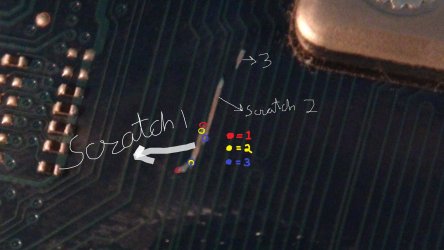
I scratched my motherboard while removing the Heat Sink of the CPU. Actually, its the opposite side of motherboard where you mount the Heat Sink Holder bracket. While removing it i scratched hard on the motherboard and it looks damaged. I can't test it by starting it as I don't have other stuff ready. But I have uploaded some pics and you can tell if it is bad enough to cause damage.


PS: My Motherboard is Gigabyte EX58-Extreme
 

My Computer My Computer

At a glance

Windows 7 Ultimate 64 BitIntel Core i72 GB x 3 Corsair DDR3Nvidia 8800GTX
Computer Manufacturer/Model Number
Self built
OS
Windows 7 Ultimate 64 Bit
CPU
Intel Core i7
Motherboard
Gigabyte EX58-Extreme
Memory
2 GB x 3 Corsair DDR3
Graphics Card(s)
Nvidia 8800GTX
Sound Card
Realtek Built in
Monitor(s) Displays
26 inch Samsung
Hard Drives
1 SSD 64 GB
1 x 1TB WD Hard Drive
PSU
850 W CoolerMaster
Case
CoolerMaster Cosmos
Cooling
Aquagate Max
Do you have a test light handy? If so, grab a 9V battery, and hook up one side of the test light to the - side of the battery, and another wire to one end of the scratch. Run the probe end along the scratch lightly, and if it lights up (without physically touching the other wire), you have likely damaged the motherboard.
 

My Computer My Computer

At a glance

W7 Professional x64AMD Athlon II X3 445 Rana 3.10 GHzPNY XLR DDR3 1600 4x2GBNVIDIA GeForce GTS 450 (fermi) 1GB GDDR5
Computer Manufacturer/Model Number
Pugh Technologies
OS
W7 Professional x64
CPU
AMD Athlon II X3 445 Rana 3.10 GHz
Motherboard
MSI 870A-G54
Memory
PNY XLR DDR3 1600 4x2GB
Graphics Card(s)
NVIDIA GeForce GTS 450 (fermi) 1GB GDDR5
Sound Card
Realtek ALC892 onboard
Monitor(s) Displays
ASUS VE205t, Viewsonic VX2035WM
Screen Resolution
1600x900, 1600x1050
Hard Drives
977GB Hitachi Hitachi HDS721010CLA332
244GB Western Digital WDC WD2500AAJS-65B4A0
488GB Western Digital WDC WD5000AAJS-00A8B0
488GB Western Digital WDC WD5000AAKS-00UU3A0
PSU
Antec EarthWatts EA650 650W
Case
ThermalTake Armor A90 Mid Tower
Cooling
3x 120mm in, 1x 120mm & 200mm out, self built hydro-cooler
Keyboard
Logitec 55
Mouse
Razer Deathadder
Internet Speed
20 Mbps D/L, 9 Mbps U/L
I think if it lights up then the motherboard should be fine because there is not damage to continuity of current. Am i correct?
 

My Computer My Computer

At a glance

Windows 7 Ultimate 64 BitIntel Core i72 GB x 3 Corsair DDR3Nvidia 8800GTX
Computer Manufacturer/Model Number
Self built
OS
Windows 7 Ultimate 64 Bit
CPU
Intel Core i7
Motherboard
Gigabyte EX58-Extreme
Memory
2 GB x 3 Corsair DDR3
Graphics Card(s)
Nvidia 8800GTX
Sound Card
Realtek Built in
Monitor(s) Displays
26 inch Samsung
Hard Drives
1 SSD 64 GB
1 x 1TB WD Hard Drive
PSU
850 W CoolerMaster
Case
CoolerMaster Cosmos
Cooling
Aquagate Max
A motherboard is basically a Printed Circuit Board, or PCB. It is a giant sandwich of conducting and insulating layers of materials with paths for each circuit to follow on the motherboard.
Conducting layers are typically made of thin copper foil. Insulating layers dielectric are typically laminated together with epoxy resin prepreg. The board is typically coated with a solder mask that is green in color. Other colors that are normally available are blue and red. There are quite a few different dielectrics that can be chosen to provide different insulating values depending on the requirements of the circuit. Some of these dielectrics are polytetrafluoroethylene (Teflon), FR-4, FR-1, CEM-1 or CEM-3. Well known prepreg materials used in the PCB industry are FR-2 (Phenolic cotton paper), FR-3 (Cotton paper and epoxy), FR-4 (Woven glass and epoxy), FR-5 (Woven glass and epoxy), FR-6 (Matte glass and polyester), G-10 (Woven glass and epoxy), CEM-1 (Cotton paper and epoxy), CEM-2 (Cotton paper and epoxy), CEM-3 (Woven glass and epoxy), CEM-4 (Woven glass and epoxy), CEM-5 (Woven glass and polyester). Thermal expansion is an important consideration especially with BGA and naked die technologies, and glass fiber offers the best dimensional stability.
For a more in depth test to ensure no damage has been done, can you see each pathway right there, just below the surface? Touch the side by side paths with one end each of the test circuit. If there is a light, that is possible damage. If you touch the same path on either side of the wire, and you get a light, that means that the path is still good.

Basically. what you don't want to have happened is:

1. Severed a connection that was there already.

2. Created a connection that should not be there.
 
Last edited:

My Computer My Computer

At a glance

W7 Professional x64AMD Athlon II X3 445 Rana 3.10 GHzPNY XLR DDR3 1600 4x2GBNVIDIA GeForce GTS 450 (fermi) 1GB GDDR5
Computer Manufacturer/Model Number
Pugh Technologies
OS
W7 Professional x64
CPU
AMD Athlon II X3 445 Rana 3.10 GHz
Motherboard
MSI 870A-G54
Memory
PNY XLR DDR3 1600 4x2GB
Graphics Card(s)
NVIDIA GeForce GTS 450 (fermi) 1GB GDDR5
Sound Card
Realtek ALC892 onboard
Monitor(s) Displays
ASUS VE205t, Viewsonic VX2035WM
Screen Resolution
1600x900, 1600x1050
Hard Drives
977GB Hitachi Hitachi HDS721010CLA332
244GB Western Digital WDC WD2500AAJS-65B4A0
488GB Western Digital WDC WD5000AAJS-00A8B0
488GB Western Digital WDC WD5000AAKS-00UU3A0
PSU
Antec EarthWatts EA650 650W
Case
ThermalTake Armor A90 Mid Tower
Cooling
3x 120mm in, 1x 120mm & 200mm out, self built hydro-cooler
Keyboard
Logitec 55
Mouse
Razer Deathadder
Internet Speed
20 Mbps D/L, 9 Mbps U/L
Thanks for the help but i find it very confusing (i am not that good at hardware). I am not getting what to do? Is there a video demonstration at Youtube for such task? Any other method to test?
 

My Computer My Computer

At a glance

Windows 7 Ultimate 64 BitIntel Core i72 GB x 3 Corsair DDR3Nvidia 8800GTX
Computer Manufacturer/Model Number
Self built
OS
Windows 7 Ultimate 64 Bit
CPU
Intel Core i7
Motherboard
Gigabyte EX58-Extreme
Memory
2 GB x 3 Corsair DDR3
Graphics Card(s)
Nvidia 8800GTX
Sound Card
Realtek Built in
Monitor(s) Displays
26 inch Samsung
Hard Drives
1 SSD 64 GB
1 x 1TB WD Hard Drive
PSU
850 W CoolerMaster
Case
CoolerMaster Cosmos
Cooling
Aquagate Max
Frack, this is hard to explain on the internet. Let me see if I can find a video, and if I cannot, I will try to find a crappy old board in my stash and make a video for you :)
 

My Computer My Computer

At a glance

W7 Professional x64AMD Athlon II X3 445 Rana 3.10 GHzPNY XLR DDR3 1600 4x2GBNVIDIA GeForce GTS 450 (fermi) 1GB GDDR5
Computer Manufacturer/Model Number
Pugh Technologies
OS
W7 Professional x64
CPU
AMD Athlon II X3 445 Rana 3.10 GHz
Motherboard
MSI 870A-G54
Memory
PNY XLR DDR3 1600 4x2GB
Graphics Card(s)
NVIDIA GeForce GTS 450 (fermi) 1GB GDDR5
Sound Card
Realtek ALC892 onboard
Monitor(s) Displays
ASUS VE205t, Viewsonic VX2035WM
Screen Resolution
1600x900, 1600x1050
Hard Drives
977GB Hitachi Hitachi HDS721010CLA332
244GB Western Digital WDC WD2500AAJS-65B4A0
488GB Western Digital WDC WD5000AAJS-00A8B0
488GB Western Digital WDC WD5000AAKS-00UU3A0
PSU
Antec EarthWatts EA650 650W
Case
ThermalTake Armor A90 Mid Tower
Cooling
3x 120mm in, 1x 120mm & 200mm out, self built hydro-cooler
Keyboard
Logitec 55
Mouse
Razer Deathadder
Internet Speed
20 Mbps D/L, 9 Mbps U/L
No, you don't need to go that deep.

Look what I just performed.

1. I took one small light, 1 cell and wires.
2. I made the circuit.
3. When I touch one end of wire to scratch 1 and other to scratch 2 or 3 there is no light.
4. When I touch one end of wire to scratch one's top and other to scratch ones bottom there is light. Same goes with other scratch 2 and 3.


What do I conclude?
 

My Computer My Computer

At a glance

Windows 7 Ultimate 64 BitIntel Core i72 GB x 3 Corsair DDR3Nvidia 8800GTX
Computer Manufacturer/Model Number
Self built
OS
Windows 7 Ultimate 64 Bit
CPU
Intel Core i7
Motherboard
Gigabyte EX58-Extreme
Memory
2 GB x 3 Corsair DDR3
Graphics Card(s)
Nvidia 8800GTX
Sound Card
Realtek Built in
Monitor(s) Displays
26 inch Samsung
Hard Drives
1 SSD 64 GB
1 x 1TB WD Hard Drive
PSU
850 W CoolerMaster
Case
CoolerMaster Cosmos
Cooling
Aquagate Max
I have marked 3 sets of points. Can you test and report back? These are my major areas of concern.
 

Attachments

  • dsc000812.jpg
    dsc000812.jpg
    193.4 KB · Views: 28

My Computer My Computer

At a glance

W7 Professional x64AMD Athlon II X3 445 Rana 3.10 GHzPNY XLR DDR3 1600 4x2GBNVIDIA GeForce GTS 450 (fermi) 1GB GDDR5
Computer Manufacturer/Model Number
Pugh Technologies
OS
W7 Professional x64
CPU
AMD Athlon II X3 445 Rana 3.10 GHz
Motherboard
MSI 870A-G54
Memory
PNY XLR DDR3 1600 4x2GB
Graphics Card(s)
NVIDIA GeForce GTS 450 (fermi) 1GB GDDR5
Sound Card
Realtek ALC892 onboard
Monitor(s) Displays
ASUS VE205t, Viewsonic VX2035WM
Screen Resolution
1600x900, 1600x1050
Hard Drives
977GB Hitachi Hitachi HDS721010CLA332
244GB Western Digital WDC WD2500AAJS-65B4A0
488GB Western Digital WDC WD5000AAJS-00A8B0
488GB Western Digital WDC WD5000AAKS-00UU3A0
PSU
Antec EarthWatts EA650 650W
Case
ThermalTake Armor A90 Mid Tower
Cooling
3x 120mm in, 1x 120mm & 200mm out, self built hydro-cooler
Keyboard
Logitec 55
Mouse
Razer Deathadder
Internet Speed
20 Mbps D/L, 9 Mbps U/L
Anywhoosle, if 2 is lit, it's good, if 1 and/or 3 are lit, try to track down where the traces go, and if they interconnect elsewhere you're all good, if it's not lit, then you're likely good.

I am off to dream land now, but I will reply to questions when I am conscious again :)
 

My Computer My Computer

At a glance

W7 Professional x64AMD Athlon II X3 445 Rana 3.10 GHzPNY XLR DDR3 1600 4x2GBNVIDIA GeForce GTS 450 (fermi) 1GB GDDR5
Computer Manufacturer/Model Number
Pugh Technologies
OS
W7 Professional x64
CPU
AMD Athlon II X3 445 Rana 3.10 GHz
Motherboard
MSI 870A-G54
Memory
PNY XLR DDR3 1600 4x2GB
Graphics Card(s)
NVIDIA GeForce GTS 450 (fermi) 1GB GDDR5
Sound Card
Realtek ALC892 onboard
Monitor(s) Displays
ASUS VE205t, Viewsonic VX2035WM
Screen Resolution
1600x900, 1600x1050
Hard Drives
977GB Hitachi Hitachi HDS721010CLA332
244GB Western Digital WDC WD2500AAJS-65B4A0
488GB Western Digital WDC WD5000AAJS-00A8B0
488GB Western Digital WDC WD5000AAKS-00UU3A0
PSU
Antec EarthWatts EA650 650W
Case
ThermalTake Armor A90 Mid Tower
Cooling
3x 120mm in, 1x 120mm & 200mm out, self built hydro-cooler
Keyboard
Logitec 55
Mouse
Razer Deathadder
Internet Speed
20 Mbps D/L, 9 Mbps U/L
Red- Not Lit
Yellow- Lit
Blue- Not lit

It was very tough to test as wires kept on moving from their place as it was very hard to hold them at one place.
 

My Computer My Computer

At a glance

Windows 7 Ultimate 64 BitIntel Core i72 GB x 3 Corsair DDR3Nvidia 8800GTX
Computer Manufacturer/Model Number
Self built
OS
Windows 7 Ultimate 64 Bit
CPU
Intel Core i7
Motherboard
Gigabyte EX58-Extreme
Memory
2 GB x 3 Corsair DDR3
Graphics Card(s)
Nvidia 8800GTX
Sound Card
Realtek Built in
Monitor(s) Displays
26 inch Samsung
Hard Drives
1 SSD 64 GB
1 x 1TB WD Hard Drive
PSU
850 W CoolerMaster
Case
CoolerMaster Cosmos
Cooling
Aquagate Max
I'm sorry, but I would consider the board ruined. :(

Most motherboards are multi-layer boards, some with upto 6 layers of electrical tracks including the top (component side) and bottom (the back). These individual layers are not much thicker than a piece of thin card. Even if you can repair the damage to the tracks on the surface of the board (either top or bottom, whichever is damaged), it is not possible to repair the damage that may exist with the tracks on the internal layers.

Having said that, you have nothing to lose. It may be that you have only caused superficial damage which can be repaired with the use of an electrically conducting silver-based paint and a fine applicator. Be aware though, that if there is hidden damage to the inner layers, it is possible to destroy your CPU/RAM/PSU when you next power it up.
 

My Computer My Computer

At a glance

Windows 8.1 Pro RTM x64Intel Core-i5-3570K 4-core @ 3.4GHz (Ivy Brid...4 x 4GB DDR3-1600 Corsair Vengeance CMZ8GX3M2...MSI GeForce GTX770 Gaming OC 2GB
Computer type
PC/Desktop
Computer Manufacturer/Model Number
Dwarf Dwf/11/2012 r09/2013
OS
Windows 8.1 Pro RTM x64
CPU
Intel Core-i5-3570K 4-core @ 3.4GHz (Ivy Bridge) (OC 4.4GHz)
Motherboard
ASRock Z77 Extreme4-M
Memory
4 x 4GB DDR3-1600 Corsair Vengeance CMZ8GX3M2A1600C9B (16GB)
Graphics Card(s)
MSI GeForce GTX770 Gaming OC 2GB
Sound Card
Realtek High Definition on board solution (ALC 898)
Monitor(s) Displays
ViewSonic VA1912w Widescreen (VGA)
Screen Resolution
1440x900
Hard Drives
OCZ Agility 3 SSD 120GB SATA III x2 (RAID 0)
Samsung HD501LJ 500GB SATA II x2
Hitachi HDS721010CLA332 1TB SATA II
Iomega 1.5TB Ext USB 2.0
WD 2.0TB Ext USB 3.0
PSU
XFX Pro Series 850W Semi-Modular
Case
Gigabyte IF233
Cooling
1 x 120mm Front Inlet 1 x 120mm Rear Exhaust
Keyboard
Microsoft Comfort Curve Keyboard 3000 (USB)
Mouse
Microsoft Comfort Mouse 3000 for Business (USB)
Internet Speed
NetGear DG834Gv3 ADSL Modem/Router (Ethernet) ~4.0 Mb/s (O2)
Antivirus
Avast! 8.0.1497
Browser
IE 11
Other Info
Optical Drive: HL-DT-ST BD-RE BH10LS30 SATA Bluray
Lexmark S305 Printer/Scanner/Copier (USB)
WEI Score: 8.1/8.1/8.5/8.5/8.25
Asus Eee PC 1011PX Netbook (Windows 7 x86 Starter)
@dwarf
have you seen the pics. does it look that bad? if yes, then what should i do?
I can't buy new one it costs RS. 20000+ in India. Its still in warranty, will they cover it?
 

My Computer My Computer

At a glance

Windows 7 Ultimate 64 BitIntel Core i72 GB x 3 Corsair DDR3Nvidia 8800GTX
Computer Manufacturer/Model Number
Self built
OS
Windows 7 Ultimate 64 Bit
CPU
Intel Core i7
Motherboard
Gigabyte EX58-Extreme
Memory
2 GB x 3 Corsair DDR3
Graphics Card(s)
Nvidia 8800GTX
Sound Card
Realtek Built in
Monitor(s) Displays
26 inch Samsung
Hard Drives
1 SSD 64 GB
1 x 1TB WD Hard Drive
PSU
850 W CoolerMaster
Case
CoolerMaster Cosmos
Cooling
Aquagate Max
It's hard to say what damage, if any, has been incurred by the inner layers. As regards warranties, then I'm sorry, but damage like this usually renders the warranty invalid.
 

My Computer My Computer

At a glance

Windows 8.1 Pro RTM x64Intel Core-i5-3570K 4-core @ 3.4GHz (Ivy Brid...4 x 4GB DDR3-1600 Corsair Vengeance CMZ8GX3M2...MSI GeForce GTX770 Gaming OC 2GB
Computer type
PC/Desktop
Computer Manufacturer/Model Number
Dwarf Dwf/11/2012 r09/2013
OS
Windows 8.1 Pro RTM x64
CPU
Intel Core-i5-3570K 4-core @ 3.4GHz (Ivy Bridge) (OC 4.4GHz)
Motherboard
ASRock Z77 Extreme4-M
Memory
4 x 4GB DDR3-1600 Corsair Vengeance CMZ8GX3M2A1600C9B (16GB)
Graphics Card(s)
MSI GeForce GTX770 Gaming OC 2GB
Sound Card
Realtek High Definition on board solution (ALC 898)
Monitor(s) Displays
ViewSonic VA1912w Widescreen (VGA)
Screen Resolution
1440x900
Hard Drives
OCZ Agility 3 SSD 120GB SATA III x2 (RAID 0)
Samsung HD501LJ 500GB SATA II x2
Hitachi HDS721010CLA332 1TB SATA II
Iomega 1.5TB Ext USB 2.0
WD 2.0TB Ext USB 3.0
PSU
XFX Pro Series 850W Semi-Modular
Case
Gigabyte IF233
Cooling
1 x 120mm Front Inlet 1 x 120mm Rear Exhaust
Keyboard
Microsoft Comfort Curve Keyboard 3000 (USB)
Mouse
Microsoft Comfort Mouse 3000 for Business (USB)
Internet Speed
NetGear DG834Gv3 ADSL Modem/Router (Ethernet) ~4.0 Mb/s (O2)
Antivirus
Avast! 8.0.1497
Browser
IE 11
Other Info
Optical Drive: HL-DT-ST BD-RE BH10LS30 SATA Bluray
Lexmark S305 Printer/Scanner/Copier (USB)
WEI Score: 8.1/8.1/8.5/8.5/8.25
Asus Eee PC 1011PX Netbook (Windows 7 x86 Starter)
Red- Not Lit
Yellow- Lit
Blue- Not lit

It was very tough to test as wires kept on moving from their place as it was very hard to hold them at one place.

amandeepmail , If blue is not lit, red is not lit and yellow is lit , then this shows as being superficial surface damage with no interconnection between the tracks ,I think you have been very lucky this time , In future take more care ;)
 

My Computer My Computer

At a glance

win 7 ultimate32bit, Win8.1pro wmc 32bitamd phenom x4 9600corsair twinxs 2x2gb2x nvidia 1gb 8500gt
Computer type
PC/Desktop
Computer Manufacturer/Model Number
self build
OS
win 7 ultimate32bit, Win8.1pro wmc 32bit
CPU
amd phenom x4 9600
Motherboard
asus m2n32-sli deluxe
Memory
corsair twinxs 2x2gb
Graphics Card(s)
2x nvidia 1gb 8500gt
Sound Card
onboard
Monitor(s) Displays
23" PB Viseo 233d
Screen Resolution
1920x1080
Hard Drives
maxtor sata 500gb
maxtor sata 320gb
fujitsu sata200gb
PSU
oryxx tornado 750w
Case
thermaltake xaser lll
Cooling
artic freezer64 pro + 7 case fans
But as per dwarf there are many layers and due to scratch internal layers might be damaged. I don't really want to buy a new motherboard knowing that this might be fine, but still i don't want to damage other parts of my pc (cpu, ram) by using the mobo.
 

My Computer My Computer

At a glance

Windows 7 Ultimate 64 BitIntel Core i72 GB x 3 Corsair DDR3Nvidia 8800GTX
Computer Manufacturer/Model Number
Self built
OS
Windows 7 Ultimate 64 Bit
CPU
Intel Core i7
Motherboard
Gigabyte EX58-Extreme
Memory
2 GB x 3 Corsair DDR3
Graphics Card(s)
Nvidia 8800GTX
Sound Card
Realtek Built in
Monitor(s) Displays
26 inch Samsung
Hard Drives
1 SSD 64 GB
1 x 1TB WD Hard Drive
PSU
850 W CoolerMaster
Case
CoolerMaster Cosmos
Cooling
Aquagate Max
But as per dwarf there are many layers and due to scratch internal layers might be damaged. I don't really want to buy a new motherboard knowing that this might be fine, but still i don't want to damage other parts of my pc (cpu, ram) by using the mobo.

looking at the photos' it looks like surface damage only ,Dwarf is correct in what he states as the mobo being multilayer and if sufficient depth of scratch as occured , then you would be looking at interconnection between the outer and inner layers of the board ,but in your case i personnally dont think the scratch is that deep ;)
 

My Computer My Computer

At a glance

win 7 ultimate32bit, Win8.1pro wmc 32bitamd phenom x4 9600corsair twinxs 2x2gb2x nvidia 1gb 8500gt
Computer type
PC/Desktop
Computer Manufacturer/Model Number
self build
OS
win 7 ultimate32bit, Win8.1pro wmc 32bit
CPU
amd phenom x4 9600
Motherboard
asus m2n32-sli deluxe
Memory
corsair twinxs 2x2gb
Graphics Card(s)
2x nvidia 1gb 8500gt
Sound Card
onboard
Monitor(s) Displays
23" PB Viseo 233d
Screen Resolution
1920x1080
Hard Drives
maxtor sata 500gb
maxtor sata 320gb
fujitsu sata200gb
PSU
oryxx tornado 750w
Case
thermaltake xaser lll
Cooling
artic freezer64 pro + 7 case fans
Yup the scratch is not that deep. I rechecked and the yellow one is only lit and looks like it is fine. So, I applied some nail polish over it to prevent corrosion of visible copper. I took idea of applying nail polish from Google and hope it doesn't spoil anything.

I also checked that two lines go from CPU to DDR3_5 so will probably damage triple channel memory of its bad.
 

My Computer My Computer

At a glance

Windows 7 Ultimate 64 BitIntel Core i72 GB x 3 Corsair DDR3Nvidia 8800GTX
Computer Manufacturer/Model Number
Self built
OS
Windows 7 Ultimate 64 Bit
CPU
Intel Core i7
Motherboard
Gigabyte EX58-Extreme
Memory
2 GB x 3 Corsair DDR3
Graphics Card(s)
Nvidia 8800GTX
Sound Card
Realtek Built in
Monitor(s) Displays
26 inch Samsung
Hard Drives
1 SSD 64 GB
1 x 1TB WD Hard Drive
PSU
850 W CoolerMaster
Case
CoolerMaster Cosmos
Cooling
Aquagate Max
Hi,
First, I would not use a 9V battery to perform any tests. Since you don't know where those traces go, you could damage components that are connected with that much voltage.
From what I see, I doubt if you damaged any inner layers of the board, just my opinion.
The only concern I would have is with the two traces that are scratched next to each other.
I would get a magnifing lens and see if the copper from one was "smeared" to the other causing a short.
If not, then I would, in my opinion, say you were lucky and good to go.
 

My Computer My Computer

At a glance

Windows 10 Pro x64, Windows 8.1 Pro x64, Wind...INTEL i9-7920X LGA 206664 GB (4 X 16 GB) G-Skill V Series DDR4 3200 ...EVGA GTX 1060 SC 3 GB
Computer type
PC/Desktop
Computer Manufacturer/Model Number
Custom Built
OS
Windows 10 Pro x64, Windows 8.1 Pro x64, Windows 7 Ultimate x64 SP1,
CPU
INTEL i9-7920X LGA 2066
Motherboard
Gigabyte X299-WU8 F3
Memory
64 GB (4 X 16 GB) G-Skill V Series DDR4 3200 Quad Channel
Graphics Card(s)
EVGA GTX 1060 SC 3 GB
Sound Card
Realtek Onboard ALC1220
Monitor(s) Displays
2 x Samsung S27E310
Screen Resolution
1920x1080
Hard Drives
Samsung 2 x 970 EVO Plus 500 GB NVMe
1 x 6TB WD 6003FZBX SATA
1 x 6TB WD 60EFRX SATA
12 x 3TB WD 30EFRX SATA
PSU
Seasonic X-1050
Case
Thermaltake Armor+
Cooling
Corsair H80i V2 Liquid AOI Cooler
Keyboard
Logitech G510s
Mouse
Logitech MX Master 2S
Internet Speed
200 Mb/s
Antivirus
ESET NOD32 13.1
Browser
EDGE (Dev, Canary, Beta), Chrome
Other Info
ASUS RT-AC68U router
Malwarebytes 4.0.4
I used 1.5 V x 3 cells to perform the test. The tests are good and shows they are not short. So, I applied nail polish to cover it (thats what i had in home :)).
 

My Computer My Computer

At a glance

Windows 7 Ultimate 64 BitIntel Core i72 GB x 3 Corsair DDR3Nvidia 8800GTX
Computer Manufacturer/Model Number
Self built
OS
Windows 7 Ultimate 64 Bit
CPU
Intel Core i7
Motherboard
Gigabyte EX58-Extreme
Memory
2 GB x 3 Corsair DDR3
Graphics Card(s)
Nvidia 8800GTX
Sound Card
Realtek Built in
Monitor(s) Displays
26 inch Samsung
Hard Drives
1 SSD 64 GB
1 x 1TB WD Hard Drive
PSU
850 W CoolerMaster
Case
CoolerMaster Cosmos
Cooling
Aquagate Max
I probably would not have used nail polish since I don't know the conductivity or dielectric characteristics of it. Depending on what those traces are for, it may effect the circuit.
 

My Computer My Computer

At a glance

Windows 10 Pro x64, Windows 8.1 Pro x64, Wind...INTEL i9-7920X LGA 206664 GB (4 X 16 GB) G-Skill V Series DDR4 3200 ...EVGA GTX 1060 SC 3 GB
Computer type
PC/Desktop
Computer Manufacturer/Model Number
Custom Built
OS
Windows 10 Pro x64, Windows 8.1 Pro x64, Windows 7 Ultimate x64 SP1,
CPU
INTEL i9-7920X LGA 2066
Motherboard
Gigabyte X299-WU8 F3
Memory
64 GB (4 X 16 GB) G-Skill V Series DDR4 3200 Quad Channel
Graphics Card(s)
EVGA GTX 1060 SC 3 GB
Sound Card
Realtek Onboard ALC1220
Monitor(s) Displays
2 x Samsung S27E310
Screen Resolution
1920x1080
Hard Drives
Samsung 2 x 970 EVO Plus 500 GB NVMe
1 x 6TB WD 6003FZBX SATA
1 x 6TB WD 60EFRX SATA
12 x 3TB WD 30EFRX SATA
PSU
Seasonic X-1050
Case
Thermaltake Armor+
Cooling
Corsair H80i V2 Liquid AOI Cooler
Keyboard
Logitech G510s
Mouse
Logitech MX Master 2S
Internet Speed
200 Mb/s
Antivirus
ESET NOD32 13.1
Browser
EDGE (Dev, Canary, Beta), Chrome
Other Info
ASUS RT-AC68U router
Malwarebytes 4.0.4
Back
Top