Solved Screen goes blank during games suddenly but computer remains on

RaviR

New member
Member
VIP
Local time
1:25 AM
Messages
229
Location
Trinidad
Hey Guys,

For the past 2 nights I've been getting this weird problem while playing games for which has never happened before. My monitor would just go blank like if its not getting any display, but my computer would be on, i would be still hearing the game sounds even TeamSpeak my friends can hear me and I can talk to them, then I would have to force restart to get back display....What gives?! :confused:

This has NEVER happened before, all my games run smoothly without any problems. Fifa 15, HoN, BF4, WatchDogs...nothing. Just since last night it started happening.

Can any help in providing some troubleshooting? Any other information or data needed please let me know.


*praying its not my graphics card*


Regards
 

My Computer My Computer

At a glance

Microsoft Windows 7 Ultimate 64-bit 7601 Mult...Intel(R) Core(TM) i5-3570K CPU @ 3.40GHz8.00 GBNVIDIA GeForce GTX 660
Computer type
PC/Desktop
Computer Manufacturer/Model Number
Custom Build
OS
Microsoft Windows 7 Ultimate 64-bit 7601 Multiprocessor Free Service Pack 1
CPU
Intel(R) Core(TM) i5-3570K CPU @ 3.40GHz
Motherboard
ASUSTeK COMPUTER INC. P8Z77-V
Memory
8.00 GB
Graphics Card(s)
NVIDIA GeForce GTX 660
Sound Card
(1) USB Audio Device (2) High Definition Audio Device (3
Screen Resolution
1360 x 768 x 32 bits (4294967296 colors) @ 60 Hz
Hard Drives
(1) M4-CT128M4SSD2 ATA Device (2) WDC WD1002FAEX-00Z3A0 ATA Device (3) WDC WD10EZEX-22BN5A0 ATA Device
PSU
Corsair Enthusiast Series TX650M
Case
NZXT Phantom 410
Cooling
Cooler Master Hyper 212 EVO
Keyboard
Logitech HID-Compliant Keyboard
Mouse
Logitech HID-compliant MX320 Laser Mouse
Ok RaviR mate start by letting us know what the temps are for the machine. Use Speccy and post back results
Speccy - Download

However it does sound like either the GPU or monitor is on the blink:(
 

My Computer My Computer

At a glance

Desk1 7 Home Prem / Desk2 10 Pro / Main lap A...Desk1 i5 3750K / Laptop i7 GTX 860M / Desk2 i...Desk1 8GB (1866) / Desk2 16GB (1333) / Laptop...Desk 1& 2NVidia GTX 650 & Laptops on board Intel
Computer type
PC/Desktop
Computer Manufacturer/Model Number
Own build (new) Desk1 / Asus ROG Win 7 / Desk2 1st build
OS
Desk1 7 Home Prem / Desk2 10 Pro / Main lap Asus ROG 10 Pro 2 laptop Toshiba 7 Pro Asus P2520 7 & 10
CPU
Desk1 i5 3750K / Laptop i7 GTX 860M / Desk2 i5 2500
Motherboard
Desk1 Asus P877-V / Desk2 Gigabyte H67 UD3H / Laptop ?
Memory
Desk1 8GB (1866) / Desk2 16GB (1333) / Laptop 8Gb DDR3
Graphics Card(s)
Desk 1& 2NVidia GTX 650 & Laptops on board Intel
Sound Card
Desk 1 & 2 -XONAR DG Realtek High Def audio Laptop
Monitor(s) Displays
Desk 1 Benq HD 2450 / Desk2 Philips 24" / Laptop 17.5"
Screen Resolution
1920x1080 D1 & D2 & Laptop 1
Hard Drives
Desk1 Samsung 120GB 830 SSD
Asus ROG 256GB 850 Pro SSD
Desk2 Samsung 840 256 SSD
Toshiba 120GB EVO
PSU
Desk 1 Corsair HX 1050/ Laptop ? / Desk 2 Corsair HX 650
Case
Desk 1 Cooler HAF XM ? Toshiba laptop / Desk2 Coolermaster
Cooling
Fans on all Desk1 -2 Desk2 - all Coolermasters 5 Laptop ?
Keyboard
Desk 1 MS Sidewinder X6 Desk 2 MS Sidewinder X 4
Mouse
Desk 1&2 - Gigabyte MS 900 gamer - laptop - Logitec wireless
Internet Speed
ADSL2+
Other Info
One other Desktop (tester) and spare Toshba laptop both with SSD's
Running Kaspersky 2016 ISS on all machines config'd identically
Logitec audio stereo systems on each machine (x3)
Canon MG5250MFC
Router/modem TP-Link running WPA2SK
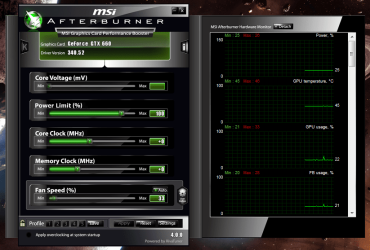
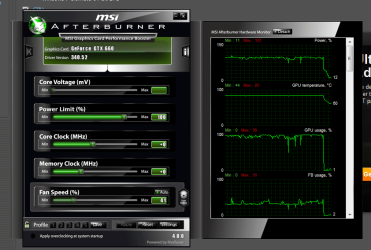
Adding to John's recommendation of Speccy, download and install MSI Afterburner, run your games in windowed mode with Afterburner set to Minimize to Tray. You can keep an eye on your temperatures in real time as you're gaming. Let us know the results.
 

My Computer My Computer

At a glance

W7 Pro x64 SP1 | W10 Pro IP x64 | W8.1 Pro x6...i7-4790k @ 4GHz (4.4GHz Boost)16GB DDR3 Kingston HyperX Fury @ 1600MHz CL 9...EVGA GTX 980 Classified
Computer type
PC/Desktop
Computer Manufacturer/Model Number
Custom Build
OS
W7 Pro x64 SP1 | W10 Pro IP x64 | W8.1 Pro x64 VM | Linux Mint VM
CPU
i7-4790k @ 4GHz (4.4GHz Boost)
Motherboard
ASUS Sabertooth Z87 (BIOS Rev 2004)
Memory
16GB DDR3 Kingston HyperX Fury @ 1600MHz CL 9-9-9-27
Graphics Card(s)
EVGA GTX 980 Classified
Sound Card
Realtek Onboard
Monitor(s) Displays
Samsung S27D390
Screen Resolution
1920 x 1080
Hard Drives
240GB Intel 520 Series SSD |
Samsung 850 EVO 120GB SSD |
2TB WD Caviar Black |
2TB WD Caviar Green
PSU
Corsair HX850-80 Gold Modular
Case
Cooler Master Silencio 650
Cooling
Corsair H80i w/2 x Corsair SP120 | 2 x 120mm Noctua NF-S12B
Keyboard
Microsoft Sidewinder X4
Mouse
Gigabyte M6900 optical
Internet Speed
152mb
Antivirus
F-Secure
Browser
Firefox 38.0
Other Info
Backup Rig: Win 7 Pro 64-bit | AMD A10-5800k | ASUS F2A85-V Pro | 8GB Samsung DDR3 @1600MHz | 120GB Toshiba SDD | 2TB Seagate HDD | Cooler Master Silencio 550
Hey Guys,

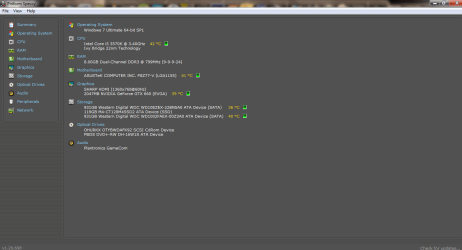
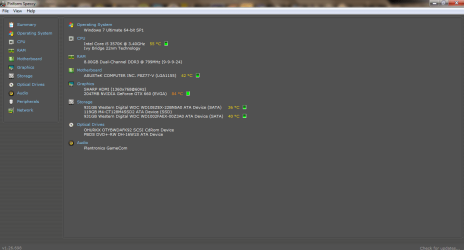
Thank you for the response so far. Let me see if I got the correct screenshots for you all. This is while playing Fifa15 at windowed mode for about 5 minutes. Before and after.

Also i forgot to mention my GTX660 is in the x8 slot because it does not seem to work at the x16 slot. See these threads where i posted about this problem.

Here and Here

Any other information needed,please let me know.

Regards
 

Attachments

  • Untitled.png
    Untitled.png
    31.2 KB · Views: 5
  • Untitled1.png
    Untitled1.png
    69.2 KB · Views: 1
  • Untitled3.png
    Untitled3.png
    31.9 KB · Views: 3
  • Untitled4.png
    Untitled4.png
    55.2 KB · Views: 1

My Computer My Computer

At a glance

Microsoft Windows 7 Ultimate 64-bit 7601 Mult...Intel(R) Core(TM) i5-3570K CPU @ 3.40GHz8.00 GBNVIDIA GeForce GTX 660
Computer type
PC/Desktop
Computer Manufacturer/Model Number
Custom Build
OS
Microsoft Windows 7 Ultimate 64-bit 7601 Multiprocessor Free Service Pack 1
CPU
Intel(R) Core(TM) i5-3570K CPU @ 3.40GHz
Motherboard
ASUSTeK COMPUTER INC. P8Z77-V
Memory
8.00 GB
Graphics Card(s)
NVIDIA GeForce GTX 660
Sound Card
(1) USB Audio Device (2) High Definition Audio Device (3
Screen Resolution
1360 x 768 x 32 bits (4294967296 colors) @ 60 Hz
Hard Drives
(1) M4-CT128M4SSD2 ATA Device (2) WDC WD1002FAEX-00Z3A0 ATA Device (3) WDC WD10EZEX-22BN5A0 ATA Device
PSU
Corsair Enthusiast Series TX650M
Case
NZXT Phantom 410
Cooling
Cooler Master Hyper 212 EVO
Keyboard
Logitech HID-Compliant Keyboard
Mouse
Logitech HID-compliant MX320 Laser Mouse
I'm not sure whether 85°C is high for a 660 to be honest, my 780 hits 80°C consistently when gaming but I know that's the norm. Does this only happen when gaming?
 

My Computer My Computer

At a glance

W7 Pro x64 SP1 | W10 Pro IP x64 | W8.1 Pro x6...i7-4790k @ 4GHz (4.4GHz Boost)16GB DDR3 Kingston HyperX Fury @ 1600MHz CL 9...EVGA GTX 980 Classified
Computer type
PC/Desktop
Computer Manufacturer/Model Number
Custom Build
OS
W7 Pro x64 SP1 | W10 Pro IP x64 | W8.1 Pro x64 VM | Linux Mint VM
CPU
i7-4790k @ 4GHz (4.4GHz Boost)
Motherboard
ASUS Sabertooth Z87 (BIOS Rev 2004)
Memory
16GB DDR3 Kingston HyperX Fury @ 1600MHz CL 9-9-9-27
Graphics Card(s)
EVGA GTX 980 Classified
Sound Card
Realtek Onboard
Monitor(s) Displays
Samsung S27D390
Screen Resolution
1920 x 1080
Hard Drives
240GB Intel 520 Series SSD |
Samsung 850 EVO 120GB SSD |
2TB WD Caviar Black |
2TB WD Caviar Green
PSU
Corsair HX850-80 Gold Modular
Case
Cooler Master Silencio 650
Cooling
Corsair H80i w/2 x Corsair SP120 | 2 x 120mm Noctua NF-S12B
Keyboard
Microsoft Sidewinder X4
Mouse
Gigabyte M6900 optical
Internet Speed
152mb
Antivirus
F-Secure
Browser
Firefox 38.0
Other Info
Backup Rig: Win 7 Pro 64-bit | AMD A10-5800k | ASUS F2A85-V Pro | 8GB Samsung DDR3 @1600MHz | 120GB Toshiba SDD | 2TB Seagate HDD | Cooler Master Silencio 550
Yes, I've never seen a high temperature during normal use. I've played many games on my rig, all at max settings that my system would allow. Its only recently, maybe after I installed and uninstalled Dead Rising 3 that this started happening.

I played Watch Dogs on almost max settings with no problem what so ever. No clue why this suddenly happening even on normal games.
 

My Computer My Computer

At a glance

Microsoft Windows 7 Ultimate 64-bit 7601 Mult...Intel(R) Core(TM) i5-3570K CPU @ 3.40GHz8.00 GBNVIDIA GeForce GTX 660
Computer type
PC/Desktop
Computer Manufacturer/Model Number
Custom Build
OS
Microsoft Windows 7 Ultimate 64-bit 7601 Multiprocessor Free Service Pack 1
CPU
Intel(R) Core(TM) i5-3570K CPU @ 3.40GHz
Motherboard
ASUSTeK COMPUTER INC. P8Z77-V
Memory
8.00 GB
Graphics Card(s)
NVIDIA GeForce GTX 660
Sound Card
(1) USB Audio Device (2) High Definition Audio Device (3
Screen Resolution
1360 x 768 x 32 bits (4294967296 colors) @ 60 Hz
Hard Drives
(1) M4-CT128M4SSD2 ATA Device (2) WDC WD1002FAEX-00Z3A0 ATA Device (3) WDC WD10EZEX-22BN5A0 ATA Device
PSU
Corsair Enthusiast Series TX650M
Case
NZXT Phantom 410
Cooling
Cooler Master Hyper 212 EVO
Keyboard
Logitech HID-Compliant Keyboard
Mouse
Logitech HID-compliant MX320 Laser Mouse
So it's happening on all games or just specific ones? Which drivers do you have installed?

:ar: Run Furmark to stress test your GPU. http://www.sevenforums.com/tutorials/100356-video-card-stress-test-furmark.html

   Note
Run Furmark for around 30 minutes.

   Warning
Your GPU temperatures will rise quickly while Furmark is running. Keep a keen eye on them, anything over 85°C and abort the test.


Let us know the results.
 

My Computer My Computer

At a glance

W7 Pro x64 SP1 | W10 Pro IP x64 | W8.1 Pro x6...i7-4790k @ 4GHz (4.4GHz Boost)16GB DDR3 Kingston HyperX Fury @ 1600MHz CL 9...EVGA GTX 980 Classified
Computer type
PC/Desktop
Computer Manufacturer/Model Number
Custom Build
OS
W7 Pro x64 SP1 | W10 Pro IP x64 | W8.1 Pro x64 VM | Linux Mint VM
CPU
i7-4790k @ 4GHz (4.4GHz Boost)
Motherboard
ASUS Sabertooth Z87 (BIOS Rev 2004)
Memory
16GB DDR3 Kingston HyperX Fury @ 1600MHz CL 9-9-9-27
Graphics Card(s)
EVGA GTX 980 Classified
Sound Card
Realtek Onboard
Monitor(s) Displays
Samsung S27D390
Screen Resolution
1920 x 1080
Hard Drives
240GB Intel 520 Series SSD |
Samsung 850 EVO 120GB SSD |
2TB WD Caviar Black |
2TB WD Caviar Green
PSU
Corsair HX850-80 Gold Modular
Case
Cooler Master Silencio 650
Cooling
Corsair H80i w/2 x Corsair SP120 | 2 x 120mm Noctua NF-S12B
Keyboard
Microsoft Sidewinder X4
Mouse
Gigabyte M6900 optical
Internet Speed
152mb
Antivirus
F-Secure
Browser
Firefox 38.0
Other Info
Backup Rig: Win 7 Pro 64-bit | AMD A10-5800k | ASUS F2A85-V Pro | 8GB Samsung DDR3 @1600MHz | 120GB Toshiba SDD | 2TB Seagate HDD | Cooler Master Silencio 550
It happened for HoN (Heroes of Newerth) and Fifa 15. Never happened before but I played for a while last night and didn't get any issues.

Going to run the test now, will post back in a while.

Current Nivdia driver is 340.52

*Update*

The program keeps crashing when I stop it when my GPU reaches 86C and I can't get a log or anything, what to do?
 
Last edited:

My Computer My Computer

At a glance

Microsoft Windows 7 Ultimate 64-bit 7601 Mult...Intel(R) Core(TM) i5-3570K CPU @ 3.40GHz8.00 GBNVIDIA GeForce GTX 660
Computer type
PC/Desktop
Computer Manufacturer/Model Number
Custom Build
OS
Microsoft Windows 7 Ultimate 64-bit 7601 Multiprocessor Free Service Pack 1
CPU
Intel(R) Core(TM) i5-3570K CPU @ 3.40GHz
Motherboard
ASUSTeK COMPUTER INC. P8Z77-V
Memory
8.00 GB
Graphics Card(s)
NVIDIA GeForce GTX 660
Sound Card
(1) USB Audio Device (2) High Definition Audio Device (3
Screen Resolution
1360 x 768 x 32 bits (4294967296 colors) @ 60 Hz
Hard Drives
(1) M4-CT128M4SSD2 ATA Device (2) WDC WD1002FAEX-00Z3A0 ATA Device (3) WDC WD10EZEX-22BN5A0 ATA Device
PSU
Corsair Enthusiast Series TX650M
Case
NZXT Phantom 410
Cooling
Cooler Master Hyper 212 EVO
Keyboard
Logitech HID-Compliant Keyboard
Mouse
Logitech HID-compliant MX320 Laser Mouse
My Computer My Computer

At a glance

Desk1 7 Home Prem / Desk2 10 Pro / Main lap A...Desk1 i5 3750K / Laptop i7 GTX 860M / Desk2 i...Desk1 8GB (1866) / Desk2 16GB (1333) / Laptop...Desk 1& 2NVidia GTX 650 & Laptops on board Intel
Computer type
PC/Desktop
Computer Manufacturer/Model Number
Own build (new) Desk1 / Asus ROG Win 7 / Desk2 1st build
OS
Desk1 7 Home Prem / Desk2 10 Pro / Main lap Asus ROG 10 Pro 2 laptop Toshiba 7 Pro Asus P2520 7 & 10
CPU
Desk1 i5 3750K / Laptop i7 GTX 860M / Desk2 i5 2500
Motherboard
Desk1 Asus P877-V / Desk2 Gigabyte H67 UD3H / Laptop ?
Memory
Desk1 8GB (1866) / Desk2 16GB (1333) / Laptop 8Gb DDR3
Graphics Card(s)
Desk 1& 2NVidia GTX 650 & Laptops on board Intel
Sound Card
Desk 1 & 2 -XONAR DG Realtek High Def audio Laptop
Monitor(s) Displays
Desk 1 Benq HD 2450 / Desk2 Philips 24" / Laptop 17.5"
Screen Resolution
1920x1080 D1 & D2 & Laptop 1
Hard Drives
Desk1 Samsung 120GB 830 SSD
Asus ROG 256GB 850 Pro SSD
Desk2 Samsung 840 256 SSD
Toshiba 120GB EVO
PSU
Desk 1 Corsair HX 1050/ Laptop ? / Desk 2 Corsair HX 650
Case
Desk 1 Cooler HAF XM ? Toshiba laptop / Desk2 Coolermaster
Cooling
Fans on all Desk1 -2 Desk2 - all Coolermasters 5 Laptop ?
Keyboard
Desk 1 MS Sidewinder X6 Desk 2 MS Sidewinder X 4
Mouse
Desk 1&2 - Gigabyte MS 900 gamer - laptop - Logitec wireless
Internet Speed
ADSL2+
Other Info
One other Desktop (tester) and spare Toshba laptop both with SSD's
Running Kaspersky 2016 ISS on all machines config'd identically
Logitec audio stereo systems on each machine (x3)
Canon MG5250MFC
Router/modem TP-Link running WPA2SK
Sorry late reply mate go with what Boozad has instructed - the tempos on Speccy are what I would have expected thought CPU is a tad high for idle.

There is a new NVidia driver out too that transformed my Ivy Bridge and new Samsung monitor
GeForce 344.11 WHQL Driver Delivers The Ultimate Gaming Experience In The Latest Blockbuster Titles | GeForce


Just got the driver update from GeForce Experience. I tried running the FurMark but when i stop the test the application itself becomes unresponsive.
 

My Computer My Computer

At a glance

Microsoft Windows 7 Ultimate 64-bit 7601 Mult...Intel(R) Core(TM) i5-3570K CPU @ 3.40GHz8.00 GBNVIDIA GeForce GTX 660
Computer type
PC/Desktop
Computer Manufacturer/Model Number
Custom Build
OS
Microsoft Windows 7 Ultimate 64-bit 7601 Multiprocessor Free Service Pack 1
CPU
Intel(R) Core(TM) i5-3570K CPU @ 3.40GHz
Motherboard
ASUSTeK COMPUTER INC. P8Z77-V
Memory
8.00 GB
Graphics Card(s)
NVIDIA GeForce GTX 660
Sound Card
(1) USB Audio Device (2) High Definition Audio Device (3
Screen Resolution
1360 x 768 x 32 bits (4294967296 colors) @ 60 Hz
Hard Drives
(1) M4-CT128M4SSD2 ATA Device (2) WDC WD1002FAEX-00Z3A0 ATA Device (3) WDC WD10EZEX-22BN5A0 ATA Device
PSU
Corsair Enthusiast Series TX650M
Case
NZXT Phantom 410
Cooling
Cooler Master Hyper 212 EVO
Keyboard
Logitech HID-Compliant Keyboard
Mouse
Logitech HID-compliant MX320 Laser Mouse
Well I'm posting back again since I didn't get a response. The same thing started back happening again last night while I was playing Far Cry 4 and also in Battlefield 4. Screen just went blank and the computer restarted. This has not happened since the last time I had posted which was last September.

Should I create a new thread or can we just continue here?

I will try the Fumark test again because I already did a clean uninstall of the Nivida Drivers and reinstalled the latest one but the same thing keeps happening.
 

My Computer My Computer

At a glance

Microsoft Windows 7 Ultimate 64-bit 7601 Mult...Intel(R) Core(TM) i5-3570K CPU @ 3.40GHz8.00 GBNVIDIA GeForce GTX 660
Computer type
PC/Desktop
Computer Manufacturer/Model Number
Custom Build
OS
Microsoft Windows 7 Ultimate 64-bit 7601 Multiprocessor Free Service Pack 1
CPU
Intel(R) Core(TM) i5-3570K CPU @ 3.40GHz
Motherboard
ASUSTeK COMPUTER INC. P8Z77-V
Memory
8.00 GB
Graphics Card(s)
NVIDIA GeForce GTX 660
Sound Card
(1) USB Audio Device (2) High Definition Audio Device (3
Screen Resolution
1360 x 768 x 32 bits (4294967296 colors) @ 60 Hz
Hard Drives
(1) M4-CT128M4SSD2 ATA Device (2) WDC WD1002FAEX-00Z3A0 ATA Device (3) WDC WD10EZEX-22BN5A0 ATA Device
PSU
Corsair Enthusiast Series TX650M
Case
NZXT Phantom 410
Cooling
Cooler Master Hyper 212 EVO
Keyboard
Logitech HID-Compliant Keyboard
Mouse
Logitech HID-compliant MX320 Laser Mouse
Well my best suggestion and what I would do is to renew the thermal compound on the CPU and GPU and see if that makes any difference you might want to reseat and clean the GPU contacts and slot too to ensure good contact.

Now there are a couple of other things you can do too and that is check out the PSU for volts using this HWiNFO, HWiNFO32/64 - Download run the program and close the right hand window > click on Sensors > scroll down that listing until you get to the section showing the volts - it will be the section with Vbatt in it post a shot of that.

You could also run memtest but it takes a long time and it MUST BE DONE for 8 passes minimum Memtest86+ - Advanced Memory Diagnostic Tool you will need to make a bootable disk for this, and insert the disk and restart the machine many leave it overnight because it takes so long depending of course on the amount of RAM on board. But please make sure it runs for 8 passes minimum.
 

My Computer My Computer

At a glance

Desk1 7 Home Prem / Desk2 10 Pro / Main lap A...Desk1 i5 3750K / Laptop i7 GTX 860M / Desk2 i...Desk1 8GB (1866) / Desk2 16GB (1333) / Laptop...Desk 1& 2NVidia GTX 650 & Laptops on board Intel
Computer type
PC/Desktop
Computer Manufacturer/Model Number
Own build (new) Desk1 / Asus ROG Win 7 / Desk2 1st build
OS
Desk1 7 Home Prem / Desk2 10 Pro / Main lap Asus ROG 10 Pro 2 laptop Toshiba 7 Pro Asus P2520 7 & 10
CPU
Desk1 i5 3750K / Laptop i7 GTX 860M / Desk2 i5 2500
Motherboard
Desk1 Asus P877-V / Desk2 Gigabyte H67 UD3H / Laptop ?
Memory
Desk1 8GB (1866) / Desk2 16GB (1333) / Laptop 8Gb DDR3
Graphics Card(s)
Desk 1& 2NVidia GTX 650 & Laptops on board Intel
Sound Card
Desk 1 & 2 -XONAR DG Realtek High Def audio Laptop
Monitor(s) Displays
Desk 1 Benq HD 2450 / Desk2 Philips 24" / Laptop 17.5"
Screen Resolution
1920x1080 D1 & D2 & Laptop 1
Hard Drives
Desk1 Samsung 120GB 830 SSD
Asus ROG 256GB 850 Pro SSD
Desk2 Samsung 840 256 SSD
Toshiba 120GB EVO
PSU
Desk 1 Corsair HX 1050/ Laptop ? / Desk 2 Corsair HX 650
Case
Desk 1 Cooler HAF XM ? Toshiba laptop / Desk2 Coolermaster
Cooling
Fans on all Desk1 -2 Desk2 - all Coolermasters 5 Laptop ?
Keyboard
Desk 1 MS Sidewinder X6 Desk 2 MS Sidewinder X 4
Mouse
Desk 1&2 - Gigabyte MS 900 gamer - laptop - Logitec wireless
Internet Speed
ADSL2+
Other Info
One other Desktop (tester) and spare Toshba laptop both with SSD's
Running Kaspersky 2016 ISS on all machines config'd identically
Logitec audio stereo systems on each machine (x3)
Canon MG5250MFC
Router/modem TP-Link running WPA2SK
Thank you for the reply. What I will do when I get home is take apart my whole system, clean and re-seat back everything, re-apply thermal paste and them put them back together. Boot and make my first try at the gaming.

If the same happens, then I will do the tests you suggested then post back. Also I will do a stress test on the gpu to see if I get any results that may help in diagnosing the problem.

How does that sound so far?
 

My Computer My Computer

At a glance

Microsoft Windows 7 Ultimate 64-bit 7601 Mult...Intel(R) Core(TM) i5-3570K CPU @ 3.40GHz8.00 GBNVIDIA GeForce GTX 660
Computer type
PC/Desktop
Computer Manufacturer/Model Number
Custom Build
OS
Microsoft Windows 7 Ultimate 64-bit 7601 Multiprocessor Free Service Pack 1
CPU
Intel(R) Core(TM) i5-3570K CPU @ 3.40GHz
Motherboard
ASUSTeK COMPUTER INC. P8Z77-V
Memory
8.00 GB
Graphics Card(s)
NVIDIA GeForce GTX 660
Sound Card
(1) USB Audio Device (2) High Definition Audio Device (3
Screen Resolution
1360 x 768 x 32 bits (4294967296 colors) @ 60 Hz
Hard Drives
(1) M4-CT128M4SSD2 ATA Device (2) WDC WD1002FAEX-00Z3A0 ATA Device (3) WDC WD10EZEX-22BN5A0 ATA Device
PSU
Corsair Enthusiast Series TX650M
Case
NZXT Phantom 410
Cooling
Cooler Master Hyper 212 EVO
Keyboard
Logitech HID-Compliant Keyboard
Mouse
Logitech HID-compliant MX320 Laser Mouse
Sounds like a plan to me Ravir:)
 

My Computer My Computer

At a glance

Desk1 7 Home Prem / Desk2 10 Pro / Main lap A...Desk1 i5 3750K / Laptop i7 GTX 860M / Desk2 i...Desk1 8GB (1866) / Desk2 16GB (1333) / Laptop...Desk 1& 2NVidia GTX 650 & Laptops on board Intel
Computer type
PC/Desktop
Computer Manufacturer/Model Number
Own build (new) Desk1 / Asus ROG Win 7 / Desk2 1st build
OS
Desk1 7 Home Prem / Desk2 10 Pro / Main lap Asus ROG 10 Pro 2 laptop Toshiba 7 Pro Asus P2520 7 & 10
CPU
Desk1 i5 3750K / Laptop i7 GTX 860M / Desk2 i5 2500
Motherboard
Desk1 Asus P877-V / Desk2 Gigabyte H67 UD3H / Laptop ?
Memory
Desk1 8GB (1866) / Desk2 16GB (1333) / Laptop 8Gb DDR3
Graphics Card(s)
Desk 1& 2NVidia GTX 650 & Laptops on board Intel
Sound Card
Desk 1 & 2 -XONAR DG Realtek High Def audio Laptop
Monitor(s) Displays
Desk 1 Benq HD 2450 / Desk2 Philips 24" / Laptop 17.5"
Screen Resolution
1920x1080 D1 & D2 & Laptop 1
Hard Drives
Desk1 Samsung 120GB 830 SSD
Asus ROG 256GB 850 Pro SSD
Desk2 Samsung 840 256 SSD
Toshiba 120GB EVO
PSU
Desk 1 Corsair HX 1050/ Laptop ? / Desk 2 Corsair HX 650
Case
Desk 1 Cooler HAF XM ? Toshiba laptop / Desk2 Coolermaster
Cooling
Fans on all Desk1 -2 Desk2 - all Coolermasters 5 Laptop ?
Keyboard
Desk 1 MS Sidewinder X6 Desk 2 MS Sidewinder X 4
Mouse
Desk 1&2 - Gigabyte MS 900 gamer - laptop - Logitec wireless
Internet Speed
ADSL2+
Other Info
One other Desktop (tester) and spare Toshba laptop both with SSD's
Running Kaspersky 2016 ISS on all machines config'd identically
Logitec audio stereo systems on each machine (x3)
Canon MG5250MFC
Router/modem TP-Link running WPA2SK
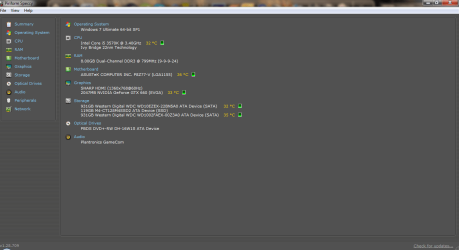
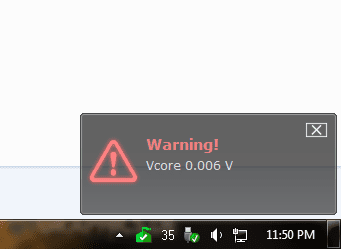
Thank you for bearing with me. So I took apart my entire system, cleaned every part,fan,screw(lol) I could have found. Removed and reapplied thermal paste to my CPU and GPU. Put them back together and booted up. Took a screen shot from Speccy of the temperatures I was getting.

After about 3 minutes tho, i got this pop up warning about my Vcore. What does that mean? How should I proceed now, go on to the test's and game play?
 

Attachments

  • Untitled.png
    Untitled.png
    31.6 KB · Views: 4
  • Untitled1.png
    Untitled1.png
    4.9 KB · Views: 23

My Computer My Computer

At a glance

Microsoft Windows 7 Ultimate 64-bit 7601 Mult...Intel(R) Core(TM) i5-3570K CPU @ 3.40GHz8.00 GBNVIDIA GeForce GTX 660
Computer type
PC/Desktop
Computer Manufacturer/Model Number
Custom Build
OS
Microsoft Windows 7 Ultimate 64-bit 7601 Multiprocessor Free Service Pack 1
CPU
Intel(R) Core(TM) i5-3570K CPU @ 3.40GHz
Motherboard
ASUSTeK COMPUTER INC. P8Z77-V
Memory
8.00 GB
Graphics Card(s)
NVIDIA GeForce GTX 660
Sound Card
(1) USB Audio Device (2) High Definition Audio Device (3
Screen Resolution
1360 x 768 x 32 bits (4294967296 colors) @ 60 Hz
Hard Drives
(1) M4-CT128M4SSD2 ATA Device (2) WDC WD1002FAEX-00Z3A0 ATA Device (3) WDC WD10EZEX-22BN5A0 ATA Device
PSU
Corsair Enthusiast Series TX650M
Case
NZXT Phantom 410
Cooling
Cooler Master Hyper 212 EVO
Keyboard
Logitech HID-Compliant Keyboard
Mouse
Logitech HID-compliant MX320 Laser Mouse
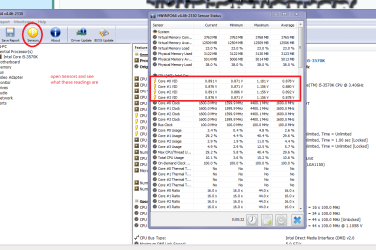
Ok Ravir that looks like the CPU voltage is on the low side unless I ma very mistaken so follow this you can do the PSU stuff but I ma more interested in what you can see as per my pics.
Using HW Info
You can test the volts on the PSU with HW Info HWiNFO, HWiNFO32/64 - Download < download the right bit version and close the right hand window select Sensors and scroll down to the power section where you will see what the volts are doing see my pic.
The original right hand window shows the machine running and is handy for that but for looking at the components in some detail close it and use the main left hand side panel
FOR OTHER COMPONENTS
Open each + down into the component itself and then click on it - in the right hand side will appear all sorts of details including brands speeds and other essential info that device. See pic for example.
 

Attachments

  • VCORE.PNG
    VCORE.PNG
    48.6 KB · Views: 2
  • VCORE 2.PNG
    VCORE 2.PNG
    35.4 KB · Views: 1

My Computer My Computer

At a glance

Desk1 7 Home Prem / Desk2 10 Pro / Main lap A...Desk1 i5 3750K / Laptop i7 GTX 860M / Desk2 i...Desk1 8GB (1866) / Desk2 16GB (1333) / Laptop...Desk 1& 2NVidia GTX 650 & Laptops on board Intel
Computer type
PC/Desktop
Computer Manufacturer/Model Number
Own build (new) Desk1 / Asus ROG Win 7 / Desk2 1st build
OS
Desk1 7 Home Prem / Desk2 10 Pro / Main lap Asus ROG 10 Pro 2 laptop Toshiba 7 Pro Asus P2520 7 & 10
CPU
Desk1 i5 3750K / Laptop i7 GTX 860M / Desk2 i5 2500
Motherboard
Desk1 Asus P877-V / Desk2 Gigabyte H67 UD3H / Laptop ?
Memory
Desk1 8GB (1866) / Desk2 16GB (1333) / Laptop 8Gb DDR3
Graphics Card(s)
Desk 1& 2NVidia GTX 650 & Laptops on board Intel
Sound Card
Desk 1 & 2 -XONAR DG Realtek High Def audio Laptop
Monitor(s) Displays
Desk 1 Benq HD 2450 / Desk2 Philips 24" / Laptop 17.5"
Screen Resolution
1920x1080 D1 & D2 & Laptop 1
Hard Drives
Desk1 Samsung 120GB 830 SSD
Asus ROG 256GB 850 Pro SSD
Desk2 Samsung 840 256 SSD
Toshiba 120GB EVO
PSU
Desk 1 Corsair HX 1050/ Laptop ? / Desk 2 Corsair HX 650
Case
Desk 1 Cooler HAF XM ? Toshiba laptop / Desk2 Coolermaster
Cooling
Fans on all Desk1 -2 Desk2 - all Coolermasters 5 Laptop ?
Keyboard
Desk 1 MS Sidewinder X6 Desk 2 MS Sidewinder X 4
Mouse
Desk 1&2 - Gigabyte MS 900 gamer - laptop - Logitec wireless
Internet Speed
ADSL2+
Other Info
One other Desktop (tester) and spare Toshba laptop both with SSD's
Running Kaspersky 2016 ISS on all machines config'd identically
Logitec audio stereo systems on each machine (x3)
Canon MG5250MFC
Router/modem TP-Link running WPA2SK
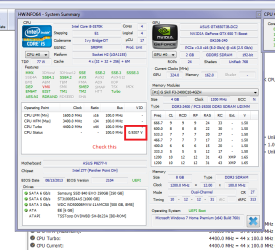
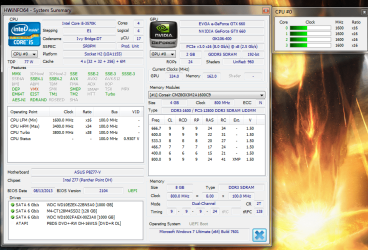
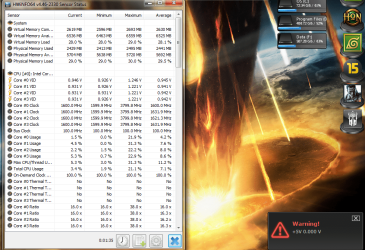
Ok so I ran the HW info and these are the results I got. I'm not sure what exactly they are saying, can you provide some clarity to the readings I am seeing?

Also i got another warning while doing this post. Is it my PSU failing? I haven't run any games yet to see if the computer would restart.
 

Attachments

  • Untitled.png
    Untitled.png
    102.5 KB · Views: 2
  • Untitled1.png
    Untitled1.png
    28.3 KB · Views: 19
  • Untitled2.png
    Untitled2.png
    176.7 KB · Views: 1

My Computer My Computer

At a glance

Microsoft Windows 7 Ultimate 64-bit 7601 Mult...Intel(R) Core(TM) i5-3570K CPU @ 3.40GHz8.00 GBNVIDIA GeForce GTX 660
Computer type
PC/Desktop
Computer Manufacturer/Model Number
Custom Build
OS
Microsoft Windows 7 Ultimate 64-bit 7601 Multiprocessor Free Service Pack 1
CPU
Intel(R) Core(TM) i5-3570K CPU @ 3.40GHz
Motherboard
ASUSTeK COMPUTER INC. P8Z77-V
Memory
8.00 GB
Graphics Card(s)
NVIDIA GeForce GTX 660
Sound Card
(1) USB Audio Device (2) High Definition Audio Device (3
Screen Resolution
1360 x 768 x 32 bits (4294967296 colors) @ 60 Hz
Hard Drives
(1) M4-CT128M4SSD2 ATA Device (2) WDC WD1002FAEX-00Z3A0 ATA Device (3) WDC WD10EZEX-22BN5A0 ATA Device
PSU
Corsair Enthusiast Series TX650M
Case
NZXT Phantom 410
Cooling
Cooler Master Hyper 212 EVO
Keyboard
Logitech HID-Compliant Keyboard
Mouse
Logitech HID-compliant MX320 Laser Mouse
It's my guess that you have some sort of faulty sensor mechanism somewhere that's giving you the error message. Your CPU is not going to run at all with a VCore of 0.006 Volts. It wouldn't even be able to post a message. Same with the GPU running at that voltage. You'd have no display.

As far as that message goes, do you have some monitoring software running in the system tray? If so, that might be returning the incorrect value causing the error message.

Just a guess on my part, but I've seen that error message before.

As far as your monitor blacking out when you play games, try increasing your fan speed on the GPU to about 60%. I had to do that to my Radeon 7770 because the fan wasn't running fast enough to keep it cool when I played games. I had the same problem and symptoms as you do. I just set my fan to manual and increased it to 60%. Poof. No more problem.
 

My Computer My Computer

At a glance

Win 7 Pro x64/Win 10 Pro x64 dual bootAMD FX 8350 Vishera @ 420016 GB Mushkin Blackline DDR3-2400 @ 1866 (9-1...XFX Radeon R9 280 Double D Black Edition
Computer type
PC/Desktop
Computer Manufacturer/Model Number
Mellon Labs (custom build)
OS
Win 7 Pro x64/Win 10 Pro x64 dual boot
CPU
AMD FX 8350 Vishera @ 4200
Motherboard
ASUS M5A97 R2.0
Memory
16 GB Mushkin Blackline DDR3-2400 @ 1866 (9-10-10-10-31)
Graphics Card(s)
XFX Radeon R9 280 Double D Black Edition
Sound Card
Realtek HD Audio on MB. Sounds great.
Monitor(s) Displays
Acer 24", Acer 22"
Screen Resolution
3840 x 1080
Hard Drives
1 x Mushkin Chronos 120 GB SSD (Win 10)
1 x Samsung 850 EVO 250 GB SSD (Win 7)
1 x WD 1TB SATA Blue
1 x WD 1TB SATA Green
PSU
Corsair TX-750
Case
CoolerMaster HAF 912+
Cooling
Coolermaster Seidon 240M Liquid AIO. 6 case fans
Keyboard
Logitech G710+
Mouse
Logitech G500s
Internet Speed
Much better since I got fiber, but still way overpriced.
Antivirus
MSE, Malware Bytes for scanning
Browser
Firefox
Other Info
Corsair VOID USB headphones.

A Mellon Labs X-1 - LCD Smartie driven system status display.

Brought to you by the letter E
Yes, I have the ASUS AI Suite II running that came with the motherboard. I am currently uninstalling and reinstalling it. In terms of the readings I got with the HW Info, are the good? Showing any problems?

After I have restarted I am going to run the FurMark and post back. And yes I will use EVGA Precision X set to Auto fan speed to ramp the card speeds up, hopefully it doesn't restart again :o
 

My Computer My Computer

At a glance

Microsoft Windows 7 Ultimate 64-bit 7601 Mult...Intel(R) Core(TM) i5-3570K CPU @ 3.40GHz8.00 GBNVIDIA GeForce GTX 660
Computer type
PC/Desktop
Computer Manufacturer/Model Number
Custom Build
OS
Microsoft Windows 7 Ultimate 64-bit 7601 Multiprocessor Free Service Pack 1
CPU
Intel(R) Core(TM) i5-3570K CPU @ 3.40GHz
Motherboard
ASUSTeK COMPUTER INC. P8Z77-V
Memory
8.00 GB
Graphics Card(s)
NVIDIA GeForce GTX 660
Sound Card
(1) USB Audio Device (2) High Definition Audio Device (3
Screen Resolution
1360 x 768 x 32 bits (4294967296 colors) @ 60 Hz
Hard Drives
(1) M4-CT128M4SSD2 ATA Device (2) WDC WD1002FAEX-00Z3A0 ATA Device (3) WDC WD10EZEX-22BN5A0 ATA Device
PSU
Corsair Enthusiast Series TX650M
Case
NZXT Phantom 410
Cooling
Cooler Master Hyper 212 EVO
Keyboard
Logitech HID-Compliant Keyboard
Mouse
Logitech HID-compliant MX320 Laser Mouse
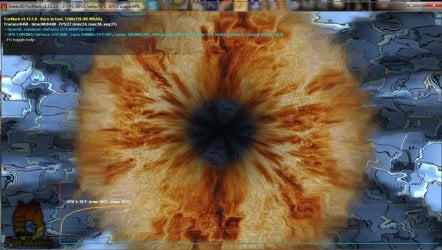
OK, So I've re-installed the AI Suite and I did the stress test for 4 minutes. These are my results with NO restart.
 

Attachments

My Computer My Computer

At a glance

Microsoft Windows 7 Ultimate 64-bit 7601 Mult...Intel(R) Core(TM) i5-3570K CPU @ 3.40GHz8.00 GBNVIDIA GeForce GTX 660
Computer type
PC/Desktop
Computer Manufacturer/Model Number
Custom Build
OS
Microsoft Windows 7 Ultimate 64-bit 7601 Multiprocessor Free Service Pack 1
CPU
Intel(R) Core(TM) i5-3570K CPU @ 3.40GHz
Motherboard
ASUSTeK COMPUTER INC. P8Z77-V
Memory
8.00 GB
Graphics Card(s)
NVIDIA GeForce GTX 660
Sound Card
(1) USB Audio Device (2) High Definition Audio Device (3
Screen Resolution
1360 x 768 x 32 bits (4294967296 colors) @ 60 Hz
Hard Drives
(1) M4-CT128M4SSD2 ATA Device (2) WDC WD1002FAEX-00Z3A0 ATA Device (3) WDC WD10EZEX-22BN5A0 ATA Device
PSU
Corsair Enthusiast Series TX650M
Case
NZXT Phantom 410
Cooling
Cooler Master Hyper 212 EVO
Keyboard
Logitech HID-Compliant Keyboard
Mouse
Logitech HID-compliant MX320 Laser Mouse
Back
Top