Screen issue??

GRoston

New member
Power User
Local time
1:37 PM
Messages
374
This is simply a question because the 'issue' is not causing any real problems.

We have a Windows 7 computer for watching videos, etc. The graphics output from the computer is routed to the display via a HDMI cable. Resolution had been set to 1920 x 1080, and when we turned the computer on, the image was just fine. We could run a program, visit a website (using Firefox), etc., without issue. However, when we would visit NetFlix.com, after a few seconds, the display would go black, then come back one with a message (from the display) saying ‘HDMI 1920x1080’.

We recently set the resolution to 1600 x 900 pixels and when we go to NetFlix.com, the same thing happens. Interestingly, while the browser is still on NetFlix and I right-click the screen to see its resolution, it still says 1600 x 900 pixels.

What on earth is going on?
 

My Computer

Computer type
PC/Desktop
OS
Windows 7 x64 Pro
CPU
Core i7 860 @ 3.8 GHz
Motherboard
MSI P55-GD80
Memory
16 GB F3-12800CL7D (DDR3 1600 7-7-7-24)
Graphics Card(s)
Sapphire Vapor-X 100283VXL Radeon HD 5770
Monitor(s) Displays
NEC LCD3090WQXi-BK
Hi

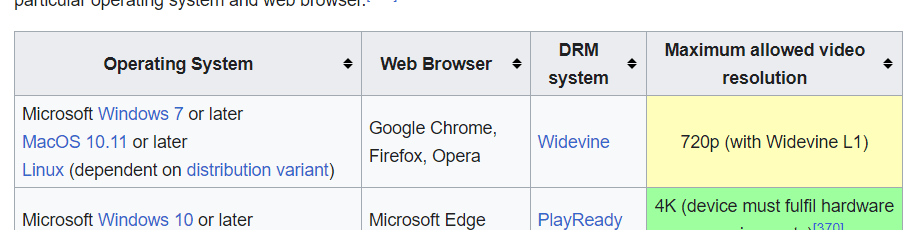
from Wiki, see screenshot
 

Attachments

  • nflix.png
    nflix.png
    43.9 KB · Views: 1

My Computer

Computer type
PC/Desktop
Computer Manufacturer/Model Number
medionl/Aspire 6930G/acer x55a
OS
W7 home premium 32bit/W7HP 64bit/w10 tp insider ring
CPU
E5300 dual core
Motherboard
medion MS7366
Memory
3gb
Graphics Card(s)
Nvidia Geforce 7100 Nforce 630i
Monitor(s) Displays
avixc
Internet Speed
n (isp resticted to 72)
Antivirus
mse/pands
Browser
palemoon
Other Info
Belkin Fd7050 n USB using Railink RT2870 drivers, more upto date
Try to turn off hardware acceleration in the browser.

Do you have NVIDIA or ATI drivers?
 
Last edited:

My Computer

Computer type
PC/Desktop
OS
Windows 7 Home Premium 32bit
Tried turning off hardware acceleration, but that did not help. Also, when we started a video in Kanopy tonight, the same thing happened as the video started.

Still need to check the drivers.
 

My Computer

Computer type
PC/Desktop
OS
Windows 7 x64 Pro
CPU
Core i7 860 @ 3.8 GHz
Motherboard
MSI P55-GD80
Memory
16 GB F3-12800CL7D (DDR3 1600 7-7-7-24)
Graphics Card(s)
Sapphire Vapor-X 100283VXL Radeon HD 5770
Monitor(s) Displays
NEC LCD3090WQXi-BK
Do you have NVIDIA or ATI drivers?
DVI or HDMI ?

Try about it. (I do not remember exactly)
NVIDIA control panel: desktop parameters > display content > Program on the desktop.
---------------------------
ATI: DVI settings
 

My Computer

Computer type
PC/Desktop
OS
Windows 7 Home Premium 32bit
I just ran HWiNFO on my computer and grabbed the following from the report:

Intel HD Graphics 4600 ----------------------------------------------------

[Video Chipset]
Video Chipset: Intel HD Graphics 4600
Video Chipset Codename: Haswell GT2
Video Memory: 1024 MBytes
[Video Card]
Video Card: Intel Haswell-DT GT2 - Integrated Graphics [MSI]
Video Bus: PCI
GPU Type: Integrated
Video RAMDAC: Internal
[Performance]
Graphics Processor Clock: 600.0 MHz
Graphics Memory Clock: 800.0 MHz
Resizable BAR (ReBAR) Support: Not Supported
Hardware ID: PCI\VEN_8086&DEV_0412&SUBSYS_78171462&REV_06
PCI Location (Bus:Dev:Fnc): 0:02:0
[Driver Information]
Driver Manufacturer: Intel Corporation
Driver Description: Intel(R) HD Graphics 4600
Driver Provider: Intel Corporation
Driver Version: 10.18.14.4414
Driver Date: 22-Mar-2016
DCH/UWD Driver: Not Capable
DeviceInstanceId PCI\VEN_8086&DEV_0412&SUBSYS_78171462&REV_06\3&11583659&0&10
Location Paths PCIROOT(0)#PCI(0200)

As such, I do not believe that I have either NVIDIA or ATI drivers.
 

My Computer

Computer type
PC/Desktop
OS
Windows 7 x64 Pro
CPU
Core i7 860 @ 3.8 GHz
Motherboard
MSI P55-GD80
Memory
16 GB F3-12800CL7D (DDR3 1600 7-7-7-24)
Graphics Card(s)
Sapphire Vapor-X 100283VXL Radeon HD 5770
Monitor(s) Displays
NEC LCD3090WQXi-BK
Hi

what are you actually linking too, tv/additional monitor or Casting???

details please
 

My Computer

Computer type
PC/Desktop
Computer Manufacturer/Model Number
medionl/Aspire 6930G/acer x55a
OS
W7 home premium 32bit/W7HP 64bit/w10 tp insider ring
CPU
E5300 dual core
Motherboard
medion MS7366
Memory
3gb
Graphics Card(s)
Nvidia Geforce 7100 Nforce 630i
Monitor(s) Displays
avixc
Internet Speed
n (isp resticted to 72)
Antivirus
mse/pands
Browser
palemoon
Other Info
Belkin Fd7050 n USB using Railink RT2870 drivers, more upto date
The HDMI cable routes to a receiver then to the TV. Pretty simple.
 

My Computer

Computer type
PC/Desktop
OS
Windows 7 x64 Pro
CPU
Core i7 860 @ 3.8 GHz
Motherboard
MSI P55-GD80
Memory
16 GB F3-12800CL7D (DDR3 1600 7-7-7-24)
Graphics Card(s)
Sapphire Vapor-X 100283VXL Radeon HD 5770
Monitor(s) Displays
NEC LCD3090WQXi-BK
Back
Top