U unko New member Member VIP Local time 12:06 PM Messages 289 Jan 8, 2014 #1 Hello, i checked power settings, screen (as well as the rest) is set to NEVER TURN OFF. Yet it does! After 20' or so. What can i do to fix it? My Computer My Computer Computer typePC/DesktopOSWin7x64
Hello, i checked power settings, screen (as well as the rest) is set to NEVER TURN OFF. Yet it does! After 20' or so. What can i do to fix it?
Sardonicus New member Guru Gold Member VIP Local time 4:06 AM Messages 1,965 Location Illinois Jan 8, 2014 #2 Set Screen saver to (None). Set "turn off the display" to Never. Set "Turn off hard disk after" to Never. My Computer My Computer Computer typePC/DesktopComputer Manufacturer/Model NumberCustom BuildOSWindows 7 Home Premium 64 bitCPUIntel Core i7-4790MotherboardGA-Z87X-D3HMemoryG.SKILL 8GB (2 x 4GB) DDR3 F3-10666CL9D-8GBNTGraphics Card(s)AMD Radeon R7 250Sound CardRealtek ALC892Monitor(s) DisplaysSamsung UN32EH5000, Dell 1703FPTScreen Resolution1920 x 1080, 1280 x 1024Hard DrivesWD5003AZEX WD10EZEX Samsung HD103SJ Samsung 128 GB 840 PROPSUSeaSonic M12II SS-500GMCaseFractal Design Define R4CoolingZalman CNPS9900ALEDKeyboardLogitech K800MouseLogitech M705Internet Speed16 MbpsAntivirusAvastBrowserFirefoxOther InfoBose Companion 2 Multimedia Speakers
Set Screen saver to (None). Set "turn off the display" to Never. Set "Turn off hard disk after" to Never.
U unko New member Member VIP Thread Starter Local time 12:06 PM Messages 289 Jan 8, 2014 #3 Now you make me remember i do have a screen saver. I checked and it's working... So why screen turns off? Non sense... My Computer My Computer Computer typePC/DesktopOSWin7x64
Now you make me remember i do have a screen saver. I checked and it's working... So why screen turns off? Non sense...
Sardonicus New member Guru Gold Member VIP Local time 4:06 AM Messages 1,965 Location Illinois Jan 8, 2014 #4 Is your screensaver set to blank? Blank will give the illusion that the monitor is turning off. My Computer My Computer Computer typePC/DesktopComputer Manufacturer/Model NumberCustom BuildOSWindows 7 Home Premium 64 bitCPUIntel Core i7-4790MotherboardGA-Z87X-D3HMemoryG.SKILL 8GB (2 x 4GB) DDR3 F3-10666CL9D-8GBNTGraphics Card(s)AMD Radeon R7 250Sound CardRealtek ALC892Monitor(s) DisplaysSamsung UN32EH5000, Dell 1703FPTScreen Resolution1920 x 1080, 1280 x 1024Hard DrivesWD5003AZEX WD10EZEX Samsung HD103SJ Samsung 128 GB 840 PROPSUSeaSonic M12II SS-500GMCaseFractal Design Define R4CoolingZalman CNPS9900ALEDKeyboardLogitech K800MouseLogitech M705Internet Speed16 MbpsAntivirusAvastBrowserFirefoxOther InfoBose Companion 2 Multimedia Speakers
U unko New member Member VIP Thread Starter Local time 12:06 PM Messages 289 Jan 8, 2014 #5 Sardonicus said: Is your screensaver set to blank? Blank will give the illusion that the monitor is turning off. Click to expand... No it's another. I changed options, we'll see. My Computer My Computer Computer typePC/DesktopOSWin7x64
Sardonicus said: Is your screensaver set to blank? Blank will give the illusion that the monitor is turning off. Click to expand... No it's another. I changed options, we'll see.
AddRAM R.I.P. Guru Gold Member VIP Local time 5:06 AM Messages 13,491 Location New Jersey Jan 8, 2014 #6 Remember to check the video card power saving options too My Computer My Computer Computer typePC/DesktopComputer Manufacturer/Model NumberSkylake Special #666OSWindows 10 Pro x64CPUIntel Core i7 6700KMotherboardAsus Sabertooth Z170 Mark 1MemoryGSkill TridentZ RGB 16GB 3600 16-16-16-36Graphics Card(s)EVGA GTX 980 Ti SC x2Sound CardRealtek High DefinitionMonitor(s) DisplaysAOC G2460PGScreen Resolution1920 x 1080 144HzHard DrivesSamsung 860 Pro 256GB, Seagate Barracuda 4TB x2PSUEVGA 1000 P2, EVGA White Custom Braided CablesCaseCorsair Vengeance C70 Gunmetal BlackCoolingCorsair H100i v2, Corsair ML120 x2, Thermal Grizzly KryonautKeyboardLogitech G910 Orion SpectrumMouseLogitech G700sInternet SpeedVerizon Fios Quantum Gateway 75/75AntivirusWindows Defender, Malwarebytes Free 3.8.3BrowserChromeOther InfoCorsair SP120 x4, LG Blu-ray Drive, Durabrand HT-395 100 Watt Dolby Digital Amp, Corsair H2100 Wireless 7.1 Headset
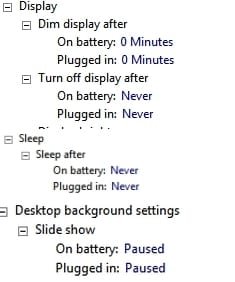
Callender New member Guru Gold Member VIP Local time 10:06 AM Messages 4,776 Location United Kingdom Jan 8, 2014 #7 Check power plan settings Check here: Control Panel\All Control Panel Items\Power Options Then check the following options for every power plan including your current power plan. Attachments Power.jpg 10.3 KB · Views: 16 My Computer My Computer Computer typeLaptopComputer Manufacturer/Model NumberASUSOSMicrosoft Windows 7 Home Premium 64-bit 7601 Multiprocessor Free Service Pack 1CPUAMD C-60 APU with Radeon(tm) HD GraphicsMotherboardASUSTeK COMPUTER INC. X501UMemory4.00 GBGraphics Card(s)AMD Radeon HD 6290 GraphicsSound Card(1) AMD High Definition Audio Device (2) Realtek High DefiScreen Resolution1366 x 768 x 32 bits (4294967296 colors) @ 60 HzHard DrivesHitachi HTS545050A7E380 SATA Disk DeviceAntivirusComodo CIS & FW, SecureAplus App Whitelisting, ThreatfireBrowserCyberfox 64bit, Opera 64bit, AirfoxOther InfoSpy-The-Spy, HitmanPro.Alert, Norton Connect Safe, MJRegWatcher, BitDefender TrafficLight, Voodoo Shield, Zemana AntiMalware
Check power plan settings Check here: Control Panel\All Control Panel Items\Power Options Then check the following options for every power plan including your current power plan.
U unko New member Member VIP Thread Starter Local time 12:06 PM Messages 289 Jan 9, 2014 #8 Working now, probably picasa updated needed the screensaver settings updated. My Computer My Computer Computer typePC/DesktopOSWin7x64