
Screen Refresh Rate - Custom for NVIDIA Brand

How to Create a Custom Screen Refresh Rate with NIVIDIA Control Panel in Windows

   Information
Microsoft answer:
Certain monitors report a TV-compatibility timing of 59.94Hz. Therefore, Windows 7 exposes two frequencies, 59Hz and 60Hz, for every resolution that is supported at that timing. The 59Hz setting makes sure that a TV-compatible timing is always available for an application such as Windows Media Center. The 60Hz setting maintains compatibility for applications that expect 60Hz.

In Windows 7, when a user selects 60Hz, the OS stores a value of 59.94Hz. However, 59Hz is shown in the Screen refresh rate in Control Panel, even though the user selected 60Hz.


This will show you how to create and set a custom screen refresh rate using the NVIDIA Control Panel in Windows. The NVIDIA Control Panel is only available when you have a NIVIDIA graphics card or chip installed in your computer along with the drivers.
   Tip
Be sure to have the lastest NVIDIA video and your monitor driver versions for Windows 7 installed to see if they may support the screen refresh rate that you are wanting first.

This can be handy if you cannot set a refresh rate normally. For example, it will not stay set above 59 Hertz despite setting it to 60 Hertz, and your monitor supports 60 or above Hertz.
   Note
Credit for this tip belongs to our member Jimmy.
   Warning
DO NOT set the refresh rate above what your monitor supports. Doing so can damage your monitor permanently. Please look up your monitor's specifications at it's manufacturer's website to confirm what refresh rates it supports.


Here's How:
1. Right click on the desktop, and click on NVIDIA Control Panel.
Step1.jpg
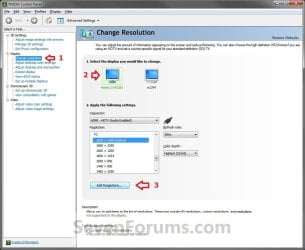
2. In the left pane, select Change resolution. Now select the monitor that you want to change the refresh rate for, then click on the Add Resolutions button. (See screenshot below)
Step2.jpg
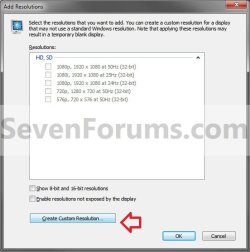
3. Click on the Create Custom Resolution button. (See screenshot below)
Step3.jpg
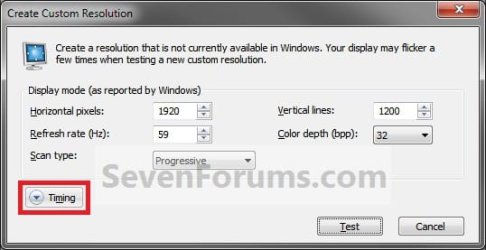
4. Click on Timing. (See screenshot below)
Step4.jpg
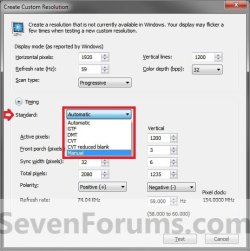
5. Under the Standard drop down menu, select Manual. (See screenshot below)
Step5.jpg
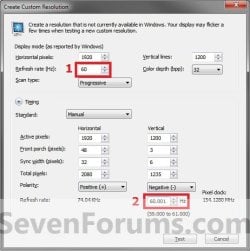
6. At the top (1 in image below), change the Refresh rate to the closest rate to what you want to set it as (ex: 60Hz). (See screenshot below)
Step6.jpg
7. At the bottom (2 in image above), change the refresh rate to .001 above the refresh rate you want to change it to. For example, if you wanted to have a 60Hz refresh rate, change this value to 60.001. Click on the Test button. (See screenshot above)

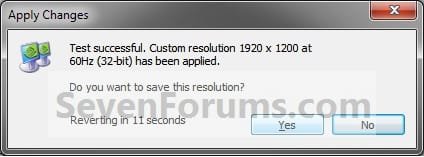
8. If the display looks ok, then click on Yes and go to step 9. If not, then click on No, and repeat steps 6 and 7 until it does or cancel the change. (See screenshot below)
Step7.jpg
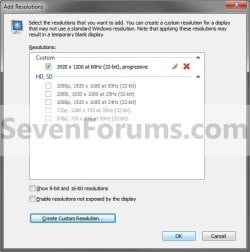
9. Click on OK. (See screenshot below)
NOTE: If you wanted to Edit (pencil icon) or Delete (red X icon) this custom screen refresh rate, then you will need to select another screen resolution in the window below step 2 or 10 first before you will be able to. You cannot edit or delete a custom resolution if it is set as your current one.
Step8.jpg
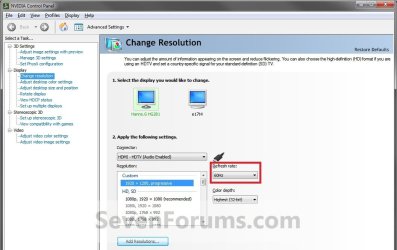
10. You will now notice that you screen refresh rate (ex: now 60Hz instead of 59Hz) has been changed. (See screenshot below)
Step9.jpg
That's it,
Shawn


Last edited:
Thanks Big Guy, much needed information. :)
 

My Computer

Computer Manufacturer/Model Number
HP Pavilion a4302f
OS
Win 7 Pro x64, VM Win XP, Win7 Pro Sandbox, Kubuntu 11
CPU
AMD Athlon(tm) II X4 640 @ 3.0 Gbz
Memory
12GB 1066MHz DDR3 SDRAM - 2x4GB, 2x2GB
Graphics Card(s)
ATI Radeon HD 4350 HD Graphics/Audio with 512MB
Sound Card
Realtek High Definition Audio
Monitor(s) Displays
1. Dell 23" SP2307, 2. Mitsublishi 40" HDTV, Hannspree 25"
Screen Resolution
1. 2048x1152, 2. 1920-1080, 3. 1920x1200
Hard Drives
Int: 1 120 Gig SSD i
1 - 2.5" 500 USB External HDD
1 -1 Tb USB External HDD
Case
Mid Tower
Cooling
Standard Fans - 5 fans (very quiet)
Keyboard
Microsoft Wireless 2000
Mouse
Microsoft Wireless Mouse 5000
Internet Speed
10 Mbit (realistically 500 Kbit - 1.2 Mbit)
Other Info
Speakers - Bose Desktop (Excellent Sound)
1 external CD|DVD\Blue-ray Recorders/Players (Sony)
You're most welcome Lee. :)
 

My Computer

Computer type
PC/Desktop
Computer Manufacturer/Model Number
Self built custom
OS
64-bit Windows 11 Pro for Workstations
CPU
Intel i7-8700K OC'd to 5 GHz
Motherboard
ASUS ROG Maximus XI Formula Z390
Memory
64 GB (4x16GB) G.SKILL TridentZ RGB DDR4 3600 MHz
Graphics Card(s)
ASUS ROG-STRIX-GTX1080TI-O11G-GAMING
Sound Card
Integrated
Monitor(s) Displays
2 x Samsung Odyssey G7 27"
Screen Resolution
2560x1440
Hard Drives
1TB Samsung 990 PRO M.2,
4TB Samsung 990 PRO PRO M.2,
TerraMaster F8 SSD Plus NAS
PSU
Seasonic Prime Titanium 850W
Case
Thermaltake Core P3
Cooling
Corsair Hydro H115i
Keyboard
Logitech wireless K800
Mouse
Logitech MX Master 4
Internet Speed
2 Gb/s Download and 100 Mb/s Upload
Antivirus
Malwarebyte Anti-Malware Premium
Browser
Google Chrome
Other Info
Logitech Z625 speaker system,
Logitech BRIO 4K Pro webcam,
HP Color LaserJet Pro MFP M477fdn,
APC SMART-UPS RT 1000 XL - SURT1000XLI,
Galaxy S23 Plus phone
You're welcome Karthikv, and welcome to Seven Forums. :)
 

My Computer

Computer type
PC/Desktop
Computer Manufacturer/Model Number
Self built custom
OS
64-bit Windows 11 Pro for Workstations
CPU
Intel i7-8700K OC'd to 5 GHz
Motherboard
ASUS ROG Maximus XI Formula Z390
Memory
64 GB (4x16GB) G.SKILL TridentZ RGB DDR4 3600 MHz
Graphics Card(s)
ASUS ROG-STRIX-GTX1080TI-O11G-GAMING
Sound Card
Integrated
Monitor(s) Displays
2 x Samsung Odyssey G7 27"
Screen Resolution
2560x1440
Hard Drives
1TB Samsung 990 PRO M.2,
4TB Samsung 990 PRO PRO M.2,
TerraMaster F8 SSD Plus NAS
PSU
Seasonic Prime Titanium 850W
Case
Thermaltake Core P3
Cooling
Corsair Hydro H115i
Keyboard
Logitech wireless K800
Mouse
Logitech MX Master 4
Internet Speed
2 Gb/s Download and 100 Mb/s Upload
Antivirus
Malwarebyte Anti-Malware Premium
Browser
Google Chrome
Other Info
Logitech Z625 speaker system,
Logitech BRIO 4K Pro webcam,
HP Color LaserJet Pro MFP M477fdn,
APC SMART-UPS RT 1000 XL - SURT1000XLI,
Galaxy S23 Plus phone
You're welcome Karthikv, and welcome to Seven Forums. :)
Blast you Shawn...:D

I was in the tutorial mood today...was going to release the one we discussed yesterday and this one to fix screen resolutions

You and your *AMC


Alien Mind Control
 

My Computer

Computer Manufacturer/Model Number
Compal JFT02 (Custom Build Laptop)
OS
Windows 7 Home Premium x64 - Mac OS X 10.6.4 x64
CPU
Intel Core 2 Duo T9300 2.5 GHz
Motherboard
JFT02
Memory
4GB Kingston DDR2-800
Graphics Card(s)
NVIDIA Geforce 8600M GT (512MB Model)
Sound Card
Realtek HD Audio
Monitor(s) Displays
WUXGA Standard Laptop Display
Screen Resolution
1680*1050
Hard Drives
Toshiba 320GB 5400RPM Laptop HD
PSU
Standard Laptop Power Supply
Case
Standard Laptop Case
Cooling
Standard Laptop Cooling
Keyboard
Standard Laptop 105 Key-Keyboard
Mouse
Synaptics Touchpad
Internet Speed
Verizion Online DSL 3360/864 kbs (dl/up)
Blast you Shawn...:D

I was in the tutorial mood today...was going to release the one we discussed yesterday and this one to fix screen resolutions

You and your *AMC


Alien Mind Control

LOL, well if you have a way to do this for ATI, you can make one if you like. I do not have a ATI card. :)
 

My Computer

Computer type
PC/Desktop
Computer Manufacturer/Model Number
Self built custom
OS
64-bit Windows 11 Pro for Workstations
CPU
Intel i7-8700K OC'd to 5 GHz
Motherboard
ASUS ROG Maximus XI Formula Z390
Memory
64 GB (4x16GB) G.SKILL TridentZ RGB DDR4 3600 MHz
Graphics Card(s)
ASUS ROG-STRIX-GTX1080TI-O11G-GAMING
Sound Card
Integrated
Monitor(s) Displays
2 x Samsung Odyssey G7 27"
Screen Resolution
2560x1440
Hard Drives
1TB Samsung 990 PRO M.2,
4TB Samsung 990 PRO PRO M.2,
TerraMaster F8 SSD Plus NAS
PSU
Seasonic Prime Titanium 850W
Case
Thermaltake Core P3
Cooling
Corsair Hydro H115i
Keyboard
Logitech wireless K800
Mouse
Logitech MX Master 4
Internet Speed
2 Gb/s Download and 100 Mb/s Upload
Antivirus
Malwarebyte Anti-Malware Premium
Browser
Google Chrome
Other Info
Logitech Z625 speaker system,
Logitech BRIO 4K Pro webcam,
HP Color LaserJet Pro MFP M477fdn,
APC SMART-UPS RT 1000 XL - SURT1000XLI,
Galaxy S23 Plus phone
Blast you Shawn...:D

I was in the tutorial mood today...was going to release the one we discussed yesterday and this one to fix screen resolutions

You and your *AMC


Alien Mind Control

LOL, well if you have a way to do this for ATI, you can make one if you like. I do not have a ATI card. :)
Well...if I had one myself...

I did do a fair bit of research a bit back and found out that NVIDIA's way of doing it is a lot better than ATI

One thing to add to the tutorial Shawn is that this will only work on Desktops. I am running custom drivers for my 8600M GT and I can do this BUT on vanilla drivers the custom resolution entry isn't there
 

My Computer

Computer Manufacturer/Model Number
Compal JFT02 (Custom Build Laptop)
OS
Windows 7 Home Premium x64 - Mac OS X 10.6.4 x64
CPU
Intel Core 2 Duo T9300 2.5 GHz
Motherboard
JFT02
Memory
4GB Kingston DDR2-800
Graphics Card(s)
NVIDIA Geforce 8600M GT (512MB Model)
Sound Card
Realtek HD Audio
Monitor(s) Displays
WUXGA Standard Laptop Display
Screen Resolution
1680*1050
Hard Drives
Toshiba 320GB 5400RPM Laptop HD
PSU
Standard Laptop Power Supply
Case
Standard Laptop Case
Cooling
Standard Laptop Cooling
Keyboard
Standard Laptop 105 Key-Keyboard
Mouse
Synaptics Touchpad
Internet Speed
Verizion Online DSL 3360/864 kbs (dl/up)
Hello Chris,

Yeah, you will have to have the NVIDIA drivers installed from NVIDIA and not generic ones. I have this option available as well with a 9800M GTS on the laptop.
 

My Computer

Computer type
PC/Desktop
Computer Manufacturer/Model Number
Self built custom
OS
64-bit Windows 11 Pro for Workstations
CPU
Intel i7-8700K OC'd to 5 GHz
Motherboard
ASUS ROG Maximus XI Formula Z390
Memory
64 GB (4x16GB) G.SKILL TridentZ RGB DDR4 3600 MHz
Graphics Card(s)
ASUS ROG-STRIX-GTX1080TI-O11G-GAMING
Sound Card
Integrated
Monitor(s) Displays
2 x Samsung Odyssey G7 27"
Screen Resolution
2560x1440
Hard Drives
1TB Samsung 990 PRO M.2,
4TB Samsung 990 PRO PRO M.2,
TerraMaster F8 SSD Plus NAS
PSU
Seasonic Prime Titanium 850W
Case
Thermaltake Core P3
Cooling
Corsair Hydro H115i
Keyboard
Logitech wireless K800
Mouse
Logitech MX Master 4
Internet Speed
2 Gb/s Download and 100 Mb/s Upload
Antivirus
Malwarebyte Anti-Malware Premium
Browser
Google Chrome
Other Info
Logitech Z625 speaker system,
Logitech BRIO 4K Pro webcam,
HP Color LaserJet Pro MFP M477fdn,
APC SMART-UPS RT 1000 XL - SURT1000XLI,
Galaxy S23 Plus phone
I havent been able to play games due to the sporatic flickering / freezing since i upgraded to Windows 7 64 about a week ago and finally a fix ! I joined the forums just to say thanks and nice find. Great forum as well ;) .
 

My Computer

Computer Manufacturer/Model Number
Dell XPS 630i
OS
Windows 7 64
CPU
Q6600 Oc'ed to 3.2
Memory
4GB
Graphics Card(s)
8800GT SLI
Sound Card
Creative Sound Blaster X-Fi
Monitor(s) Displays
Dell 2707WFP
You're welcome Saytr, and welcome to Seven Forums. :)
 

My Computer

Computer type
PC/Desktop
Computer Manufacturer/Model Number
Self built custom
OS
64-bit Windows 11 Pro for Workstations
CPU
Intel i7-8700K OC'd to 5 GHz
Motherboard
ASUS ROG Maximus XI Formula Z390
Memory
64 GB (4x16GB) G.SKILL TridentZ RGB DDR4 3600 MHz
Graphics Card(s)
ASUS ROG-STRIX-GTX1080TI-O11G-GAMING
Sound Card
Integrated
Monitor(s) Displays
2 x Samsung Odyssey G7 27"
Screen Resolution
2560x1440
Hard Drives
1TB Samsung 990 PRO M.2,
4TB Samsung 990 PRO PRO M.2,
TerraMaster F8 SSD Plus NAS
PSU
Seasonic Prime Titanium 850W
Case
Thermaltake Core P3
Cooling
Corsair Hydro H115i
Keyboard
Logitech wireless K800
Mouse
Logitech MX Master 4
Internet Speed
2 Gb/s Download and 100 Mb/s Upload
Antivirus
Malwarebyte Anti-Malware Premium
Browser
Google Chrome
Other Info
Logitech Z625 speaker system,
Logitech BRIO 4K Pro webcam,
HP Color LaserJet Pro MFP M477fdn,
APC SMART-UPS RT 1000 XL - SURT1000XLI,
Galaxy S23 Plus phone
I cannot set a custom res. It says I already have it.

Code:
---------------------------
Custom Resolution Test
---------------------------
Duplicate resolution. 


Custom resolution 1920 x 1080 at 60Hz (32-bit) already exists in HD, SD section.
---------------------------
OK   
---------------------------
 

My Computer

OS
7
Hello Paft, and welcome to Seven Forums.

Are you able to select and use that resolution option in the location in stated instead?
 

My Computer

Computer type
PC/Desktop
Computer Manufacturer/Model Number
Self built custom
OS
64-bit Windows 11 Pro for Workstations
CPU
Intel i7-8700K OC'd to 5 GHz
Motherboard
ASUS ROG Maximus XI Formula Z390
Memory
64 GB (4x16GB) G.SKILL TridentZ RGB DDR4 3600 MHz
Graphics Card(s)
ASUS ROG-STRIX-GTX1080TI-O11G-GAMING
Sound Card
Integrated
Monitor(s) Displays
2 x Samsung Odyssey G7 27"
Screen Resolution
2560x1440
Hard Drives
1TB Samsung 990 PRO M.2,
4TB Samsung 990 PRO PRO M.2,
TerraMaster F8 SSD Plus NAS
PSU
Seasonic Prime Titanium 850W
Case
Thermaltake Core P3
Cooling
Corsair Hydro H115i
Keyboard
Logitech wireless K800
Mouse
Logitech MX Master 4
Internet Speed
2 Gb/s Download and 100 Mb/s Upload
Antivirus
Malwarebyte Anti-Malware Premium
Browser
Google Chrome
Other Info
Logitech Z625 speaker system,
Logitech BRIO 4K Pro webcam,
HP Color LaserJet Pro MFP M477fdn,
APC SMART-UPS RT 1000 XL - SURT1000XLI,
Galaxy S23 Plus phone
Hey, thanks for the welcome.

The res under "HD, SD" is 1080i @ 30Hz. Under "PC" is 1920 x 1080 (native) @ 59 Hz.

It is strange. When I first open up NVIDIA's 'Change resoloutuion' window my native res says it is @ 59Hz, but If I just single click on 1080i and then go back and single click on the native res it now shows as 60Hz..
It still reverts back to 59Hz when I hit apply.

Also, my LCD monitors OSD menu says it is in "1920 x 1080 @ 60Hz"... but Windows and Nvidia say it is at 59Hz


Is it important to be at 60Hz? Because my monitors instructions states to do so.
 

My Computer

OS
7
Paft,

Changing from 59Hz to 60Hz with this is more of a cosmetic change since there is very little difference between them. If you are not experiencing any resolution or refresh rate issues, then I would not worry about it.
 

My Computer

Computer type
PC/Desktop
Computer Manufacturer/Model Number
Self built custom
OS
64-bit Windows 11 Pro for Workstations
CPU
Intel i7-8700K OC'd to 5 GHz
Motherboard
ASUS ROG Maximus XI Formula Z390
Memory
64 GB (4x16GB) G.SKILL TridentZ RGB DDR4 3600 MHz
Graphics Card(s)
ASUS ROG-STRIX-GTX1080TI-O11G-GAMING
Sound Card
Integrated
Monitor(s) Displays
2 x Samsung Odyssey G7 27"
Screen Resolution
2560x1440
Hard Drives
1TB Samsung 990 PRO M.2,
4TB Samsung 990 PRO PRO M.2,
TerraMaster F8 SSD Plus NAS
PSU
Seasonic Prime Titanium 850W
Case
Thermaltake Core P3
Cooling
Corsair Hydro H115i
Keyboard
Logitech wireless K800
Mouse
Logitech MX Master 4
Internet Speed
2 Gb/s Download and 100 Mb/s Upload
Antivirus
Malwarebyte Anti-Malware Premium
Browser
Google Chrome
Other Info
Logitech Z625 speaker system,
Logitech BRIO 4K Pro webcam,
HP Color LaserJet Pro MFP M477fdn,
APC SMART-UPS RT 1000 XL - SURT1000XLI,
Galaxy S23 Plus phone
Hei this is amazing pal!!
 

My Computer

OS
Windows 7 64 bit Build 7600 RTM
CPU
Intel Core2Duo E7200 @ 3.6ghz
Motherboard
MSI P45 Neo F
Memory
4gb ddr2 @ 880 mhz
Graphics Card(s)
Nvidia 9600gt ddr3 1GB
Sound Card
Realtek HD 7.1 Audio
Monitor(s) Displays
LG 700 E
Screen Resolution
1280 X 1024
Hard Drives
Seagate st3500320as(primary)
Seagate st3320620as(backup)
PSU
Mercury 550 watts
Case
Mercury
Cooling
Stock
Keyboard
Logitech
Mouse
Techcom
Internet Speed
2 mbps
hey there!

nice work this forum!

i still cant find a fix for my problem.
i need a refreshrate of 75hz. both in 800x600 and 640x480 resolution fullscreen.
i added the custom resolution following your tutorial.
BUT:
there is no Custom section when i pass all OK's in the overview of all my resolutions. only sections "HD,SD" and "PC". In your screen there is a "Custom" section as well.
the 800resolution appears by default. now when i check it, its still set to 60hz but on 16bit. if i switch to 32bit it shows 75hz. but it does not change anything.
the 640resolution does not appear at all! i dont know why.

the next problem is, that when i start my game (Counter-Strike 1.6 for example) and i have those custom resolutions checked, that i can not choose any of these customized resolutions. they simply are not listed in the game any more. if i delete the custom resolutions. i can choose all resolutions but they will play on 60hz instead of 75hz.

i use the Samsung SyncMasterp2250 with drivers installed and it supports up to 75hz. especially in those small resolutions. and on windowsXP i had no problems with 75hz in any game i played.

any help?

best regards
frisco
 

My Computer

OS
Win 7 Prof 64bit
CPU
core2duo
Motherboard
asus p5k
Graphics Card(s)
nvidia 8800 GTS 320mb
KOOL Man good definition... Thanks buddy
 

My Computer

Computer Manufacturer/Model Number
Microsoft
OS
Windows 7 and MAC
Graphics Card(s)
NVIDIA 9200 GT
Sound Card
NvIdiA
Tutorials like this are exactly why I come here. Thank you!
 

My Computer

OS
Windows 7 Home Premium x64
CPU
Phenom II X4 955 C3 @ 4.0 GHz (1.488v)
Motherboard
Gigabyte GA-790FXTA-UD5
Memory
G.Skill DDR3 1600 (2 x 2GB) [9-9-9-24-2T]
Graphics Card(s)
EVGA GTX 260 @ (700 / 1509 / 1200)
Sound Card
Realtek HD Audio ALC889 Integrated Chip
Monitor(s) Displays
Samsung SyncMaster 245BW
Screen Resolution
1920x1200
Hard Drives
OCZ Agility 60GB / Dual Seagate 7200.10 500GB
PSU
CORSAIR CMPSU-850TX 850W
Case
CM HAF 932
Cooling
Noctua NH-D14
Keyboard
SteelSeries 7G
Mouse
SteelSeries Ikari Laser
Internet Speed
20 Mbps Download / 2 Mbps Upload
Back
Top