Screen Resolution Stuck @ 640x480, Can't find drivers

Akeru

New member
Local time
10:54 PM
Messages
1
Hello! I just did a fresh install of Windows 7 on my old Dell Dimension 2400, hoping to breathe some new life into the thing. Everything went smoothly except the screen resolution is stuck at 640x480.

The monitor, a Dell E172FPt, was running on Generic PnP drivers, so I attempted to update them. FIrst automatically, which concluded that the generic drivers were fine, then I searched the internet and found no drivers for my model of monitor on the Dell website at all. The only drivers matching my model were on download.com, for windows XP. Desperately, I installed them, and they installed fine, but it made no difference whatsoever. The resolution dropdown is still greyed out.

What do I do now?

Please tell me I'm not going to be stuck with a 640x480 resolution on this computer!

-Akeru
 

My Computer My Computer

At a glance

Windows 7 Ultimate512mb
Computer Manufacturer/Model Number
Dell DImension 2400
OS
Windows 7 Ultimate
Memory
512mb
Monitor(s) Displays
Dell E172FPt
Hello! I just did a fresh install of Windows 7 on my old Dell Dimension 2400, hoping to breathe some new life into the thing. Everything went smoothly except the screen resolution is stuck at 640x480.

The monitor, a Dell E172FPt, was running on Generic PnP drivers, so I attempted to update them. FIrst automatically, which concluded that the generic drivers were fine, then I searched the internet and found no drivers for my model of monitor on the Dell website at all. The only drivers matching my model were on download.com, for windows XP. Desperately, I installed them, and they installed fine, but it made no difference whatsoever. The resolution dropdown is still greyed out.

What do I do now?

Please tell me I'm not going to be stuck with a 640x480 resolution on this computer!

-Akeru
Id say its your graphics driver not your monitor,have you tried those?
And i see your using 512MB of ram,id upgrade to at the very minimum 1GB or ram.
 

My Computer My Computer

At a glance

Windows 7 Ultimate 64bitAMD Phenom II 555 Black Edition Quad Core OC'...G Skill RipJaw 1333MHz 4GBATI raideon 4250 HD/XFX ATI Radeon 1GB HD4650
Computer Manufacturer/Model Number
Blue Shards 1.0
OS
Windows 7 Ultimate 64bit
CPU
AMD Phenom II 555 Black Edition Quad Core OC'd to 4.0GHz
Motherboard
ASUS M4A88T-M
Memory
G Skill RipJaw 1333MHz 4GB
Graphics Card(s)
ATI raideon 4250 HD/XFX ATI Radeon 1GB HD4650
Sound Card
Realteck HD Audio
Monitor(s) Displays
2x 22" Widescreen HD Monitors
Hard Drives
500GB Sata 7500RPM
80GB IDE
PSU
850W OCUK Modular
Case
Antec Dark Fleet DF-30
Cooling
Titan Fenrir Pro (CPU)
Keyboard
Logitech Wireless
Mouse
Logitech Wireless
Internet Speed
24Meg
Other Info
Getting soon-
2TB 7200RPM HDD
+8GB RAM
30GB SSD
HD6950/70
Hello! I just did a fresh install of Windows 7 on my old Dell Dimension 2400, hoping to breathe some new life into the thing. Everything went smoothly except the screen resolution is stuck at 640x480.

The monitor, a Dell E172FPt, was running on Generic PnP drivers, so I attempted to update them. FIrst automatically, which concluded that the generic drivers were fine, then I searched the internet and found no drivers for my model of monitor on the Dell website at all. The only drivers matching my model were on download.com, for windows XP. Desperately, I installed them, and they installed fine, but it made no difference whatsoever. The resolution dropdown is still greyed out.

What do I do now? Please tell me I'm not going to be stuck with a 640x480 resolution on this computer!

-Akeru
Hello Akeru, and welcome to Windows Seven Forums!

The Dell web site says the 2400 uses the Intel 845 chipset. There is just no support for video that old. Your best option would be to purchase an inexpensive video card and disable the onboard video.

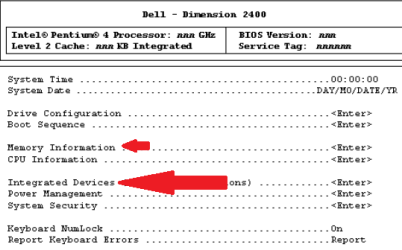
There is another possibility, I was not able to confirm, some integrated Dell video allow the Bios setting to be changed from 1MB to 4 or 8MB of shared video memory. To see, reboot your computer, and tap the F2 key when the Dell logo appears. You will get a bios menu like this:

dimension_video_bios.png

Look under "Intregrated Devices" to see if there is the opportunity to increase the video memory.

Also, I must agree with Minotar that another 512MB of memory is really needed just to meet minimum requirments.

Cheers!
Robert
 

My Computer My Computer

At a glance

...
OS
...
Just as a little help. Here are some really cheap graphics cards starting at $15. Maybe there is one that fits your mobo. Deals2buy: Graphic Cards deals
 

My Computer My Computer

At a glance

Vista, Windows7, Mint Mate, Zorin, Windows 8from 1.6GHz Duo to i7
Computer Manufacturer/Model Number
HP, Dell, Gateway, Toshiba - 4 laptops and 2 desktops
OS
Vista, Windows7, Mint Mate, Zorin, Windows 8
CPU
from 1.6GHz Duo to i7
Monitor(s) Displays
2x HP w2207
Hard Drives
5x HDD, 7x SSD, 12x Externals
Keyboard
with trackball - no mices
Mouse
Trackball mice
Internet Speed
DSL 6000
Back
Top