Screen Saver Login

j0hncage

New member
Local time
9:55 AM
Messages
3
Hello,

I have a new laptop with W7 on it and even though I've shut off the screen saver, after a period of time the machine logs off and requires a password to log back in. I'm happy with the initial start/boot up password requirement but would like to shut off this after a few minutes of inactivity, timeout and requirement to log back in with my password. Can someone help with this? I would have thought that just shutting off the screen saver might address this but no luck. TIA
 

My Computer My Computer

At a glance

Windows Home Premium 64bitAMD Turion II 2.3GHz4 MB
Computer Manufacturer/Model Number
HP Pavilion Dv6
OS
Windows Home Premium 64bit
CPU
AMD Turion II 2.3GHz
Memory
4 MB
Hello,

I have a new laptop with W7 on it and even though I've shut off the screen saver, after a period of time the machine logs off and requires a password to log back in. I'm happy with the initial start/boot up password requirement but would like to shut off this after a few minutes of inactivity, timeout and requirement to log back in with my password. Can someone help with this? I would have thought that just shutting off the screen saver might address this but no luck. TIA


Its here

http://www.sevenforums.com/tutorials/10024-password-require-wakeup.html
 
Last edited:

My Computer My Computer

At a glance

Win 8 Release candidate 8400[email protected]4 gigsNvidia 9600M
Computer Manufacturer/Model Number
HP Pavillion dv-7 1005 Tx
OS
Win 8 Release candidate 8400
CPU
[email protected]
Memory
4 gigs
Graphics Card(s)
Nvidia 9600M
Sound Card
HD built-in
Monitor(s) Displays
17" Wxga
Screen Resolution
1440x900
Cooling
none
Internet Speed
45Mb down 5Mb up
can't get the page to open right - new computer

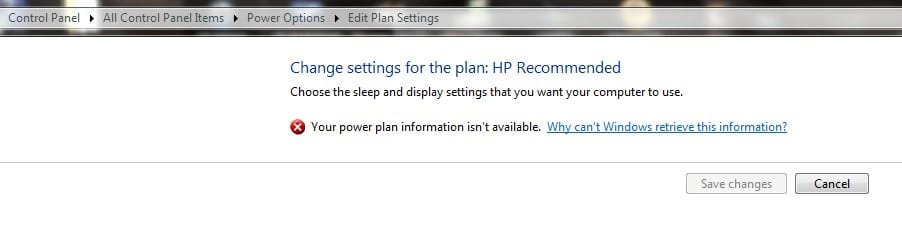
Can't get to that for some reason. I receive a screen reading "Change settings for the plan": [plan named], Choose the sleep and display settings that you want your computer to use". with a red X and the following: "Your power plan information isn't
available. Underlined "Why can't Windows retrieve this information?" and a blank screen below that.

'Save Changes' box is grayed out and the only option available is the cancel button. I'm logged in as an administrator so can't understand why it wouldn't open the settings. Is there another way in that you are aware of?

Thanks,
John
 

My Computer My Computer

At a glance

Windows Home Premium 64bitAMD Turion II 2.3GHz4 MB
Computer Manufacturer/Model Number
HP Pavilion Dv6
OS
Windows Home Premium 64bit
CPU
AMD Turion II 2.3GHz
Memory
4 MB
Try this:

http://www.sevenforums.com/tutorials/950-power-plan-restore-default-settings.html

Type cmd.exe in the "Search programs and files" box
Right-click cmd.exe and select "Run as administrator"
At the command prompt, type this, and then "Enter":

powercfg -restoredefaultschemes
If that does not work, try the command prompt again but type this:

powercfg.exe -L
In each case, restart the computer.
 

My Computer My Computer

At a glance

Vista and now 7 in 32 and 64 bit.
Computer Manufacturer/Model Number
Three desktops and one laptop with good specs..
OS
Vista and now 7 in 32 and 64 bit.
Note Attachment

Thanks for the ideas guys - no change. I still get the screen as viewed on the attachment and can't seem to get past it. Tried the commands in the DOS box and opened as administrator just fine but the same result.
 

Attachments

  • screenshot1.jpg
    screenshot1.jpg
    18.4 KB · Views: 5

My Computer My Computer

At a glance

Windows Home Premium 64bitAMD Turion II 2.3GHz4 MB
Computer Manufacturer/Model Number
HP Pavilion Dv6
OS
Windows Home Premium 64bit
CPU
AMD Turion II 2.3GHz
Memory
4 MB
Did you try clicking the "Why can't Windows retrieve this information?" I believe that is a link to more info.
 

My Computer My Computer

At a glance

Windows 10 Education 64 bitAMD Phenom II X4 980 Black Edition Deneb 3.7GHz8GB 4GBx2 Kingston PC10600 DDR3 1333 MemoryZotac NVIDIA Geforce GT640 2 Gig DDR3 PCIe
Computer type
PC/Desktop
Computer Manufacturer/Model Number
Home Built
OS
Windows 10 Education 64 bit
CPU
AMD Phenom II X4 980 Black Edition Deneb 3.7GHz
Motherboard
Asus M4N68T-M V2 µATX Motherboard
Memory
8GB 4GBx2 Kingston PC10600 DDR3 1333 Memory
Graphics Card(s)
Zotac NVIDIA Geforce GT640 2 Gig DDR3 PCIe
Sound Card
VIA VT1708s High Definition Audio 8-channel Onboard
Monitor(s) Displays
22" LG E2242 1080p and 2 19" I-INC AG191D
Screen Resolution
1280x1024 - 1920x1080 - 1280x1024
Hard Drives
Crucial M100 256 GB SSD and 500 GB WD Blue SATA
PSU
Thermaltake TR 620
Case
Power Up Black ATX Mid-Tower Case
Cooling
Stock heatsink and fan
Keyboard
Logitech Wireless K350 Wave
Mouse
Logitech Wireless M570 Trackman Wheel
Internet Speed
80 Mbps Down 30 Mbps Up
Antivirus
Windows Defender
Browser
Internet Explorer 11
Other Info
HP DVD1040e Lightscribe - External USB2
Another thought!
Open services.msc and see if the "Power" service is enabled
 

My Computer My Computer

At a glance

Vista and now 7 in 32 and 64 bit.
Computer Manufacturer/Model Number
Three desktops and one laptop with good specs..
OS
Vista and now 7 in 32 and 64 bit.
Back
Top