Script blocking program

WaltB32

New member
Member
Local time
11:59 AM
Messages
83
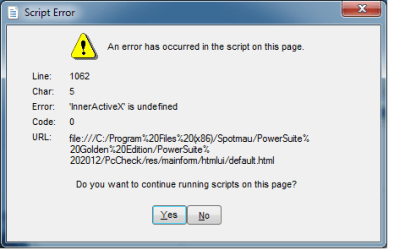
I just uploaded a Windows Update security patch for Windows 7 and since than I have not been able to
run one of my diagnostic programs script attached. It appears that active X is causing a problem.
 

Attachments

  • Script.png
    Script.png
    8 KB · Views: 34

My Computer My Computer

Computer type
PC/Desktop
Computer Manufacturer/Model Number
custom built
OS
Windows 7 64 bit Home Premium
CPU
Intel I7
Motherboard
GA-Z77-DS3H Gigabyte
Memory
Kingston
Graphics Card(s)
Radion
Hard Drives
1 SADA 2 IDE
Antivirus
Norton 360
Browser
Explore 9
Perhaps you could rename the file that contains the scripts -- go to the folder listed in the box under "URL" and rename activeX.js to activeX_.js_. This will keep the misbehaving scripts from running. [C:\Program Files (x86)\Spotmau\PowerSuite Golden Edition/PowerSuite 2012/PcCheck/res/mainform/htmlui/js/activeX.js]
 

My Computer My Computer

Computer type
PC/Desktop
Computer Manufacturer/Model Number
Dell
OS
Linux Mint 18.2 xfce 64-bit (VMWare host) / Windows 8.1 Pro 32-bit (VMWare guest)
CPU
Haswell
Memory
4 GB
Monitor(s) Displays
Acer 23"
Screen Resolution
1920 x 1080
Hard Drives
Two hard drives, 1TB each: One for Linux, one for my data.
Keyboard
IBM Model M
Antivirus
Sophos (Linux), Trend Micro (Windows)
Browser
Firefox, Opera
Other Info
I use Samba to share my data drive with the other computers at my house and with my guest session in VMWare Workstation Player.
Changed but still has problems

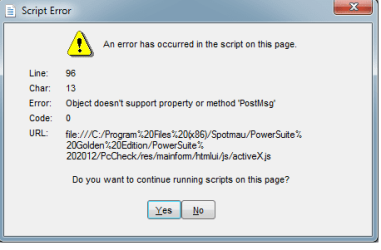
Changed the file as you suggested but now it goes to a default file.
 

Attachments

  • default.png
    default.png
    8.8 KB · Views: 27

My Computer My Computer

Computer type
PC/Desktop
Computer Manufacturer/Model Number
custom built
OS
Windows 7 64 bit Home Premium
CPU
Intel I7
Motherboard
GA-Z77-DS3H Gigabyte
Memory
Kingston
Graphics Card(s)
Radion
Hard Drives
1 SADA 2 IDE
Antivirus
Norton 360
Browser
Explore 9
I suggest that you uninstall Sportmau PowerSuite Golden Edition, and see if that solves the problem.

If it does, then you might try to reinstall it. Perhaps the uninstall and reinstall will fix the problem. If it doesn't, then uninstall it and don't reinstall it.
 

My Computer My Computer

Computer type
PC/Desktop
Computer Manufacturer/Model Number
Dell
OS
Linux Mint 18.2 xfce 64-bit (VMWare host) / Windows 8.1 Pro 32-bit (VMWare guest)
CPU
Haswell
Memory
4 GB
Monitor(s) Displays
Acer 23"
Screen Resolution
1920 x 1080
Hard Drives
Two hard drives, 1TB each: One for Linux, one for my data.
Keyboard
IBM Model M
Antivirus
Sophos (Linux), Trend Micro (Windows)
Browser
Firefox, Opera
Other Info
I use Samba to share my data drive with the other computers at my house and with my guest session in VMWare Workstation Player.
Still not working

I uninstalled and reinstall Spotmu and the script continues to come back and blocks the diagnostic
program. It is also not allowing me to access my drive on the protective Safe even after the password
has been entered.
 

My Computer My Computer

Computer type
PC/Desktop
Computer Manufacturer/Model Number
custom built
OS
Windows 7 64 bit Home Premium
CPU
Intel I7
Motherboard
GA-Z77-DS3H Gigabyte
Memory
Kingston
Graphics Card(s)
Radion
Hard Drives
1 SADA 2 IDE
Antivirus
Norton 360
Browser
Explore 9
When Sportmau was uninstalled, did the script go away? Could you access your drive?

If so, then you'll need to uninstall Sportmau in order to eliminate the problem. It is the problem.
 

My Computer My Computer

Computer type
PC/Desktop
Computer Manufacturer/Model Number
Dell
OS
Linux Mint 18.2 xfce 64-bit (VMWare host) / Windows 8.1 Pro 32-bit (VMWare guest)
CPU
Haswell
Memory
4 GB
Monitor(s) Displays
Acer 23"
Screen Resolution
1920 x 1080
Hard Drives
Two hard drives, 1TB each: One for Linux, one for my data.
Keyboard
IBM Model M
Antivirus
Sophos (Linux), Trend Micro (Windows)
Browser
Firefox, Opera
Other Info
I use Samba to share my data drive with the other computers at my house and with my guest session in VMWare Workstation Player.
Script

No I could not access the drive and the script returned after 1 cycle of the diagnostic.
 

My Computer My Computer

Computer type
PC/Desktop
Computer Manufacturer/Model Number
custom built
OS
Windows 7 64 bit Home Premium
CPU
Intel I7
Motherboard
GA-Z77-DS3H Gigabyte
Memory
Kingston
Graphics Card(s)
Radion
Hard Drives
1 SADA 2 IDE
Antivirus
Norton 360
Browser
Explore 9
Boot into Safe Mode and uninstall Sportmau.
 

My Computer My Computer

Computer type
PC/Desktop
Computer Manufacturer/Model Number
Dell
OS
Linux Mint 18.2 xfce 64-bit (VMWare host) / Windows 8.1 Pro 32-bit (VMWare guest)
CPU
Haswell
Memory
4 GB
Monitor(s) Displays
Acer 23"
Screen Resolution
1920 x 1080
Hard Drives
Two hard drives, 1TB each: One for Linux, one for my data.
Keyboard
IBM Model M
Antivirus
Sophos (Linux), Trend Micro (Windows)
Browser
Firefox, Opera
Other Info
I use Samba to share my data drive with the other computers at my house and with my guest session in VMWare Workstation Player.
Safemode

That worked and the program is back to normal. Could you explain why it worked and uninstalling it
the other way didn't?
 

My Computer My Computer

Computer type
PC/Desktop
Computer Manufacturer/Model Number
custom built
OS
Windows 7 64 bit Home Premium
CPU
Intel I7
Motherboard
GA-Z77-DS3H Gigabyte
Memory
Kingston
Graphics Card(s)
Radion
Hard Drives
1 SADA 2 IDE
Antivirus
Norton 360
Browser
Explore 9
When you are in Safe Mode, you are running Windows in a stripped-down way, with as little functionality enabled as possible. This allows you to accomplish tasks which you aren't able to do in regular mode, because there is less to interfere with these tasks.

Some examples:
  • A lot of malware can't function when you are in Safe Mode. Therefore, Safe Mode is a good environment for getting rid of malware.
  • Defragging your hard drive can be very slow when you do it in regular mode, because the hard drive is being accessed by other processes. So there are two ways to fix this problem: (1) go to Task Manager and kill pretty much everything, so that nothing else is accessing the hard drive, or (2) go in Safe Mode, where hardly anything is running. I prefer simply going into Safe Mode if I need to run defrag.
  • Sometimes video problems cause issues in Normal Mode. However, if you go into Safe Mode, the video is plain-vanilla VGA, which means that you can work and get things done, even though the video isn't as nice. There is also a "VGA Mode" (I don't remember what it is called in Windows 7; that was the name of it in earlier versions of Windows), which is Normal mode except for the hi-res video. If you choose "VGA Mode" and your problem goes away, then you know that you have a video problem.
 

My Computer My Computer

Computer type
PC/Desktop
Computer Manufacturer/Model Number
Dell
OS
Linux Mint 18.2 xfce 64-bit (VMWare host) / Windows 8.1 Pro 32-bit (VMWare guest)
CPU
Haswell
Memory
4 GB
Monitor(s) Displays
Acer 23"
Screen Resolution
1920 x 1080
Hard Drives
Two hard drives, 1TB each: One for Linux, one for my data.
Keyboard
IBM Model M
Antivirus
Sophos (Linux), Trend Micro (Windows)
Browser
Firefox, Opera
Other Info
I use Samba to share my data drive with the other computers at my house and with my guest session in VMWare Workstation Player.
Back
Top