Script To Turn Off Proxy Settings

Comicsnut

New member
Member
Local time
1:45 PM
Messages
73
I have a problem PC that I've scrubbed clean with everything from Combofix to Ccleaner to Malwarebytes anti-rootkit, to JRT, to ADW, to TDSS, to rkill and beyond.

The only thing wrong with this PC is that, every few days the proxy settings are toggled on and I need to go turn them off.

I can find no trace of any malicious software on this machine at all, so while I do more research I want to write a script that will run every 10 minutes or so turning off Internet proxy settings.

Would any adventurous soul be willing to lend a hand in this one? :)
 

My Computer

Computer type
PC/Desktop
Computer Manufacturer/Model Number
Specced Out
OS
Win 7 Home Premium x64
CPU
AMD Phenom II X4 955 Black Edition Deneb Quad-Core 3.2GHz
Motherboard
ASUSTeK Computer INC. M4A77TD
Memory
20GB G.SKILL Ripjaws DDR3 1600 (PC3 12800)
Graphics Card(s)
SAPPHIRE Radeon HD 5750 (1GB)
Sound Card
Sound Blaster Audigy
Monitor(s) Displays
Dual Monitors
Hard Drives
128GB OCZ Vertex 3 SSD
1TB Hitachi HDS721010CLA332
1TB Western Digital WD1001FALS
3TB Toshiba DT01ACA300
3x1TB External Seagate
PSU
Corsair TX CMPSU-750TX 750W ATX12V - SLI & Crossfire Ready
Case
Cooler Master Elite 310 ATX
Hi,

Try this..

Code:
reg add "[HKEY_CURRENT_USER\Software\Microsoft\Windows\CurrentVersion\Internet Settings]
" /v ProxyEnable /t REG_DWORD /d "0" /f
I have no idea if it works for FF or Chrome, but it does seem to work for IE, which is the only one I tried it on.

All you need to do it add that line to a .BAT/.CMD file, and set up a windows task to run when you want it.

A tutorial for that can be found here... http://www.sevenforums.com/tutorials/12444-task-scheduler-create-new-task.html#post176848

But I don't deserve credit for this... I simply Googled your request and got thousands of hits...

https://www.google.com.au/search?q=...hannel=sb&gfe_rd=cr&ei=zcaFU5L2NejM8gfR_oH4AQ
 

My Computer

Computer type
PC/Desktop
Computer Manufacturer/Model Number
Home Made
OS
Linux Mint 17 Cinnamon | Win 7 Ult x64
CPU
Intel I7-3770K @ 4.2ghz
Motherboard
ASRock Extreme 4
Memory
32GB G-Skill C10Q
Graphics Card(s)
EVGA GTX 670 2GB SC
Sound Card
Creative Fatality ExtremeGamer
Monitor(s) Displays
LG E2742V x 2
Screen Resolution
1920x1080
Hard Drives
256GB Vertex 4 SSD
2TB Seagate ST2000DM001
1TB Seagate ST1000DM003
PSU
Corsair HX 650
Case
HAF 932 advanced
Cooling
Corsair H100i liquid cooler
Keyboard
Logitech Wireless
Mouse
Logitech Wireless
Internet Speed
OptusNet NBN 100/40
Antivirus
Malwarebytes
Browser
Firefox 30
Other Info
Router: Sagemcom F@st 3846 Crippled by Optus.
Comicsnut, TanyaC was kind enough to dig up some code for you, but the code should be all on one line. The line return probably came in via copy/paste from a website.
Code:
reg add "HKEY_CURRENT_USER\Software\Microsoft\Windows\CurrentVersion\Internet Settings" /v ProxyEnable /t REG_DWORD /d "0" /f
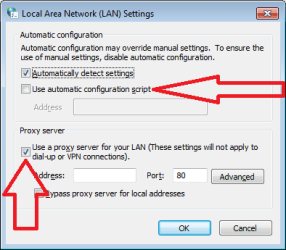
Also, there should not be brackets around the key name. The code quoted above has been tested using a Virtual Machine; however, it only turns off one of the ways to set a proxy. The code above will "uncheck" the Proxy server option, but not the "...script" option.

proxy.png

Is this on a customer's computer or on a computer that you own?


Take a look at the first video in this post where I have an AutoIt script constantly monitoring a few registry keys. When I use regedit to simulate some app making an unwanted change, the script halts with a message telling the user the time that the change happened.

If I change that script to watch for a change to the proxy settings in the registry, we can know exactly when the change happened. Add Process Monitor into the mix and we might know what app changed the setting. See this post for more info. That said, some apps just call WMI to make registry changes. Process Monitor might only show WMI and not the app that called it.

Running Process Monitor for weeks at a time might be problematic, but there are ways to set it up so that it should work. Just let me know if you want to bother with it.
 
Last edited:

My Computer

Computer type
Laptop
Computer Manufacturer/Model Number
Employer provided Dell Latitude
OS
W7 Pro SP1 64bit
CPU
i7
Memory
8GB
Graphics Card(s)
Intel HD Graphics
Hard Drives
crappy SSD
Antivirus
Employer mandated Symantec Endpoint Protection
Browser
Pale Moon 64bit, IE11 64bit & Chrome 64bit
Back
Top