
PepFontana
New member
- Local time
- 4:13 PM
- Messages
- 3
Hello,
I found the below script on this very website (http://www.sevenforums.com/general-...osing-custom-icons-removable-flash-drive.html) written by user Pyprohly. I am in the exact same situation as the person that originally posted, however there is one small piece of it that I am having trouble with.
I have a portable hard drive with a bunch of video files on it. When I create custom folder icons for each video, they are fine until I take the hard drive to a different PC and plug it in. Thru the above mentioned thread, I was able to determine that the problem was with the desktop.ini file listing the drive letter in the path to the icon file. If you edit the desktop.ini file and remove (In my case) the I: part of the path, it no longer matters what drive letter the various PC's assign and the icon files work as I want them to.
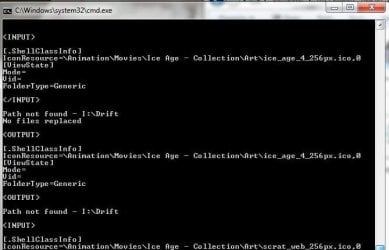
The problem I am having is that when I use the script in the above thread the script works perfectly if you have the files_named_like_this. If you have the file named without the underscores say for example "Jims Hockey Game" the script appears to be only using the last word in the title when it tries to write the file back into the folder. The script fails saying that the path was not found (in this example it would show that it was looking for the “I:\Game” path). This error happens to every folder that has a title with spaces in it. If the folder happens to only have a single word in the title, the script works fine and renames the .ini file.
Would someone happen to know how to edit this script to have it work correctly with files that have spaces between the words in the folder title?
I have attached a picture of what the error looks like when I run the script and I also have attached the script that is in the above link.
Thank you for any help that can be provided.
I found the below script on this very website (http://www.sevenforums.com/general-...osing-custom-icons-removable-flash-drive.html) written by user Pyprohly. I am in the exact same situation as the person that originally posted, however there is one small piece of it that I am having trouble with.
I have a portable hard drive with a bunch of video files on it. When I create custom folder icons for each video, they are fine until I take the hard drive to a different PC and plug it in. Thru the above mentioned thread, I was able to determine that the problem was with the desktop.ini file listing the drive letter in the path to the icon file. If you edit the desktop.ini file and remove (In my case) the I: part of the path, it no longer matters what drive letter the various PC's assign and the icon files work as I want them to.
The problem I am having is that when I use the script in the above thread the script works perfectly if you have the files_named_like_this. If you have the file named without the underscores say for example "Jims Hockey Game" the script appears to be only using the last word in the title when it tries to write the file back into the folder. The script fails saying that the path was not found (in this example it would show that it was looking for the “I:\Game” path). This error happens to every folder that has a title with spaces in it. If the folder happens to only have a single word in the title, the script works fine and renames the .ini file.
Would someone happen to know how to edit this script to have it work correctly with files that have spaces between the words in the folder title?
I have attached a picture of what the error looks like when I run the script and I also have attached the script that is in the above link.
Thank you for any help that can be provided.
Attachments
My Computer
- Computer type
- PC/Desktop
- OS
- Windows 7 Pro 64bit


