Scrollbar Width Change

Nemron

New member
Local time
7:24 AM
Messages
2
Old hand at XP. Forced into Windows 7. Stranger in a strange land.

In XP, to modify width of scrollbar, you would left click in desktop.
A menu called Display Properties would appear.
You would click on Appearance tab, then Advanced tab.
Click on Items, then Scrollbar on the drop down.
Then you could input a size number. The default was something like 16, and I'd always increase it to 23.
This gave me a good wide scrollbar that a frenetic mouse cursor would not easily miss.

In Windows 7, I cannot find anything like a Display Properties menu.
Cannot find anything about Appearance.
Cannot find anything about Scrollbar.
Microsoft slogan = 'If it works, delete it.'
 

My Computer

Computer type
Laptop
Computer Manufacturer/Model Number
dell
OS
windows 7 home 32b
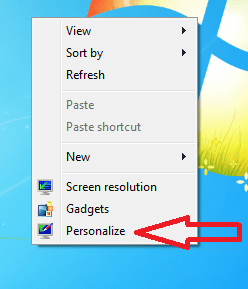
Right click on an empty spot on your desktop and select Personalize from the context menu:

1.png

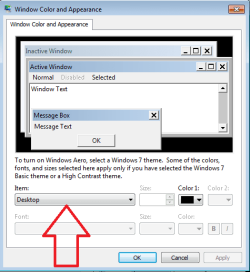
2.png

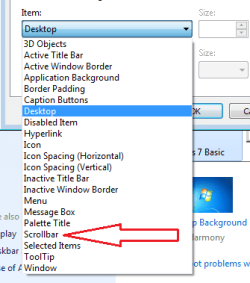
3.png

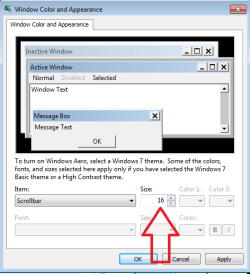
4.png

5.png
 

My Computer

Computer type
Laptop
Computer Manufacturer/Model Number
Employer provided Dell Latitude
OS
W7 Pro SP1 64bit
CPU
i7
Memory
8GB
Graphics Card(s)
Intel HD Graphics
Hard Drives
crappy SSD
Antivirus
Employer mandated Symantec Endpoint Protection
Browser
Pale Moon 64bit, IE11 64bit & Chrome 64bit
Well done UsernameIssues.
 

My Computer

Computer type
PC/Desktop
Computer Manufacturer/Model Number
Home made Desktop
OS
Windows 10 Pro. 64/ version 1709 Windows 7 Pro/64
CPU
Intel i7-6800K @ 4.3
Motherboard
ASUS X-99 Deluxe II
Memory
Corsair Platinum 16 gig @2400
Graphics Card(s)
EVGA GTX 1070 OC
Monitor(s) Displays
Asus 27" LED LCD/VE278Q
Screen Resolution
1920-1080 or 1280-720 HDMI
Hard Drives
INTEL SSD 730-240 Gb Sata 3.0/
PSU
EVGA Platium 1200W
Case
Phanteks Luxe Tempered Glass 8 fans/ one radiator
Cooling
XSPC/ Water Cooled CPU
Keyboard
Das 4 Professional
Mouse
Logitech M705/MX Anywhere 2-S
Internet Speed
100 mbits
Antivirus
Microsoft Security Essentials/ Malwarebytes Premium 3.0/ SAS
Browser
I.E. 11 default/Firefox/ ISP Time Warner Cable/Spectrum
Other Info
LG BluRay Burner/
Sound system-KLipsch-THX/
Icy Dock ssd Hot Swap bays.
Advanced Appearance settings concealed under Window Colour? :sarc:
Yeah, that was all I needed.
Going well out of your way to provide illustrated step-by-step
duplicating what I already indicated I knew was insulting.
 

My Computer

Computer type
Laptop
Computer Manufacturer/Model Number
dell
OS
windows 7 home 32b
Advanced Appearance settings concealed under Window Colour? :sarc:
Yeah, that was all I needed.
Going well out of your way to provide illustrated step-by-step
duplicating what I already indicated I knew was insulting.
It was not my intent to insult you. You probably would have been livid had I added text above each screenshot. I opted not to do that because I was having trouble seeing what I had typed. Also, that post was one of the times that my typing was limited to one finger on one hand. Making screenshots was easier for me to do and see.

You won't be the only person reading this thread. Maybe others will like the screenshots.


I did not know where those settings were in Windows 7. I was just lucky enough to find instructions via Google search. Even then, the steps that I found were wrong... but were close enough for me to figure it out.

I don't know why MS hides stuff where they do. Just wait until you go hunting for stuff in Windows 10.
 

My Computer

Computer type
Laptop
Computer Manufacturer/Model Number
Employer provided Dell Latitude
OS
W7 Pro SP1 64bit
CPU
i7
Memory
8GB
Graphics Card(s)
Intel HD Graphics
Hard Drives
crappy SSD
Antivirus
Employer mandated Symantec Endpoint Protection
Browser
Pale Moon 64bit, IE11 64bit & Chrome 64bit
Scrollbar width change: No need to be nasty

I don't know the date of this posting but being nasty to the person responding and being helpful is disgusting. Do you step on anthills?
 

My Computer

Computer Manufacturer/Model Number
Dell Inspiron 546
OS
Windows 7 Professional
CPU
2.70gigahertz AMD Athlon 7750 Dual-Core
Motherboard
Dell, Inc. 0F896N A02
Memory
3328 Megabytes Usable Installed Memory
Graphics Card(s)
ATI Radcon HD 3200 Graphics
Monitor(s) Displays
Dell E1709W 17,2" monitor
Hard Drives
309.54G usable hard drive capacity
161.25G hard drive free space
Seagate FreeAgent Go 500G external drive
Seagate FreeAgent Go 160G external drive
Maxtor One Touch 250G external drive
Back
Top